
Last updated on
Nov 6, 2026
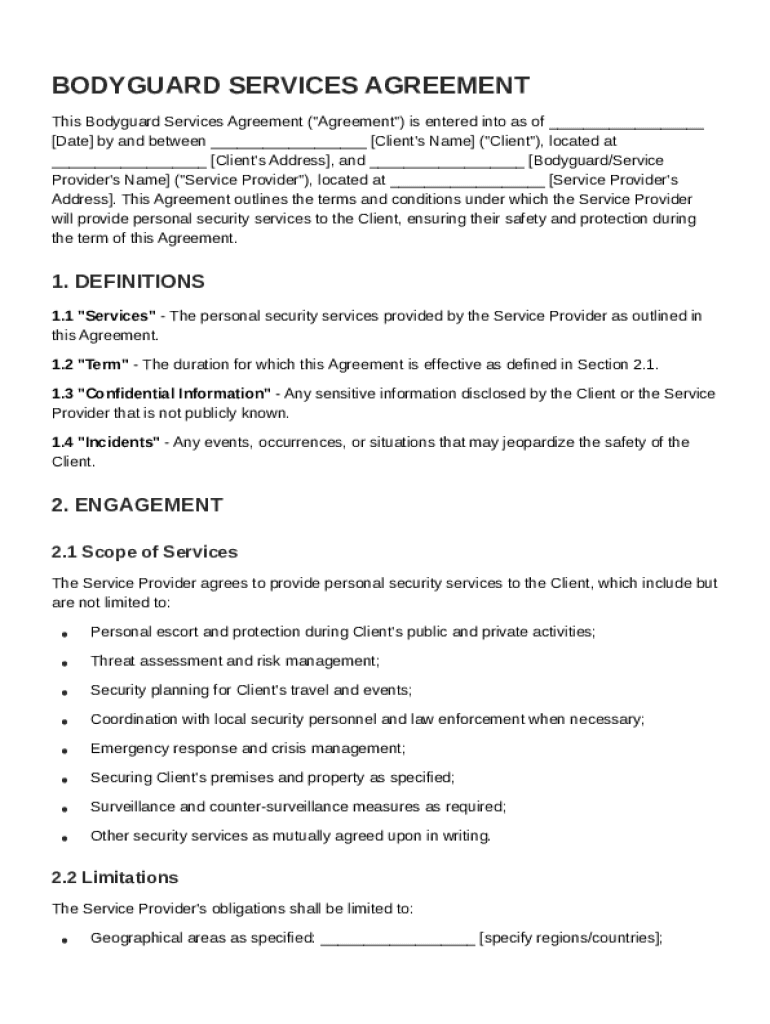
Bodyguard Contract Template free printable template
We are not affiliated with any brand or entity on this form

Fill out
Complete the form online in a simple drag-and-drop editor.

eSign
Add your legally binding signature or send the form for signing.

Share
Share the form via a link, letting anyone fill it out from any device.

Export
Download, print, email, or move the form to your cloud storage.
Why pdfFiller is the best tool for your documents and forms


End-to-end document management
From editing and signing to collaboration and tracking, pdfFiller has everything you need to get your documents done quickly and efficiently.
Accessible from anywhere
pdfFiller is fully cloud-based. This means you can edit, sign, and share documents from anywhere using your computer, smartphone, or tablet.
Secure and compliant
pdfFiller lets you securely manage documents following global laws like ESIGN, CCPA, and GDPR. It's also HIPAA and SOC 2 compliant.
What is Bodyguard Contract Template
The Bodyguard Services Agreement is a service agreement used by clients and security providers to outline the terms for personal security services.
pdfFiller scores top ratings on review platforms




I have tried various programs to change…
I have tried various programs to change PDF's, and I find this one the easiest to use. It is much more intuitive than some of the others.
I thought I only needed this temporarily
I thought I only needed this for an isolated use, but found it was much more useful in future applications. I appreciated it in a pinch.
Works great to fill PDF's
Great
Really love the easy accessibility of this.
Great!
Great program!
Good app
Good appi like it makes editing easier
Who needs Bodyguard Contract Template?
Explore how professionals across industries use pdfFiller.

Bodyguard Contract Template is needed by:
-
Individuals hiring personal security services
-
Security service companies offering bodyguard services
-
Event planners requiring safety management
-
Corporate entities needing employee protection
-
Political figures engaging personal security
-
Private citizens seeking personal safety arrangements
Comprehensive Guide to Bodyguard Contract Template
What is the Bodyguard Services Agreement?
The Bodyguard Services Agreement is a crucial contract defining the relationship between a client and a security service provider. It clarifies what personal security services will be rendered, such as escort services or threat assessments. Having this formal agreement is vital as it outlines expectations and reduces the risk of disputes; lacking such a contract can result in significant misunderstandings and liabilities.
Purpose and Benefits of the Bodyguard Services Agreement
This agreement serves several important purposes for both parties involved. It promotes transparency regarding the services offered and the compensation structure, ensuring all aspects are clearly defined. Additionally, it protects both the client and the service provider by clearly stating the terms and conditions, which can facilitate a more professional relationship.
-
Clarifies services and financial obligations.
-
Offers protection against disputes or misunderstandings.
-
Sets professional expectations between parties.
Key Features of the Bodyguard Services Agreement
The agreement includes essential sections and elements that enhance its usability. Key features consist of fillable fields where users can input details such as client and service provider information, payment rates, and terms of service. The presence of signature lines ensures both parties formally acknowledge the terms, which have legal implications.
-
Fillable fields for relevant details.
-
Signature lines that signify agreement.
-
Legal clauses covering confidentiality, liability, and governing laws.
Who Should Use the Bodyguard Services Agreement?
This agreement is designed for a range of users who require personal security services. Individuals looking for security for events or personal safety benefits greatly from having a formalized contract. Additionally, security companies or professionals in the industry can utilize this agreement to outline their service parameters clearly.
-
Individuals needing personal or event security.
-
Security firms providing bodyguard services.
-
Professionals in the security sector requiring formalized contracts.
How to Fill Out the Bodyguard Services Agreement Online (Step-by-Step)
Completing the Bodyguard Services Agreement online is straightforward using pdfFiller. Users should follow specific steps to ensure accuracy and completeness.
-
Navigate to the Bodyguard Services Agreement template on pdfFiller.
-
Fill in the client and service provider details in the designated fields.
-
Enter the agreed-upon rate and specific terms of service.
-
Review all entries for accuracy.
-
Save and proceed to the signing process.
Signing and Notarizing the Bodyguard Services Agreement
After filling out the agreement, the next step is formal execution. This can involve choosing between a digital or wet signature based on preferences and requirements. Users can utilize pdfFiller to eSign the document easily, ensuring it is legally binding.
-
Understand digital signatures versus wet signatures.
-
Follow instructions for eSigning on pdfFiller.
-
Know the notarization requirements and how to incorporate them if necessary.
Best Practices for Managing Your Bodyguard Services Agreement
Once the agreement has been completed and signed, managing it responsibly is crucial. Maintaining an accessible and secure copy of the contract is recommended to prevent loss or unauthorized access.
-
Retain a copy for your records.
-
Store sensitive information securely.
-
Be aware of privacy and data protection concerns.
Legal Compliance and Security in Using Bodyguard Services Agreements
Ensuring compliance with relevant laws is critical when using bodyguard services agreements. Stakeholders must understand the regulations that govern personal security services and implement security measures for handling contracts digitally.
-
Familiarize yourself with applicable regulations and standards.
-
Prioritize security measures when managing contracts online.
-
Utilize pdfFiller’s security features to assist with compliance.
User-Friendly Features of pdfFiller for Completing Your Agreement
pdfFiller offers numerous intuitive features that enhance the user experience when creating or editing agreements. Such tools are designed to streamline the document management process, ensuring ease of access and customization.
-
Editing and annotation tools for personalized agreements.
-
Cloud storage enables access from any device.
-
Integration with eSigning options and document management functionalities.
Get Started with Your Bodyguard Services Agreement Today
Ready to create your Bodyguard Services Agreement? With pdfFiller, you can easily access the platform and take the first steps toward obtaining a professional agreement. The process is secure and user-friendly, allowing you to manage sensitive documents with confidence.
How to fill out the Bodyguard Contract Template
-
1.Access pdfFiller and search for 'Bodyguard Services Agreement'. Open the template for editing.
-
2.Review the document to familiarize yourself with the structure and necessary fields.
-
3.Gather essential information like your name, address, the service provider’s details, and the agreed rate before you start.
-
4.Begin filling out the form by clicking on each highlighted field to enter the required information.
-
5.Input the date in the specified format and ensure that all names and addresses are correct and complete.
-
6.Carefully review your entries for any errors or omissions after completing all necessary fields.
-
7.Finalize the agreement by signing in the designated areas, ensuring both parties' signatures are included.
-
8.Once the form is completed, you can save the document directly in pdfFiller. Choose to download it as a PDF or share it electronically via email or cloud storage.

Who is eligible to use the Bodyguard Services Agreement?
Any individual or business looking to contract personal security services can use the Bodyguard Services Agreement. Both the client and service provider must agree to the terms specified in the document.
Is there a deadline for completing the agreement?
While the Bodyguard Services Agreement does not impose a specific deadline, it is advisable to complete and sign the agreement as soon as the terms are agreed upon to ensure clarity and accountability between both parties.
What method should I use to submit the agreement?
The completed Bodyguard Services Agreement can be submitted electronically via email to the involved parties. Alternatively, you can print it out and present it in person for signing.
Are there any documents required alongside the agreement?
Typically, you may not need additional documents aside from the Bodyguard Services Agreement itself. However, having identification or proof of address can help verify identities during the signing process.
What common mistakes should I avoid when filling out the agreement?
Ensure all names, addresses, and dates are filled out correctly to prevent discrepancies. Avoid skipping signature fields and double-check all agreed terms before finalizing the document.
How long does it take to finalize the Bodyguard Services Agreement?
Finalizing the Bodyguard Services Agreement typically takes just a few minutes once all information is gathered. However, allow extra time for both parties to review and sign.
What if I need to make changes to the agreement after signing?
If changes are necessary, both parties must agree to and sign an amendment to the original Bodyguard Services Agreement outlining the new terms.
Related Forms
Get the latest insights from our blog


If you believe that this page should be taken down, please follow our DMCA take down process
here
.
This form may include fields for payment information. Data entered in these fields is not covered by PCI DSS compliance.