
Last updated on
Nov 6, 2026
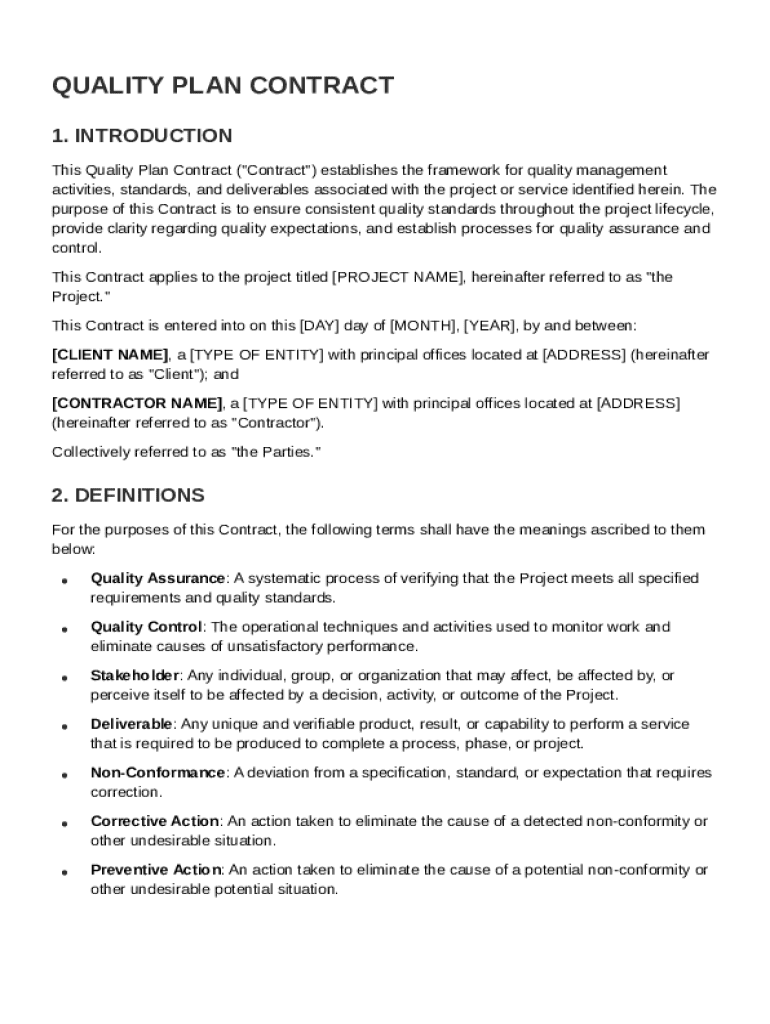
Quality Plan Contract Template free printable template
We are not affiliated with any brand or entity on this form

Fill out
Complete the form online in a simple drag-and-drop editor.

eSign
Add your legally binding signature or send the form for signing.

Share
Share the form via a link, letting anyone fill it out from any device.

Export
Download, print, email, or move the form to your cloud storage.
Why pdfFiller is the best tool for your documents and forms


End-to-end document management
From editing and signing to collaboration and tracking, pdfFiller has everything you need to get your documents done quickly and efficiently.
Accessible from anywhere
pdfFiller is fully cloud-based. This means you can edit, sign, and share documents from anywhere using your computer, smartphone, or tablet.
Secure and compliant
pdfFiller lets you securely manage documents following global laws like ESIGN, CCPA, and GDPR. It's also HIPAA and SOC 2 compliant.
What is Quality Plan Contract Template
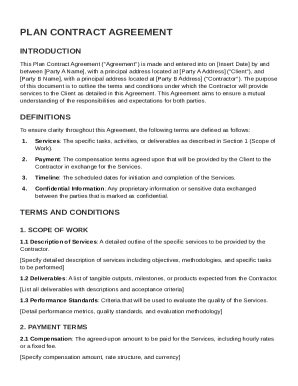
The Quality Plan Contract is a service agreement used by clients and contractors to establish a framework for quality management activities associated with a specific project.
pdfFiller scores top ratings on review platforms




awsome
I LOVE IT
excellent
I have never been more satisfied with a program
amazing
Helpful for my need.
Helpful for my need.
Who needs Quality Plan Contract Template?
Explore how professionals across industries use pdfFiller.

Quality Plan Contract Template is needed by:
-
Clients requiring quality assurance in projects
-
Contractors managing project quality standards
-
Project managers overseeing project execution
-
Quality assurance teams implementing quality plans
-
Legal professionals drafting service agreements
-
Businesses aiming to meet regulatory quality standards
Comprehensive Guide to Quality Plan Contract Template
What is the Quality Plan Contract?
The Quality Plan Contract defines a structured approach to quality management within project settings. It outlines the responsibilities and expectations for both the Client and Contractor, establishing a solid foundation for quality objectives and deliverables. Having a structured quality management framework is essential for enhancing project outcomes. This framework ensures that all stakeholders understand their roles and accountability in maintaining quality standards throughout the project lifecycle.
A well-defined Quality Plan Contract is vital for aligning the goals of both the Client and Contractor, ultimately resulting in more successful project completions.
Purpose and Benefits of the Quality Plan Contract
The Quality Plan Contract serves multiple purposes that significantly benefit both parties involved in a project. By clearly establishing quality objectives and standards, it lays a foundation for effective communication between the Client and Contractor. This framework not only promotes accountability but also enhances collaboration.
Implementing such a contract helps maintain consistent quality throughout the project's progression, minimizing the risk of misunderstandings and errors. The advantages of having a clearly articulated Quality Plan Contract are indispensable for ensuring project success.
Key Features of the Quality Plan Contract
Understanding the key components of the Quality Plan Contract is essential for effective utilization. Notably, it includes fillable fields such as [PROJECT NAME], [CLIENT NAME], and [CONTRACTOR NAME], which allow for customization according to specific project needs. Additionally, sections dedicated to [ADDITIONAL PROJECT-SPECIFIC QUALITY GOALS] and [QUALITY ASSURANCE ACTIVITIES] are included to further enhance project relevance.
For legal validity, proper signing requirements must be adhered to, ensuring that both parties formally agree to the contract terms. These features collectively contribute to a comprehensive quality management framework.
Who Needs the Quality Plan Contract?
The Quality Plan Contract is particularly beneficial for various stakeholders in a project. Typical users include contractors, clients, and project managers, all of whom play critical roles in ensuring project success. Scenarios where this contract is essential often arise in complex projects requiring rigorous quality adherence and oversight.
The versatility of the Quality Plan Contract allows it to be relevant across various industries, addressing unique project requirements while still upholding core quality management principles.
How to Fill Out the Quality Plan Contract Online (Step-by-Step)
Filling out the Quality Plan Contract is a straightforward process when following these steps:
-
Begin by accessing the contract template on pdfFiller.
-
Input your information in the designated fillable fields, starting with [PROJECT NAME].
-
Complete the sections for [CLIENT NAME] and [CONTRACTOR NAME].
-
Specify any [ADDITIONAL PROJECT-SPECIFIC QUALITY GOALS] that are relevant.
-
Fill in the section for [QUALITY ASSURANCE ACTIVITIES] as applicable.
-
Review all information for accuracy before proceeding to the signature section.
By adhering to these best practices, you can ensure the quality plan contract is accurately completed and ready for execution.
Digital Signature Requirements for the Quality Plan Contract
Utilizing digital signatures streamlines the signing process for the Quality Plan Contract. It is important to understand the differences between digital signatures and traditional wet signatures, with the former offering added security and convenience. Digital signatures can be easily executed using tools like pdfFiller, making the process both efficient and secure.
Security measures during the signing process are critical for protecting sensitive information and maintaining the integrity of the contract. Following the outlined digital signature protocols ensures that both parties can confidently proceed with their agreements.
Submitting the Quality Plan Contract
Once the Quality Plan Contract is filled out and signed, submission can be accomplished through various methods. Users must decide between electronic submission or sending printed versions, depending on project requirements.
-
Electronic submissions are often faster and offer immediate confirmation.
-
Ensure that any filing fees associated with the submission process are addressed.
-
Contact resources may be available for queries related to post-submission processes.
Choosing the appropriate submission method is essential for effectively managing contract documentation and compliance.
Security and Compliance for the Quality Plan Contract
Addressing security in the handling of the Quality Plan Contract is paramount. With pdfFiller’s robust security features—such as 256-bit encryption and compliance with standards like HIPAA and GDPR—users can fill out and sign contracts with confidence. Protecting business data is crucial throughout the document's lifecycle.
Understanding data retention policies and user privacy assurances further enhances the security framework surrounding the Quality Plan Contract, ensuring that sensitive information is adequately protected.
How to Download, Save, or Print the Quality Plan Contract PDF
After successfully completing the Quality Plan Contract, managing the document is essential for record-keeping. To download or save the contract on your device, follow these steps:
-
Select the download option on pdfFiller to save the contract as a PDF file.
-
Choose the appropriate file location on your device for easy access.
-
If physical records are needed, use the print option to produce a hard copy.
-
Organize saved contracts in dedicated folders for efficient document management.
Implementing these practices allows users to maintain a well-organized contract management system.
Get Started with pdfFiller for Your Quality Plan Contract Needs
To streamline your experience with filling out the Quality Plan Contract, pdfFiller offers an array of user-friendly features. The platform simplifies the form-filling process and allows for easy document management and secure storage.
Additionally, users can explore further templates and resources available on pdfFiller, enhancing their document workflow capabilities. Enjoy the advantages of an efficient, cloud-based solution that addresses all your quality plan contract needs.
How to fill out the Quality Plan Contract Template
-
1.Access pdfFiller and search for the 'Quality Plan Contract' form using the search bar.
-
2.Open the form by selecting it from the search results to view the fillable fields.
-
3.Gather the necessary information including project name, client name, contractor name, and address prior to starting.
-
4.Navigate through the document to find fillable fields marked such as [PROJECT NAME] and [CLIENT NAME].
-
5.Click on each field to enter the required information. Use the provided space to elaborate on additional quality goals.
-
6.Fill in all checkboxes and sections prompting user completion, ensuring all relevant project-specific details are addressed.
-
7.Once all fields are completed, review the form thoroughly for accuracy and completeness before finalizing.
-
8.Save your changes to the document, ensuring you do not lose any entered data.
-
9.Download the completed form to your device or submit directly through pdfFiller’s options, if available.

What are the eligibility requirements for using the Quality Plan Contract?
Both clients and contractors must participate in the signing process, ensuring their roles are clearly defined within the document before use.
Are there deadlines associated with submitting this form?
Deadlines for using the Quality Plan Contract can vary based on project timelines. It is advisable to complete the form before the project begins to ensure proper quality management.
How can I submit the completed Quality Plan Contract?
You can submit the completed contract by downloading it from pdfFiller and sending it via email, or if the platform allows, submitting it directly through the service.
What supporting documents are required with this contract?
Typically, supporting documents such as project specifications, company profiles, and past project evidence may be needed, adding credibility to the Quality Plan Contract.
What common mistakes should I avoid while filling out this form?
Ensure all fields are completely filled out, particularly fillable sections. Double-check for any missing signatures from both the client and contractor to avoid processing delays.
How long does it take to process the Quality Plan Contract?
The processing time can vary based on the parties involved. Generally, if submitted correctly and timely, contracts can be finalized within a few business days.
Can I make changes after I have signed the contract?
Once signed, any changes will typically require a new agreement or an amendment to be drafted and signed by both parties.
Related Forms



Get the latest insights from our blog


If you believe that this page should be taken down, please follow our DMCA take down process
here
.
This form may include fields for payment information. Data entered in these fields is not covered by PCI DSS compliance.