
Last updated on
Oct 31, 2026
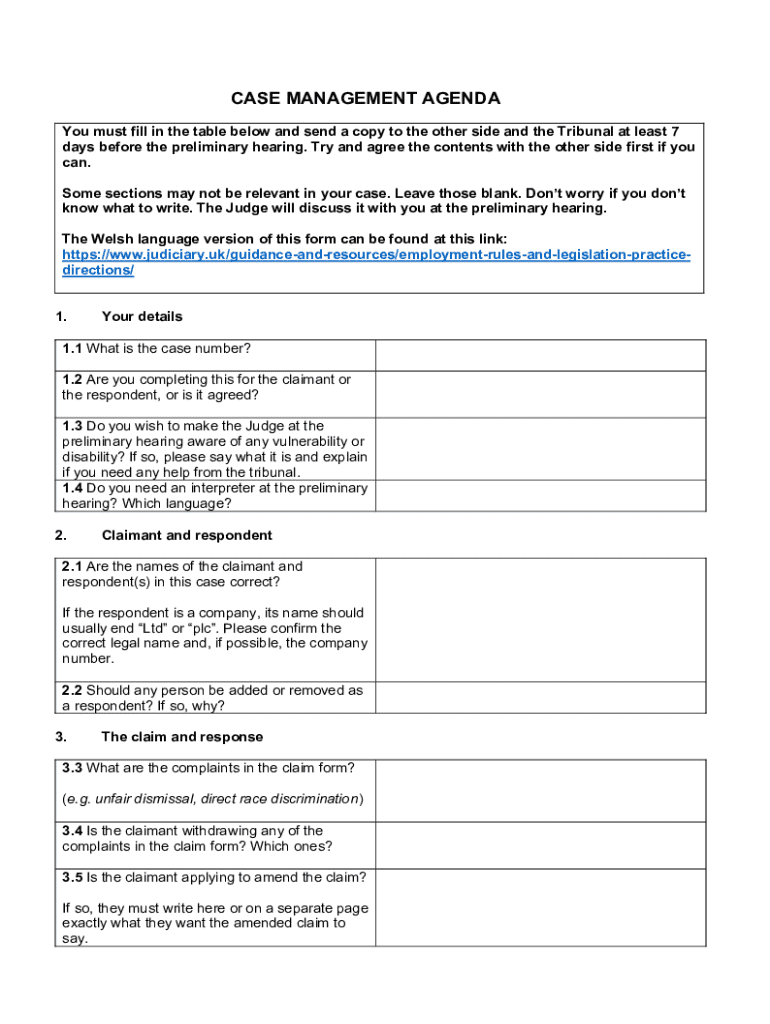
Get the free Employment Tribunal Preliminary Hearing Form
We are not affiliated with any brand or entity on this form

Fill out
Complete the form online in a simple drag-and-drop editor.

eSign
Add your legally binding signature or send the form for signing.

Share
Share the form via a link, letting anyone fill it out from any device.

Export
Download, print, email, or move the form to your cloud storage.
Why pdfFiller is the best tool for your documents and forms


End-to-end document management
From editing and signing to collaboration and tracking, pdfFiller has everything you need to get your documents done quickly and efficiently.
Accessible from anywhere
pdfFiller is fully cloud-based. This means you can edit, sign, and share documents from anywhere using your computer, smartphone, or tablet.
Secure and compliant
pdfFiller lets you securely manage documents following global laws like ESIGN, CCPA, and GDPR. It's also HIPAA and SOC 2 compliant.
What is Tribunal Form
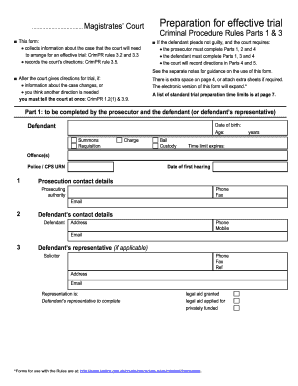
The Employment Tribunal Preliminary Hearing Form is a legal document used by claimants and respondents in the UK to prepare for a preliminary hearing in an employment tribunal case.
pdfFiller scores top ratings on review platforms




Who needs Tribunal Form?
Explore how professionals across industries use pdfFiller.

Tribunal Form is needed by:
-
Individuals filing a claim at an employment tribunal
-
Respondents contesting claims in employment tribunal cases
-
Legal representatives assisting clients with tribunal matters
-
HR departments involved in employment disputes
-
Lawyers specializing in employment law
-
Trade union representatives supporting claimants
Comprehensive Guide to Tribunal Form
What is the Employment Tribunal Preliminary Hearing Form?
The Employment Tribunal Preliminary Hearing Form is a critical document used in the UK employment tribunal system. This form functions to prepare for a preliminary hearing and helps the parties involved define their positions and the issues to be addressed. The main parties required to complete this form are the Claimant and the Respondent, ensuring that both sides present their case effectively.
Purpose and Benefits of the Employment Tribunal Preliminary Hearing Form
This form serves a vital purpose in the preparation for a preliminary hearing. It aids users by organizing documentation and facilitating clear communication of issues related to the case. By effectively utilizing the form, parties can streamline the dispute resolution process, increasing the chances of a favorable outcome.
Key Features of the Employment Tribunal Preliminary Hearing Form
Understanding the key components of the Employment Tribunal Preliminary Hearing Form is essential for effective completion. This form includes fillable fields for necessary information such as details about the claim, response, and remedy sought. It also emphasizes the importance of gathering supporting documentation and evidence, paramount in any tribunal case.
-
Claim and response details.
-
Instructions for completing each section.
-
Spaces for listing required documentation.
Who Needs to Complete the Employment Tribunal Preliminary Hearing Form?
The primary users of this form are the Claimants and Respondents involved in tribunal cases. To file the Employment Tribunal Preliminary Hearing Form, individuals must meet specific eligibility criteria, including the nature of their employment dispute. There are also exceptions for certain situations that may alter the basic requirements.
How to Fill Out the Employment Tribunal Preliminary Hearing Form Online (Step-by-Step)
Filling out the Employment Tribunal Preliminary Hearing Form online can be efficiently accomplished using pdfFiller. Follow these steps for accurate submission:
-
Access the pre-filled form on pdfFiller.
-
Carefully input your details in the designated fields.
-
Review the entered information for accuracy.
-
Add any supporting documentation as required.
-
Submit the form electronically upon completion.
Pay special attention to the accuracy of each section, as any incorrect information can impact the tribunal's proceedings.
Common Errors and How to Avoid Them
Many users encounter common pitfalls while filling out the Employment Tribunal Preliminary Hearing Form. Frequent mistakes can include incomplete fields or invalid information. To mitigate these risks, it’s advisable to have a review and validation checklist before submission, enhancing the accuracy of the form and its acceptance by the tribunal.
Submission Methods and Deadlines for the Employment Tribunal Preliminary Hearing Form
To ensure your submission is valid, it's crucial to understand the available methods for submitting the Employment Tribunal Preliminary Hearing Form. Options include online submission, mailing, or in-person delivery. Each method may have specific requirements and associated deadlines, and missed deadlines can lead to significant consequences in your case.
-
Online submission through pdfFiller is encouraged for efficiency.
-
Mailing should ensure sufficient time for delivery.
-
In-person submission must adhere to tribunal office hours.
Security and Compliance for the Employment Tribunal Preliminary Hearing Form
When using the Employment Tribunal Preliminary Hearing Form, it's essential to consider the security of your information. pdfFiller implements robust security measures, including 256-bit encryption and compliance with HIPAA and GDPR, ensuring your sensitive documents are protected throughout the process. Users retain rights to data protection and privacy, which are high priorities in document handling.
After Submission: What Happens Next?
Once the Employment Tribunal Preliminary Hearing Form is submitted, users should know what to expect in the post-submission process. Typically, the tribunal will provide confirmation of receipt, which can be tracked for convenience. If there are any errors in the submission, guidance will be available on how to correct or amend the form post-submission.
Get Started with the Employment Tribunal Preliminary Hearing Form Using pdfFiller
Utilizing pdfFiller offers numerous advantages for creating and managing your Employment Tribunal Preliminary Hearing Form. Features like eSigning and document organization simplify the process, allowing for quick access and editing of all employment tribunal documents. To begin using pdfFiller, simply visit the platform and start your form filling journey today.
How to fill out the Tribunal Form
-
1.To begin, access pdfFiller and log into your account. If you do not have one, create a new account to gain access to the Employment Tribunal Preliminary Hearing Form.
-
2.Once logged in, use the search bar to find the Employment Tribunal Preliminary Hearing Form. Click on the form to open it in the editing interface.
-
3.Review the form layout, which includes multiple sections for entering details about your case. Familiarize yourself with the fillable fields and checkboxes available.
-
4.Before completing the form, gather all necessary information, including case details, the claim and response, remedy sought, and any relevant documents or evidence you plan to submit.
-
5.Start filling in the fields by clicking on each one. Enter your information accurately. Make sure to provide all details about the claimant and respondent as required.
-
6.Follow the instructions provided within the form for each section, checking the boxes where necessary. Take your time to ensure that you fill out all parts of the form completely.
-
7.Once you have filled in all the sections, carefully review the form for any errors or missing information. Double-check that all mandatory fields are filled out correctly.
-
8.After finalizing the content, proceed to save your work. Use the 'Save' option to store your form in pdfFiller for future access.
-
9.If you need to download the form, choose the 'Download' option to save a copy to your computer. Alternatively, submit your form directly through pdfFiller if this option is available.

Who needs to fill out the Employment Tribunal Preliminary Hearing Form?
Both claimants and respondents involved in an employment tribunal case must complete this form to prepare for the preliminary hearing and submit essential case details.
What information do I need to complete the form?
Before starting, gather essential details such as the names of the claimant and respondent, case specifics, the nature of the claim, any responses made, and evidence related to the case.
How do I submit the Employment Tribunal Preliminary Hearing Form?
You can submit the completed form either electronically through pdfFiller, if available, or by printing it and sending it directly to the tribunal via post or another official submission method.
Is there a deadline for submitting this form?
Deadlines for submitting the Employment Tribunal Preliminary Hearing Form can vary based on the specifics of your case. It is essential to check with the tribunal or seek legal advice for exact timelines.
What are common mistakes to avoid when filling out the form?
Make sure to avoid common pitfalls such as leaving mandatory fields blank, providing inaccurate information, or failing to include required supporting documents. Double-check your details before submission.
Are there any fees associated with filing this form?
Generally, there may be fees related to filing an employment tribunal case. It's advisable to consult the tribunal's guidelines or your legal advisor for specific cost information.
What happens after I submit the Employment Tribunal Preliminary Hearing Form?
After submission, the tribunal will review your form and determine the next steps in the proceedings, including scheduling the preliminary hearing and notifying involved parties of updates.
Related Forms





Get the latest insights from our blog


If you believe that this page should be taken down, please follow our DMCA take down process
here
.
This form may include fields for payment information. Data entered in these fields is not covered by PCI DSS compliance.