
Last updated on
Oct 31, 2026
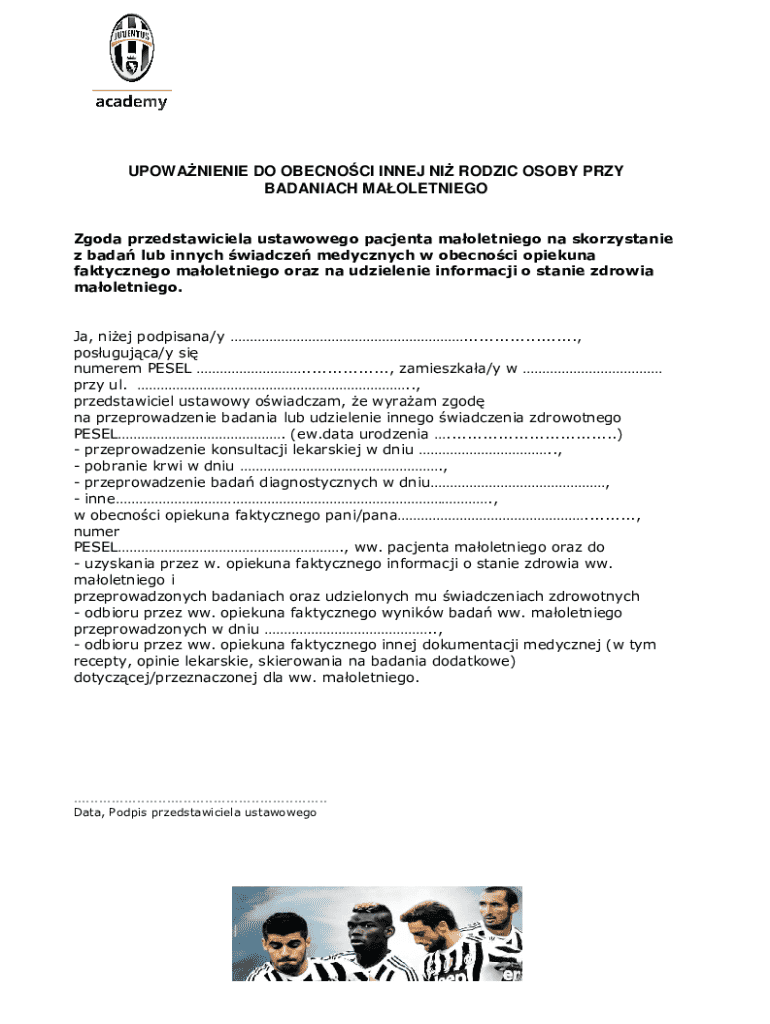
Get the free Consent for Minor's Medical Examination with Another Guardian
We are not affiliated with any brand or entity on this form

Fill out
Complete the form online in a simple drag-and-drop editor.

eSign
Add your legally binding signature or send the form for signing.

Share
Share the form via a link, letting anyone fill it out from any device.

Export
Download, print, email, or move the form to your cloud storage.
Why pdfFiller is the best tool for your documents and forms


End-to-end document management
From editing and signing to collaboration and tracking, pdfFiller has everything you need to get your documents done quickly and efficiently.
Accessible from anywhere
pdfFiller is fully cloud-based. This means you can edit, sign, and share documents from anywhere using your computer, smartphone, or tablet.
Secure and compliant
pdfFiller lets you securely manage documents following global laws like ESIGN, CCPA, and GDPR. It's also HIPAA and SOC 2 compliant.
What is Minor Medical Consent
The Medical Consent for Minor's Presence is a healthcare form used by legal representatives in Poland to grant permission for a minor to receive medical examinations or treatments in a caretaker’s presence.
pdfFiller scores top ratings on review platforms




Who needs Minor Medical Consent?
Explore how professionals across industries use pdfFiller.

Minor Medical Consent is needed by:
-
Legal representatives granting permission for medical procedures.
-
Caretakers accompanying minors to medical appointments.
-
Parents needing to authorize non-parental caretakers.
-
Healthcare providers requiring consent documentation.
-
Educational institutions organizing health-related activities.
Comprehensive Guide to Minor Medical Consent
What is the Medical Consent for Minor's Presence?
The Medical Consent for Minor's Presence form is a critical document used in healthcare settings to ensure that medical providers have the necessary authorization to treat a minor. This form holds significant importance in both emergency and non-emergency scenarios, facilitating clear communication regarding parental consent. Key stakeholders in this process include parents, guardians, and healthcare providers, all of whom play vital roles in safeguarding the minor's health and well-being.
Completing this form is essential for lawful medical care, underscoring the importance of consent in pediatric healthcare, particularly in situations where immediate action is required.
Purpose and Benefits of the Medical Consent for Minor's Presence
This form serves multiple purposes, most notably enhancing the clarity of communication between parents and healthcare providers. By explicitly articulating parental consent, the form protects a child's health, particularly during urgent situations where timely medical intervention is necessary.
Moreover, having this form completed carries significant legal implications, ensuring that healthcare providers adhere to the required standards of practice and parental rights.
Key Features of the Medical Consent for Minor's Presence Form
The Medical Consent for Minor's Presence form includes several key features that are vital for effective use:
-
Required fields include the minor's information and the guardian's details.
-
Customization options are available through pdfFiller, allowing users to tailor the document to their needs.
-
Essential elements of the form consist of signatures and dates, confirming the validity of consent.
Who Needs the Medical Consent for Minor's Presence?
Various individuals may need to complete the Medical Consent for Minor's Presence form, including parents and guardians responsible for minors. There are specific scenarios in which this form is essential, such as during school trips or unexpected medical emergencies.
Failure to possess this form can significantly impact care delivery in relevant situations, potentially hindering timely medical intervention.
How to Fill Out the Medical Consent for Minor's Presence Online (Step-by-Step)
Filling out the Medical Consent for Minor's Presence online is straightforward with pdfFiller. The following steps outline the process:
-
Visit the pdfFiller platform to access the form.
-
Follow the prompts to fill in the required fields accurately.
-
Review the completed information to ensure all details are correct.
-
Submit the form as directed on the platform.
To avoid common errors, double-check that all mandatory fields are filled in and that information is clear and legible.
Field-by-Field Instructions for the Medical Consent for Minor's Presence
Understanding each field in the Medical Consent for Minor's Presence form is essential for accurate completion. Here’s a breakdown of the significant fields:
-
The minor's information should include their full name, date of birth, and any relevant health details.
-
Parent's details must be comprehensive, including contact information and relationship to the minor.
-
Provide a specific description of the medical procedure or examination to be performed.
It’s crucial to highlight common mistakes, such as misspellings or leaving fields blank, which can lead to delays in processing the form.
How to Sign and Submit the Medical Consent for Minor's Presence
Signing the Medical Consent for Minor's Presence can be done digitally using pdfFiller. The platform allows users to create a digital signature, ensuring that the form meets modern electronic signature standards.
Additionally, it’s important to understand the differences between digital and traditional wet signatures for legal purposes. Once signed, users can submit the form through various methods, including online, print, or mail.
Security and Compliance for the Medical Consent for Minor's Presence
When using pdfFiller, users can rest assured that their data security is paramount. The platform employs strong encryption methods and is compliant with HIPAA and GDPR regulations, safeguarding user information.
The importance of compliance cannot be overstated, particularly in healthcare settings where sensitive documents are handled. pdfFiller takes user privacy seriously, implementing stringent protections to uphold confidentiality.
How to Download and Save the Medical Consent for Minor's Presence PDF
To download the Medical Consent for Minor's Presence PDF after completing the form, follow these steps:
-
Locate the download button on the pdfFiller platform.
-
Choose the appropriate format for your needs.
-
Save the document to a secure location for future reference.
Utilizing pdfFiller tools can greatly enhance the organization and management of important documents, ensuring easy access when needed.
Next Steps After Completing the Medical Consent for Minor's Presence
Once the Medical Consent for Minor's Presence form is completed, it’s essential to track the submission process for confirmation of receipt. Should there be any need to correct or amend submitted information, be prepared to follow up promptly.
Using pdfFiller’s features can provide ongoing support for future document needs, simplifying the management of similar forms.
Utilizing pdfFiller for Your Medical Consent for Minor's Presence Needs
pdfFiller offers a robust platform tailored to facilitate completing the Medical Consent for Minor's Presence form effectively. Users appreciate the ease of use and the comprehensive features available for document management.
Many users report high satisfaction rates with the platform, highlighting its efficiency and user-friendly design. Explore the capabilities of pdfFiller today to streamline your document needs.
How to fill out the Minor Medical Consent
-
1.To begin, access the pdfFiller platform and locate the 'Medical Consent for Minor's Presence' form in the search bar.
-
2.Once you find the form, click to open it within the pdfFiller editor.
-
3.Before filling out the form, gather essential information: the minor's details, including name, PESEL number, and address, as well as the specifics about the medical procedures and caretaker's information.
-
4.In the pdfFiller interface, click on each fillable field. Start with the legal representative’s details, ensuring accuracy to avoid potential issues.
-
5.Continue to input the minor's information in the corresponding sections, filling in all required fields carefully.
-
6.Next, complete the caretaker's details, which include name and contact information for easy access during medical treatments.
-
7.Specify the medical procedures and any relevant dates, ensuring clarity and completeness in your entries.
-
8.After filling the form, thoroughly review all information for accuracy. Look for any missed sections or errors that may require correction.
-
9.Once you are satisfied with the information provided, save your work immediately to prevent data loss.
-
10.Finally, choose the option to download, print, or submit the form directly through pdfFiller, following any specific submission guidelines that apply.

Who is eligible to use the Medical Consent for Minor's Presence form?
Eligible users include legal representatives and caretakers of minors needing medical consent in Poland. This form is specifically designed for situations where parental consent is required for medical examinations performed by caretakers.
Is there a deadline for submitting the medical consent form?
While specific deadlines vary based on the healthcare provider's policies, it is recommended to submit the Medical Consent for Minor's Presence form in advance of the scheduled medical appointment to ensure it is processed in time.
What methods can I use to submit this form?
You can submit the Medical Consent for Minor's Presence form either electronically through platforms like pdfFiller or by printing it out and delivering it in person to the relevant healthcare provider.
What supporting documents are required with the form?
Typically, no additional supporting documents are required with the Medical Consent for Minor's Presence form. However, having identification for both the legal representative and the minor may be beneficial during the appointment.
What are common mistakes to avoid when filling out the form?
Common mistakes include missing required fields, providing incorrect minor details, or neglecting the signature of the legal representative. Double-check all entries for accuracy before submission to avoid delays.
How long does it take to process the medical consent form?
Processing times may vary depending on the healthcare provider. Generally, submissions are acknowledged quickly, so it's advisable to allow a few days before the appointment for confirmation.
What should I do if there are changes needed after submitting the form?
If changes are necessary, contact the healthcare provider immediately to inform them. Depending on the provider, you may need to fill out a new form or submit an amended version.
Related Forms




Get the latest insights from our blog


If you believe that this page should be taken down, please follow our DMCA take down process
here
.
This form may include fields for payment information. Data entered in these fields is not covered by PCI DSS compliance.