
Last updated on
Oct 31, 2026
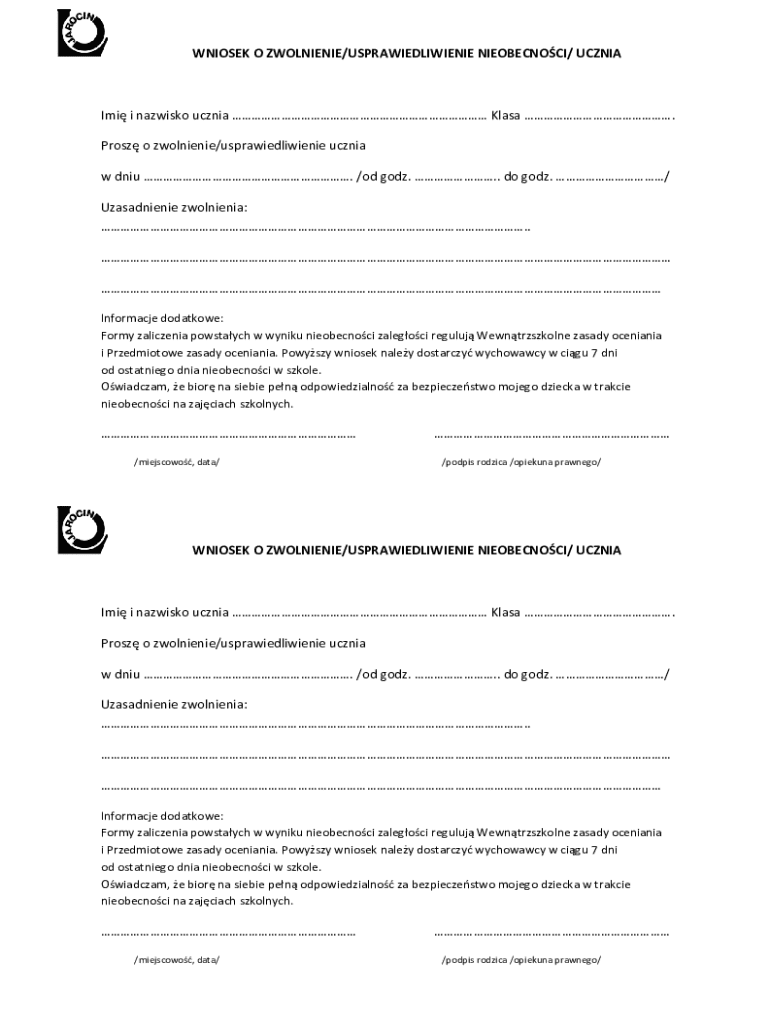
Get the free Student Absence Excuse Request Form
We are not affiliated with any brand or entity on this form

Fill out
Complete the form online in a simple drag-and-drop editor.

eSign
Add your legally binding signature or send the form for signing.

Share
Share the form via a link, letting anyone fill it out from any device.

Export
Download, print, email, or move the form to your cloud storage.
Why pdfFiller is the best tool for your documents and forms


End-to-end document management
From editing and signing to collaboration and tracking, pdfFiller has everything you need to get your documents done quickly and efficiently.
Accessible from anywhere
pdfFiller is fully cloud-based. This means you can edit, sign, and share documents from anywhere using your computer, smartphone, or tablet.
Secure and compliant
pdfFiller lets you securely manage documents following global laws like ESIGN, CCPA, and GDPR. It's also HIPAA and SOC 2 compliant.
What is Absence Excuse Form
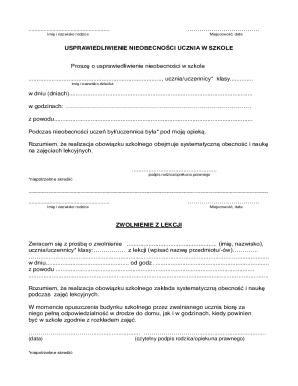
The Student Absence Excuse Request Form is a document used by parents or guardians to formally request an excuse for a student's absence from school.
pdfFiller scores top ratings on review platforms




Who needs Absence Excuse Form?
Explore how professionals across industries use pdfFiller.

Absence Excuse Form is needed by:
-
Parents or guardians seeking to excuse a student's absence
-
Teachers needing a record of student absences
-
School administrators managing attendance records
-
Students who require validated absence for educational purposes
-
Educational institutions requiring formal documentation for absences
Comprehensive Guide to Absence Excuse Form
Understanding the Student Absence Excuse Request Form
The Student Absence Excuse Request Form serves a crucial function in the educational landscape for students and their families. This form provides a standardized way for students to request an acknowledgment of their absence.
Submitting the form is essential for excused absences, as it helps ensure that students maintain proper attendance records. It is specifically intended for students, parents, and guardians navigating the complexities of school attendance policies.
Benefits of Using the Student Absence Excuse Request Form
Completing the Student Absence Excuse Request Form promptly and accurately offers several significant benefits.
-
Avoid academic penalties associated with unexcused absences.
-
Streamline communication channels between parents/guardians and school officials.
-
Ensure adherence to school policies regarding absenteeism and its documentation.
Key Features of the Student Absence Excuse Request Form
Understanding the key features of the Student Absence Excuse Request Form allows for a more efficient process. This form typically includes essential fields that capture necessary information.
-
Student details, including name and class information.
-
Absence dates and reasons for the student's absence.
-
Distinction between required fields and optional ones.
-
Instructions for submitting supporting documentation if necessary.
Who Should Use the Student Absence Excuse Request Form?
This form is intended for various users in the educational community. It clarifies the specific audience that should engage with it to ensure proper utilization.
-
Students intending to excuse their absence from school.
-
Parents or guardians completing the form for students who are minors.
-
Schools providing guidelines for the usage of the form.
How to Fill Out the Student Absence Excuse Request Form Online
Filling out the Student Absence Excuse Request Form online is straightforward when following the appropriate steps.
-
Access the Student Absence Excuse Request Form on pdfFiller.
-
Fill in the necessary information field by field.
-
Review the completed form to ensure all information is accurate.
-
Submit the form through the designated method chosen.
Additional Information Required with the Student Absence Excuse Request Form
When submitting the Student Absence Excuse Request Form, additional documentation may be required to support the request.
-
Common documents include a doctor's note or other proof of absence.
-
Submitting complete information helps avoid delays in processing the request.
-
Gathering and preparing the necessary documentation efficiently is essential.
Submit Your Student Absence Excuse Request Form: Methods and Guidelines
The submission of the Student Absence Excuse Request Form can be accomplished through various methods. Understanding these options is important for timely processing.
-
Online submission through platforms like pdfFiller.
-
In-person delivery to school officials.
-
Mailing the form to the school's designated address.
Additionally, it is vital to be aware of submission deadlines as stipulated by school policies to ensure that requests are considered accordingly.
Tracking the Status of Your Student Absence Excuse Request Form
After submitting the Student Absence Excuse Request Form, it is essential to know how to track its status effectively.
-
Follow specific steps provided by the school to check the status of your request.
-
Address any issues or rejections with clarity, should they arise.
-
Contact information for school officials is important for seeking assistance.
Why Choose pdfFiller for Your Student Absence Excuse Request Form?
Utilizing pdfFiller for your form needs offers several compelling reasons. The platform is designed for ease of use.
-
pdfFiller features intuitive tools for easy form filling and eSigning.
-
Robust security measures protect sensitive information.
-
User testimonials highlight successful experiences using pdfFiller for similar documentation needs.
Streamline Your Student Absence Excuse Request Process with pdfFiller
By choosing to use pdfFiller, you can manage the Student Absence Excuse Request Form process more efficiently. The platform simplifies form filling and minimizes hassle.
Start utilizing pdfFiller today for a smooth documentation experience, providing a valuable resource for your form needs.
How to fill out the Absence Excuse Form
-
1.Access pdfFiller and search for the Student Absence Excuse Request Form using the search bar.
-
2.Click on the form to open it in the pdfFiller editor.
-
3.Begin filling in the required fields: enter the student's full name, class, and the dates of absence.
-
4.Provide a clear reason for the absence in the designated field.
-
5.Ensure all information is accurate and double-check for any errors.
-
6.Once you have completed the fields, sign the form in the signature section.
-
7.The teacher who will also validate the absence should review and sign the form.
-
8.Review the entire form to make sure all fields are filled and correct.
-
9.When satisfied, save the completed form by clicking on the save option or download it as a PDF.
-
10.You can then submit the form directly through pdfFiller or print it out for physical submission to the teacher.

What are the eligibility requirements for using this form?
Parents or guardians of students who have been absent from school are eligible to use this form to request an excuse for the absence.
Is there a deadline for submitting the absence excuse request?
Yes, the form must be submitted to the teacher within 7 days following the last day of the student's absence to be considered valid.
How do I submit the completed form?
After filling out the form on pdfFiller, you can submit it electronically or print it to hand in directly to the teacher.
What supporting documents do I need to provide?
Typically, no additional documents are required, but you may need to explain the reason for absence clearly within the form.
What common mistakes should I avoid when filling out this form?
Ensure all fields are completed accurately, particularly the student's name and reason for absence. Missing signatures can also invalidate the form.
How long does it take to process the absence excuse request?
Usually, processing is immediate upon submission, but the teacher may take additional time to respond or validate the request based on school policies.
Can the form be filled out in a language other than Polish?
Since this form is designed for Polish educational institutions, it should ideally be filled out in Polish to meet the school's language requirements.
Related Forms

Get the latest insights from our blog


If you believe that this page should be taken down, please follow our DMCA take down process
here
.
This form may include fields for payment information. Data entered in these fields is not covered by PCI DSS compliance.