
Last updated on
Oct 31, 2026
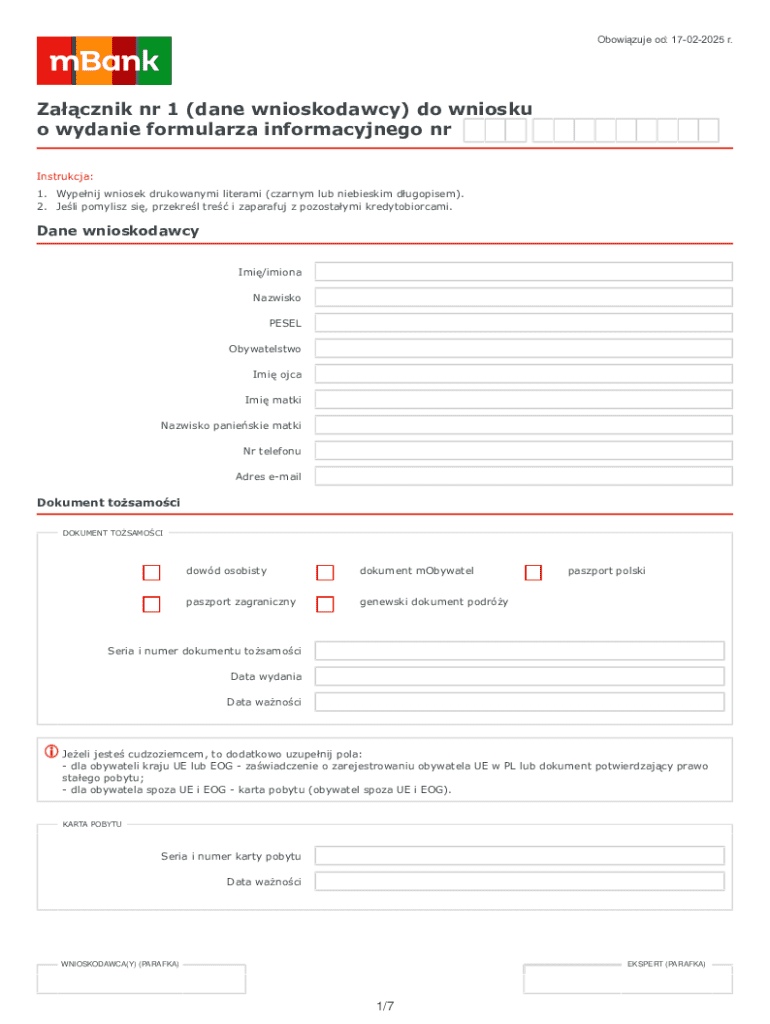
Get the free Application for Information Form
We are not affiliated with any brand or entity on this form

Fill out
Complete the form online in a simple drag-and-drop editor.

eSign
Add your legally binding signature or send the form for signing.

Share
Share the form via a link, letting anyone fill it out from any device.

Export
Download, print, email, or move the form to your cloud storage.
Why pdfFiller is the best tool for your documents and forms


End-to-end document management
From editing and signing to collaboration and tracking, pdfFiller has everything you need to get your documents done quickly and efficiently.
Accessible from anywhere
pdfFiller is fully cloud-based. This means you can edit, sign, and share documents from anywhere using your computer, smartphone, or tablet.
Secure and compliant
pdfFiller lets you securely manage documents following global laws like ESIGN, CCPA, and GDPR. It's also HIPAA and SOC 2 compliant.
What is Info Form
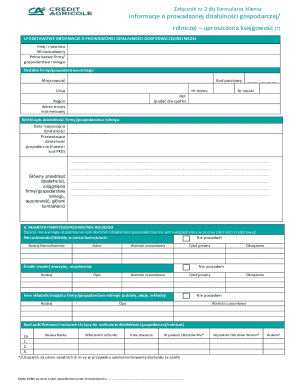
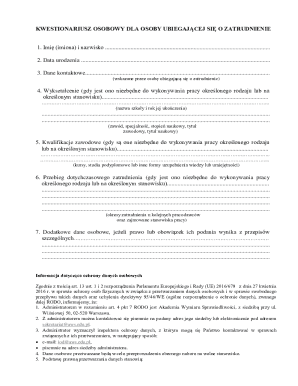
The Application for Information Form is a government form used by individuals in Poland to provide personal details and request information from the authorities.
pdfFiller scores top ratings on review platforms




Who needs Info Form?
Explore how professionals across industries use pdfFiller.

Info Form is needed by:
-
Polish citizens applying for residency information
-
Individuals needing to update personal data with the government
-
Experts assisting applicants with identity documentation
-
Foreign nationals seeking Polish citizen services
-
Employers verifying employee identity and documentation
Comprehensive Guide to Info Form
Overview of the Application for Information Form
The Application for Information Form is a crucial document utilized by residents to request information from the Polish government. This form acts as a direct line for citizens seeking to obtain necessary governmental details. Understanding this form's significance is essential for individuals residing in Poland, as it facilitates access to vital information.
Purpose and Benefits of the Application for Information Form
Individuals are encouraged to fill out the Application for Information Form due to its numerous benefits. This form simplifies the process of accessing required information from government sources, ensuring citizens can obtain what they need efficiently. When submitted accurately, this form can lead to timely responses and useful outcomes.
Who Should Use the Application for Information Form?
The Application for Information Form is designed for various users, including specific roles such as Wnioskodawca and Ekspert. Anyone eligible to request information will find this form useful, particularly in situations requiring governmental insight or documentation. Common scenarios include inquiries related to residency status, employment verification, and access to public records.
How to Fill Out the Application for Information Form Online
To complete the Application for Information Form online, follow these steps:
-
Access the digital version of the form through the designated portal.
-
Fill in all required fields accurately, paying close attention to any specific instructions.
-
Ensure that all necessary checkboxes are selected according to your circumstances.
-
Review the entire form for completeness and accuracy before submission.
Accuracy in filling out this personal information form is vital for successful processing.
Key Features of the Application for Information Form
The Application for Information Form includes several key features, such as:
-
Fillable fields that guide users through the completion process.
-
Clear instructions available to enhance user understanding.
-
The requirement for signatures from both the applicant and the expert involved.
These features aim to enrich the overall user experience while ensuring compliance with guidelines.
Common Errors and How to Avoid Them
When completing the Application for Information Form, applicants often make several common errors, including:
-
Leaving fields blank or providing incomplete information.
-
Failing to sign the form appropriately.
-
Submitting the form past the deadline.
To minimize these issues, consider implementing a review checklist to ensure all necessary items are covered prior to submission.
Digital Signature Requirements for the Application for Information Form
Signing the Application for Information Form correctly is crucial. A digital signature may be required, providing a secure method for signing documents electronically. It is essential to adhere to security measures such as encryption to protect sensitive information. Using platforms like pdfFiller can streamline the eSigning process effectively.
Submission Methods for the Application for Information Form
Applicants have several options for submitting the completed Application for Information Form, including:
-
Online submission through designated government portals.
-
Physical submission via mail or in-person at relevant offices.
Be aware of any associated fees or deadlines that may accompany different submission methods, and ensure to track your submission for confirmation.
What Happens After You Submit the Application for Information Form
After submission, applicants should prepare for the following steps:
-
Tracking the application to confirm successful submission.
-
Understanding the expected response time from the government.
-
Methods for checking the application status regularly.
Being proactive can help manage expectations during the waiting period.
Empowering Your Application Process with pdfFiller
Leveraging pdfFiller can significantly enhance your experience when filling out and managing the Application for Information Form. The platform offers user-friendly functionalities that allow easy editing and form creation. Additionally, utilizing pdfFiller ensures document security practices are in place, safeguarding sensitive information throughout your application journey.
How to fill out the Info Form
-
1.To access the Application for Information Form, visit pdfFiller and search for the form by its name.
-
2.Once located, open the form by clicking on it to launch the fillable interface.
-
3.Carefully read the form description and gather all necessary information, including your name, PESEL number, and contact details.
-
4.Begin filling in the fields; use the fillable text boxes for your personal data and tick the relevant checkboxes for marital status and residency.
-
5.If required, gather your identity documents, including passports or ID cards, to complete the sections involving documentation.
-
6.Proceed to fill in employment details, ensuring you accurately capture the nature of your employment and other educational information.
-
7.After completing all sections, review the form to ensure all fields are filled correctly and consistently.
-
8.Pay close attention to signature fields, as both the applicant and an expert must sign; use the 'Add Signature' option on pdfFiller to sign electronically.
-
9.Once satisfied with all entries and signatures, save your form by clicking 'Save' on the toolbar.
-
10.Download the filled form to your device or opt to submit it directly through pdfFiller if submission options are available.

Who is eligible to use the Application for Information Form?
Any Polish citizen or individual residing in Poland seeking to provide personal information for government processing is eligible to use this form.
Are there specific deadlines for submitting this form?
Generally, the submission of the Application for Information Form has no strict deadlines. However, it’s best to submit as soon as your information is ready to avoid delays in processing.
How should I submit the completed Application for Information Form?
You can submit the completed form either online through pdfFiller if supported, or you may download and print it for manual submission to the relevant government office.
What supporting documents are required with the form?
When completing the form, you may need to provide copies of identity documents such as a national ID or passport, and any relevant employment or residency documentation.
What common mistakes should I avoid when completing this form?
Common mistakes include incomplete fields, incorrect PESEL numbers, and missing signatures. Always double-check for accuracy before submission.
What are the typical processing times for this form?
Processing times can vary depending on the government office, but you can generally expect it to take several weeks to receive feedback or confirmation after submission.
Is notarization required for the Application for Information Form?
No, notarization is not required for this form, making the submission process more straightforward for applicants.
Related Forms





Get the latest insights from our blog



If you believe that this page should be taken down, please follow our DMCA take down process
here
.
This form may include fields for payment information. Data entered in these fields is not covered by PCI DSS compliance.