
Last updated on
Oct 31, 2026
Get the free Non-Profit Member Register
We are not affiliated with any brand or entity on this form

Fill out
Complete the form online in a simple drag-and-drop editor.

eSign
Add your legally binding signature or send the form for signing.

Share
Share the form via a link, letting anyone fill it out from any device.

Export
Download, print, email, or move the form to your cloud storage.
Why pdfFiller is the best tool for your documents and forms


End-to-end document management
From editing and signing to collaboration and tracking, pdfFiller has everything you need to get your documents done quickly and efficiently.
Accessible from anywhere
pdfFiller is fully cloud-based. This means you can edit, sign, and share documents from anywhere using your computer, smartphone, or tablet.
Secure and compliant
pdfFiller lets you securely manage documents following global laws like ESIGN, CCPA, and GDPR. It's also HIPAA and SOC 2 compliant.
What is Member Register
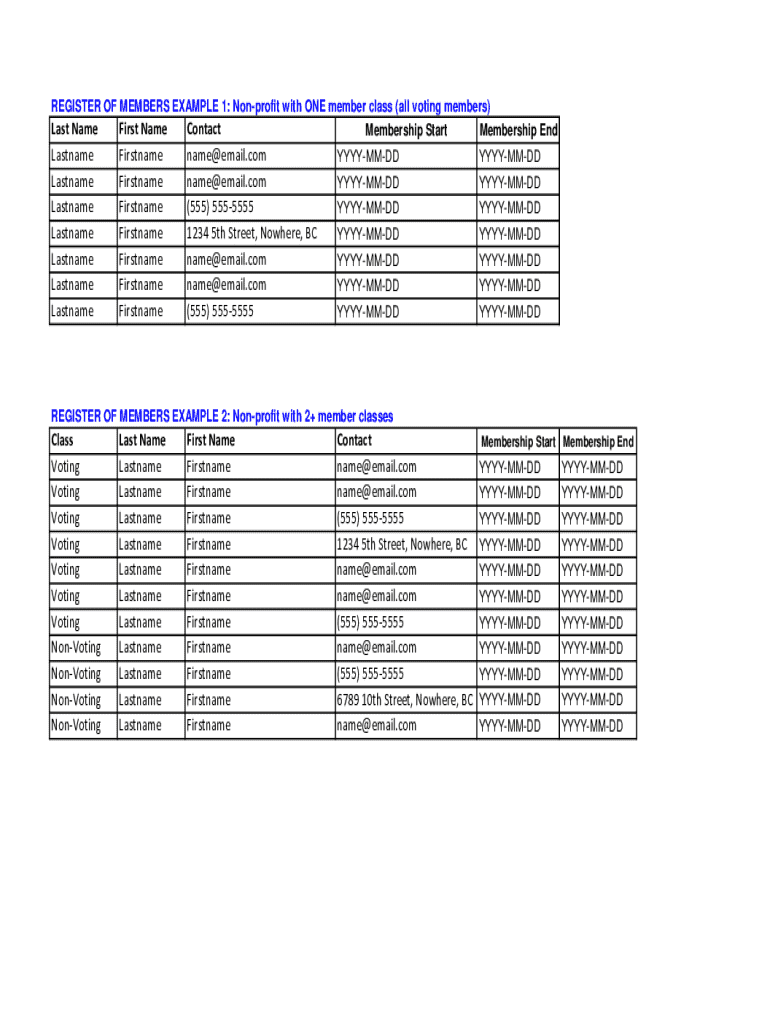
The Non-Profit Member Register is a template document used by non-profit organizations to track member information, including contact details and membership dates.
pdfFiller scores top ratings on review platforms




Who needs Member Register?
Explore how professionals across industries use pdfFiller.

Member Register is needed by:
-
Non-profit organizations in British Columbia
-
Membership coordinators managing member data
-
Administrators requiring a member database
-
Volunteer groups needing to track participation
-
Community organizations organizing member lists
Comprehensive Guide to Member Register
What is the Non-Profit Member Register?
The Non-Profit Member Register is a critical document designed to help non-profit organizations maintain a structured record of their members. This template allows for efficient tracking of member information, such as last name, first name, contact details, and membership dates. Its significance extends particularly to non-profits operating in British Columbia, Canada, ensuring they have a comprehensive view of their membership landscape.
Essential fields typically included in the register encompass:
-
Last name
-
First name
-
Contact details
-
Membership start date
-
Membership end date
Purpose and Benefits of the Non-Profit Member Register
The Non-Profit Member Register stands as a pivotal tool for organizations aiming to streamline their operations. Maintaining organized member data directly impacts the efficiency and effectiveness of non-profit activities.
-
Organized member data facilitates smooth operations and better communication.
-
Customizable forms allow differentiation between member classes, such as voting and non-voting members.
-
Helps ensure compliance with local regulations, which is vital for non-profit organizations.
Key Features of the Non-Profit Member Register
This member register template boasts several essential features that cater to varied organizational needs. Its adaptability and user-friendly design make it a valuable resource for non-profits.
-
Customizable fields and design elements tailored to the organization’s requirements.
-
Digital capabilities, including fillable forms and electronic signatures for ease of use.
-
Integration with document management systems, like pdfFiller, enhances editing and sharing processes.
Who Needs the Non-Profit Member Register?
The Non-Profit Member Register is beneficial for various types of non-profit organizations seeking to keep their member data organized. Administrators and membership coordinators find this tool particularly useful in their roles.
-
Non-profit organizations of all sizes looking to enhance their data tracking.
-
Individuals in roles such as membership coordinators who manage member interactions.
-
Specific scenarios where organized member databases are crucial for compliance and management.
How to Fill Out the Non-Profit Member Register Online (Step-by-Step)
Completing the Non-Profit Member Register online can be straightforward when following these steps:
-
Access the Non-Profit Member Register template through pdfFiller.
-
Fill out the required member information, ensuring accuracy.
-
Save your progress frequently to avoid data loss.
-
Review all entered information for completeness.
-
Submit the completed form according to your organization’s guidelines.
Gathering essential data beforehand, such as contact information and membership history, helps facilitate a smoother filling process.
Common Errors and How to Avoid Them
While filling out the Non-Profit Member Register, there are common mistakes that users often encounter. Awareness of these pitfalls can lead to a more accurate submission.
-
Inputting incorrect member data, particularly contact information.
-
Neglecting to check for missing fields, which can lead to incomplete submissions.
-
Being unfamiliar with the features of pdfFiller, leading to frustration.
Staying vigilant and utilizing available resources on pdfFiller can significantly help in avoiding these issues.
Submission Methods and Delivery of the Non-Profit Member Register
Upon completion of the Non-Profit Member Register, organizations must choose a submission method that suits their needs. There are various options available for submission.
-
Electronic submission of the completed register is often the quickest method.
-
Printed copies can also be submitted, adhering to specific guidelines.
-
Understanding submission timelines and deadlines is crucial for compliance.
Monitoring the submission status ensures that organizations remain informed of their document’s delivery status.
Security and Compliance for the Non-Profit Member Register
Handling sensitive member information necessitates a robust approach to security. The Non-Profit Member Register incorporates various measures to protect data integrity.
-
Security features provided by pdfFiller ensure the safe handling of sensitive documents.
-
Adherence to relevant privacy regulations protects both the organization and its members.
-
Document security is enhanced through encryption and secure access controls.
Sample of a Completed Non-Profit Member Register
Viewing a completed example of the Non-Profit Member Register can be immensely helpful for users. It illustrates the correct format and the kind of information required.
-
A filled-out example showcases appropriately entered member data.
-
Key sections are highlighted to guide users on what information to provide.
-
This sample can serve as a practical guideline for users completing their own register.
Empowering Your Non-Profit with the Right Tools
Leveraging pdfFiller facilitates a more manageable experience when handling the Non-Profit Member Register. This platform enhances the efficiency of data management.
-
pdfFiller streamlines the process of filling and managing non-profit member data.
-
Encouragement to explore additional features of pdfFiller that can bring further benefits to non-profits.
-
User satisfaction is critical, supported by trusted digital management tools.
How to fill out the Member Register
-
1.To access the Non-Profit Member Register, go to pdfFiller and search for the form by name.
-
2.Once you’ve located the form, click on it to open in the pdfFiller interface.
-
3.Familiarize yourself with the layout, noting where the blank fields are located for member information.
-
4.Before starting to fill out the form, gather necessary information such as member names, contact details, and membership start and end dates.
-
5.Begin filling in member information in the appropriate fields, ensuring accuracy in spellings and numbers.
-
6.Utilize pdfFiller’s tools to add or adjust text as needed, ensuring all member classes are properly documented.
-
7.Once you have filled in all required fields, thoroughly review the details for any omissions or errors.
-
8.After confirming the accuracy of the information, save your progress within pdfFiller to avoid losing data.
-
9.To finalize the form, download it for your records or submit it directly through pdfFiller’s submission features.

Who is eligible to use the Non-Profit Member Register?
The Non-Profit Member Register is intended for use by non-profit organizations operating in British Columbia, Canada, that require a structured way to manage and track their member information.
What is the deadline for completing this form?
There is no strict deadline for filling out the Non-Profit Member Register, but it is best to complete it as soon as possible to ensure accurate tracking of new and existing members.
How can I submit the completed Non-Profit Member Register?
After completing the form in pdfFiller, you can submit it electronically if your organization allows for digital submissions, or download and print it for manual submission.
What supporting documents are needed with this form?
Typically, the Non-Profit Member Register does not require supporting documents, but it is a good idea to have verification details or supplemental information for new members to ensure accuracy.
What common mistakes should I avoid when filling out this form?
Common mistakes include typos in names and contact details, leaving required fields blank, and not differentiating between voting and non-voting members when applicable.
How long does it take to process this document?
Processing time for the Non-Profit Member Register depends on your internal organization's procedures but expect immediate usability once completed in pdfFiller.
Can I edit the Non-Profit Member Register after saving?
Yes, pdfFiller allows you to edit and make changes to the Non-Profit Member Register even after saving, as long as you retain access to the document within the platform.
Related Forms


Get the latest insights from our blog



If you believe that this page should be taken down, please follow our DMCA take down process
here
.
This form may include fields for payment information. Data entered in these fields is not covered by PCI DSS compliance.