
Last updated on
Oct 31, 2026
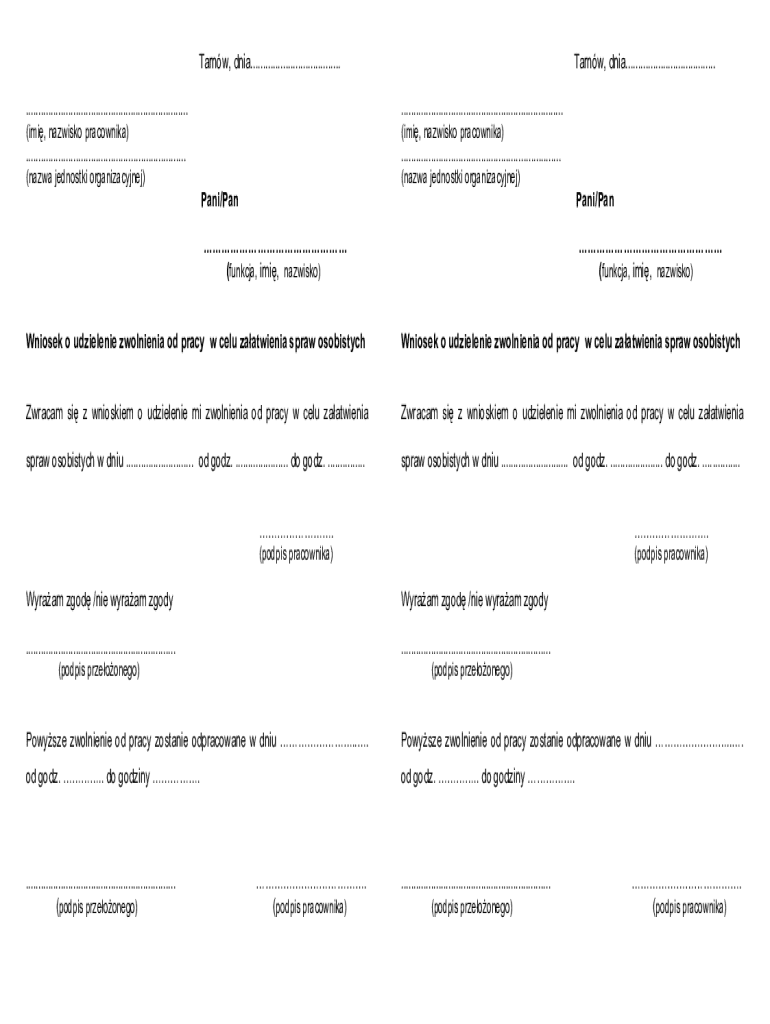
Get the free Employee Leave Request Form
We are not affiliated with any brand or entity on this form

Fill out
Complete the form online in a simple drag-and-drop editor.

eSign
Add your legally binding signature or send the form for signing.

Share
Share the form via a link, letting anyone fill it out from any device.

Export
Download, print, email, or move the form to your cloud storage.
Why pdfFiller is the best tool for your documents and forms


End-to-end document management
From editing and signing to collaboration and tracking, pdfFiller has everything you need to get your documents done quickly and efficiently.
Accessible from anywhere
pdfFiller is fully cloud-based. This means you can edit, sign, and share documents from anywhere using your computer, smartphone, or tablet.
Secure and compliant
pdfFiller lets you securely manage documents following global laws like ESIGN, CCPA, and GDPR. It's also HIPAA and SOC 2 compliant.
What is Leave Request
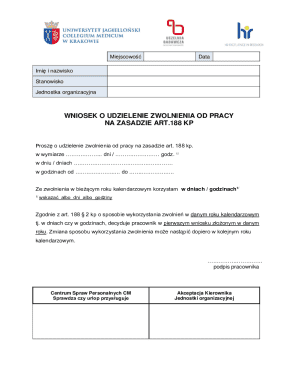
The Employee Leave Request Form is a type of document used by employees in Poland to formally request time off for personal matters, guaranteeing supervisor approval.
pdfFiller scores top ratings on review platforms




Who needs Leave Request?
Explore how professionals across industries use pdfFiller.

Leave Request is needed by:
-
Regular full-time employees seeking leave for personal reasons
-
Supervisors who must approve leave requests
-
Human Resource teams managing employee absences
-
Payroll departments needing accurate leave records
-
Administrators responsible for employee management forms
Comprehensive Guide to Leave Request
What is the Employee Leave Request Form?
The Employee Leave Request Form is a crucial document used by employees in Poland to formally request time off. Its primary purpose lies in streamlining the leave request process, ensuring that both employees and supervisors maintain clear communication throughout. This form is particularly important for employees as it provides a standardized method for submitting requests, thus safeguarding their rights to take personal time off when necessary.
Purpose and Benefits of the Employee Leave Request Form
Employees need to submit the Employee Leave Request Form to officially document their requests for leave. Utilizing this standardized form has several benefits, such as providing clarity and consistency in the leave approval process. It minimizes misunderstandings between employees and supervisors, ensuring that leave policies are followed accurately.
Who Needs the Employee Leave Request Form?
Typical users of the Employee Leave Request Form include both workers and supervisors. Employees are responsible for filling out and submitting the form, while supervisors are tasked with reviewing and approving the requests. Understanding the roles of both parties is essential, as it ensures that the leave management process is executed efficiently.
Key Features of the Employee Leave Request Form
The Employee Leave Request Form includes several key features essential for its functionality:
-
Required signatures from both the employee and supervisor
-
Fillable fields for entering relevant details such as dates and times
-
Space for additional comments if necessary
-
A standardized layout for easy comprehension
How to Fill Out the Employee Leave Request Form Online (Step-by-Step)
Completing the Employee Leave Request Form using pdfFiller involves several simple steps:
-
Access the Employee Leave Request Form on pdfFiller.
-
Fill in your name and contact information.
-
Indicate the dates and times you plan to be absent.
-
Provide a brief reason for your leave request.
-
Review your entries for accuracy before submission.
-
Submit the form for supervisor approval.
Common Errors and How to Avoid Them
While filling out the Employee Leave Request Form, employees often make some common mistakes. These include:
-
Failing to provide signatures
-
Leaving fields blank that are necessary for processing
-
Not specifying exact dates or times
To avoid these errors, double-check all information entered and ensure that the form is thoroughly completed before submission.
How to Sign the Employee Leave Request Form
Both employees and supervisors must sign the Employee Leave Request Form for it to be valid. The signing process can involve different methods:
-
Digital signatures, which offer convenience and enforceability
-
Wet signatures, requiring physical signing of the document
Understanding the requirements for each type of signature can help streamline the approval process.
Submission Methods and Delivery of the Employee Leave Request Form
Once the Employee Leave Request Form is completed, it needs to be submitted correctly. Submission methods include:
-
Emailing the completed form to your supervisor
-
Hand-delivering the form to your office
-
Uploading it to the company’s HR portal, if available
Be sure to include any necessary materials alongside the form, such as supporting documentation for your leave request.
Security and Compliance for the Employee Leave Request Form
When handling sensitive documents like the Employee Leave Request Form, security is paramount. pdfFiller employs robust security measures, including:
-
256-bit encryption to protect data
-
Compliance with SOC 2 Type II, HIPAA, and GDPR regulations
Understanding these security protocols is essential for ensuring confidentiality and data protection when managing employee leave requests.
Efficient Management with pdfFiller
Utilizing pdfFiller for the Employee Leave Request Form offers numerous advantages. It simplifies the process of creating, filling, and signing the form, facilitating a smoother experience for both employees and supervisors. By leveraging pdfFiller's capabilities, users can enhance their document management efficiency, making leave requests easier to handle.
How to fill out the Leave Request
-
1.Start by accessing pdfFiller and searching for the Employee Leave Request Form template in the search bar.
-
2.Once found, click on the form to open it within the pdfFiller interface. Utilize the fillable fields to enter required information.
-
3.Before starting to fill out the form, gather essential details such as the leave dates, reasons for the leave, and any personal identification required.
-
4.Navigate through the form, filling in your name, employee ID, and the specific dates you wish to request off.
-
5.Make sure to specify the reason for your leave clearly in the designated field—it could be for vacation, personal matters or illness.
-
6.Next, input your supervisor’s name and department to ensure they are correctly notified of the leave request.
-
7.Once all the information is filled in, review your entries carefully to verify that everything is accurate.
-
8.Seek your supervisor’s input if needed, then use the signature fields to digitally sign the form.
-
9.Upon final review, save your form by clicking on the 'Save' option in pdfFiller.
-
10.If required, download a copy of the completed form for your records or submit it directly through the pdfFiller interface.

Who is eligible to use the Employee Leave Request Form?
The Employee Leave Request Form is designed for regular full-time employees in Poland who need to request time off for personal reasons, such as vacations or other personal matters.
What is the submission method for the leave request?
You can submit the completed Employee Leave Request Form through the pdfFiller platform, emailing it to your supervisor, or physically handing it in, depending on your company’s procedures.
What supporting documents are required with the form?
Generally, you may need to provide a brief explanation of your absence. Certain companies might require documentation depending on the leave reason, such as medical certificates for sick leave.
Are there deadlines for submitting the leave request?
Deadlines for submitting an Employee Leave Request can vary by company policy. It is always best to submit your request as early as possible to allow for supervisor review and approval.
What common mistakes should I avoid when filling out the form?
Ensure that all required fields are completed and that your request is clear. Avoid incomplete information and double-check for any spelling errors in names or dates to prevent delays in processing.
How long does it take for the leave request to be processed?
Processing times for the Employee Leave Request usually depend on the supervisor's schedule and company policy, but typically, you should expect to wait a few days for approval or feedback.
Do I need to notarize the Employee Leave Request Form?
No, the Employee Leave Request Form does not require notarization. Simply obtaining the necessary signatures from you and your supervisor is sufficient.
Related Forms


Get the latest insights from our blog



If you believe that this page should be taken down, please follow our DMCA take down process
here
.
This form may include fields for payment information. Data entered in these fields is not covered by PCI DSS compliance.