
Last updated on
Oct 31, 2026
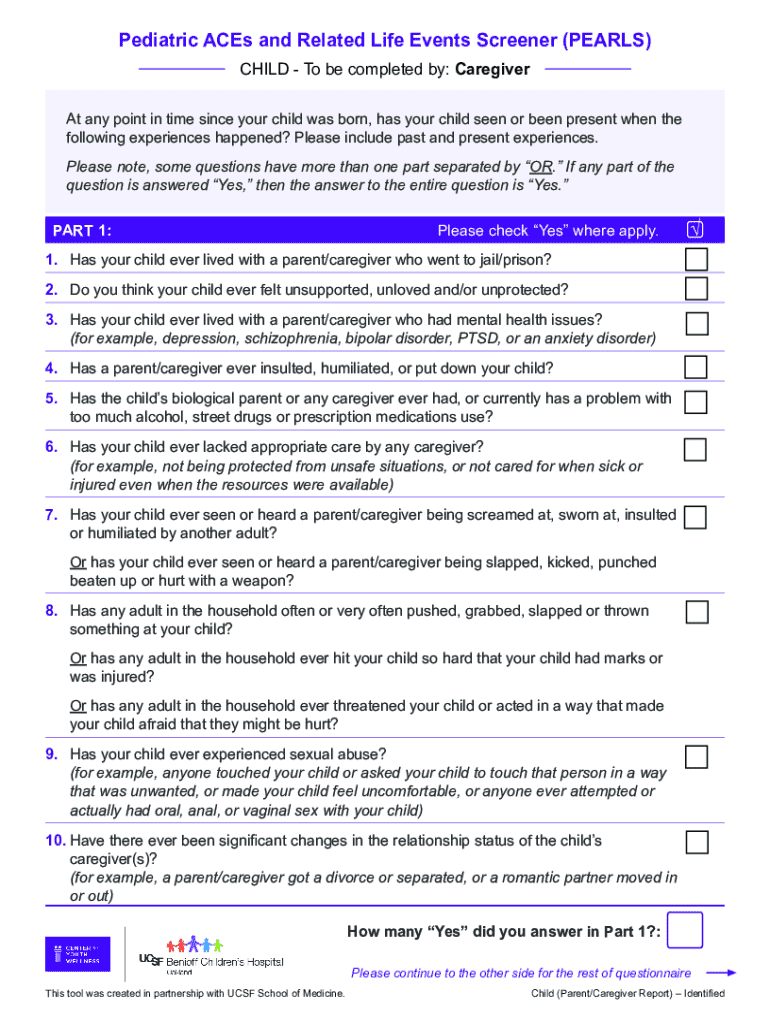
Get the free Pediatric ACEs and Related Life Events Screener
We are not affiliated with any brand or entity on this form

Fill out
Complete the form online in a simple drag-and-drop editor.

eSign
Add your legally binding signature or send the form for signing.

Share
Share the form via a link, letting anyone fill it out from any device.

Export
Download, print, email, or move the form to your cloud storage.
Why pdfFiller is the best tool for your documents and forms


End-to-end document management
From editing and signing to collaboration and tracking, pdfFiller has everything you need to get your documents done quickly and efficiently.
Accessible from anywhere
pdfFiller is fully cloud-based. This means you can edit, sign, and share documents from anywhere using your computer, smartphone, or tablet.
Secure and compliant
pdfFiller lets you securely manage documents following global laws like ESIGN, CCPA, and GDPR. It's also HIPAA and SOC 2 compliant.
What is Pediatric ACEs Screener
The Pediatric ACEs and Related Life Events Screener is a medical history form used by caregivers to assess stressful life events that may impact a child's health and wellbeing.
pdfFiller scores top ratings on review platforms




Who needs Pediatric ACEs Screener?
Explore how professionals across industries use pdfFiller.

Pediatric ACEs Screener is needed by:
-
Caregivers of children needing health assessments
-
Healthcare professionals evaluating childhood experiences
-
Mental health specialists focusing on pediatric care
-
Social workers assessing family health dynamics
-
Researchers studying children's wellbeing
-
Schools identifying student support needs
Comprehensive Guide to Pediatric ACEs Screener
What is the Pediatric ACEs and Related Life Events Screener?
The Pediatric ACEs and Related Life Events Screener, or PEARLS, serves as a crucial medical history document aimed at assessing children's health. This screening tool focuses on identifying adverse childhood experiences (ACEs) and related life events that may impact a child's wellbeing. Caregiver input is vital in this evaluation, providing context that enhances understanding of the child's experiences and needs.
Purpose and Benefits of the Pediatric ACEs Screener
This form plays an essential role in identifying potential stressors affecting children's mental and physical health. By facilitating early identification of these issues, it supports timely interventions and enhances the care provided. Healthcare providers benefit significantly from this assessment by gaining insights into a patient’s background, enabling them to tailor their approach for improved care delivery.
Key Features of the Pediatric ACEs Screener
The Pediatric ACEs Screener is designed for user-friendliness and effectiveness. It comprises two parts, each specifically structured to require simple Yes/No responses that facilitate quick completion. This form is available in a digital, fillable format online, ensuring easy access and convenient use. The comprehensive nature of the questions allows for a thorough assessment of the child's life events.
Who Needs the Pediatric ACEs and Related Life Events Screener?
Various individuals and professionals can benefit from utilizing this screener. Caregivers and parents of children undergoing medical assessments frequently complete this form to provide critical background information. Pediatric healthcare providers rely on the data collected to inform clinical decision-making, while social services professionals may use it to evaluate family dynamics.
How to Fill Out the Pediatric ACEs Screener Online (Step-by-Step Guide)
To effectively fill out the Pediatric ACEs Screener online, follow these steps:
-
Access the form on pdfFiller's website.
-
Gather necessary information regarding the child's experiences before starting.
-
Complete each section, ensuring clarity in responses.
-
Review specific parts of the form that may need additional thought or clarification.
-
Submit the form when all questions have been answered.
Common Errors in Filling Out the Pediatric ACEs Screener & How to Avoid Them
Avoid mistakes when completing the screener by being aware of common errors. These may include skipping questions or misunderstanding specific terms. To ensure accuracy, adhere to best practices such as:
-
Carefully reading each question before answering.
-
Double-checking for completeness of responses.
-
Using a validation checklist to review the form before submission.
Secure Submission and Data Protection for the Pediatric ACEs Screener
Securing sensitive information during the submission of healthcare forms is crucial. pdfFiller employs robust security measures, such as encryption compliance, to protect user data. Understanding the importance of HIPAA compliance further assures caregivers that their information is handled responsibly and remains private throughout the process.
What Happens After You Submit the Pediatric ACEs Screener?
After submitting the Pediatric ACEs Screener, caregivers can track the status of their submission through the platform. They may receive follow-up communications from healthcare providers, emphasizing the importance of maintaining open communication regarding assessment results. Timely engagement ensures that caregivers stay informed about the next steps in their child's care.
Experience the Convenience of Using pdfFiller for Your Pediatric ACEs Screener
Utilizing pdfFiller's platform for completing the Pediatric ACEs Screener presents multiple advantages. Users can benefit from its simple interface, digital signing options, and efficient document management features. Filling out medical forms online with a secure platform not only enhances convenience but also streamlines the overall process for caregivers and healthcare professionals alike.
How to fill out the Pediatric ACEs Screener
-
1.Access the Pediatric ACEs and Related Life Events Screener on pdfFiller by searching for its title in the platform's search bar.
-
2.Once you find the form, click on it to open in the pdfFiller editor interface.
-
3.Review the fillable fields and instructions provided at the top of the form to understand the required information.
-
4.Before starting, gather necessary documentation about the child's health, including any past medical records or adverse experiences.
-
5.Complete the first part of the form by answering questions about adverse childhood experiences, selecting 'Yes' or 'No' as instructed.
-
6.Proceed to the second part of the form and answer related life events questions, ensuring every section is filled out accurately.
-
7.After completing all sections, double-check your responses to ensure all information is entered correctly.
-
8.Once you are satisfied with your responses, use the 'Save' option to keep a copy of the filled form on your pdfFiller account.
-
9.If you need to download a copy, click on 'Download' and choose your preferred file format.
-
10.When ready to submit, select the appropriate submission method outlined in the form guidelines, whether electronically or in print.

Who should fill out the Pediatric ACEs Screener?
The form should be completed by the child's primary caregiver, such as a parent or guardian, who has relevant insights about the child's health and life experiences.
Are there any deadlines for submitting this form?
While there are no specific submission deadlines mentioned in the metadata, it is advised to complete the form as soon as possible for timely healthcare assessments.
How can I submit the completed form?
You can submit the completed Pediatric ACEs Screener electronically through pdfFiller or print it out for submission at your healthcare provider's office.
What information do I need to complete the form?
Gather details about the child's medical history, including previous health issues, family dynamics, and any known adverse childhood experiences before starting the form.
What common mistakes should I avoid while filling out the form?
Ensure all questions are answered accurately, avoid leaving any sections blank, and double-check for clarity in your responses to prevent any discrepancies.
How long does it take to process the Pediatric ACEs Screener?
Processing times can vary based on the healthcare provider's workload; however, it is good practice to follow up if you don't receive feedback within a week or two after submission.
Can I edit the form after saving it?
Yes, once saved in pdfFiller, you can reopen and edit the Pediatric ACEs Screener at any time before final submission.
Related Forms


Get the latest insights from our blog


If you believe that this page should be taken down, please follow our DMCA take down process
here
.
This form may include fields for payment information. Data entered in these fields is not covered by PCI DSS compliance.