
Last updated on
Oct 31, 2026
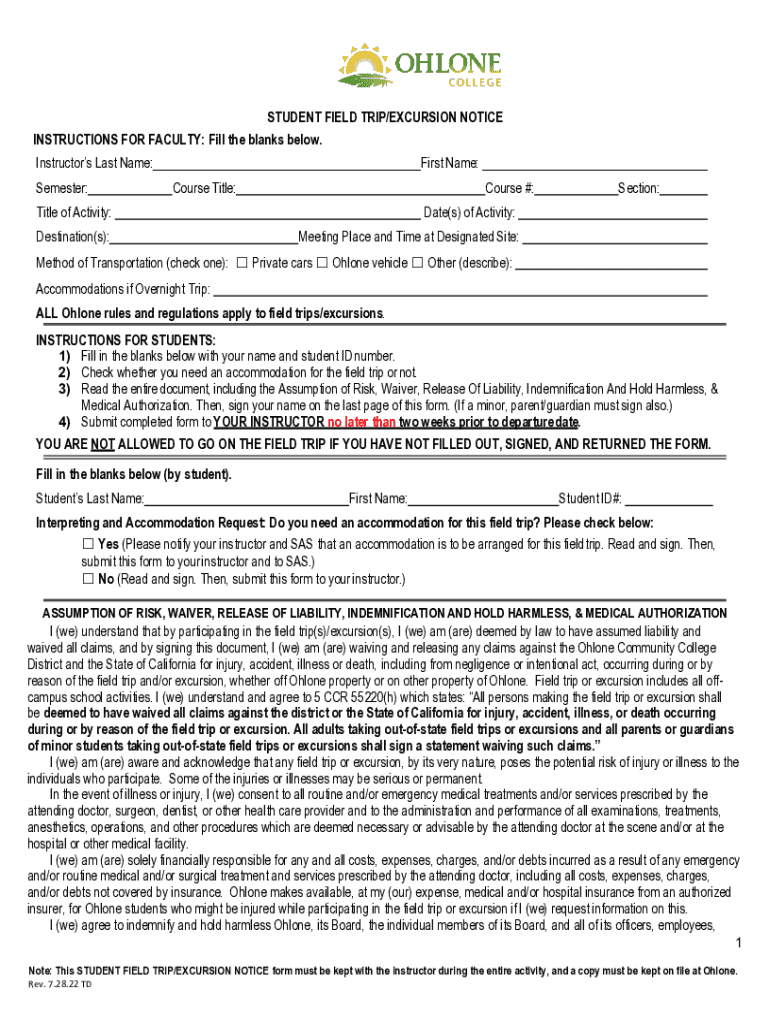
Get the free Student Field Trip Excursion Notice
We are not affiliated with any brand or entity on this form

Fill out
Complete the form online in a simple drag-and-drop editor.

eSign
Add your legally binding signature or send the form for signing.

Share
Share the form via a link, letting anyone fill it out from any device.

Export
Download, print, email, or move the form to your cloud storage.
Why pdfFiller is the best tool for your documents and forms


End-to-end document management
From editing and signing to collaboration and tracking, pdfFiller has everything you need to get your documents done quickly and efficiently.
Accessible from anywhere
pdfFiller is fully cloud-based. This means you can edit, sign, and share documents from anywhere using your computer, smartphone, or tablet.
Secure and compliant
pdfFiller lets you securely manage documents following global laws like ESIGN, CCPA, and GDPR. It's also HIPAA and SOC 2 compliant.
What is Field Trip Notice
The Student Field Trip Excursion Notice is a permission slip used by Ohlone Community College to authorize student participation in field trips or excursions.
pdfFiller scores top ratings on review platforms




Who needs Field Trip Notice?
Explore how professionals across industries use pdfFiller.

Field Trip Notice is needed by:
-
Students participating in educational field trips
-
Parents or guardians of underage students
-
Ohlone Community College instructors
-
Educational program coordinators
-
School administrators overseeing field trips
Comprehensive Guide to Field Trip Notice
What is the Student Field Trip Excursion Notice?
The Student Field Trip Excursion Notice is a crucial form used by Ohlone Community College to document and authorize participation in field trips. This form plays a significant role in the educational process, ensuring that students have permission from their parents or guardians, especially if they are under 18 years old.
Documenting and authorizing student participation in excursions is important not only for safety but also for compliance with institutional policies. The roles of both the student and the parent or guardian are vital, as their signatures indicate consent and understanding of the trip's nature.
Purpose and Benefits of the Student Field Trip Excursion Notice
The Student Field Trip Excursion Notice serves multiple essential purposes. It fosters clear communication between students, parents, and educators, ensuring all parties are aware of trip details and responsibilities.
Moreover, the form releases Ohlone Community College from liability, effectively managing risks associated with field trips. By completing this form, parents and guardians aid in facilitating necessary arrangements, such as transportation and accommodations, creating a smoother experience for everyone involved.
Who Needs the Student Field Trip Excursion Notice?
The Student Field Trip Excursion Notice must be completed by specific individuals. All students participating in field trips, particularly those under the age of 18, are required to obtain parental or guardian signatures to ensure safety and compliance.
This form is mandatory for participation, and instructors play a key role in collecting the completed forms to confirm that all necessary information is accurately provided. They help to review the forms before the excursion, ensuring everyone is prepared.
How to Fill Out the Student Field Trip Excursion Notice Online (Step-by-Step)
Filling out the Student Field Trip Excursion Notice online is a simple process via pdfFiller. Here are the steps to follow:
-
Access the form through the pdfFiller platform.
-
Enter your personal information as required.
-
Select your preferred transportation method from the available options.
-
Provide your signature and, if required, a guardian's signature.
-
Ensure the completed form is submitted at least two weeks prior to the trip date.
Field-by-Field Instructions for the Student Field Trip Excursion Notice
Understanding each section of the form is critical for accurate completion. Common fields include 'Instructor's Last Name' and 'Student ID#', which are essential for identification purposes.
When filling out transportation options, ensure that you accurately select the method that applies to you. Additionally, be mindful of common mistakes, such as skipping mandatory fields, which can delay the approval process.
Submission Methods and Delivery for the Student Field Trip Excursion Notice
Submitting the Student Field Trip Excursion Notice can be done through various methods. Users can choose between digital submissions via pdfFiller or paper submissions directly to their instructor.
It is crucial to confirm the submission of your form well ahead of the due date to avoid any last-minute issues, ensuring that all necessary parties receive the document in time.
Security and Compliance for the Student Field Trip Excursion Notice
User safety while handling forms is a top priority. pdfFiller employs 256-bit encryption for secure document management, ensuring that sensitive information is protected throughout the process.
Moreover, compliance with privacy regulations such as HIPAA and GDPR further guarantees that users' data is kept safe, offering peace of mind while filling out documents.
What Happens After You Submit the Student Field Trip Excursion Notice?
After submission, the processing time for the Student Field Trip Excursion Notice varies. Users can expect to receive a response regarding their submission within a specific timeframe.
Tracking the status of your submitted form is also important. Users should familiarize themselves with the process for following up, as it may involve checking in with the instructor or utilizing pdfFiller's features.
How to Correct or Amend the Student Field Trip Excursion Notice
If there are any errors in the submitted information, timely corrections are necessary. Here are steps to take for amending the form:
-
Identify the details that need correction.
-
Contact your instructor or access the pdfFiller platform to adjust the information.
-
Submit the amended form promptly to avoid impacting your participation in the field trip.
Resources through pdfFiller are available for assistance with amendments, ensuring a smooth correction process.
Your Resource for Managing the Student Field Trip Excursion Notice with pdfFiller
Using pdfFiller for the Student Field Trip Excursion Notice offers numerous benefits. As a cloud-based platform, it allows users to fill out forms, eSign documents, and manage submissions seamlessly, without needing to download software.
Features like form sharing and tracking enhance the overall experience, making it easier to manage documentation effectively. Users are encouraged to leverage pdfFiller to streamline the handling of this important document.
How to fill out the Field Trip Notice
-
1.Access the Student Field Trip Excursion Notice form by navigating to pdfFiller and searching for the form title.
-
2.Once located, click on the form to open it in the pdfFiller editor interface.
-
3.Gather all necessary information, including both the student's and parent or guardian's personal details, the instructor’s name, and transportation preferences.
-
4.Begin filling out the required fields, such as 'Instructor’s Last Name' and 'Student’s Last Name,' by clicking on each field and typing in the respective information.
-
5.Use checkboxes to indicate transportation methods and any accommodation requests, ensuring that selections are clearly marked.
-
6.After completing all fields, carefully review the entire form for accuracy, checking that names are spelled correctly and all necessary information is included.
-
7.Finalizing the form, click the 'Save' option to ensure your changes are retained within the pdfFiller platform.
-
8.Once saved, you can download a copy of the completed form or submit it directly through pdfFiller by following the on-screen submission instructions.
-
9.If submitting to an instructor, ensure that you do so at least two weeks prior to the trip, as specified in the guidelines.

Who is required to sign the Student Field Trip Excursion Notice?
Both the student and their parent or guardian must sign the Student Field Trip Excursion Notice if the student is under 18, ensuring legal authorization for participation.
What information is needed to complete the form?
You will need personal details for both the student and the parent or guardian, including names and contact information, as well as specifics about transportation methods.
When should the form be submitted?
The completed form must be submitted to the instructor at least two weeks prior to the planned field trip or excursion to ensure all arrangements can be made.
Can the form be filled out online?
Yes, the Student Field Trip Excursion Notice can be filled out online using pdfFiller, which makes completing and submitting the form much easier.
What happens if I forget to sign the form?
If the form is not signed by both required parties, it may not be accepted, preventing the student from participating in the field trip or excursion.
Are there any fees associated with submitting the form?
Typically, there are no fees associated with submitting the Student Field Trip Excursion Notice; however, check with your school for specific policies.
How can I make changes after submitting the form?
If changes need to be made after submission, contact the instructor directly to discuss the necessary adjustments or resubmission of the updated form.
Related Forms



Get the latest insights from our blog


If you believe that this page should be taken down, please follow our DMCA take down process
here
.
This form may include fields for payment information. Data entered in these fields is not covered by PCI DSS compliance.