
Last updated on
Oct 31, 2026
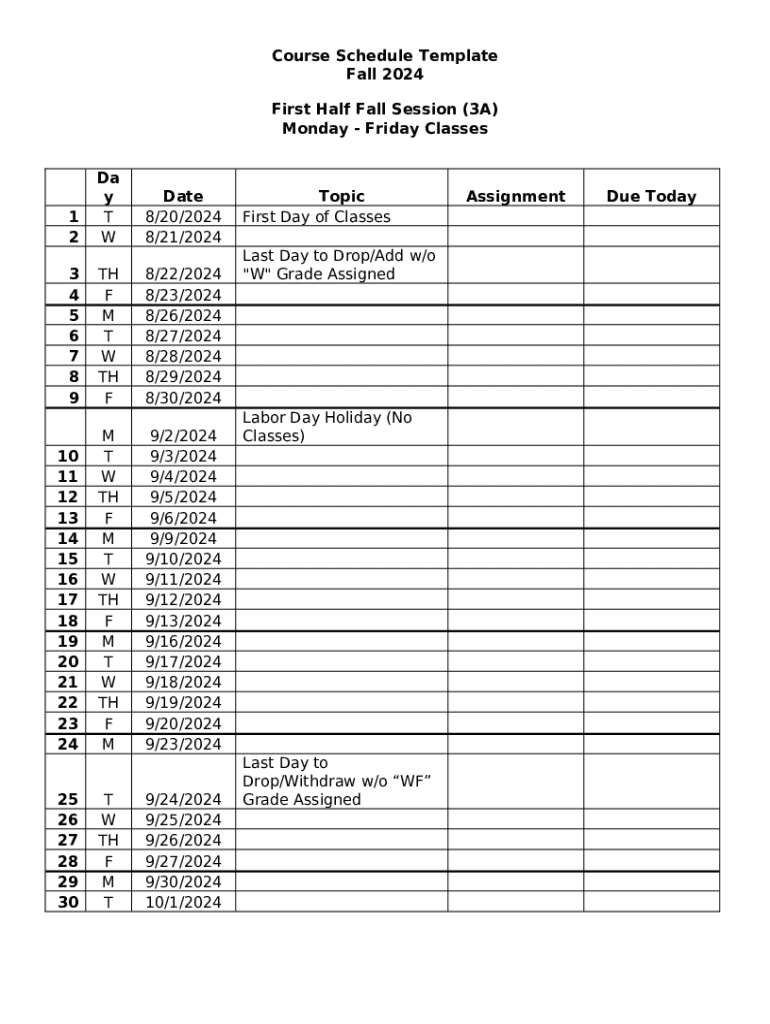
Get the free Course Schedule Template
We are not affiliated with any brand or entity on this form

Fill out
Complete the form online in a simple drag-and-drop editor.

eSign
Add your legally binding signature or send the form for signing.

Share
Share the form via a link, letting anyone fill it out from any device.

Export
Download, print, email, or move the form to your cloud storage.
Why pdfFiller is the best tool for your documents and forms


End-to-end document management
From editing and signing to collaboration and tracking, pdfFiller has everything you need to get your documents done quickly and efficiently.
Accessible from anywhere
pdfFiller is fully cloud-based. This means you can edit, sign, and share documents from anywhere using your computer, smartphone, or tablet.
Secure and compliant
pdfFiller lets you securely manage documents following global laws like ESIGN, CCPA, and GDPR. It's also HIPAA and SOC 2 compliant.
What is Course Schedule
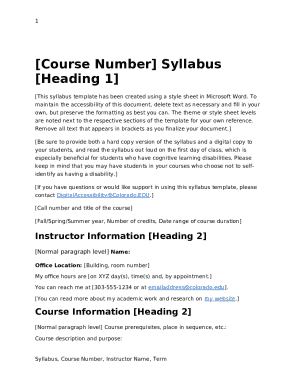
The Course Schedule Template is an educational document used by institutions to outline the dates, topics, and assignments for courses during the Fall 2024 semester.
pdfFiller scores top ratings on review platforms




Who needs Course Schedule?
Explore how professionals across industries use pdfFiller.

Course Schedule is needed by:
-
Instructors designing course schedules for Fall 2024
-
Students planning their class registration and coursework
-
Academic advisors assisting students with scheduling
-
Administrators managing course offerings
-
Department heads overseeing curriculum development
Comprehensive Guide to Course Schedule
What is the Course Schedule Template?
The Course Schedule Template is a critical tool utilized in educational institutions to organize course information efficiently. Designed for the Fall 2024 semester, this template supports both instructors and students in outlining important course elements.
This template features fillable fields that include essential details such as dates, topics, and assignments, ensuring that every participant has a clear understanding of what is expected throughout the semester. By utilizing a course schedule template, users can effectively manage their academic responsibilities and expectations.
Purpose and Benefits of the Course Schedule Template
The Course Schedule Template serves multiple purposes, significantly benefiting both instructors and students. Firstly, it provides clarity on course expectations and timelines, promoting a better understanding of the academic landscape.
Additionally, this template helps track important deadlines, such as drop/add dates and final exam schedules, which are crucial for academic planning. By aiding in organization, the Course Schedule Template ultimately contributes to the academic success of both instructors and students alike.
Key Features of the Course Schedule Template
-
Fillable fields allow for easy completion and personal customization of schedules.
-
Instructions are included to guide users through the process of filling out the template.
-
The ability to save the document digitally ensures easy access from various devices.
Who Needs the Course Schedule Template?
The Course Schedule Template is an essential resource for several user groups. Instructors benefit by having a structured way to outline their courses clearly for students.
Students also find the template critical as it offers a clear roadmap for their semester, helping them manage their time effectively. Furthermore, educational institutions require a standardized format to maintain consistency across courses, making this template indispensable.
How to Fill Out the Course Schedule Template Online (Step-by-Step)
-
Access the Course Schedule Template through pdfFiller.
-
Edit the template to add specific course details, such as dates and assignments.
-
Ensure all required fields are completed before saving the document.
-
Save the completed schedule to your device for easy access.
-
Share or print the schedule as needed.
Common Errors and How to Avoid Them
While using the Course Schedule Template, there are common errors that users should be aware of. One frequent mistake is leaving fillable fields incomplete, which can lead to confusion.
Moreover, misalignment of crucial course dates or details can create significant issues. It’s vital to thoroughly review the template before submission to avoid these common pitfalls.
Security and Compliance When Using the Course Schedule Template
When using pdfFiller to handle the Course Schedule Template, users can trust in robust security measures. The platform employs 256-bit encryption and ensures compliance with HIPAA and GDPR standards, providing an extra layer of privacy for sensitive academic documents.
Maintaining the security of educational documents is paramount, and pdfFiller expertly handles these concerns, ensuring users can fill out and submit their templates safely.
How to Download, Save, and Print the Course Schedule Template
Downloading the completed Course Schedule Template for personal use is straightforward. Begin by saving the PDF directly from pdfFiller.
If a hard copy is required, follow the simple instructions for printing the template. Different formats are also available for download, catering to individual preferences.
Submission Methods and Delivery of the Course Schedule Template
Submitting the completed Course Schedule Template can be accomplished through various methods. Users can upload or email their completed templates, depending on institutional requirements.
When submitting digitally, it’s essential to bear in mind any deadlines or policies established by the institution to ensure compliance.
Explore the Ease of Using pdfFiller for Your Course Schedule Template Needs
Engaging with pdfFiller enables users to efficiently fill out and manage their Course Schedule Template. The platform boasts numerous benefits, including user-friendliness, enhanced security features, and various capabilities tailored to academic planning.
Users are encouraged to get started with their academic planning today and can also explore additional resources and support offered through pdfFiller to enhance their experience.
How to fill out the Course Schedule
-
1.To access the Course Schedule Template on pdfFiller, visit the website and use the search function to locate the form by typing its name into the search bar.
-
2.Once you find the form, click on it to open the template in pdfFiller's editing interface where you can begin filling out the necessary information.
-
3.Before starting, gather essential information such as course dates, topics to be covered, assignment deadlines, and any other specific details relevant to the course.
-
4.Navigate through the fillable fields, ensuring to input accurate and detailed information, placing emphasis on deadlines, topics, and assignments using pdfFiller's editing tools.
-
5.After completing the fields, carefully review the information entered to ensure it is correct and comprehensive.
-
6.Finalize the form by checking for any missing entries or errors, returning to any field that needs revising.
-
7.Once satisfied with the form, save your work, and utilize the save or download options provided by pdfFiller to keep a copy for your records, or submit the form as required.

Who is eligible to use the Course Schedule Template?
The Course Schedule Template is designed for use by educational institutions, specifically instructors, students, and academic advisors involved in course planning and scheduling.
Are there deadlines for submitting the course schedule?
Yes, it is important to complete and submit the course schedule before the start of the semester. Be sure to note any institutional deadlines regarding schedule submissions.
What methods can I use to submit the Course Schedule Template?
You can submit the completed Course Schedule Template electronically through the institution's registration system or email it to the relevant department as per your institution's guidelines.
What supporting documents do I need to fill out the schedule?
Gather essential course information, such as the academic calendar, course syllabus, and any departmental guidelines to ensure all required details are accurately recorded.
What common mistakes should I avoid when completing the form?
Avoid leaving fields blank, ensure deadlines are clearly marked, and double-check course details for accuracy to prevent scheduling conflicts.
How long does it take to process the submitted schedule?
Processing times may vary by institution, but typically, you should allow 1-2 weeks after submission for confirmation and any necessary adjustments.
Can I make changes to the schedule after submission?
Yes, changes can often be made after submission, but you should check with your institution’s policies for any specific procedures regarding schedule amendments.
Related Forms


Get the latest insights from our blog



If you believe that this page should be taken down, please follow our DMCA take down process
here
.
This form may include fields for payment information. Data entered in these fields is not covered by PCI DSS compliance.