
Last updated on
Oct 31, 2026
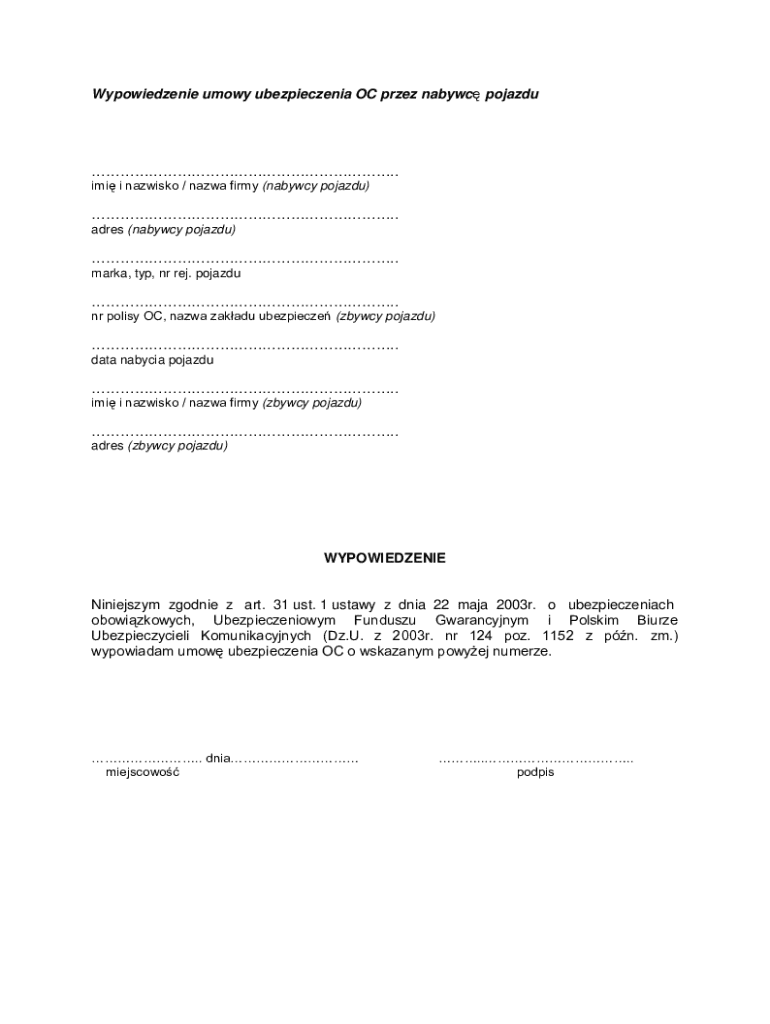
Get the free Insurance Cancellation Notice
We are not affiliated with any brand or entity on this form

Fill out
Complete the form online in a simple drag-and-drop editor.

eSign
Add your legally binding signature or send the form for signing.

Share
Share the form via a link, letting anyone fill it out from any device.

Export
Download, print, email, or move the form to your cloud storage.
Why pdfFiller is the best tool for your documents and forms


End-to-end document management
From editing and signing to collaboration and tracking, pdfFiller has everything you need to get your documents done quickly and efficiently.
Accessible from anywhere
pdfFiller is fully cloud-based. This means you can edit, sign, and share documents from anywhere using your computer, smartphone, or tablet.
Secure and compliant
pdfFiller lets you securely manage documents following global laws like ESIGN, CCPA, and GDPR. It's also HIPAA and SOC 2 compliant.
What is Insurance Cancellation
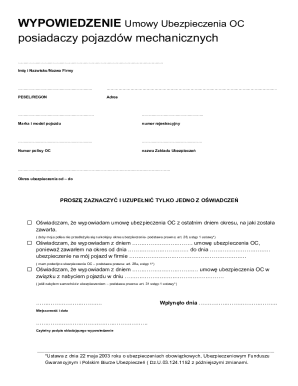
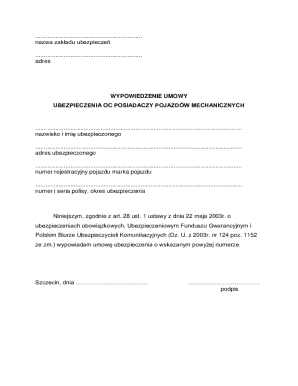
The Insurance Cancellation Notice is a legal document used by buyers to formally cancel a compulsory civil liability insurance policy for a vehicle.
pdfFiller scores top ratings on review platforms




Who needs Insurance Cancellation?
Explore how professionals across industries use pdfFiller.

Insurance Cancellation is needed by:
-
Vehicle owners wanting to cancel their insurance policy
-
Buyers of used vehicles needing to terminate existing insurance
-
Insurance agents assisting clients with policy cancellation
-
Individuals transitioning to a new insurance provider
-
Businesses managing fleet insurance policies
Comprehensive Guide to Insurance Cancellation
What is the Insurance Cancellation Notice?
The Insurance Cancellation Notice is a critical document used to terminate a compulsory civil liability insurance policy for a vehicle. This form is primarily utilized by buyers who wish to formally indicate their intent to cancel existing insurance coverage. It plays a pivotal role in ensuring that all legal stipulations regarding vehicle insurance termination are adhered to.
The form typically captures essential information, including the buyer's name and contact details, as well as pertinent vehicle information. Its significance lies in helping buyers avoid unnecessary legal complications and ensuring compliance with insurance regulations in Poland.
Purpose and Benefits of the Insurance Cancellation Notice
This form serves several important purposes in the realm of vehicle insurance. By using the Insurance Cancellation Notice, buyers fulfill legal obligations that come with vehicle ownership. Failure to properly cancel insurance coverage can lead to undesired legal repercussions.
Furthermore, utilizing this form provides buyers with numerous benefits, such as avoiding penalties and extra charges related to ongoing insurance. This proactive approach is vital for maintaining financial clarity during vehicle transactions.
Key Features of the Insurance Cancellation Notice
The Insurance Cancellation Notice includes several key components, vital for its effective use. Essential fields that must be filled include the names of both the buyer and the seller, vehicle details, insurance policy number, and a signature for validation.
The fillable nature of the form is designed to make completion straightforward, with specific fields drawing attention for their importance. Ensuring that all information is accurately filled out is crucial to avoid delays in processing.
Who Needs the Insurance Cancellation Notice?
Various individuals may find the Insurance Cancellation Notice beneficial during specific circumstances. Primarily, vehicle owners who decide to sell their vehicle or switch insurance providers require this form to officially terminate existing coverage.
This document is important for both buyers and sellers as it safeguards their interests during vehicle transactions, ensuring all parties are aware of the insurance status and liabilities associated with the vehicle.
How to Fill Out the Insurance Cancellation Notice Online (Step-by-Step)
Completing the Insurance Cancellation Notice online is an efficient way to manage your insurance records. Follow these steps to ensure accurate submission:
-
Access the form via pdfFiller and open it in the online editor.
-
Fill in the buyer's and seller's names along with their respective contact details.
-
Enter the vehicle's details, including make, model, and year.
-
Input the insurance policy number accurately to avoid discrepancies.
-
Sign the document to validate the cancellation request.
-
Review all entries for completeness and accuracy before submission.
Review and Validation Checklist for the Insurance Cancellation Notice
To ensure the Insurance Cancellation Notice is completed correctly, consider the following checklist. This will help prevent common errors:
-
Ensure all required fields are filled out, including names and vehicle information.
-
Double-check signatures and dates for accuracy.
-
Confirm that the insurance policy number matches official documents.
-
Check for any missing information that could delay processing.
-
Review the form layout to ensure it is legible and correctly formatted.
How to Sign and Submit the Insurance Cancellation Notice
Signing the Insurance Cancellation Notice can be done through various methods. Buyers may choose between digital signatures, which offer convenience, or wet signatures for traditional submission methods.
Once signed, you can submit the form through electronic means, usually via your insurance provider's portal, or by mailing a printed copy. Following the specific submission guidelines provided is essential for successful processing.
What Happens After You Submit the Insurance Cancellation Notice?
After submission, buyers can expect confirmation regarding the cancellation status of their insurance. Tracking the status of the submission may involve checking online portals or waiting for a formal response from the insurance company.
In cases where the form is rejected or requires corrections, buyers will receive feedback indicating necessary changes. Addressing these prompts promptly is crucial to finalize the cancellation without further complications.
Security and Compliance with the Insurance Cancellation Notice
Handling sensitive documents like the Insurance Cancellation Notice requires a focus on data protection. pdfFiller implements robust security features designed to safeguard personal information during the completion and submission of forms.
Additionally, compliance with regulations such as GDPR and HIPAA ensures that users' data is managed responsibly and securely, providing confidence in the process of filling out the cancellation notice.
Start Using pdfFiller for Your Insurance Cancellation Notice Today!
pdfFiller offers an intuitive platform for creating, filling, and submitting the Insurance Cancellation Notice quickly and efficiently. With features like form tracking and the ability to save forms, users can manage their documents seamlessly.
Utilizing pdfFiller not only simplifies the process but also enhances the overall experience of managing important documents such as insurance cancellation forms.
How to fill out the Insurance Cancellation
-
1.To access the Insurance Cancellation Notice on pdfFiller, visit the pdfFiller website and use the search bar to find the form. Once located, click on the form title to open it in the editor.
-
2.Navigate through the form by clicking on each field to enter your details. Use pdfFiller's intuitive interface to fill in the required information about the buyer and seller, vehicle specifics, insurance policy number, and purchase date.
-
3.Before filling out the form, gather necessary information such as the buyer's and seller's names, their addresses, and the insurance policy details. Having this information readily available will streamline the completion process.
-
4.Review the completed form carefully, ensuring all information is accurate and properly filled. Check for any required fields that may have been missed, and ensure the buyer's signature is added where necessary.
-
5.Once finalized, pdfFiller provides options to save the document locally or cloud-synchronize it. You can also download your completed Insurance Cancellation Notice or submit it directly through the platform, depending on specific requirements.

Who is eligible to use the Insurance Cancellation Notice?
The Insurance Cancellation Notice can be used by buyers of vehicles who wish to cancel their compulsory civil liability insurance policy. It is specifically designed for individuals who need to terminate their existing insurance agreement.
Are there any deadlines for submitting the cancellation notice?
While there are no specific deadlines imposed by the form itself, it is advisable to submit the cancellation notice as soon as the decision to cancel the insurance policy is made. This ensures compliance with insurance provider requirements.
How do I submit the completed Insurance Cancellation Notice?
You can submit the completed Insurance Cancellation Notice via email, mailing it to the insurance provider, or through the online submission portal of your insurance company. Make sure to follow the specific submission guidelines provided by your insurer.
What supporting documents do I need to provide with this form?
Typically, you may need to include a copy of your current insurance policy, identification documents, and possibly proof of vehicle ownership. Check with your insurer for any specific requirements related to additional documentation.
What common mistakes should I avoid while filling out the form?
Common mistakes include leaving required fields blank, misspelling names, or entering incorrect vehicle details. Make sure all information is accurate, legible, and matches the documentation you are submitting.
How long does it take for the insurance cancellation to process?
Processing times for insurance cancellations can vary by provider. Typically, it may take a few business days once the Insurance Cancellation Notice is submitted. Always reach out to your insurance agent for a more specific timeline.
What should I do if I change my mind after submitting the cancellation notice?
If you change your mind, contact your insurance provider immediately. Some companies may allow you to revoke the cancellation but understand that once processed, you may need to start a new insurance policy.
Related Forms

Get the latest insights from our blog


If you believe that this page should be taken down, please follow our DMCA take down process
here
.
This form may include fields for payment information. Data entered in these fields is not covered by PCI DSS compliance.