
Last updated on
Oct 31, 2026
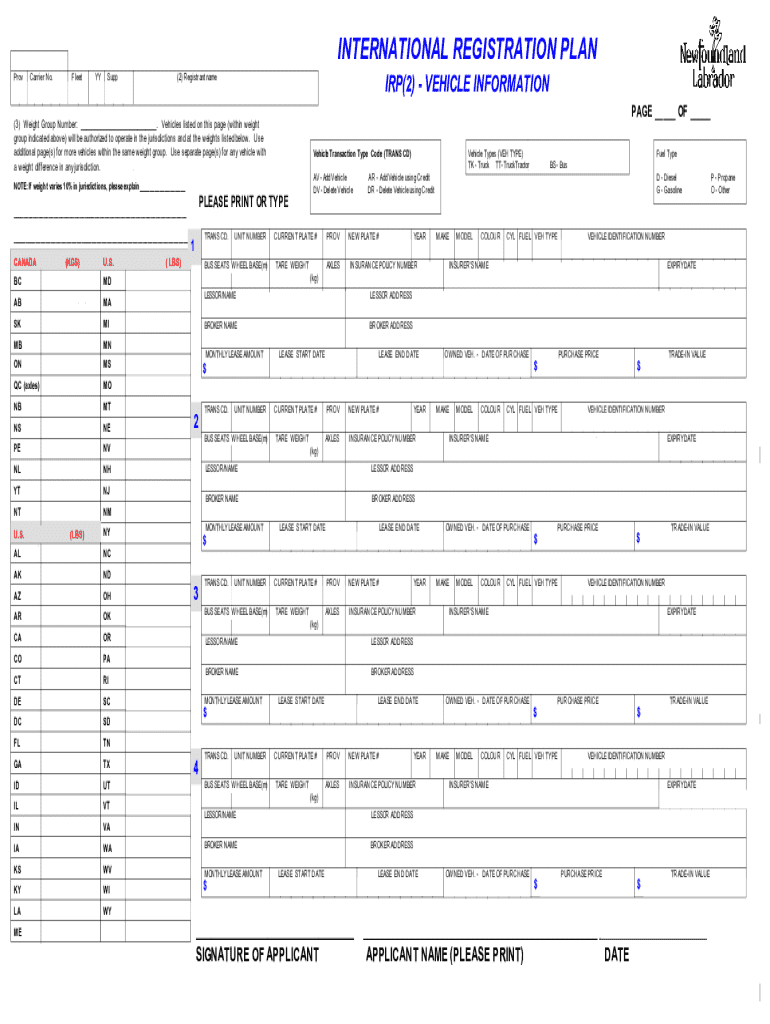
Get the free IRP Vehicle Information Form
We are not affiliated with any brand or entity on this form

Fill out
Complete the form online in a simple drag-and-drop editor.

eSign
Add your legally binding signature or send the form for signing.

Share
Share the form via a link, letting anyone fill it out from any device.

Export
Download, print, email, or move the form to your cloud storage.
Why pdfFiller is the best tool for your documents and forms


End-to-end document management
From editing and signing to collaboration and tracking, pdfFiller has everything you need to get your documents done quickly and efficiently.
Accessible from anywhere
pdfFiller is fully cloud-based. This means you can edit, sign, and share documents from anywhere using your computer, smartphone, or tablet.
Secure and compliant
pdfFiller lets you securely manage documents following global laws like ESIGN, CCPA, and GDPR. It's also HIPAA and SOC 2 compliant.
What is IRP Application
The IRP Vehicle Information Form is a government document used by carriers to register vehicles for operation under the International Registration Plan.
pdfFiller scores top ratings on review platforms




Who needs IRP Application?
Explore how professionals across industries use pdfFiller.

IRP Application is needed by:
-
Commercial vehicle operators
-
Fleet managers overseeing multiple vehicles
-
Carriers operating in multiple states or provinces
-
Drivers needing cross-border registration
-
Transportation service providers
Comprehensive Guide to IRP Application
What is the IRP Vehicle Information Form?
The IRP Vehicle Information Form is essential for carriers operating vehicles across multiple jurisdictions under the International Registration Plan (IRP). This form plays a significant role in facilitating vehicle registration, ensuring compliance with diverse regional regulations. Its meticulous detailing aids in streamlining the vehicle registration process, ensuring carriers adhere to legal requirements.
Purpose and Benefits of the IRP Vehicle Information Form
This form primarily facilitates cross-border vehicle registration, allowing carriers to register vehicles in multiple jurisdictions efficiently. The benefits extend to minimizing delays in registrations and ensuring compliance with local laws, which can be vital for operational continuity.
-
Streamlines permit applications for international operations.
-
Reduces processing time for registrations.
-
Aids in maintaining compliance with varied regional requirements.
Who Needs the IRP Vehicle Information Form?
The primary audience for this form includes carriers using vehicles across multiple jurisdictions. Entities that must complete this form consist of commercial vehicle owners and fleet operators, ensuring their operations remain compliant with IRP requirements.
-
Commercial vehicle owners.
-
Fleet operators.
-
Applicants seeking cross-border vehicle registration.
Information You Need to Gather
Before filling out the IRP Vehicle Information Form, it is vital to gather specific information to ensure a smooth application process. Essential details include vehicle identification numbers, weights, and insurance information.
-
Vehicle identification numbers (VIN).
-
Weights of the vehicle.
-
Insurance documentation.
How to Fill Out the IRP Vehicle Information Form Online (Step-by-Step)
Filling out the IRP Vehicle Information Form online involves several steps to ensure all fields are accurately completed. Users should refer to specific fields such as "Weight Group Number" and "Current Plate #." Following these instructions helps minimize common errors during the submission process.
-
Access the online form and input your details.
-
Fill in the "Weight Group Number."
-
Add your "Current Plate #."
-
Review all entries for accuracy.
-
Submit the form upon confirmation of details.
Submission Methods and Delivery of the IRP Vehicle Information Form
There are various methods available to submit the IRP Vehicle Information Form, including online submissions, mailing, or in-person delivery. Each submission method may have different deadlines, and tracking confirmation of submissions is recommended to ensure proper processing.
-
Online submission via the official platform.
-
Mailing the completed form to the appropriate office.
-
In-person delivery at designated locations.
What Happens After You Submit the IRP Vehicle Information Form?
After submitting the IRP Vehicle Information Form, applicants should be aware of possible processing outcomes, including reasons for rejection. Being prepared allows users to amend the form if necessary and understand what to expect regarding timelines for receiving permits and licenses.
-
Common rejection reasons include incomplete information.
-
Guidance on correcting submitted details.
Security and Compliance for the IRP Vehicle Information Form
Ensuring the security and compliance of sensitive vehicle information is critical during the form-filling process. pdfFiller employs robust security measures to protect user data, adhering to industry compliance standards during online processing to ensure user privacy.
-
Uses 256-bit encryption for data protection.
-
Complies with HIPAA and GDPR standards.
Why Choose pdfFiller for Your IRP Vehicle Information Form?
pdfFiller offers a range of features that enhance the form-filling process for the IRP Vehicle Information Form. With over 100 million users, the platform emphasizes security, ease of use, and cloud-based access, making the application process straightforward and efficient.
-
Cloud-based editing and document management.
-
Ability to eSign documents securely.
-
Easy-to-use interface for all users.
Get Started with Your IRP Vehicle Information Form Today!
Engage with pdfFiller to quickly fill out and submit your IRP Vehicle Information Form. The platform offers a user-friendly approach for completing necessary documentation, ensuring a secure and efficient submission process.
How to fill out the IRP Application
-
1.To begin, visit pdfFiller and log into your account. If you do not have one, create an account for free.
-
2.Once logged in, search for 'IRP Vehicle Information Form' using the search bar.
-
3.Open the form by clicking on its title to access the fillable document interface.
-
4.Before filling out the form, gather all necessary information such as vehicle identification numbers, weights, insurance details, and leasing information.
-
5.Navigate through the form using provided fields. Click on each blank field to enter the required information. Use the tab key to move between fields efficiently.
-
6.If any details require checkboxes, simply click on your selection to mark them.
-
7.Double-check all entered information for accuracy, ensuring there are no missing fields or incorrect data.
-
8.Once satisfied with the completed form, use the review feature to make any final adjustments.
-
9.To save or download your form, click on the 'Save as' option and choose your preferred format, such as PDF.
-
10.If you need to submit the form directly through pdfFiller, make sure to follow the provided submission guidelines in the interface.

Who is eligible to use the IRP Vehicle Information Form?
Eligible users of the IRP Vehicle Information Form include commercial vehicle operators, fleet managers, and any carrier planning to register vehicles for multi-jurisdictional operation. Ensure all relevant vehicle and operating details are included.
What supporting documents are required for submission?
When filling out the IRP Vehicle Information Form, ensure you have supporting documents such as proof of insurance, vehicle titles, and any leasing agreements. These documents should be readily available to streamline your application process.
How do I submit the completed form?
After filling out the IRP Vehicle Information Form on pdfFiller, you can electronically submit it through the platform or download it and mail it to the appropriate government agency. Review submission guidelines for your jurisdiction.
What common mistakes should I avoid when filling out the form?
Common mistakes include omitting required fields, entering incorrect vehicle identification numbers, and failing to sign the form. Carefully review your entries to minimize errors before submission.
Is there a deadline for submitting the IRP Vehicle Information Form?
Submission deadlines may vary depending on your jurisdiction and specific operational requirements. It's essential to check with your local department of transportation for any time-sensitive information related to vehicle registration.
How long does processing take after submitting the form?
Processing times for the IRP Vehicle Information Form can vary based on the jurisdiction and the volume of applications. Typically, it may take several weeks to receive confirmation or further instructions after submission.
Do I need to notarize the form?
No, the IRP Vehicle Information Form does not require notarization. However, the applicant must sign it to validate the information provided within the document.
Related Forms




Get the latest insights from our blog


If you believe that this page should be taken down, please follow our DMCA take down process
here
.
This form may include fields for payment information. Data entered in these fields is not covered by PCI DSS compliance.