
Last updated on
Oct 31, 2026
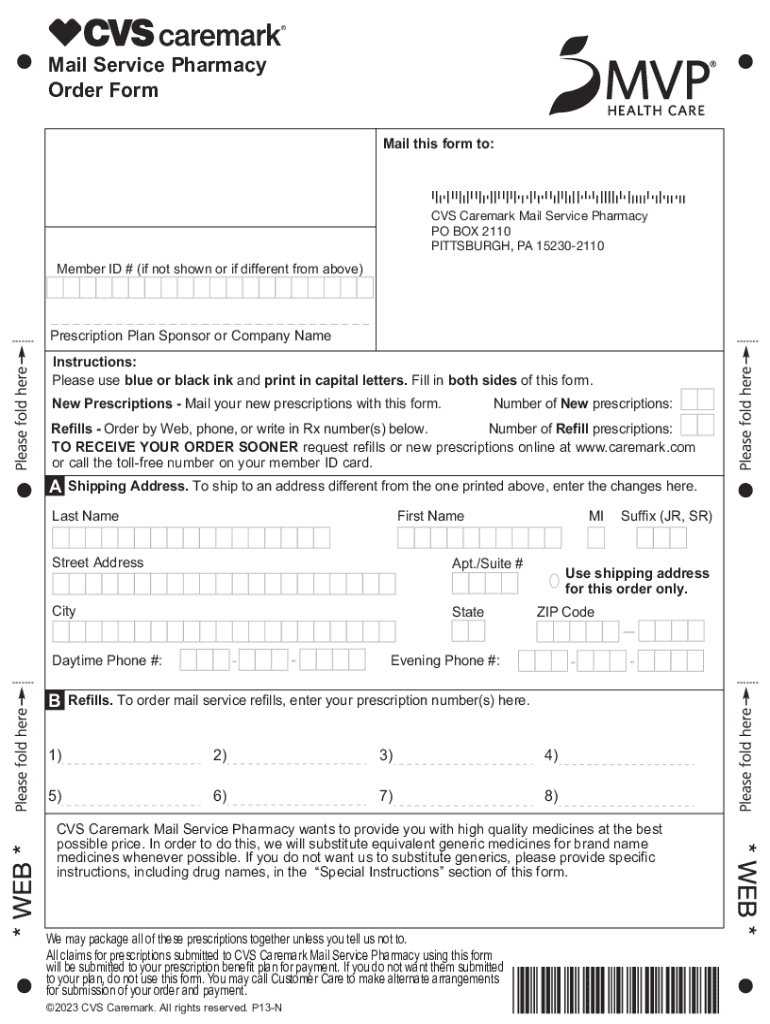
Get the free CVS Caremark Mail Service Pharmacy Order Form
We are not affiliated with any brand or entity on this form

Fill out
Complete the form online in a simple drag-and-drop editor.

eSign
Add your legally binding signature or send the form for signing.

Share
Share the form via a link, letting anyone fill it out from any device.

Export
Download, print, email, or move the form to your cloud storage.
Why pdfFiller is the best tool for your documents and forms


End-to-end document management
From editing and signing to collaboration and tracking, pdfFiller has everything you need to get your documents done quickly and efficiently.
Accessible from anywhere
pdfFiller is fully cloud-based. This means you can edit, sign, and share documents from anywhere using your computer, smartphone, or tablet.
Secure and compliant
pdfFiller lets you securely manage documents following global laws like ESIGN, CCPA, and GDPR. It's also HIPAA and SOC 2 compliant.
What is CVS Pharmacy Order Form
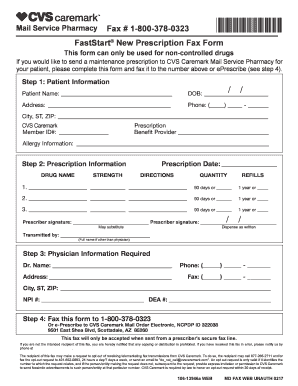
The CVS Caremark Mail Service Pharmacy Order Form is a healthcare document used by patients to order new prescriptions or refills from CVS Caremark Mail Service Pharmacy.
pdfFiller scores top ratings on review platforms




Who needs CVS Pharmacy Order Form?
Explore how professionals across industries use pdfFiller.

CVS Pharmacy Order Form is needed by:
-
Patients needing to refill prescriptions
-
Individuals seeking to order new medications
-
Caregivers managing health needs
-
Healthcare providers assisting patients with medication orders
-
Insurance representatives verifying prescription requests
Comprehensive Guide to CVS Pharmacy Order Form
What is the CVS Caremark Mail Service Pharmacy Order Form?
The CVS Caremark Mail Service Pharmacy Order Form is a crucial document for managing prescriptions. This form facilitates patients in ordering new prescriptions or refills efficiently. When completing the form, personal information such as the patient's name and date of birth is required. Additionally, it asks for the prescribing doctor's details, ensuring accurate processing of medications.
Benefits of Using the CVS Caremark Mail Service Pharmacy Order Form
Utilizing the CVS Caremark Mail Service Pharmacy Order Form provides multiple advantages for patients. This form offers easy access to prescription refills and new orders while allowing users to submit prescriptions from the comfort of their own homes. It includes sections dedicated to listing allergies, medical conditions, and any special instructions, which can significantly streamline the prescription management process.
Who Needs the CVS Caremark Mail Service Pharmacy Order Form?
The CVS Caremark Mail Service Pharmacy Order Form is designed for patients who need to refill or order prescriptions, particularly those requiring the convenience of medication delivery to their homes. Eligibility to use this form may be influenced by certain factors, such as residency in Pennsylvania, making it essential for local residents seeking pharmaceutical services.
How to Fill Out the CVS Caremark Mail Service Pharmacy Order Form
Completing the CVS Caremark Mail Service Pharmacy Order Form is straightforward when following these steps:
-
Gather necessary personal and medical information, including details like your name and date of birth.
-
Carefully fill in each field, ensuring all information is accurate, especially your doctor’s contact information.
-
Check any boxes related to allergies or medical conditions to avoid potential issues.
-
Review the entire form for common mistakes, such as incomplete sections or incorrect data entry.
Field-by-Field Instructions for the CVS Caremark Mail Service Pharmacy Order Form
For effective completion of the CVS Caremark Mail Service Pharmacy Order Form, pay close attention to specific fields:
-
Name: Ensure the name is spelled correctly and matches identification.
-
Date of Birth: Use the proper format and double-check the date.
-
Doctor’s Details: Provide complete contact information for your healthcare provider.
-
Allergy and Condition Checkboxes: Mark any relevant medical issues that apply.
-
Signature and Payment Information: Sign and provide accurate payment details to finalize your order.
Submitting the CVS Caremark Mail Service Pharmacy Order Form
After completing the CVS Caremark Mail Service Pharmacy Order Form, you can submit it in several ways:
-
Online submission via the CVS Caremark website for immediate processing.
-
Mailing the form to the designated pharmacy address.
-
Tracking the status of your order through the CVS Caremark portal after submission.
Be aware of potential fees and processing times associated with your order, which may vary depending on the chosen submission method.
Addressing Common Issues with the CVS Caremark Mail Service Pharmacy Order Form
Users may encounter various issues when using the CVS Caremark Mail Service Pharmacy Order Form. Common errors include providing incorrect information, which can lead to delays. If you must make corrections, follow these guidelines:
-
Review your submitted form for any outright inaccuracies.
-
In the event of a rejection, analyze the reasons provided by CVS Caremark for clarification.
Security and Compliance for the CVS Caremark Mail Service Pharmacy Order Form
When handling the CVS Caremark Mail Service Pharmacy Order Form, it's vital to understand the security measures implemented. The form adheres to HIPAA standards, ensuring that patient data is protected. Patients should take precautions to safeguard their sensitive information when filling out the form, including avoiding public connections and utilizing encrypted channels for submission.
Why Use pdfFiller for Your CVS Caremark Mail Service Pharmacy Order Form?
pdfFiller offers a comprehensive solution for managing the CVS Caremark Mail Service Pharmacy Order Form. Users benefit from the platform's ease of filling, editing, and eSigning, providing a user-friendly experience. The cloud-based service ensures secure access to your forms from any device, facilitating seamless management of healthcare documents while prioritizing data protection.
How to fill out the CVS Pharmacy Order Form
-
1.Access the CVS Caremark Mail Service Pharmacy Order Form on pdfFiller by searching for the form title in the search bar.
-
2.Open the form to view the fillable fields. Familiarize yourself with the layout, which includes sections for your personal information and prescription details.
-
3.Before you begin filling out the form, gather the necessary information such as your name, date of birth, doctor's details, and payment information.
-
4.Fill in your personal details in the designated fields, ensuring all information is accurate. Include your allergies and any medical conditions in the checkboxes provided.
-
5.Complete the section for your doctor's information with their name and contact details. This will be essential for processing your prescription order.
-
6.Indicate any special instructions you have regarding your medication or delivery preferences within the relevant fields.
-
7.Review all your entries to ensure accuracy. Make sure that all required fields are filled in and that you have included your signature if needed.
-
8.Finally, save your completed form, download a copy for your records, or submit it directly through pdfFiller as directed. Check for any confirmation of submission if applicable.

Who is eligible to use the CVS Caremark Mail Service Pharmacy Order Form?
Any patient needing to order new prescriptions or refills from the CVS Caremark Mail Service Pharmacy can use this form. It is essential for individuals who manage their medications or help others with their prescriptions.
What information do I need to complete the order form?
To complete the form, you will need your personal information, doctor's details, payment information, and any relevant medical information such as allergies and conditions.
How do I submit the completed CVS Caremark Mail Service Pharmacy Order Form?
You can submit the completed form through pdfFiller directly by following the submission instructions provided on the platform, or you may choose to download and mail it to CVS Caremark.
Are there deadlines for submitting the order form?
Typically, orders should be submitted as soon as possible to ensure timely processing. Consult with your healthcare provider or pharmacy regarding any specific timelines related to your medications.
What common mistakes should I avoid when filling out the form?
Avoid leaving blank fields unless specified, ensure that all personal and doctor's information is correctly entered, and double-check the credit card details to prevent payment processing issues.
How long does it take to process the order after submission?
Processing times can vary, but generally, you can expect your order to be processed within a few business days after submission, depending on prescription availability.
Can I make changes to my order after submitting the form?
If you need to make changes, contact CVS Caremark directly as soon as possible. They will provide guidance on how to amend your prescription order.
Related Forms



Get the latest insights from our blog


If you believe that this page should be taken down, please follow our DMCA take down process
here
.
This form may include fields for payment information. Data entered in these fields is not covered by PCI DSS compliance.