
Last updated on
Oct 31, 2026
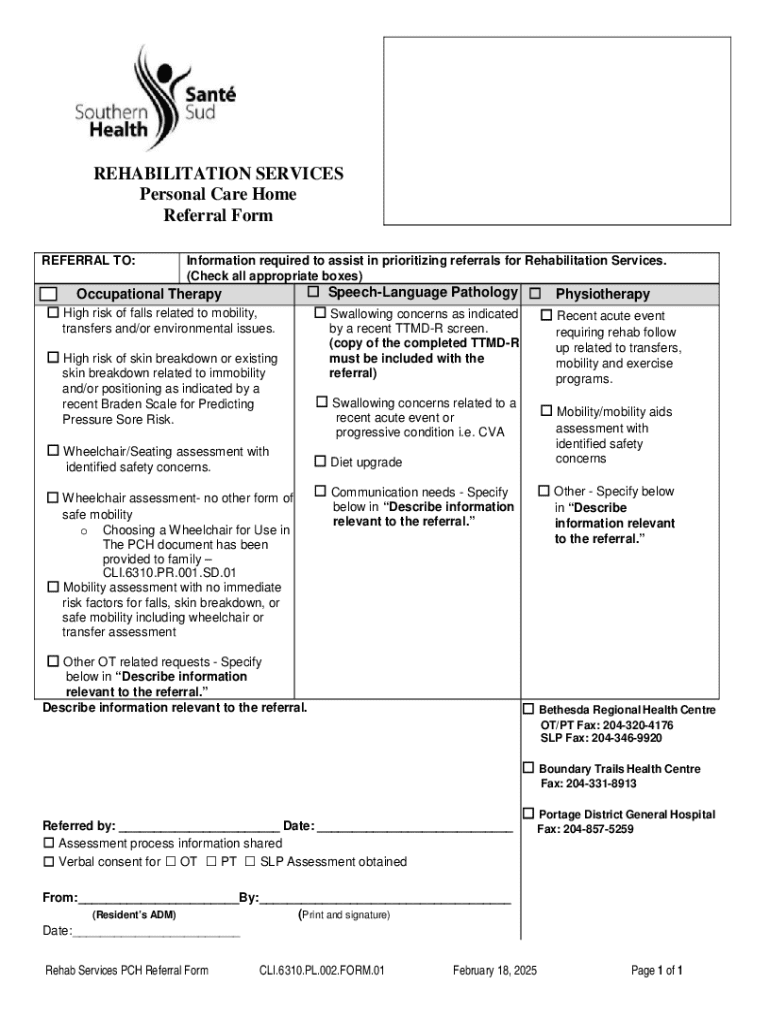
Get the free Rehabilitation Services Referral Form
We are not affiliated with any brand or entity on this form

Fill out
Complete the form online in a simple drag-and-drop editor.

eSign
Add your legally binding signature or send the form for signing.

Share
Share the form via a link, letting anyone fill it out from any device.

Export
Download, print, email, or move the form to your cloud storage.
Why pdfFiller is the best tool for your documents and forms


End-to-end document management
From editing and signing to collaboration and tracking, pdfFiller has everything you need to get your documents done quickly and efficiently.
Accessible from anywhere
pdfFiller is fully cloud-based. This means you can edit, sign, and share documents from anywhere using your computer, smartphone, or tablet.
Secure and compliant
pdfFiller lets you securely manage documents following global laws like ESIGN, CCPA, and GDPR. It's also HIPAA and SOC 2 compliant.
What is Rehab Referral Form
The Rehabilitation Services Referral Form is a patient consent document used by healthcare providers to prioritize referrals for occupational therapy, speech-language pathology, and physiotherapy services.
pdfFiller scores top ratings on review platforms




Who needs Rehab Referral Form?
Explore how professionals across industries use pdfFiller.

Rehab Referral Form is needed by:
-
Residents in personal care homes seeking rehabilitation services
-
Healthcare professionals referring patients for therapy services
-
Authorized decision-makers for patients needing consent
-
Care coordinators responsible for managing patient needs
-
Family members assisting patients with rehabilitation referrals
Comprehensive Guide to Rehab Referral Form
What is the Rehabilitation Services Referral Form?
The Rehabilitation Services Referral Form is a crucial document designed to streamline the referral process for rehabilitation services in personal care homes across Canada. This form plays a significant role in facilitating timely and accurate referrals for various therapy services, ensuring that residents receive the necessary care tailored to their specific needs.
Specifically focused on personal care homes, this form assists in connecting healthcare providers with the appropriate rehabilitation services, enhancing the overall patient experience.
Purpose and Benefits of the Rehabilitation Services Referral Form
The primary purpose of the Rehabilitation Services Referral Form is to ensure a seamless healthcare referral process. Completing the form accurately allows healthcare providers to deliver effective services while prioritizing patient needs.
Key benefits include:
-
Streamlined communication between patients and providers.
-
Enhanced ability to address specific patient needs.
-
Improved service delivery through accurate information.
Key Features of the Rehabilitation Services Referral Form
This form includes several essential sections that cater to specific patient needs. Key features consist of checkboxes for identifying required services and fields for crucial information, such as:
-
The individual who referred the patient.
-
The date of the referral submission.
-
Detailed descriptions of patient concerns like mobility, swallowing issues, and skin breakdown.
These elements ensure that relevant information is collected efficiently, facilitating optimal care.
Who Needs the Rehabilitation Services Referral Form?
The Rehabilitation Services Referral Form is vital for various users, including:
-
Residents of personal care homes seeking assistance.
-
Authorized decision-makers who act on residents' behalf.
-
Healthcare providers who need to assess and refer patients.
Referral situations often arise when patients have specific rehabilitation needs that require professional evaluation and intervention.
How to Fill Out the Rehabilitation Services Referral Form Online (Step-by-Step)
Filling out the Rehabilitation Services Referral Form online is a straightforward process using pdfFiller. Follow these steps to complete the form:
-
Access the form through pdfFiller.
-
Enter the patient’s personal information in the designated fields.
-
Select the appropriate checkboxes to indicate specific needs.
-
Complete fields such as “Referred by” and “Date” accurately.
-
Review all entered information for completeness and precision.
-
Submit the form electronically or fax it as instructed.
By following these steps, users can ensure that the referral is processed smoothly.
Security and Compliance for the Rehabilitation Services Referral Form
When handling sensitive patient information, security is paramount. pdfFiller takes this seriously, implementing robust measures to protect data and ensure compliance with regulations such as HIPAA and GDPR.
Security features include:
-
256-bit encryption to safeguard user data.
-
Regular audits to maintain compliance standards.
-
Secure data storage and access control mechanisms.
These safeguards are critical for fostering trust and maintaining confidentiality in the referral process.
Submission Methods and Delivery of the Rehabilitation Services Referral Form
Submitting the Rehabilitation Services Referral Form can be done through various methods, facilitating flexibility for users:
-
Digital submission via pdfFiller for instant processing.
-
Fax options to ensure traditional submission methods are available.
After submission,.next steps involve tracking the status of the referral, with expected timelines communicated according to the healthcare provider’s protocols.
Common Errors and How to Avoid Them in the Rehabilitation Services Referral Form
Filling out the Rehabilitation Services Referral Form can result in common errors that may delay processing. Frequent mistakes include:
-
Omitting required fields such as “Referred by” and “Date.”
-
Failing to check necessary service requirements.
To avoid these pitfalls, users should ensure a thorough review of the form before submission, verifying that all information is complete and accurate.
How pdfFiller Can Help with the Rehabilitation Services Referral Form
pdfFiller offers a streamlined approach to filling out the Rehabilitation Services Referral Form. Some features that enhance user experience include:
-
Easily eSign documents to expedite approvals.
-
Share forms securely with relevant parties.
-
Store documents in a secure online environment for easy access.
Utilizing pdfFiller simplifies the entire process, ensuring that users have a seamless and efficient experience.
Ready to Complete Your Rehabilitation Services Referral Form?
Getting started with the Rehabilitation Services Referral Form is easier than ever. With pdfFiller’s user-friendly interface, you can manage your documents with ease, ensuring compliance and security at every step. Begin your experience with pdfFiller today!
How to fill out the Rehab Referral Form
-
1.Access the Rehabilitation Services Referral Form on pdfFiller by navigating to the relevant webpage and selecting the document from your files or using the form search feature.
-
2.Once the form is open, familiarize yourself with the sections available for input, noting each field you need to complete.
-
3.Gather necessary information before starting the form; ensure you have details about the patient's specific needs, including any mobility, swallowing, or skin condition concerns.
-
4.Begin completing the form by entering the patient's details in the designated fields, making sure all information is accurate and thorough.
-
5.Use the checkboxes available to indicate the specific therapy services being requested, and fill in the blank fields such as 'Referred by' and 'Date' accordingly.
-
6.As you progress, follow instructions like 'Describe information relevant to the referral' to provide comprehensive information that will assist in prioritizing the patient's needs.
-
7.After completing all required sections, review the entire form carefully for accuracy to ensure it meets the criteria for submission.
-
8.Finalize the form by clicking on the 'Save' option in pdfFiller to store a copy, then choose to download the document or share it via fax directly through the platform as appropriate.

Who is eligible to complete the Rehabilitation Services Referral Form?
The Rehabilitation Services Referral Form can be completed by authorized decision-makers or healthcare professionals responsible for referring residents for rehabilitation services.
Is there a deadline for submitting this form?
While specific deadlines may not be provided, it is crucial to submit the Rehabilitation Services Referral Form as soon as possible to ensure timely access to rehabilitation services for the patient.
How can I submit the form once completed?
You can submit the form directly through pdfFiller by using the built-in fax feature or download the completed form and send it via traditional mail or email to the appropriate healthcare center.
What supporting documents are needed with this form?
Typically, you may need to provide patient identification information, prior medical records, or additional consent forms, depending on the healthcare center's requirements.
What are common mistakes to avoid when completing the form?
Ensure all fields are filled out accurately and completely, particularly the patient's needs and the referring individual's signature, to avoid delays in processing the referral.
How long does it take to process the referral after submission?
Processing times can vary by healthcare center, but it generally takes a few days to a week after submission of the Rehabilitation Services Referral Form.
Is notarization required for this form?
No, the Rehabilitation Services Referral Form does not require notarization; it only requires a signature from the resident's authorized decision-maker.
Related Forms





Get the latest insights from our blog


If you believe that this page should be taken down, please follow our DMCA take down process
here
.
This form may include fields for payment information. Data entered in these fields is not covered by PCI DSS compliance.