
Last updated on
Oct 31, 2026
Get the free Student Feedback by Employer Form
We are not affiliated with any brand or entity on this form

Fill out
Complete the form online in a simple drag-and-drop editor.

eSign
Add your legally binding signature or send the form for signing.

Share
Share the form via a link, letting anyone fill it out from any device.

Export
Download, print, email, or move the form to your cloud storage.
Why pdfFiller is the best tool for your documents and forms


End-to-end document management
From editing and signing to collaboration and tracking, pdfFiller has everything you need to get your documents done quickly and efficiently.
Accessible from anywhere
pdfFiller is fully cloud-based. This means you can edit, sign, and share documents from anywhere using your computer, smartphone, or tablet.
Secure and compliant
pdfFiller lets you securely manage documents following global laws like ESIGN, CCPA, and GDPR. It's also HIPAA and SOC 2 compliant.
What is Employer Feedback Form
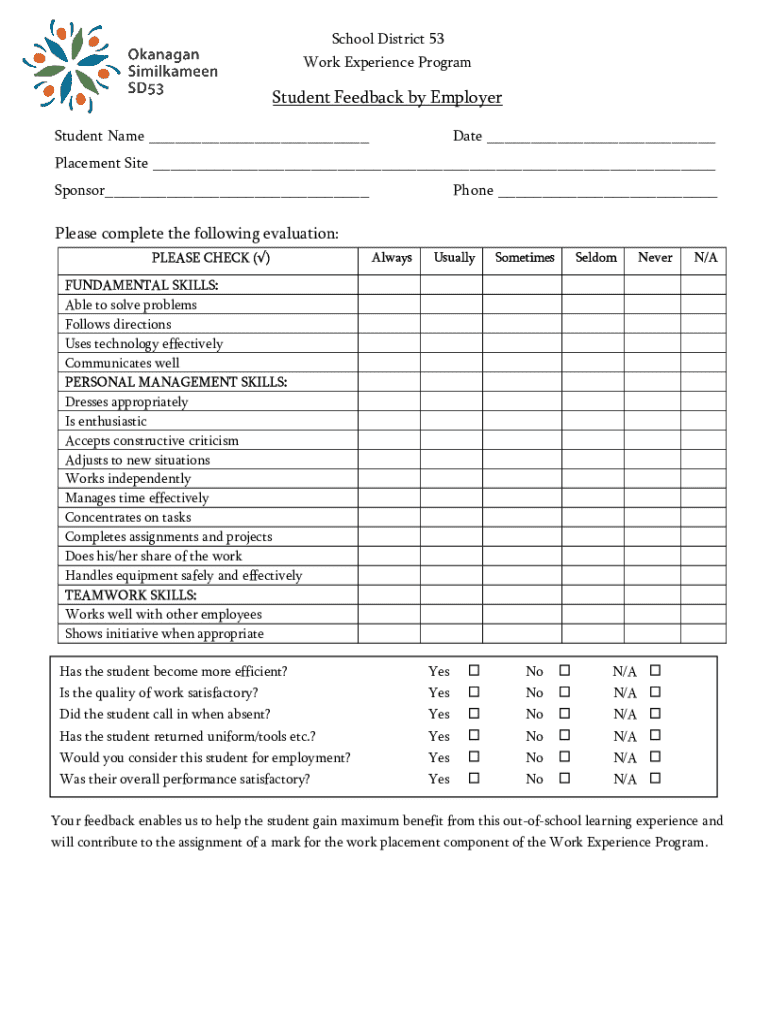
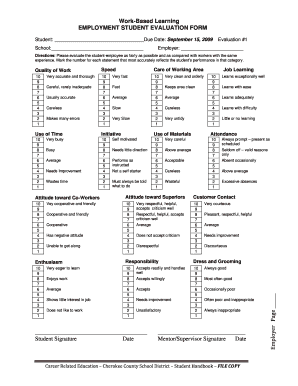
The Student Feedback by Employer Form is an educational document used by employers to evaluate students in the Work Experience Program.
pdfFiller scores top ratings on review platforms




Who needs Employer Feedback Form?
Explore how professionals across industries use pdfFiller.

Employer Feedback Form is needed by:
-
Employers involved in student internships and work placements
-
Educational institutions conducting work experience programs
-
Students seeking assessments from their employers
-
Career services assisting students in placements
-
Program administrators requiring feedback data
Comprehensive Guide to Employer Feedback Form
What is the Student Feedback by Employer Form?
The Student Feedback by Employer Form serves as a vital tool for evaluating students in the Work Experience Program. It provides a structured way for employers to share insights about a student's performance and skills during their work placement.
This form is essential for assessing various competencies, including personal management and teamwork, highlighting its necessity in the overall student evaluation process. By utilizing the student feedback form, employers contribute meaningfully to the academic assessment of students.
Purpose and Benefits of the Student Feedback by Employer Form
This form is indispensable for both employers and students as it directly impacts the student's final mark for their placement. It allows for a comprehensive evaluation of core skills that are critical in any work environment.
-
Evaluates fundamental skills, personal management, and teamwork.
-
Provides employers with a structured feedback mechanism.
-
Enhances the student's learning experience through constructive criticism.
Key Features of the Student Feedback by Employer Form
The Student Feedback by Employer Form incorporates various features designed to simplify the evaluation process. It includes checkboxes for quick assessments as well as sections for comprehensive comments, enabling employers to offer detailed feedback.
A signature requirement ensures that the form is verified and authentic. Additionally, a fillable form template is available online, making completion straightforward and efficient.
Who Needs the Student Feedback by Employer Form?
The Student Feedback by Employer Form is vital for various stakeholders involved in the Work Experience Program. Employers engaged in evaluating students will benefit from using this form to document their observations systematically.
Educational institutions also require this form for comprehensive student evaluations, while students on work placements must understand its importance in shaping their academic and career paths.
How to Fill Out the Student Feedback by Employer Form Online (Step-by-Step)
Completing the Student Feedback by Employer Form online is easy with pdfFiller. Follow these steps to ensure accurate submission:
-
Access the fillable form on pdfFiller.
-
Complete each section, using checkboxes for fundamentals and writing comments for additional feedback.
-
Digitally sign the form for validation and submission.
Common Errors and How to Avoid Them
To ensure the successful completion of the Student Feedback by Employer Form, it is crucial to be aware of common mistakes that can arise during the process. Proper validation of information before submission can help mitigate potential errors.
-
Double-check all fields for accuracy and completeness.
-
Ensure that required sections are filled out to avoid incomplete submissions.
Submission Methods and Delivery of the Student Feedback by Employer Form
Once completed, the Student Feedback by Employer Form can be submitted through various channels. Online submission via pdfFiller is an efficient option that provides confirmation of receipt upon sending.
To ensure timely delivery, users should follow necessary steps for submission and, if applicable, track the status of their submission for peace of mind.
How pdfFiller Enhances the Student Feedback by Employer Form Experience
pdfFiller significantly enhances the process of completing the Student Feedback by Employer Form. Its features support seamless form completion, allowing for eSigning and easy editing.
The platform ensures the protection of sensitive feedback through robust security measures, including 256-bit encryption and compliance with various regulations. Users can also access troubleshooting support when needed.
Record Retention and Data Privacy for the Student Feedback by Employer Form
Retaining records of the Student Feedback by Employer Form is critical for compliance and reference. It is advisable to keep completed forms for a designated period to align with institutional policies.
Moreover, measures to protect personal data must be a priority, ensuring that all actions comply with legal guidelines regarding data privacy and record-keeping best practices.
Get Started with the Student Feedback by Employer Form Today
To begin using the Student Feedback by Employer Form, users can easily access it on pdfFiller. Taking prompt action in completing and submitting the form is crucial for achieving effective evaluations.
Explore additional features offered by pdfFiller that can further streamline form management and enhance user experience.
How to fill out the Employer Feedback Form
-
1.Access the Student Feedback by Employer Form on pdfFiller by searching for the form title in the platform's search bar.
-
2.Once opened, familiarize yourself with the layout of the form, which includes various sections for filling out the employer's evaluation.
-
3.Gather all necessary information, such as the student's performance data, fundamental skills observed, personal management skills, and teamwork abilities before starting to fill the form.
-
4.Use pdfFiller's toolbar to click on fields that require input. You can either type directly into the fields or select checkboxes for evaluations based on the student's performance.
-
5.Add any additional comments that provide context or detail to your assessments in the specified comment sections.
-
6.After completing the form, carefully review all entries to ensure accuracy and completeness. Check if every required field is filled and that comments are clear.
-
7.Once finalized, click on the 'Save' option to store a copy of the completed form securely in your pdfFiller account.
-
8.If you need to share the form, use the 'Download' option to save it as a PDF file, or select the 'Submit' option if there is a designated recipient for the evaluation.

Who is eligible to fill out the Student Feedback by Employer Form?
Employers who have supervised students in a work placement capacity are eligible to fill out this form. It is designed specifically for those providing feedback on student performance.
Is there a deadline for submitting this form?
While specific deadlines may vary by educational institution, it is generally advised to complete and submit the form promptly after the student completes their work placement for timely evaluation.
How do I submit the Student Feedback by Employer Form?
You can submit the form directly through pdfFiller by using the 'Submit' option, which may send it to the designated contacts, or by downloading it and sending it via email.
What supporting documents are required with this form?
Typically, no additional documents are required with this form. However, relevant prior communications or evaluations related to the student's work may enhance the feedback provided.
What common mistakes should be avoided while filling out the form?
Common mistakes include leaving required fields blank, failing to provide specific feedback, and neglecting to sign the form when required. Ensure that all sections are completed thoughtfully.
How long does it take to process the form once submitted?
Processing times vary based on institutional requirements, but you can usually expect feedback to be communicated within a few weeks after submission.
Can I edit the form after submitting it?
If you need to make changes after submission, you will likely need to contact the receiving institution directly to discuss the necessary steps for a resubmission.
Related Forms



Get the latest insights from our blog



If you believe that this page should be taken down, please follow our DMCA take down process
here
.
This form may include fields for payment information. Data entered in these fields is not covered by PCI DSS compliance.