
Last updated on
Oct 1, 2026
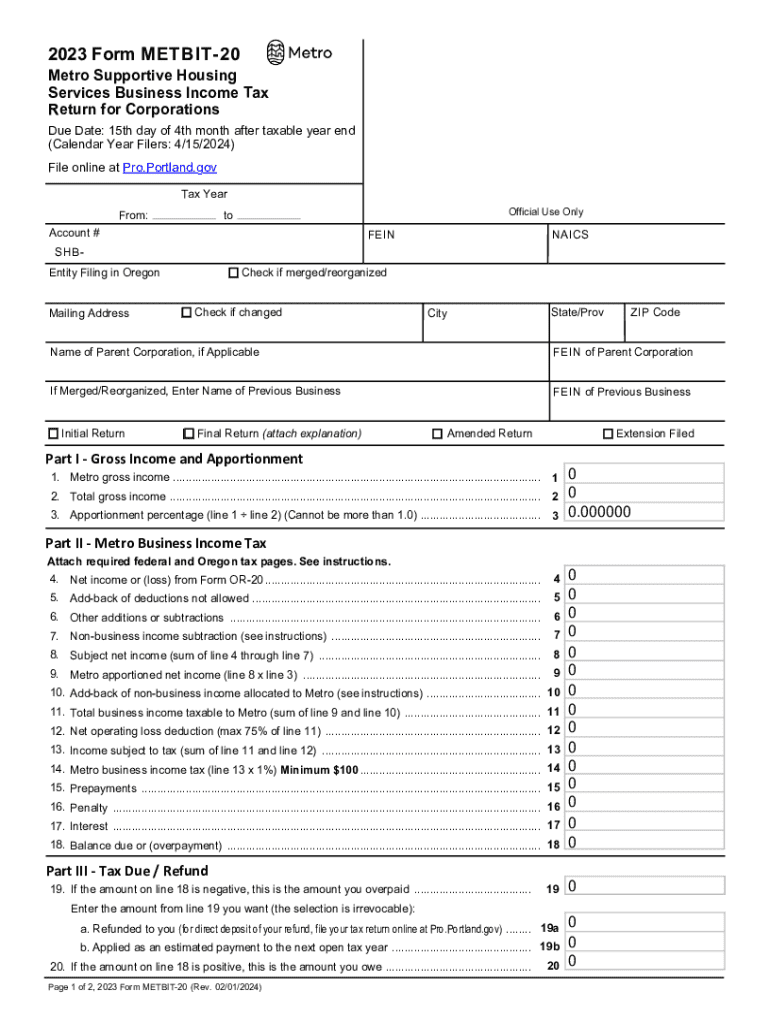
Get the free 2023 Form METBIT-20 Metro Business Income Tax Return
We are not affiliated with any brand or entity on this form

Fill out
Complete the form online in a simple drag-and-drop editor.

eSign
Add your legally binding signature or send the form for signing.

Share
Share the form via a link, letting anyone fill it out from any device.

Export
Download, print, email, or move the form to your cloud storage.
Why pdfFiller is the best tool for your documents and forms


End-to-end document management
From editing and signing to collaboration and tracking, pdfFiller has everything you need to get your documents done quickly and efficiently.
Accessible from anywhere
pdfFiller is fully cloud-based. This means you can edit, sign, and share documents from anywhere using your computer, smartphone, or tablet.
Secure and compliant
pdfFiller lets you securely manage documents following global laws like ESIGN, CCPA, and GDPR. It's also HIPAA and SOC 2 compliant.
What is METBIT-20 2023
The 2023 Form METBIT-20 Metro Business Income Tax Return is a state tax form used by corporations in Oregon to report and pay the Metro Supportive Housing Services Business Income Tax.
pdfFiller scores top ratings on review platforms




Who needs METBIT-20 2023?
Explore how professionals across industries use pdfFiller.

METBIT-20 2023 is needed by:
-
Oregon corporations subject to Metro business income tax
-
Tax filers preparing to file state business tax returns
-
Tax preparers assisting businesses with tax filings
-
Businesses aiming to fulfill state tax obligations
-
Financial professionals advising on Metro tax compliance
Comprehensive Guide to METBIT-20 2023
What is the 2023 Form METBIT-20 Metro Business Income Tax Return
The 2023 Form METBIT-20 serves as a critical tool for businesses in Oregon, specifically designed for reporting their Metro Supportive Housing Services Business Income Tax. This state tax return form is essential for ensuring compliance with local tax regulations.
The form addresses the specific tax that supports housing services within the metro area, and it comes with a set of basic requirements that businesses must follow to complete it accurately. Understanding these requirements is crucial for corporations wanting to fulfill their tax obligations in Oregon.
Purpose and Benefits of the 2023 Form METBIT-20
The necessity of the 2023 Form METBIT-20 cannot be overstated for corporations operating in Oregon. Completing the form correctly and submitting it on time is vital for maintaining compliance with state tax laws.
Filing this form promptly provides various benefits, including avoiding potential penalties and ensuring that businesses contribute to essential services in their communities. Resources and assistance are available to help businesses navigate the filing process comfortably.
Who Needs to Complete the 2023 Form METBIT-20
Any corporation or business entity conducting operations within Oregon's jurisdiction is required to complete the 2023 Form METBIT-20. This includes various types of corporations that meet specific thresholds of business income.
Tax filers and preparers play significant roles in the completion of the form, as they are responsible for accurate reporting and compliance. Understanding these responsibilities is essential for successful filing.
When to File the 2023 Form METBIT-20 Metro Business Income Tax Return
Timely submission of the 2023 Form METBIT-20 is critical. The deadline for submission is the 15th day of the 4th month following the end of the taxable year. Failing to meet this deadline can lead to penalties for late filing.
Extensions may be available for certain situations, so it's essential for filers to understand their options regarding deadlines and potential ramifications of delays.
How to Fill Out the 2023 Form METBIT-20 Online (Step-by-Step)
Filling out the 2023 Form METBIT-20 online requires a systematic approach. Here are the steps to ensure accurate completion:
-
Access the form from a trusted platform.
-
Begin by entering the gross income from your business activities.
-
Calculate the apportionment percentage necessary for your operations.
-
Provide any additional required fields, such as deductions and credits.
-
Review all sections to confirm accuracy before submission.
Employing these steps will help avoid common errors associated with form-filling and ensure compliance.
Field-by-Field Instructions for the 2023 Form METBIT-20
Understanding each field on the 2023 Form METBIT-20 is crucial for accurate filing. Key fields include:
-
Gross income: Ensure all income sources are reported.
-
Apportionment percentage: This needs precise calculation based on business operations.
-
Net income: Clearly state your business's net income to determine tax obligations.
Common pitfalls include misreporting income or failing to sign the form correctly, so attention to detail is paramount when filling out each section.
How to Sign the 2023 Form METBIT-20
Signing the 2023 Form METBIT-20 involves understanding the signature requirements. Both the tax filer and the preparer must provide their signatures to validate the form.
There are differences between digital signatures and wet signatures. Businesses must ensure they meet the necessary criteria for the type of signature they choose to utilize.
Where and How to Submit the 2023 Form METBIT-20
Submission of the 2023 Form METBIT-20 can occur through several methods. It can be submitted online, mailed to the appropriate tax authority, or delivered in person. Each method requires specific processes for submission.
After submission, confirming the receipt of your form and tracking its status are essential steps to ensure timely processing.
Security and Compliance in Handling the 2023 Form METBIT-20
When handling the 2023 Form METBIT-20, data security is a top priority. Sensitive tax information should be protected according to best practices.
Utilizing platforms like pdfFiller can enhance security, as it offers encryption and complies with regulations such as HIPAA and GDPR, ensuring that your data remains protected throughout the filing process.
Utilizing pdfFiller for Your 2023 Form METBIT-20 Needs
Businesses can leverage pdfFiller to simplify the form-filling experience for the 2023 Form METBIT-20. The platform provides tools for editing, signing, and securely storing completed forms.
Exploring pdfFiller’s features can significantly enhance the efficiency of managing tax-related documentation, empowering businesses to focus on their core operations.
How to fill out the METBIT-20 2023
-
1.To access the 2023 Form METBIT-20 on pdfFiller, visit the pdfFiller website and log in to your account or create a new one if you don't have it.
-
2.Use the search feature to locate the form by typing 'METBIT-20' in the search bar, then click on the form to open it.
-
3.Familiarize yourself with the layout of the form and the available tools on pdfFiller’s interface, including text entry, checkbox selections, and signature fields.
-
4.Before starting to fill out the form, gather all necessary financial documents, including gross income statements, apportionment percentages, and previous tax returns, to ensure you have the required information at hand.
-
5.Begin filling out the form by entering the relevant business details such as the business name, tax identification number, and owner's information in the designated fields.
-
6.Continue filling out the income details, tax calculations, and any applicable deductions, ensuring numbers are accurate and reflect your financial records.
-
7.Make sure to sign the form digitally using the signature fields for both the tax filer and the preparer to confirm authenticity.
-
8.Review the completed form for accuracy, checking all fields are filled and all calculations are correct.
-
9.Once satisfied, save your progress using the save option provided by pdfFiller.
-
10.To submit, select the download option to get a PDF version of your form or utilize the direct submit feature to send it to the appropriate tax authority.

Who is eligible to file the METBIT-20?
The METBIT-20 is specifically for corporations operating in Oregon that are required to report and pay the Metro Supportive Housing Services Business Income Tax. Corporations that generate taxable income in the Metro area should use this form.
What is the filing deadline for the METBIT-20?
The form must be filed by the 15th day of the 4th month after the end of the taxable year. For calendar year filers, this typically falls on April 15th of the following year.
How can I submit the METBIT-20 form?
You can submit the METBIT-20 form by downloading it from pdfFiller and mailing it to the appropriate tax authority. Alternatively, if allowed, use the online submission features provided by the state.
What supporting documents do I need for METBIT-20?
When completing the METBIT-20, you typically need supporting documents such as financial statements, income reports, and previous tax documentation to accurately disclose gross income and calculate taxes owed.
What common mistakes should I avoid while completing the METBIT-20?
Common mistakes include miscalculating the net income, failing to provide signatures, and missing the filing deadline. Ensure all information is accurate and all necessary fields are completed to avoid delays.
How long does it take to process the METBIT-20?
Processing times can vary, but generally, expect a few weeks once submitted. It's advisable to allow ample time before your tax obligations are due.
What happens if I miss the filing deadline for METBIT-20?
Missing the filing deadline for the METBIT-20 could result in penalties and interest on any taxes owed. It is crucial to file on time to avoid these additional costs.
Related Forms



Get the latest insights from our blog


If you believe that this page should be taken down, please follow our DMCA take down process
here
.
This form may include fields for payment information. Data entered in these fields is not covered by PCI DSS compliance.