
Last updated on
Oct 24, 2026
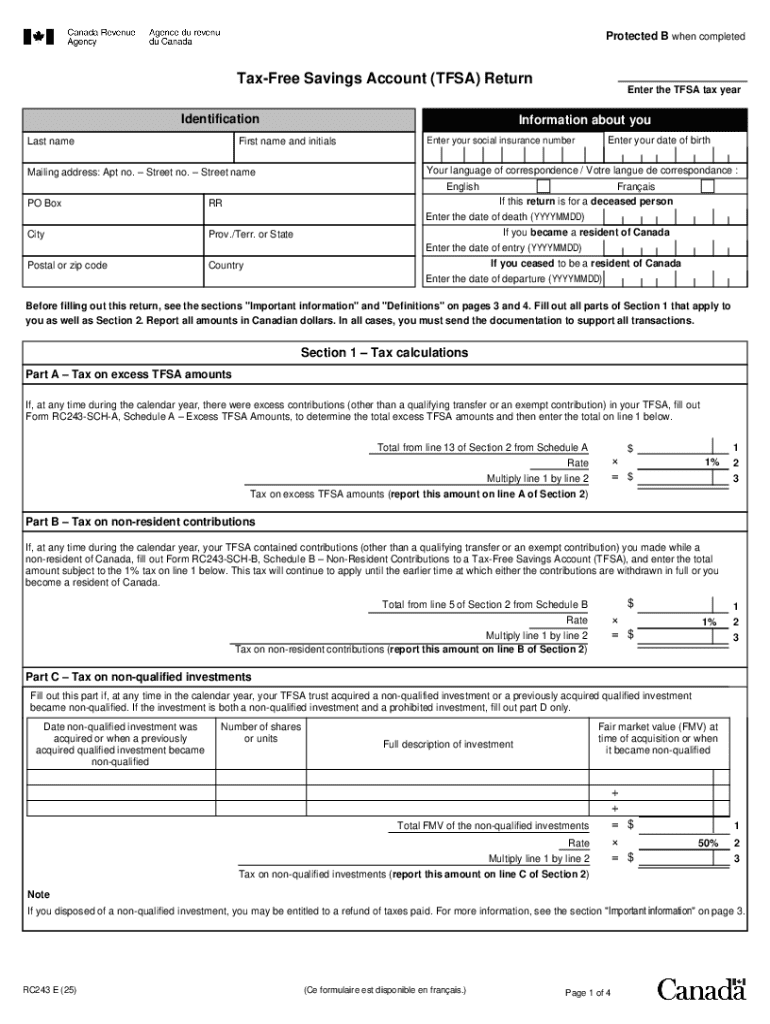
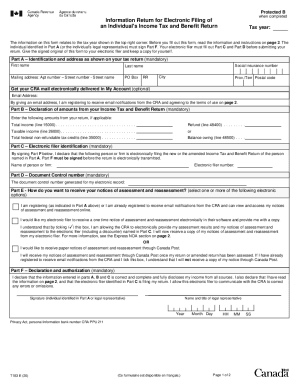
CA RC243 2025-2026 free printable template
We are not affiliated with any brand or entity on this form

Fill out
Complete the form online in a simple drag-and-drop editor.

eSign
Add your legally binding signature or send the form for signing.

Share
Share the form via a link, letting anyone fill it out from any device.

Export
Download, print, email, or move the form to your cloud storage.
Why pdfFiller is the best tool for your documents and forms


End-to-end document management
From editing and signing to collaboration and tracking, pdfFiller has everything you need to get your documents done quickly and efficiently.
Accessible from anywhere
pdfFiller is fully cloud-based. This means you can edit, sign, and share documents from anywhere using your computer, smartphone, or tablet.
Secure and compliant
pdfFiller lets you securely manage documents following global laws like ESIGN, CCPA, and GDPR. It's also HIPAA and SOC 2 compliant.
What is CA RC243
The Canada TFSA Return Form is an essential document used by Canadian residents to report contributions and withdrawals made to their Tax-Free Savings Account for the tax year.
pdfFiller scores top ratings on review platforms




Who needs CA RC243?
Explore how professionals across industries use pdfFiller.

CA RC243 is needed by:
-
Canadian taxpayers with a Tax-Free Savings Account (TFSA)
-
Individuals seeking to maximize their tax-free investment growth
-
Residents needing to reconcile TFSA transactions with the Canada Revenue Agency (CRA)
-
Financial advisors assisting clients in tax planning
-
Accountants preparing tax returns for individuals with TFSAs
Comprehensive Guide to CA RC243
What is the Canada TFSA Return Form?
The Canada TFSA Return Form plays a vital role in managing tax-free savings accounts (TFSAs) by helping Canadians report their contributions and withdrawals accurately. Understanding the significance of this form helps users make the most of their tax-free savings. Canadians who own a TFSA and have contributed to it are typically required to fill out the form to ensure compliance with tax regulations.
Purpose and Benefits of the Canada TFSA Return Form
Filing the Canada TFSA Return Form accurately offers numerous benefits, including maximizing tax advantages and eligibility for increased contribution limits in subsequent years. Individuals who properly report their contributions benefit from better financial planning and enhanced retirement savings. The purpose of this form extends beyond compliance; it is a critical tool for effective financial management.
Who Needs the Canada TFSA Return Form?
This form is targeted at all Canadians who have a TFSA and meet the specific criteria set by the Canada Revenue Agency. To determine if you need to submit the Canada TFSA Return Form, consider your total contributions and income levels. Individuals who exceed the set contribution limits or have withdrawals may also be required to file.
-
Canadians with tax-free savings accounts
-
Those exceeding contribution limits
-
Individuals with taxable income related to their TFSA
How to Fill Out the Canada TFSA Return Form Online (Step-by-Step)
Filling out the Canada TFSA Return Form online can be simplified by using pdfFiller. Follow these steps to complete your form accurately:
-
Log into pdfFiller and select the Canada TFSA Return Form.
-
Fill in your personal information and financial data as required.
-
Review all entries for accuracy before finalizing.
-
Submit the form electronically for processing.
Common Errors and How to Avoid Them When Filling Out the Canada TFSA Return Form
Many individuals make common errors when completing the Canada TFSA Return Form, which can lead to complications. Common misconceptions include underreporting contributions or misunderstanding eligibility criteria. To avoid mistakes, ensure to double-check:
-
Your contribution amounts
-
Your income thresholds
-
Filing deadlines
How to Sign and Submit the Canada TFSA Return Form
When signing the Canada TFSA Return Form, you have the option of using a digital signature or a traditional wet signature. Submission methods vary; you can file the form online or send it via mail.
-
Digital submission is typically faster and more secure.
-
Mail submission may take longer to process.
-
Ensure all required signatures are provided before submitting.
Required Documents and Supporting Materials for the Canada TFSA Return Form
To complete the Canada TFSA Return Form, certain documents are necessary. These materials help support your entries and ensure compliance with tax regulations.
-
Proof of contributions made to your TFSA
-
Any correspondence from the Canada Revenue Agency regarding your TFSA
-
Record of withdrawals (if applicable)
Processing Time and Confirmation for the Canada TFSA Return Form
After submitting the Canada TFSA Return Form, processing times can vary. Users may expect confirmation of their submission once processed. It’s essential to track the status of your filing to ensure everything is completed correctly.
Security and Compliance When Filing the Canada TFSA Return Form
Security is paramount when submitting sensitive documents like the Canada TFSA Return Form. pdfFiller incorporates advanced security measures, including 256-bit encryption and compliance with regulations such as HIPAA and GDPR, to protect your information during the filing process.
Empower Your Filing with pdfFiller’s Features
pdfFiller significantly enhances the experience of completing the Canada TFSA Return Form. By leveraging pdfFiller’s features, including efficient editing tools, eSigning options, and user-friendly navigation, you can ensure a seamless document management experience that simplifies the filing process.
How to fill out the CA RC243
-
1.Access the Canada TFSA Return Form by visiting pdfFiller and searching for the form using its name.
-
2.Once you find the form, click on it to open it in the pdfFiller editor.
-
3.Review the required fields and prepare the necessary information, such as your TFSA contribution limits and transaction details for the year.
-
4.Using the toolbar, fill in the required fields with accurate information regarding your contributions and withdrawals.
-
5.Use the 'text' tool to add notes or additional explanations if necessary.
-
6.After filling out the form, review all entries for accuracy, ensuring that figures are correct and all required information is included.
-
7.Utilize pdfFiller’s review features to check for errors or omissions before finalizing the document.
-
8.Once satisfied, click on the options to save your progress, download a copy for your records, or submit it directly to the CRA if applicable.

What eligibility criteria must I meet to file the Canada TFSA Return Form?
To file the Canada TFSA Return Form, you must be a resident of Canada and have contributed to a Tax-Free Savings Account within the tax year. Ensure you comply with contribution limits and reporting requirements set by the Canada Revenue Agency.
What are the deadlines for submitting the TFSA Return Form?
The deadline for submitting the Canada TFSA Return Form typically coincides with the tax return filing deadline for the year, which is usually April 30th. If you're self-employed, the deadline may extend to June 15th.
How can I submit my Canada TFSA Return Form?
You can submit your completed Canada TFSA Return Form electronically to the Canada Revenue Agency via their online services or by mailing a printed copy to the designated CRA address. Ensure you keep a copy for your records.
What supporting documents do I need to submit with the TFSA Return Form?
Generally, you do not need to submit additional documents with your TFSA Return Form. However, it's advisable to keep records of your TFSA transactions and calculations as the CRA may request them in the future.
What are common mistakes to avoid when completing the TFSA Return Form?
Common mistakes include incorrect calculations of withdrawals and contributions, failing to report all TFSA accounts, and missing signatures. Double-check your form for these issues before submission.
How long does it take for the CRA to process the TFSA Return Form?
Processing times for the TFSA Return Form can vary, but typically, it may take several weeks to process and update your account. If you have not received confirmation, check with the CRA.
Are there any fees associated with filing the Canada TFSA Return Form?
There are no fees associated with filing the Canada TFSA Return Form itself. However, if you require assistance from a tax professional or use paid tax software, fees may apply for those services.
Related Forms





Get the latest insights from our blog


If you believe that this page should be taken down, please follow our DMCA take down process
here
.
This form may include fields for payment information. Data entered in these fields is not covered by PCI DSS compliance.