
Last updated on
Oct 31, 2026
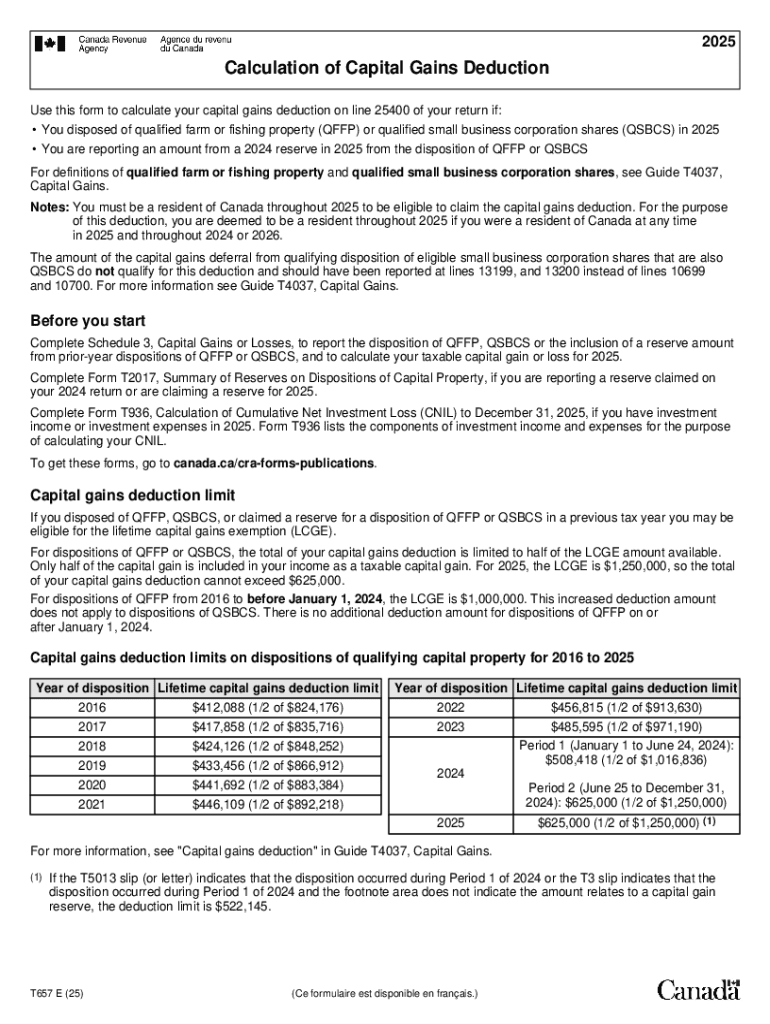
CA T657 2025-2026 free printable template
We are not affiliated with any brand or entity on this form

Fill out
Complete the form online in a simple drag-and-drop editor.

eSign
Add your legally binding signature or send the form for signing.

Share
Share the form via a link, letting anyone fill it out from any device.

Export
Download, print, email, or move the form to your cloud storage.
Why pdfFiller is the best tool for your documents and forms


End-to-end document management
From editing and signing to collaboration and tracking, pdfFiller has everything you need to get your documents done quickly and efficiently.
Accessible from anywhere
pdfFiller is fully cloud-based. This means you can edit, sign, and share documents from anywhere using your computer, smartphone, or tablet.
Secure and compliant
pdfFiller lets you securely manage documents following global laws like ESIGN, CCPA, and GDPR. It's also HIPAA and SOC 2 compliant.
What is CA T657
The Canada Capital Gains Deduction is a tax provision that allows Canadian taxpayers to reduce or eliminate capital gains tax on the sale of certain properties. Its primary purpose is to support investment in specific qualifying assets.
pdfFiller scores top ratings on review platforms




Who needs CA T657?
Explore how professionals across industries use pdfFiller.

CA T657 is needed by:
-
Canadian residents selling qualifying properties
-
Investors looking to minimize tax liabilities
-
Business owners transferring ownership of eligible assets
-
Financial advisors assisting clients with tax planning
-
Tax professionals preparing client returns with capital gains
Comprehensive Guide to CA T657
What is the Canada Capital Gains Deduction?
The Canada capital gains deduction allows taxpayers to reduce their taxable income by permitting the exclusion of capital gains from certain eligible properties. Capital gains refer to the profit made from the sale of an asset, such as stocks or real estate, that has increased in value. This deduction is significant for Canadian taxpayers because it directly impacts the amount of tax owed, offering a financial advantage that can benefit both individuals and businesses.
Purpose and Benefits of the Canada Capital Gains Deduction
The primary purpose of the Canada capital gains deduction is to incentivize investment in Canadian businesses and assets. By lowering taxable income, this deduction helps taxpayers decrease their overall tax liability. This not only results in potential savings but also promotes economic growth by encouraging more Canadians to invest in their local economy and contribute to business development.
Eligibility Criteria for the Canada Capital Gains Deduction
To qualify for the Canada capital gains deduction, taxpayers must meet specific eligibility criteria. This includes adhering to income thresholds and understanding the types of assets that are deemed eligible for the deduction.
-
Individuals must possess qualifying capital property for at least 24 months to be eligible.
-
Specific asset types include shares in certain qualified small business corporations and certain types of real estate.
-
Taxpayers must ensure they are within the prescribed income limits to take advantage of the deduction.
How to Fill Out the Canada Capital Gains Deduction Form Online
Completing the Canada capital gains deduction form online using pdfFiller is a straightforward process. Start by accessing the form on the pdfFiller platform and follow these steps:
-
Open the form in the pdfFiller editor.
-
Fill in each section with accurate information regarding your capital gains.
-
Review all entries for completeness before submission.
Be sure to double-check details to ensure accuracy and adherence to submission guidelines.
Common Errors to Avoid When Submitting the Canada Capital Gains Deduction
When filling out the Canada capital gains deduction form, taxpayers often make several common errors. Recognizing these can minimize the likelihood of submission issues:
-
Incorrect calculation of capital gains can lead to discrepancies.
-
Failing to review eligibility criteria against your financial situation.
-
Neglecting specific reporting requirements, leading to incomplete submissions.
Submission Methods and Delivery for the Canada Capital Gains Deduction
Taxpayers have multiple options for submitting the completed Canada capital gains deduction form. You can choose between electronic submission or opting for paper forms. Here are important aspects to consider:
-
Electronic submissions are often processed more quickly than paper submissions.
-
For paper submissions, ensure to send via a secure delivery method to avoid loss.
-
Confirmation of receipt may vary by submission method, so it’s crucial to follow up if necessary.
Security and Compliance When Using pdfFiller for the Canada Capital Gains Deduction
When handling sensitive information like the Canada capital gains deduction, security is paramount. pdfFiller employs robust security measures to protect your data:
-
Utilizes 256-bit encryption to safeguard personal information.
-
Complies with major privacy regulations including HIPAA and GDPR.
-
Ensures a secure platform to handle your financial documentation safely.
What Happens After You Submit the Canada Capital Gains Deduction Form?
After submitting the Canada capital gains deduction form, you can expect a specific timeline for processing. Generally, here’s what occurs next:
-
The processing timeline can vary, but feedback is typically provided within a few weeks.
-
If your submission is rejected, you may need to address specific issues before reapplying.
-
Tracking the status of your application can also help manage expectations during this period.
Why Choose pdfFiller for Filling Out the Canada Capital Gains Deduction Form?
Using pdfFiller to complete your Canada capital gains deduction form offers numerous advantages. Here’s why many users prefer this platform:
-
pdfFiller’s interface allows for easy editing and eSigning, streamlining the form completion process.
-
A large user base highlights the platform’s reliability and positive user experiences.
-
The convenience of accessing pdfFiller from any device enhances usability and efficiency.
Next Steps: Getting Started with pdfFiller to Complete Your Canada Capital Gains Deduction Form
To begin filling out your Canada capital gains deduction form, get started with pdfFiller by creating an account. This platform is designed to make the process simple and efficient:
-
Explore the features of pdfFiller and familiarize yourself with its capabilities.
-
Utilize the quick guide to navigate form completion successfully.
-
Take advantage of resources available to maximize the efficiency of your experience.
How to fill out the CA T657
-
1.Visit the pdfFiller website and log into your account, or create a new account if you do not have one.
-
2.Search for the 'Canada Capital Gains Deduction' form in the provided template section or upload your own if necessary.
-
3.Open the form in pdfFiller’s editor, ensuring you can view all fields clearly.
-
4.Before filling out the form, gather the necessary information, including details on the asset sold, acquisition date, selling price, and any associated costs.
-
5.Begin filling out each field, using the toolbar to add text, numbers, or checkboxes as required. Utilize help features if you need assistance with specific terminology.
-
6.Carefully review the entered information for accuracy, ensuring all calculations and data match your provided documents.
-
7.Once completed, utilize the 'Review' feature to check for any errors or missing information.
-
8.After final confirmation, save the filled form to your pdfFiller account or download it as a PDF file to your device.
-
9.Submit the completed form to the appropriate tax authority, or follow any additional submission instructions provided within pdfFiller if applicable.

Who is eligible for the Canada Capital Gains Deduction?
Eligibility for the Canada Capital Gains Deduction applies to Canadian residents who sell their primary residence or certain qualifying small business shares. Ensure you meet the specific requirements outlined by the Canada Revenue Agency (CRA) to benefit from this deduction.
What deadlines should I be aware of when applying this deduction?
The deadlines for applying the Canada Capital Gains Deduction generally align with tax filing deadlines, which are usually April 30th for individual taxpayers. Ensure you file your taxes on time to claim the deduction for the relevant tax year.
How do I submit the Canada Capital Gains Deduction form?
You can submit the Canada Capital Gains Deduction form electronically through your tax software or send it by mail to the CRA. If you're using pdfFiller, ensure to follow submission guidelines provided in the application process.
What documents do I need to support my claim for this deduction?
To support your claim for the Canada Capital Gains Deduction, you will typically require documents such as the sale agreement, proof of purchase, and any supporting financial statements related to the asset sold. Keep these documents organized for reference during your tax filing.
What common mistakes should I avoid when filling out this form?
Common mistakes include miscalculating capital gains, failing to report all eligible assets, and omitting supporting documents. Review your entries carefully to avoid errors that could delay processing or impact your deduction.
How long does it take to process the Canada Capital Gains Deduction claim?
Processing times for the Canada Capital Gains Deduction claims can vary, but generally, it takes several weeks during peak tax season. Check the CRA website for current processing times or to track your claim status.
Can I amend my claim if I made an error after submission?
Yes, if you discover an error in your Canada Capital Gains Deduction claim, you can amend your tax return by filing a T1 Adjustment Request with the CRA. Be prepared to provide corrected documentation to support your amended claim.
Related Forms





Get the latest insights from our blog


If you believe that this page should be taken down, please follow our DMCA take down process
here
.
This form may include fields for payment information. Data entered in these fields is not covered by PCI DSS compliance.