
Last updated on
Oct 19, 2026
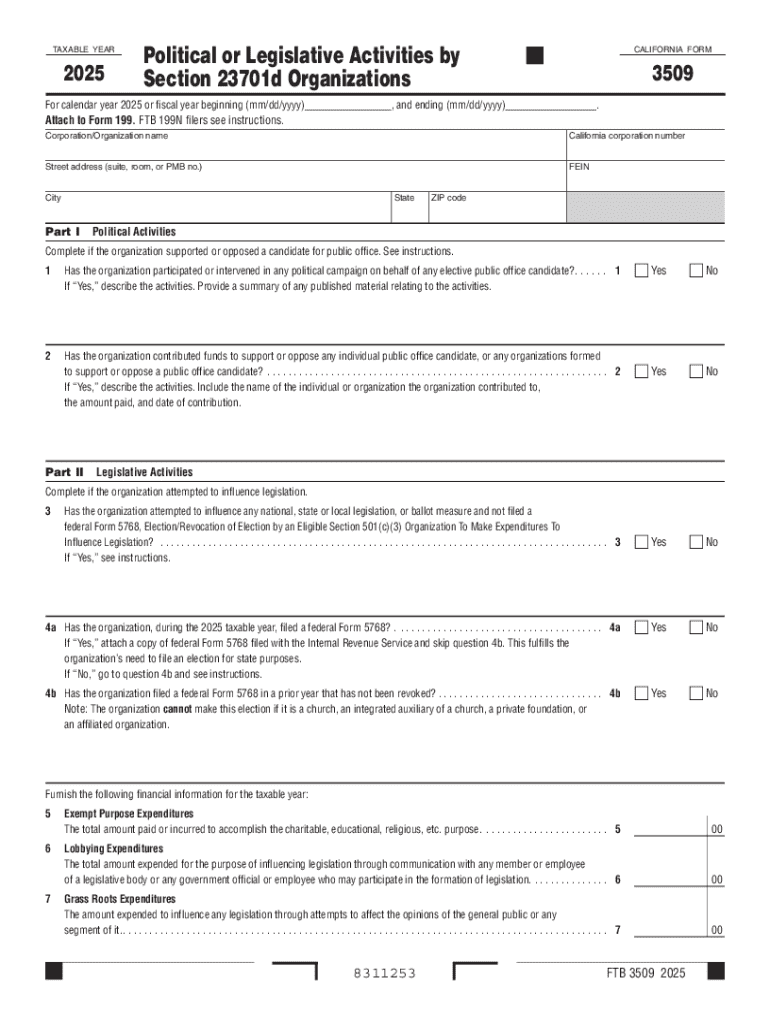
Get the free California Form 23701d for Political and Legislative Activities
We are not affiliated with any brand or entity on this form

Fill out
Complete the form online in a simple drag-and-drop editor.

eSign
Add your legally binding signature or send the form for signing.

Share
Share the form via a link, letting anyone fill it out from any device.

Export
Download, print, email, or move the form to your cloud storage.
Why pdfFiller is the best tool for your documents and forms


End-to-end document management
From editing and signing to collaboration and tracking, pdfFiller has everything you need to get your documents done quickly and efficiently.
Accessible from anywhere
pdfFiller is fully cloud-based. This means you can edit, sign, and share documents from anywhere using your computer, smartphone, or tablet.
Secure and compliant
pdfFiller lets you securely manage documents following global laws like ESIGN, CCPA, and GDPR. It's also HIPAA and SOC 2 compliant.
What is CA Form 3509
The California Form 23701D is a state-specific document used by individuals and businesses in California to report various tax-related information.
pdfFiller scores top ratings on review platforms




Who needs CA Form 3509?
Explore how professionals across industries use pdfFiller.

CA Form 3509 is needed by:
-
California taxpayers filing state income tax returns
-
Business owners needing to report business income
-
Finance professionals assisting clients with tax filings
-
Tax preparers looking for comprehensive state information
-
Individuals claiming specific tax credits or deductions
Comprehensive Guide to CA Form 3509
What is the California Form 23701D?
The California Form 23701D is a crucial document designed for specific users in the state of California. This form plays an important role in ensuring compliance with state regulations, particularly for businesses and individuals seeking particular tax statuses. Users should familiarize themselves with the circumstances under which the California Form 23701D is relevant to avoid potential pitfalls.
Benefits of Using the California Form 23701D
Completing the California Form 23701D accurately and on time provides significant advantages. This includes preventing costly mistakes that could affect both personal and business finances. Utilizing solutions like pdfFiller streamlines this process, enabling users to focus on filling the form correctly while offering tools for efficient completion.
Who Needs the California Form 23701D?
A range of users may require the California Form 23701D, including small business owners, freelancers, and non-profit organizations. Specific professions or scenarios, such as new business ventures and those applying for certain tax exemptions, necessitate the use of this form. Understanding who needs the California Form 23701D can help streamline the application process for those eligible.
Eligibility Criteria for the California Form 23701D
To use the California Form 23701D, users must meet certain eligibility criteria. These requirements may include specific business types, income thresholds, or operational guidelines based on user categories. Users should ensure they qualify to avoid complications during the filing process.
How to Fill Out the California Form 23701D Online (Step-by-Step)
Filling out the California Form 23701D online is a straightforward process, especially when using pdfFiller. Follow these steps to ensure accurate completion:
-
Access pdfFiller and locate the California Form 23701D.
-
Begin filling in the key fields, ensuring all necessary information is accurate.
-
Utilize pdfFiller’s tools to review and edit your responses as needed.
-
Once completed, save your document and prepare for submission.
Common Mistakes and How to Avoid Them
When completing the California Form 23701D, users often make common errors that can lead to complications. Frequent mistakes include missing signatures or incorrectly filled out sections. To ensure accuracy, double-check all entries and familiarize yourself with the requirements before submission.
Submitting the California Form 23701D
Submitting the California Form 23701D can be done through several methods, including online submission via pdfFiller or mailing in a physical copy. It is essential to adhere to deadlines and understand the processing times associated with each submission method to avoid delays.
What Happens After Submission of the California Form 23701D?
After submitting the California Form 23701D, users can expect various responses based on their submissions. Tracking submission status through the provided channels helps users stay informed about any issues that may arise and enables timely responses to requests for additional information.
Security and Compliance When Using the California Form 23701D
When utilizing the California Form 23701D, pdfFiller prioritizes document security through advanced measures. With features such as 256-bit encryption and compliance with legal standards like HIPAA and GDPR, users can trust that their sensitive information is handled securely.
Enhance Your Experience with pdfFiller for the California Form 23701D
Employing pdfFiller for the California Form 23701D maximizes the efficiency and security of your form-filling experience. With features such as editable fields and secure eSigning, users can streamline their process and ensure that all necessary tasks are completed accurately and on time.
How to fill out the CA Form 3509
-
1.Start by accessing the pdfFiller website and log into your account. If you do not have an account, create one to proceed.
-
2.Use the search bar on the dashboard to find California Form 23701D. Click on the form title to open it in the editor.
-
3.Once the form is open, you will see various fields you need to fill out. Review the form's instructions to understand what information is required.
-
4.Gather all necessary information, including your personal identification number, income statements, and any relevant documents required for reporting tax information.
-
5.Navigate through the fields on pdfFiller. Click into each field to input the required information. Use the toolbar to add checkmarks or additional notes as needed.
-
6.After completing all fields, double-check that all information is accurate and complete. Look out for any highlighted fields that may indicate missing information.
-
7.Once reviewed, click on the 'Finish' button on the toolbar. You will have the option to save the form to your pdfFiller account, download it as a PDF, or submit it electronically if applicable.

Who is eligible to fill out California Form 23701D?
Eligibility to fill out California Form 23701D primarily includes California taxpayers, both individuals and businesses, who need to report income and relevant tax information to the state.
What is the deadline for submitting California Form 23701D?
The deadline for submitting California Form 23701D typically aligns with the state income tax filing deadline. For individuals, this is generally April 15th, unless a holiday falls on this date.
How can I submit California Form 23701D?
California Form 23701D can be submitted electronically through approved e-filing systems or mailed directly to the designated state tax office. Make sure to check for the correct submission address.
What supporting documents are required for California Form 23701D?
Supporting documents generally include income statements such as W-2s, 1099s, and any receipts or documentation for claimed deductions. Consult the form instructions for a complete list.
What common mistakes should I avoid when filling out this form?
Common mistakes include misreporting income amounts, failing to complete all required fields, and not reviewing for accuracy. Double-check entries and ensure all information matches documents.
How long does it take to process California Form 23701D?
Processing times can vary, but generally, electronic submissions are processed faster than paper submissions. Expect a few weeks for processing after submission, especially during peak tax seasons.
Is there a fee associated with filing California Form 23701D?
Typically, there is no fee directly associated with filing California Form 23701D. However, you may incur fees if using a tax preparer or an online filing service.
Related Forms





Get the latest insights from our blog


If you believe that this page should be taken down, please follow our DMCA take down process
here
.
This form may include fields for payment information. Data entered in these fields is not covered by PCI DSS compliance.