
Last updated on
Oct 19, 2026
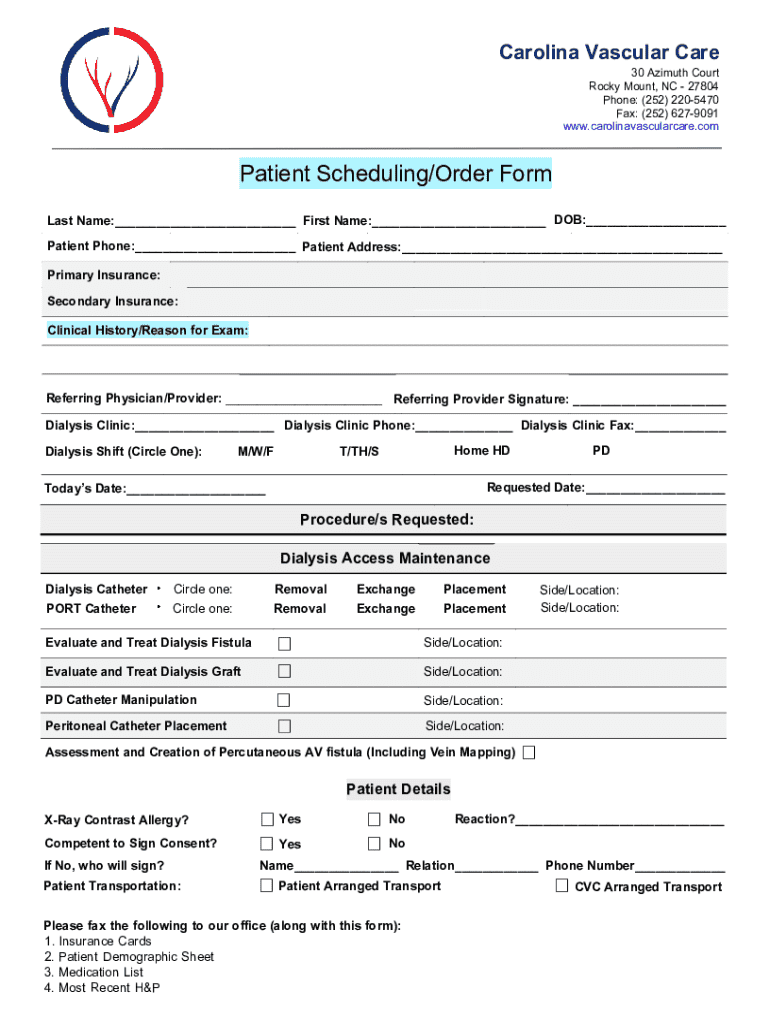
Get the free Patient Scheduling Order Form
We are not affiliated with any brand or entity on this form

Fill out
Complete the form online in a simple drag-and-drop editor.

eSign
Add your legally binding signature or send the form for signing.

Share
Share the form via a link, letting anyone fill it out from any device.

Export
Download, print, email, or move the form to your cloud storage.
Why pdfFiller is the best tool for your documents and forms


End-to-end document management
From editing and signing to collaboration and tracking, pdfFiller has everything you need to get your documents done quickly and efficiently.
Accessible from anywhere
pdfFiller is fully cloud-based. This means you can edit, sign, and share documents from anywhere using your computer, smartphone, or tablet.
Secure and compliant
pdfFiller lets you securely manage documents following global laws like ESIGN, CCPA, and GDPR. It's also HIPAA and SOC 2 compliant.
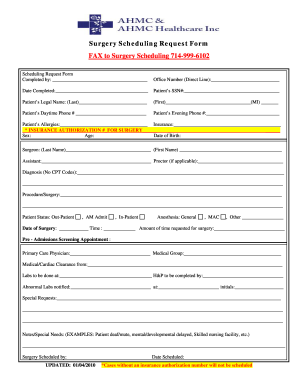
What is Patient Scheduling Form
The patient scheduling order form is a document used by healthcare providers to arrange appointments and manage patient scheduling effectively.
pdfFiller scores top ratings on review platforms




Who needs Patient Scheduling Form?
Explore how professionals across industries use pdfFiller.

Patient Scheduling Form is needed by:
-
Healthcare providers coordinating patient appointments
-
Medical administrative staff managing schedules
-
Patients needing to schedule or modify appointments
-
Clinics and hospitals organizing patient flow
-
Insurance companies requiring appointment details for claims
Comprehensive Guide to Patient Scheduling Form
What Is the Patient Scheduling Order Form?
The patient scheduling order form is a critical tool utilized in healthcare settings to streamline the management of patient appointments. This form serves to consolidate necessary information, enhancing appointment organization. It's commonly used by healthcare providers to efficiently coordinate patient schedules, which is essential for effective patient management.
By using this form, healthcare providers minimize the possibility of scheduling conflicts and ensure that patients receive timely care. Thus, the patient scheduling order form plays a vital role in supporting a well-organized appointment system.
Benefits of Using the Patient Scheduling Order Form
Utilizing the patient scheduling order form brings numerous advantages to both patients and healthcare providers. One of the primary benefits is the streamlined patient scheduling process that facilitates efficient organization of appointments. Additionally, the form significantly reduces administrative errors, resulting in improved efficiency across healthcare operations.
Another key benefit is the enhancement of communication between patients and providers, ensuring that both parties remain informed about scheduling details. Overall, this form aids in creating a more efficient healthcare experience.
Key Features of the Patient Scheduling Order Form
This form includes several key features that promote its usability and effectiveness. First, it has fillable sections, allowing easy customization based on specific needs. Users can also benefit from the capability to eSign digitally, streamlining the signature process directly within the platform.
-
Fillable sections for easy customization
-
Capability to eSign digitally
-
Availability of templates for various jurisdictions
Who Needs the Patient Scheduling Order Form?
The target users of the patient scheduling order form include a range of stakeholders in the healthcare system. Healthcare providers rely on this form to organize patient appointments efficiently, ensuring that their schedules are accurate and up-to-date.
-
Healthcare providers organizing patient appointments
-
Patients seeking to confirm or request appointments
-
Administrative staff managing schedules
How to Fill Out the Patient Scheduling Order Form Online
Filling out the patient scheduling order form online is straightforward when using tools like pdfFiller. Here’s a step-by-step guide to completing the form:
-
Access the form through the pdfFiller platform.
-
Enter the necessary patient information in the designated fields.
-
Provide specific appointment details, such as date and time.
-
Review all entered information for accuracy.
-
Submit the completed form.
Common Errors When Completing the Patient Scheduling Order Form
While filling out the patient scheduling order form, users often encounter some common errors. One frequent issue is failure to accurately fill in critical fields, which can lead to misunderstandings or scheduling issues.
It’s crucial to double-check all entered information before submission. In case of errors, users should follow specific guidance to revise any mistakes and resubmit the form effectively.
How to Submit the Patient Scheduling Order Form
Submitting the patient scheduling order form can be done through various methods, each of which has its specific advantages. Users can choose to submit the form online for immediate processing, via fax for traditional paper-based submission, or through the mail for physical documentation.
-
Submit online for quick processing.
-
Use fax for traditional submissions.
-
Mail the form if necessary.
After submission, tracking the status ensures that users can confirm their submission was received and processed. Be mindful of any applicable deadlines to ensure timely scheduling.
Security and Compliance When Using the Patient Scheduling Order Form
When dealing with the patient scheduling order form, security and compliance are paramount. pdfFiller implements robust data encryption techniques to safeguard user information and ensure privacy. Additionally, the platform adheres to HIPAA and GDPR regulations, emphasizing the importance of securely handling sensitive patient information.
How pdfFiller Supports You with the Patient Scheduling Order Form
pdfFiller provides a comprehensive suite of tools to support users in managing the patient scheduling order form seamlessly. The cloud-based platform simplifies document management, offering ease of use for filling out, editing, and submitting forms without downloading software.
-
Real-time collaboration features enhance teamwork.
-
eSigning capabilities streamline the process.
By leveraging pdfFiller, users can experience improved document management and positive outcomes in their scheduling processes.
Exploring Alternatives and Variants of the Patient Scheduling Order Form
There are several alternative forms and variants of the patient scheduling order form that may also serve relevant functions. Exploring these options can help users identify which form best meets their specific scheduling needs.
-
Related forms with similar purposes are available.
-
Differences or updates in variants may affect selection.
By understanding these alternatives, users can make informed decisions about which form to utilize for effective patient scheduling.
How to fill out the Patient Scheduling Form
-
1.To access the patient scheduling order form on pdfFiller, visit the pdfFiller website and use the search bar to locate the form by its name.
-
2.Open the form by clicking on it from the search results. You will now see the pdfFiller interface displaying the form for editing.
-
3.Before filling in the form, gather necessary information such as patient details (name, contact information), preferred appointment dates and times, and any specific requirements.
-
4.Begin filling out the form by clicking on each field and entering the requested information. Use the tab key to move between fields for efficiency.
-
5.Pay attention to any required fields marked clearly on the form. Ensure all mandatory information is completed to avoid submission errors.
-
6.Once all fields are completed, review the form carefully for accuracy. Check for any typos or missing information that may cause processing issues.
-
7.After reviewing, finalize the form by clicking the 'Save' option if you wish to keep a copy. You can also use the 'Download' button to export your completed form to your device.
-
8.If you need to submit the form, select the 'Submit' option on pdfFiller, following any additional prompts for email or method of delivery.

Who is eligible to use the patient scheduling order form?
The patient scheduling order form is primarily for use by healthcare providers, medical administrative staff, and patients seeking to book or modify appointments.
Are there any deadlines associated with submission of this form?
While there are no specific deadlines for the patient scheduling order form itself, it's advised to submit your request as early as possible to secure preferred appointment times.
What methods can I use to submit the completed form?
You can submit the completed patient scheduling order form directly through pdfFiller by using the 'Submit' option or save it and send it via email to the healthcare provider.
What supporting documents do I need when submitting this form?
Typically, no additional supporting documents are required with the patient scheduling order form unless specifically requested by the healthcare provider. Check for any particular instructions.
What are common mistakes to avoid when filling out this form?
Common mistakes include neglecting to fill in required fields, submitting incomplete information, and failing to double-check appointment details for accuracy.
How long does it take to process the patient scheduling request?
Processing times can vary based on the healthcare provider's practices, but typically, you can expect a response within one to three business days after submission.
Can I modify my appointment after submitting the form?
Yes, modifications can often be made, but you'll need to contact the healthcare provider's office directly to alter your appointment as needed.
Related Forms






Get the latest insights from our blog


If you believe that this page should be taken down, please follow our DMCA take down process
here
.
This form may include fields for payment information. Data entered in these fields is not covered by PCI DSS compliance.