
Last updated on
Oct 19, 2026
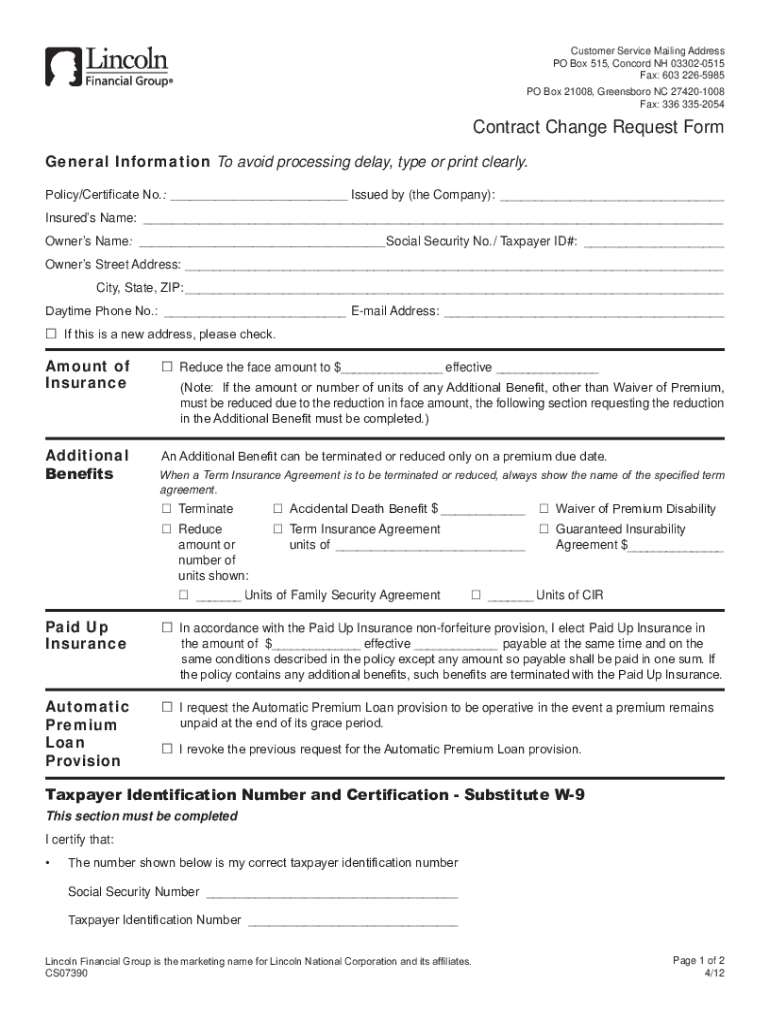
Get the free Contract Change Request Form
We are not affiliated with any brand or entity on this form

Fill out
Complete the form online in a simple drag-and-drop editor.

eSign
Add your legally binding signature or send the form for signing.

Share
Share the form via a link, letting anyone fill it out from any device.

Export
Download, print, email, or move the form to your cloud storage.
Why pdfFiller is the best tool for your documents and forms


End-to-end document management
From editing and signing to collaboration and tracking, pdfFiller has everything you need to get your documents done quickly and efficiently.
Accessible from anywhere
pdfFiller is fully cloud-based. This means you can edit, sign, and share documents from anywhere using your computer, smartphone, or tablet.
Secure and compliant
pdfFiller lets you securely manage documents following global laws like ESIGN, CCPA, and GDPR. It's also HIPAA and SOC 2 compliant.
What is Contract Change Form
The Contract Change Request Form is a document used by individuals or businesses to request modifications to an existing contract.
pdfFiller scores top ratings on review platforms




Who needs Contract Change Form?
Explore how professionals across industries use pdfFiller.

Contract Change Form is needed by:
-
Businesses needing to amend contracts with suppliers or clients
-
Freelancers requiring changes to project contracts
-
Legal professionals managing client agreements
-
Contract administrators overseeing compliance
-
Project managers adjusting terms on collaborative contracts
Comprehensive Guide to Contract Change Form
What is the Contract Change Request Form?
The contract change request form serves as a formal tool allowing parties involved in a contractual agreement to modify its terms. This document is essential for ensuring that any changes made are appropriately documented and communicated, maintaining clarity and transparency between all involved parties. Its purpose lies in formalizing requests for modifications to existing contract conditions, thereby preventing misunderstandings and disputes.
Purpose and Benefits of Using the Contract Change Request Form
Utilizing the contract change request form offers several advantages for both parties in a contract. Firstly, it fosters clear communication regarding amendments, ensuring all modifications are explicitly defined. Additionally, using this form provides a written record of changes, which minimizes the risk of misinterpretations later on. The essential reasons to use this form include enhancing accountability and establishing a common understanding of new contract conditions.
Key Features of the Contract Change Request Form
This form includes various functionalities that enhance the contract modification process. Key features consist of the ability to edit, eSign, and securely share documents. Additionally, it allows for the generation of fillable fields to streamline the input of information, ensuring users can efficiently manage revisions to their contracts.
Who Should Use the Contract Change Request Form?
The contract change request form is designed for a diverse audience, including individuals, businesses, and organizations involved in binding agreements. It is particularly useful in scenarios where changes in contract terms, parties, or conditions are necessary. Users such as legal professionals, business owners, and contract managers will find this form essential for maintaining the integrity of their agreements.
How to Fill Out the Contract Change Request Form Online (Step-by-Step)
Filling out the contract change request form online using pdfFiller is a straightforward process. Follow these steps to complete the form accurately:
-
Access the form through pdfFiller’s platform.
-
Fill in the fields related to the existing contract details.
-
Specify the changes being requested clearly, including any new terms or conditions.
-
Review the filled information for accuracy.
-
Sign the form electronically using pdfFiller’s eSignature tool.
-
Submit the completed form to the relevant parties for approval.
Required Documents and Supporting Materials for the Contract Change Request Form
To effectively fill out the contract change request form, specific documents are necessary. Key prerequisites include:
-
The original contract to reference current terms.
-
Identification documents for verification purposes.
-
Any prior correspondence that could support the requested changes.
Common Errors and How to Avoid Them When Submitting the Contract Change Request Form
When using the contract change request form, users may encounter several common errors that could hinder the submission process. Frequent mistakes include incomplete fields, unclear descriptions of changes, and incorrect signatures. To avoid these issues, it is advisable to double-check all entries, ensure clarity in the modifications being requested, and verify the legitimacy of signatures before submission.
Security and Compliance When Using the Contract Change Request Form
pdfFiller places a strong emphasis on security and compliance in managing sensitive contractual information. The platform employs 256-bit encryption and adheres to rigorous standards, including SOC 2 Type II, HIPAA, and GDPR compliance. This commitment to data protection assures users that their confidential information is secure during the contract change process.
What Happens After You Submit the Contract Change Request Form?
After submission, the contract change request form goes through a specified process. Users can expect to receive a confirmation of their submission, followed by appropriate tracking information. The timeline for processing the request will vary but users should anticipate receiving feedback on the changes within a reasonable period, depending on the parties involved.
Streamline Your Contract Modifications with pdfFiller's Contract Change Request Form
Leveraging pdfFiller’s contract change request form can significantly enhance the document management experience. The platform provides users with an easy-to-navigate interface and efficient tools that simplify the process of making and tracking amendments to contracts. This streamlining of contract modifications allows for greater efficiency and reduces the potential for errors.
How to fill out the Contract Change Form
-
1.To begin, access the pdfFiller website and log in or create an account if you don’t have one.
-
2.Once logged in, use the search bar to locate the 'Contract Change Request Form'.
-
3.Click on the form to open it in the pdfFiller editor.
-
4.Before filling out the form, gather all relevant information such as contract details, names, and specific changes required.
-
5.Utilize the pdfFiller interface to click on text fields, entering the necessary information accurately.
-
6.Check for dropdown menus or checkboxes for options that fit your request.
-
7.After completing the form, utilize the preview feature to review all entered information for accuracy.
-
8.Once confirmed, click on the save button to save your changes.
-
9.You can download the filled form directly to your device or send it via email using pdfFiller’s submission options.
-
10.For any further action, such as submitting to a third party, ensure you follow the necessary guidelines provided by all involved parties.

Who is eligible to use the Contract Change Request Form?
Typically, any party involved in a contract can use this form to request changes. This includes businesses, freelancers, and legal representatives who want to alter contract terms.
Are there deadlines for submitting the Contract Change Request Form?
Deadlines vary by contract. It’s important to submit your request as soon as possible to allow sufficient time for approval or revisions before contract execution.
How should I submit the completed Contract Change Request Form?
After filling out the form on pdfFiller, you can submit it by downloading and emailing it, or by using any electronic submission options provided by the involved parties.
What supporting documents are required with the form?
Typically, you may need to attach the original contract, any previous amendments, and documents that justify your requested changes. Always check specific requirements.
What are common mistakes to avoid when filling out this form?
Common mistakes include omitting key details, not specifying the necessary changes clearly, and failing to review the form for accuracy before submission.
What is the typical processing time for a Contract Change Request?
Processing times vary based on the complexity of the request and internal procedures of the parties involved but generally expect a response within a week.
Related Forms




Get the latest insights from our blog


If you believe that this page should be taken down, please follow our DMCA take down process
here
.
This form may include fields for payment information. Data entered in these fields is not covered by PCI DSS compliance.