
Last updated on
Oct 31, 2026
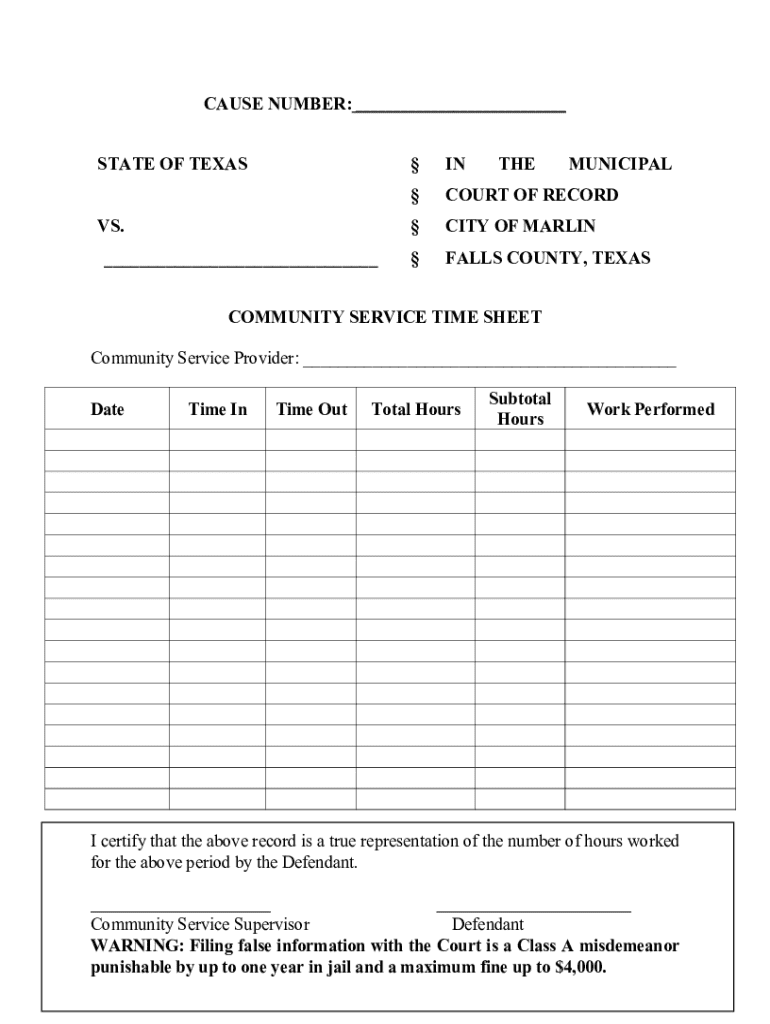
Get the free Community Service Time Sheet
We are not affiliated with any brand or entity on this form

Fill out
Complete the form online in a simple drag-and-drop editor.

eSign
Add your legally binding signature or send the form for signing.

Share
Share the form via a link, letting anyone fill it out from any device.

Export
Download, print, email, or move the form to your cloud storage.
Why pdfFiller is the best tool for your documents and forms


End-to-end document management
From editing and signing to collaboration and tracking, pdfFiller has everything you need to get your documents done quickly and efficiently.
Accessible from anywhere
pdfFiller is fully cloud-based. This means you can edit, sign, and share documents from anywhere using your computer, smartphone, or tablet.
Secure and compliant
pdfFiller lets you securely manage documents following global laws like ESIGN, CCPA, and GDPR. It's also HIPAA and SOC 2 compliant.
What is Community Service Time Sheet
The community service time sheet is a document used by individuals engaging in community service to track and report their hours and activities.
pdfFiller scores top ratings on review platforms




Who needs Community Service Time Sheet?
Explore how professionals across industries use pdfFiller.

Community Service Time Sheet is needed by:
-
Volunteers completing community service hours
-
Nonprofit organizations managing volunteer work
-
Students fulfilling service requirements for school
-
Court-mandated individuals completing community service
-
Employers verifying volunteer hours for employees
-
Community service coordinators overseeing programs
Comprehensive Guide to Community Service Time Sheet
What is the Community Service Time Sheet?
The community service time sheet is a vital tool designed to track volunteer hours effectively. It serves the purpose of documenting time spent on volunteer activities, crucial for individuals fulfilling community service requirements. Used widely in schools, non-profit organizations, and legal institutions, the time sheet ensures accurate record-keeping and accountability in community service initiatives.
Benefits of Using the Community Service Time Sheet
Utilizing the community service time sheet offers numerous advantages for both individuals and organizations. It simplifies record-keeping, ensuring compliance with various service requirements. Additionally, it streamlines the process of submitting necessary documentation for scholarship applications or legal purposes.
-
Improves accuracy in tracking volunteer hours
-
Enhances organizational efficiency
-
Facilitates easier verification of community service completion
Key Features of the Community Service Time Sheet
The community service time sheet includes several key features that enhance user experience. Editable fields allow users to customize their inputs, while annotation capabilities facilitate additional notes as needed. Users can fill out the time sheet online using pdfFiller, ensuring accessibility and ease of use.
-
Secure online edits through pdfFiller
-
Encryption to protect sensitive information
-
User-friendly interface for easy navigation
Who Needs to Use the Community Service Time Sheet?
The community service time sheet is designed for a variety of users including students, volunteers, and organizations looking to document service hours. It becomes essential in specific scenarios such as applying for scholarships or fulfilling legal service documentation requirements.
How to Fill Out the Community Service Time Sheet Online
Filling out the community service time sheet is straightforward when using pdfFiller. To ensure the process runs smoothly, it is advisable to gather all necessary information beforehand. Follow these steps to complete the time sheet online:
-
Log in to your pdfFiller account.
-
Select the community service time sheet template.
-
Fill in the required fields with accurate information.
-
Add any annotations if necessary.
-
Review the information for accuracy.
-
Save the completed form.
Common Errors When Completing the Community Service Time Sheet
Users may encounter several common errors when completing the community service time sheet. Identifying these mistakes early can lead to a smoother submission process. It's important to validate the completed form before submission to ensure all necessary information is included.
-
Incorrectly filled fields
-
Omitting essential signatures
-
Failing to review for completion
How to Sign and Submit the Community Service Time Sheet
Signing the community service time sheet involves meeting specific requirements, including options for digital or wet signatures. Submission can be accomplished through various methods, such as email or physical mail. It’s essential to keep track of any deadlines for submission to ensure timely processing.
What Happens After You Submit the Community Service Time Sheet
Once submitted, the community service time sheet follows a post-submission process that may include various outcomes and confirmation steps. Users can typically check the status of their submission and may need to take follow-up actions based on feedback from the receiving organization.
-
Monitoring submission status
-
Retaining a copy of the completed form
-
Understanding potential outcomes
Why Choose pdfFiller for Your Community Service Time Sheet Needs?
Choosing pdfFiller for your community service time sheet needs presents unique advantages. The platform not only offers a user-friendly interface but also ensures a secure environment for document management. Users have reported positive experiences, highlighting the efficiency and security that pdfFiller provides.
How to fill out the Community Service Time Sheet
-
1.To access the community service time sheet on pdfFiller, start by visiting the pdfFiller website and log into your account, or create a new account if you don’t have one.
-
2.Once logged in, use the search bar to type 'community service time sheet' and select the appropriate form from the results to open it in the editor.
-
3.Before completing the form, gather all necessary information, such as the date of service, location, type of community service performed, and total hours worked to ensure smooth filling.
-
4.As you navigate through the form, pdfFiller allows you to click into each field to enter your data. Be sure to double-check entries for accuracy as you go.
-
5.After filling all required fields, review the information for completeness. Utilize pdfFiller's features to enhance readability if needed.
-
6.Once satisfied with the form, you can finalize it by clicking the 'Save' option to store it in your account or choose 'Download' to save it directly to your device.
-
7.To submit the completed form, follow the prompts to either email it directly from pdfFiller or download it for submission through your preferred method.

Who is eligible to use the community service time sheet?
Anyone engaging in community service, including volunteers, students, and individuals completing mandated community hours, can use the community service time sheet to document their activities.
Are there any submission deadlines for the completed time sheet?
Submission deadlines typically depend on the organization requiring the form. It's best to check directly with them for any specific due dates.
What methods can I use to submit the completed community service time sheet?
You can submit the completed time sheet via email, online portal, or physically deliver it to the organization supervising your community service. Check with the relevant entity for their preferred submission method.
What supporting documents are needed when submitting the time sheet?
Supporting documents may include personal identification, specific community service guidelines, or proof of hours worked. Confirm with the organization for their specific requirements.
What are the common mistakes to avoid when filling out the time sheet?
Common mistakes include missing details like the exact hours worked, failing to sign the form, or not maintaining accurate records of service activities. Make sure to review each section carefully before submitting.
How long does it take to process the community service time sheet?
Processing times may vary by organization. Generally, it can take from a few days to several weeks, so it's advised to submit your form well in advance of any deadlines.
Is notarization required for the community service time sheet?
Typically, notarization is not required for the community service time sheet, but it’s advisable to check with the organization to confirm their specific policies.
Related Forms



Get the latest insights from our blog


If you believe that this page should be taken down, please follow our DMCA take down process
here
.
This form may include fields for payment information. Data entered in these fields is not covered by PCI DSS compliance.