
Last updated on
Oct 31, 2026
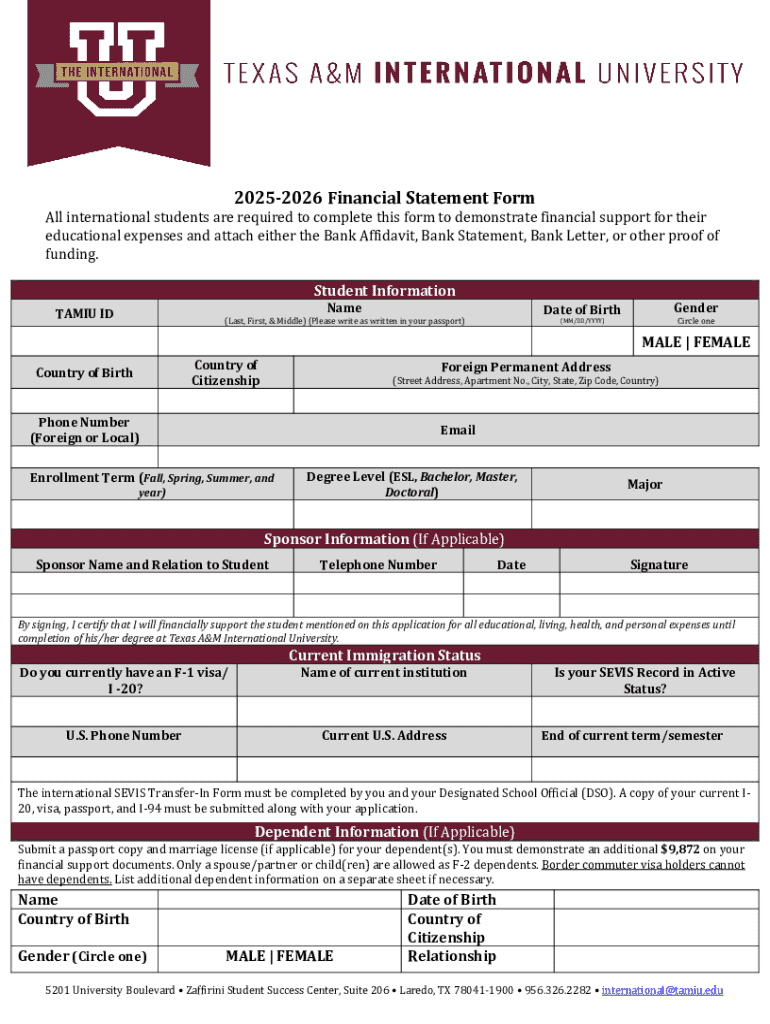
Get the free 2025-2026 Financial Statement Form
We are not affiliated with any brand or entity on this form

Fill out
Complete the form online in a simple drag-and-drop editor.

eSign
Add your legally binding signature or send the form for signing.

Share
Share the form via a link, letting anyone fill it out from any device.

Export
Download, print, email, or move the form to your cloud storage.
Why pdfFiller is the best tool for your documents and forms


End-to-end document management
From editing and signing to collaboration and tracking, pdfFiller has everything you need to get your documents done quickly and efficiently.
Accessible from anywhere
pdfFiller is fully cloud-based. This means you can edit, sign, and share documents from anywhere using your computer, smartphone, or tablet.
Secure and compliant
pdfFiller lets you securely manage documents following global laws like ESIGN, CCPA, and GDPR. It's also HIPAA and SOC 2 compliant.
What is Financial Statement Form
The 2025-2026 financial statement form is a document used by individuals or entities to report their financial status for the stated period.
pdfFiller scores top ratings on review platforms




Who needs Financial Statement Form?
Explore how professionals across industries use pdfFiller.

Financial Statement Form is needed by:
-
Individuals applying for loans or mortgages
-
Businesses preparing financial disclosures
-
Tax professionals assisting clients with tax preparations
-
Non-profit organizations reporting financials for grants
-
Students applying for financial aid
-
Landlords screening potential tenants
Comprehensive Guide to Financial Statement Form
What is the 2 Financial Statement Form?
The 2 financial statement form is an essential document in financial reporting that outlines the financial position and performance of an entity. It serves as a standard tool for reporting income, expenses, assets, and liabilities, making it integral to ensure transparency and accuracy in financial practices. Common users of this form include businesses, freelancers, and various professionals who require a systematic way to present their financial data.
In the current year, users should be aware of any amendments or updates made to this form that may affect how they report their finances. This awareness is critical for maintaining compliance and ensuring that financial statements are up-to-date.
Purpose and Benefits of the 2 Financial Statement Form
The 2 financial statement form is vital for several reasons, primarily for promoting accurate financial reporting. It helps users understand their financial health and make informed decisions. For individuals and businesses alike, the benefits include streamlined reporting, easier compliance with regulations, and improved credibility with stakeholders.
Accurate financial reporting is not only crucial for internal decision-making but also necessary for meeting regulatory requirements. Failing to report correctly can lead to penalties or adverse consequences, emphasizing the importance of using this form effectively.
Key Features of the 2 Financial Statement Form
This form is equipped with several important features that enhance usability:
-
Editable fields allow users to input their financial information directly into the form.
-
Necessary attachments and sections ensure comprehensive reporting.
-
Interactive capabilities include fillable fields, making the form easier to complete.
-
The option to save and share the form digitally simplifies collaboration and submission.
Who Needs the 2 Financial Statement Form?
Various entities and individuals depend on the 2 financial statement form, including:
-
Businesses of all sizes needing to report financial performance.
-
Freelancers and independent contractors who must track their income and expenses.
-
Non-profit organizations that require transparent financial reporting.
-
Investors seeking to evaluate potential opportunities.
Specific professions such as accountants or financial analysts typically utilize the form to fulfill their reporting obligations and offer financial insights.
How to Fill Out the 2 Financial Statement Form Online
Filling out the 2 financial statement form online through pdfFiller involves a straightforward process:
-
Access the form on the pdfFiller platform.
-
Utilize the text editing and annotation tools to enter required information.
-
Ensure all editable fields are completed accurately.
-
Save your progress frequently to avoid losing any information.
Be cautious of common pitfalls, such as neglecting to provide all necessary documentation or miscalculating figures, to ensure accurate submissions.
Required Documents and Supporting Materials for the 2 Financial Statement Form
When preparing to fill out the 2 financial statement form, gather the following necessary documents:
-
Income statements detailing all revenue sources.
-
Expense reports capturing all business-related costs.
-
Tax documents that provide essential financial information.
Supporting materials further enhance the form's credibility. Utilize pdfFiller's secure management features to store and organize these documents effectively.
Submission Methods for the 2 Financial Statement Form
Once the form is completed, users can submit it through various methods:
-
Online submissions via pdfFiller for immediate processing.
-
Mailing the form to the designated address if physical submissions are required.
-
In-person submissions for those needing direct confirmation.
Users should also be aware of submission deadlines, processing times, and tracking features available through pdfFiller to monitor the status of their submissions.
Security and Compliance—How pdfFiller Keeps Your Financial Information Safe
Security is a top priority when handling sensitive financial information. pdfFiller implements several robust security measures:
-
256-bit encryption to safeguard data during transmission.
-
Compliance with regulatory standards, including GDPR and HIPAA, ensuring user trust.
-
Guidelines for managing sensitive information securely on the platform.
How to Check Your Application Status for the 2 Financial Statement Form
After submission, checking the status of your application is easy:
-
Log into your pdfFiller account.
-
Navigate to the submitted forms section.
-
Review status updates and notifications regarding your submission.
If your application faces any issues, pdfFiller provides support to help facilitate the next steps in the process.
Experience Seamless Document Management with pdfFiller
Leveraging pdfFiller for your 2 financial statement form needs offers numerous advantages, including:
-
User-friendly features that simplify form completion.
-
Enhanced security and compliance measures for your peace of mind.
-
The ability to manage your documents efficiently in a cloud-based environment.
Start using pdfFiller for filling out the 2 financial statement form today to experience seamless document management and increased efficiency.
How to fill out the Financial Statement Form
-
1.Access the 2025-2026 financial statement form on pdfFiller by searching for the form name in the pdfFiller search bar.
-
2.Once located, click on the form to open it in the pdfFiller editor interface.
-
3.Review the form fields to understand what information is required. Gather necessary documents such as bank statements, tax returns, and income records before starting.
-
4.Begin filling in the form by clicking on each field. Use the pdfFiller tools to input information accurately. Enter details like income, expenses, assets, and liabilities.
-
5.Ensure you complete all mandatory fields, marked by asterisks, to avoid submission issues later.
-
6.Use the 'Preview' option to review your filled-out form. Check for any errors or omissions and make corrections as needed.
-
7.Once you are satisfied with the information entered, save your work. You can do this by clicking the 'Save' button in the upper right corner.
-
8.To download your completed form, select the 'Download' option. This allows you to save a copy in various formats, such as PDF or Word.
-
9.If required to submit the form, follow the provided submission instructions, which may include emailing or uploading it to a specific platform.

Who is eligible to use the 2025-2026 financial statement form?
The 2025-2026 financial statement form is intended for individuals, businesses, or non-profits who need to report financial information for the specified period, especially for applications related to loans, grants, or financial aid.
What is the deadline for submitting the financial statement form?
The submission deadline for the 2025-2026 financial statement form can vary based on the purpose of the report. Always check with the requesting institution for specific deadlines to ensure timely submission.
What methods can I use to submit the completed form?
You can typically submit the completed form via email, postal mail, or through an online portal if specified by the requesting entity. Check the submission instructions provided to confirm the accepted methods.
What supporting documents are required with the financial statement form?
Common supporting documents may include bank statements, tax returns, income statements, and other financial records that substantiate the information reported in the financial statement form.
What common mistakes should I avoid when filling out the form?
Ensure all fields are filled accurately, double-check for any omitted information, and confirm that supporting documents are attached. Avoid vague answers and clarify information as needed to prevent rejection.
How long does it take to process the financial statement form?
Processing times can vary depending on the institution or organization requiring the form. It is advisable to allow sufficient time for review and processing, often ranging from a few days to several weeks.
Can I edit the financial statement form after submitting it?
Editability post-submission depends on the policies of the institution to which you submitted the form. If corrections are needed, contact them directly to inquire about possible amendments.
Related Forms




Get the latest insights from our blog


If you believe that this page should be taken down, please follow our DMCA take down process
here
.
This form may include fields for payment information. Data entered in these fields is not covered by PCI DSS compliance.