
Last updated on
Oct 19, 2026

Get the free Australian Immunisation Register Form IM013
We are not affiliated with any brand or entity on this form

Fill out
Complete the form online in a simple drag-and-drop editor.

eSign
Add your legally binding signature or send the form for signing.

Share
Share the form via a link, letting anyone fill it out from any device.

Export
Download, print, email, or move the form to your cloud storage.
Why pdfFiller is the best tool for your documents and forms


End-to-end document management
From editing and signing to collaboration and tracking, pdfFiller has everything you need to get your documents done quickly and efficiently.
Accessible from anywhere
pdfFiller is fully cloud-based. This means you can edit, sign, and share documents from anywhere using your computer, smartphone, or tablet.
Secure and compliant
pdfFiller lets you securely manage documents following global laws like ESIGN, CCPA, and GDPR. It's also HIPAA and SOC 2 compliant.
What is AIR Form IM013
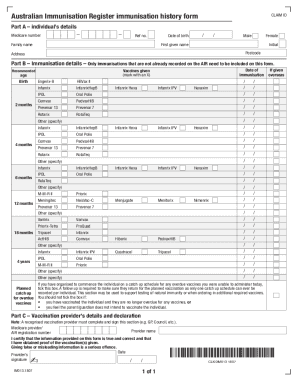
The Australian Immunisation Register Form is an official document used by individuals to report and record immunisation details for themselves or their children to the national immunisation register.
pdfFiller scores top ratings on review platforms




Who needs AIR Form IM013?
Explore how professionals across industries use pdfFiller.

AIR Form IM013 is needed by:
-
Parents registering their children's immunisation records
-
Individuals seeking to update their personal immunisation status
-
Healthcare providers submitting immunisation information
-
Schools requiring proof of immunisation for admission
-
Employers needing immunisation proof for workplace requirements
Comprehensive Guide to AIR Form IM013
What is the Australian Immunisation Register Form?
The Australian Immunisation Register Form serves as a crucial document for tracking immunisations across Australia. Its primary purpose is to maintain accurate records of vaccinations administered, ensuring individuals remain compliant with national health policies. Issued by health authorities, this form is utilized by healthcare providers to record immunisation histories and by individuals to verify their vaccination status. The importance of this form cannot be understated, as it plays a vital role in safeguarding public health through comprehensive immunisation tracking.
Purpose and Benefits of the Australian Immunisation Register Form
The Australian Immunisation Register Form offers significant advantages for both individuals and public health initiatives. By utilizing this form, individuals can ensure they are up-to-date with their vaccinations, an essential step in preventing disease outbreaks. Furthermore, the form facilitates easier access to immunisation records for schools and employers, aiding in compliance with various health requirements. Overall, this form greatly supports public health initiatives by promoting widespread vaccination and fostering community health safety.
Who Needs the Australian Immunisation Register Form?
Various individuals are required to complete the Australian Immunisation Register Form, including parents, guardians, and healthcare providers. The necessity of this form typically arises during significant life events, such as school enrolment and employment, where proof of immunisation is essential. Specific age groups, particularly children and adolescents, are often the focus, as they are frequently required to provide vaccination documentation to access educational or employment opportunities.
How to Fill Out the Australian Immunisation Register Form Online
Filling out the Australian Immunisation Register Form online is a straightforward process when using pdfFiller. Follow these steps for a successful submission:
-
Access the form through pdfFiller's online platform.
-
Input personal details, ensuring all necessary fields are completed accurately.
-
Enter vaccination details as required, including dates and types of vaccines.
-
Review your entries for any mistakes or typos before finalizing your submission.
By following these steps, you can efficiently complete the form while minimizing the risk of errors.
Common Errors and How to Avoid Them
While completing the Australian Immunisation Register Form, users often encounter several common errors. These include incorrect data entry, missed fields, and outdated vaccination information. To ensure accuracy, keep these tips in mind:
-
Double-check all entries for correct spelling and factual accuracy.
-
Consult current health records to confirm vaccination dates and details before submission.
Addressing these points can significantly reduce mistakes and improve the submission process.
Submission Methods for the Australian Immunisation Register Form
Upon completing the Australian Immunisation Register Form, various submission methods are available to users. Options include:
-
Submitting the form online directly through pdfFiller.
-
Mailing a physical copy of the completed form to the relevant health authority.
After submission, it's crucial to follow up by tracking your submission status and awaiting any confirmation notifications from health agencies.
Security and Compliance for the Australian Immunisation Register Form
When handling the Australian Immunisation Register Form, data security and compliance are paramount. pdfFiller employs robust security measures, including 256-bit encryption, to protect sensitive information during the form-filling process. Compliance with data protection regulations such as HIPAA and GDPR further ensures that user information remains confidential. Utilizing a secure platform for managing personal documents is essential for safeguarding your data.
What Happens After You Submit the Australian Immunisation Register Form?
After submitting the Australian Immunisation Register Form, users can expect a structured processing period. Typically, individuals should allow a designated timeframe for their submissions to be processed. To check the status of your submission, keep an eye out for notifications from health authorities regarding any necessary actions or confirmations that may be required after submission.
Sample Completed Australian Immunisation Register Form
For those needing guidance, a sample completed Australian Immunisation Register Form is available for download. This sample highlights correctly filled sections and provides visual aids to help users understand the document's layout more effectively. Referencing a completed form can greatly assist in navigating the required fields and ensuring the submission is accurate.
Empower Yourself with pdfFiller for Filling Out the Australian Immunisation Register Form
Utilizing pdfFiller for completing the Australian Immunisation Register Form enhances your form-filling experience. With user-friendly features such as eSigning, document editing, and secure storage options, pdfFiller streamlines the management of your forms. Start leveraging these tools today for efficient and hassle-free submissions.
How to fill out the AIR Form IM013
-
1.To begin, visit pdfFiller and use the search bar to find the Australian Immunisation Register Form. Select the form from the results displayed.
-
2.Once the form is open, familiarize yourself with the layout. Use the zoom features if needed to read the text clearly.
-
3.Gather the required information before starting the form. This typically includes personal details like your full name, date of birth, and immunisation history.
-
4.Start filling in the personal details section. Click on each field to type in the required information. Ensure accuracy to avoid delays.
-
5.Next, provide the immunisation information. This may involve entering the dates and types of vaccines received. Make sure this information matches your vaccination records.
-
6.If your entry requires any special comments or additional details, use the designated text box to provide this information clearly.
-
7.Once you have filled in all the necessary fields, take a moment to review your entries for any errors or omissions.
-
8.To ensure your form is complete and accurate, go through each section carefully and verify that all required fields are filled out.
-
9.After reviewing, look for the 'Save' option to store a draft. You can edit the form later if necessary.
-
10.Finally, select the 'Download' option to save the form to your device or choose the submission option if you are ready to send it electronically.

Who can use the Australian Immunisation Register Form?
The form can be used by parents registering their children's immunisation data, individuals updating their immunisation status, and healthcare providers reporting vaccinations.
Is there a deadline for submitting the immunisation details?
While there is generally no fixed deadline, it is advisable to submit the form promptly after vaccination to ensure timely updating of records.
How can I submit the completed form?
You can submit the Australian Immunisation Register Form online through pdfFiller by selecting the submission option after filling it out or by downloading and sending it to the appropriate health authority.
What supporting documents do I need to include?
Typically, you may need to attach your vaccination records or other health documents relevant to your immunisation history when submitting the form.
What common mistakes should I avoid when completing the form?
Ensure that all personal details are accurate, vaccination dates are correct, and all required fields are filled to avoid processing delays.
How long does it take to process the submitted form?
Processing times can vary. Generally, it may take a few weeks to update your immunisation records, depending on the health authority's workload.
Are there any fees associated with submitting this form?
There are typically no fees for submitting the Australian Immunisation Register Form, but check with your local health authority for any specific regulations.
Related Forms



Get the latest insights from our blog


If you believe that this page should be taken down, please follow our DMCA take down process
here
.
This form may include fields for payment information. Data entered in these fields is not covered by PCI DSS compliance.