
Last updated on
Oct 19, 2026

Get the free TA6 Property Information Form
We are not affiliated with any brand or entity on this form

Fill out
Complete the form online in a simple drag-and-drop editor.

eSign
Add your legally binding signature or send the form for signing.

Share
Share the form via a link, letting anyone fill it out from any device.

Export
Download, print, email, or move the form to your cloud storage.
Why pdfFiller is the best tool for your documents and forms


End-to-end document management
From editing and signing to collaboration and tracking, pdfFiller has everything you need to get your documents done quickly and efficiently.
Accessible from anywhere
pdfFiller is fully cloud-based. This means you can edit, sign, and share documents from anywhere using your computer, smartphone, or tablet.
Secure and compliant
pdfFiller lets you securely manage documents following global laws like ESIGN, CCPA, and GDPR. It's also HIPAA and SOC 2 compliant.
What is TA6 Form
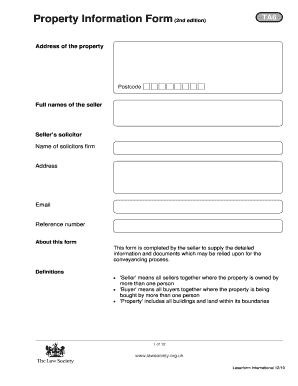
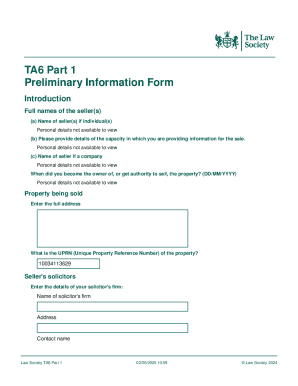
The ta6 property information form is a document used by property owners to provide comprehensive details about their real estate assets.
pdfFiller scores top ratings on review platforms




Who needs TA6 Form?
Explore how professionals across industries use pdfFiller.

TA6 Form is needed by:
-
Property owners seeking to document their asset information
-
Real estate agents needing detailed property descriptions for listings
-
Investors evaluating potential property purchases
-
Property managers managing multiple real estate assets
-
Lenders assessing properties for loan approval
Comprehensive Guide to TA6 Form
What is the ta6 Property Information Form?
The ta6 Property Information Form is a critical document used in property management, specifically catering to the needs of property owners and real estate professionals. This form serves as a comprehensive tool for gathering essential data regarding properties, which can aid in various transactions and assessments.
Understanding this form's role is vital for effective communication between property stakeholders. It applies to situations such as property sales and tax assessments, making it an indispensable resource in the real estate industry.
Purpose and Benefits of the ta6 Property Information Form
The ta6 Property Information Form is designed to facilitate the organized collection of property information. This structured approach significantly benefits accurate tax assessments and property valuations.
Using this form also ensures compliance with regulatory requirements, helping property owners avoid potential legal issues. Proper filing enhances the overall management of property-related documentation, making it easier to maintain records and comply with industry standards.
Who Needs the ta6 Property Information Form?
Several parties benefit from utilizing the ta6 Property Information Form. Primary users include property owners, real estate agents, and property management companies who frequently engage in property sales or tax assessments.
Additionally, this form is crucial in specific scenarios for landlords and tenants, particularly regarding lease agreements and property evaluations. Understanding who requires this form can streamline the property management process and ensure accurate information is collected.
How to Fill Out the ta6 Property Information Form Online (Step-by-Step)
Filling out the ta6 Property Information Form online is straightforward with platforms like pdfFiller. Follow these simple steps to complete the form:
-
Access the ta6 Property Information Form using your browser.
-
Begin by filling in key fields, such as property details and owner information.
-
Provide accurate data for all sections to ensure completeness.
-
Review all entered information for accuracy before submission.
-
Submit the form online through pdfFiller's interface.
By following these steps, users can efficiently complete the form while ensuring all required information is provided.
Key Features of the ta6 Property Information Form
The ta6 Property Information Form offers several features that enhance its usability:
-
Interactive fields allow for seamless data entry.
-
Options for eSigning streamline the approval process.
-
Direct sharing capabilities enable quick distribution to relevant parties.
-
Incorporates security measures to protect sensitive data.
These features are designed to simplify the form-filling experience, making it accessible for all users.
Common Errors and How to Avoid Them
When completing the ta6 Property Information Form, it’s essential to avoid common pitfalls. Some frequent mistakes include:
-
Leaving fields incomplete, which can lead to processing delays.
-
Providing incorrect data, risking compliance issues.
-
Failing to validate information before submission.
To ensure accuracy, double-check all entries and ensure compliance with required regulations. Reviewing entries prior to final submission can help mitigate errors and facilitate smoother processing.
Submission Methods and Confirmation of the ta6 Property Information Form
Submitting the ta6 Property Information Form can be done through various methods, including:
-
Online submission via pdfFiller.
-
Mailing a printed version of the form.
-
In-person delivery to the relevant office.
Once submitted, tracking the confirmation status is crucial. Users should verify submission with the appropriate authorities and be aware of expected timelines for processing responses. Confirming the submission ensures that no issues arise post-filing.
How pdfFiller Simplifies the ta6 Property Information Form Process
pdfFiller enhances the experience of filling out the ta6 Property Information Form by offering several capabilities.
-
Users can easily edit and customize the form according to their needs.
-
The platform ensures secure handling of all submitted data.
-
Offers convenient storage options for future access to important documents.
By utilizing pdfFiller, users can streamline their document management processes, making interactions with the ta6 Property Information Form seamless and efficient.
Security and Compliance Considerations for the ta6 Property Information Form
When handling the ta6 Property Information Form, security is a paramount concern. pdfFiller employs 256-bit encryption to secure sensitive data and complies with privacy laws such as HIPAA and GDPR.
These measures are crucial for maintaining the confidentiality and integrity of personal data. By ensuring robust security protocols, users can feel confident that their information is managed appropriately while adhering to industry compliance standards.
Next Steps for Using the ta6 Property Information Form with pdfFiller
To get started with the ta6 Property Information Form using pdfFiller, access the platform and explore its features. Signing up will unlock powerful tools for PDF editing and form filling.
Utilize the benefits of pdfFiller for efficient document management, making the process of completing the ta6 Property Information Form easy and effective. Start enhancing your property management tasks with pdfFiller today.
How to fill out the TA6 Form
-
1.Begin by accessing pdfFiller's website and logging into your account. If you don't have an account, you can create one easily.
-
2.Once logged in, search for the 'ta6 property information form' in the document search bar or browse the available forms in the property section.
-
3.Click on the form to open it in the pdfFiller editor, ensuring you have a clear view of the fields that need to be completed.
-
4.Before filling out the form, gather all necessary information including property details such as address, size, ownership history, and any additional features.
-
5.Start filling in the fields by clicking on each one. Use pdfFiller's intuitive interface to add text, check boxes, or select options as necessary for each section of the form.
-
6.As you complete each field, ensure the information is accurate and complete. This will help avoid common mistakes that can delay processing.
-
7.Once all fields are filled, review the entire form thoroughly. Check for any missing information or errors that need correction.
-
8.After reviewing, finalize the form by clicking the save button. You can choose to download it to your device or save it in your pdfFiller account for future reference.
-
9.To submit the form, look for the submission options. You can usually email it directly from pdfFiller or download it for printing and mailing, depending on the submission requirements.

Who is eligible to fill out the ta6 property information form?
Property owners and authorized representatives can fill out the ta6 property information form. It's designed for anyone needing to document detailed property information for financial or legal purposes.
Is there a deadline for submitting the ta6 property information form?
Deadlines can vary based on specific requirements set by local authorities or lenders. It's important to check with your specific audience or institution to ensure timely submission.
What methods can I use to submit the ta6 property information form?
The form can typically be submitted via email directly through pdfFiller or downloaded for mailing. Ensure to follow the specific submission method required by the receiving party.
What supporting documents are required when submitting this form?
Generally, you should include documents that verify property ownership and additional information that supports the details declared in the ta6 property information form, such as title deeds or past tax documents.
What are common mistakes to avoid when filling out the form?
Common mistakes include omitting necessary information, inaccuracies in property details, and failing to review the form before submission. Always double-check to ensure completeness.
How long does processing the ta6 property information form usually take?
Processing times can depend on the submission method and the office handling it. Typically, expect to wait between a few days to a couple of weeks. Check with the entity you submitted it to for more accurate timelines.
What should I do if I make a mistake on the form?
If you realize a mistake after submission, contact the receiving entity immediately to inquire about their process for amendments. If it's before submission, simply correct the error in pdfFiller and save the changes.
Related Forms




Get the latest insights from our blog


If you believe that this page should be taken down, please follow our DMCA take down process
here
.
This form may include fields for payment information. Data entered in these fields is not covered by PCI DSS compliance.