
Last updated on
Oct 19, 2026

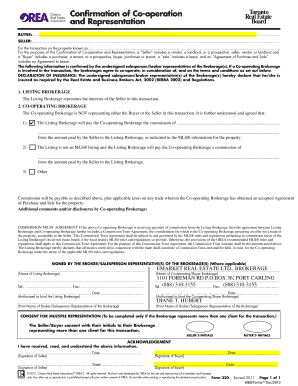
Get the free Confirmation of Co-operation and Representation Form 320
We are not affiliated with any brand or entity on this form

Fill out
Complete the form online in a simple drag-and-drop editor.

eSign
Add your legally binding signature or send the form for signing.

Share
Share the form via a link, letting anyone fill it out from any device.

Export
Download, print, email, or move the form to your cloud storage.
Why pdfFiller is the best tool for your documents and forms


End-to-end document management
From editing and signing to collaboration and tracking, pdfFiller has everything you need to get your documents done quickly and efficiently.
Accessible from anywhere
pdfFiller is fully cloud-based. This means you can edit, sign, and share documents from anywhere using your computer, smartphone, or tablet.
Secure and compliant
pdfFiller lets you securely manage documents following global laws like ESIGN, CCPA, and GDPR. It's also HIPAA and SOC 2 compliant.
What is Form 320
The Confirmation of Co-operation form is a document utilized by parties involved to confirm their agreement and collaboration on specific matters.
pdfFiller scores top ratings on review platforms




Who needs Form 320?
Explore how professionals across industries use pdfFiller.

Form 320 is needed by:
-
Business partners seeking formal documentation.
-
Organizations entering into collaborations.
-
Individuals needing to affirm their cooperative intentions.
-
Lawyers drafting agreements for clients.
-
Human resources professionals managing employee contracts.
Comprehensive Guide to Form 320
What is the Confirmation of Co-operation?
The confirmation of co-operation is a vital document used to verify mutual agreement and participation between parties. It serves various functions across different contexts, ensuring that all involved parties recognize their commitments and responsibilities. This form is essential for maintaining transparency and fostering trust in professional collaborations.
Purpose and Benefits of the Confirmation of Co-operation
This form is necessary for several reasons, primarily aimed at facilitating seamless operations in various business or personal scenarios. Benefits of implementing the confirmation of co-operation include:
-
Clear documentation of commitments and roles.
-
Enhanced collaboration and communication between parties.
-
Reduction of potential misunderstandings and disputes.
-
Streamlined processes in negotiations and agreements.
By ensuring co-operation, users can experience significant operational efficiencies and a strengthened partnership.
Who Needs the Confirmation of Co-operation?
Various stakeholders may require the confirmation of co-operation, including:
-
Individuals participating in joint ventures.
-
Businesses entering into partnerships or contracts.
-
Organizations collaborating on projects or research.
Eligibility to use this form often depends on the nature of the agreement and the relationships between parties. Those seeking to formalize any collaboration should consider using the confirmation of co-operation.
Key Features of the Confirmation of Co-operation
This form includes essential features designed to aid users in documenting their agreements effectively. Key aspects encompass:
-
Specific sections requiring details of each party involved.
-
Fields for outlining the scope of co-operation and responsibilities.
-
Options for digital submission, enhancing efficiency and security.
Utilizing a digital format ensures that users can fill out the confirmation of co-operation securely and easily, reducing the chances of errors.
How to Fill Out the Confirmation of Co-operation Online
Filling out the confirmation of co-operation online is straightforward. Follow these steps:
-
Access the form via your preferred digital platform.
-
Enter the necessary details about each party in the designated fields.
-
Review the information for accuracy to prevent common errors.
-
Submit the completed form following the outlined submission methods.
Pay attention to fields that typically contribute to errors, such as ensuring correct names and dates are accurately entered.
Submission Methods and Delivery of the Confirmation of Co-operation
Once the confirmation of co-operation is complete, several submission methods are available:
-
Direct online submission through a web portal.
-
Emailing the completed form to the necessary parties.
-
Faxing the document if digital means are not an option.
To facilitate processing, ensure all supplemental documentation is attached as required for your specific submission method.
Consequences of Not Filing or Late Filing
Failing to file the confirmation of co-operation on time can lead to significant consequences:
-
Legal ramifications regarding enforceability of agreements.
-
Operational delays that could impact ongoing projects.
-
Risk of disputes between parties due to lack of formal documentation.
Adhering to deadlines when filing this form is crucial to avoid complications and ensure smooth collaboration.
Security and Compliance with the Confirmation of Co-operation
Utilizing secure platforms such as pdfFiller for your confirmation of co-operation enhances document safety. Key security features include:
-
256-bit encryption protecting sensitive information.
-
Compliance with regulations such as HIPAA and GDPR, ensuring user data is handled responsibly.
Prioritizing security is essential when dealing with confidential documents, and pdfFiller provides trustworthy solutions.
Why Use pdfFiller for Your Confirmation of Co-operation?
Choosing pdfFiller streamlines the process of filling out the confirmation of co-operation. Benefits include:
-
User-friendly interface that simplifies form completion.
-
Features like eSigning and document sharing enhance collaboration.
-
Robust support options available for users needing assistance.
This cloud-based platform offers a distinct advantage over traditional methods, making document management effortless.
Get Started with Your Confirmation of Co-operation Today
Engage with pdfFiller to quickly and securely complete your confirmation of co-operation today. This platform is designed to assist users in managing forms efficiently, reinforcing its usefulness for this and other essential documentation needs.
How to fill out the Form 320
-
1.To access the Confirmation of Co-operation form on pdfFiller, begin by visiting the pdfFiller website. Search for the form in the search bar or navigate through the document categories to locate it.
-
2.Once you have accessed the form, open it in the pdfFiller editor. Familiarize yourself with the interface, noting the fields you need to complete and any guidance provided.
-
3.Before you start filling out the form, gather necessary information such as the names of the parties involved, the specifics of the cooperation, and any relevant dates. Ensure you have all pertinent details handy.
-
4.As you fill in the form, click on each field to enter your information. Use the text tools to add any necessary details. Make sure to review for accuracy and completeness after filling out each section.
-
5.After you have filled out all the necessary fields, review the entire form for any errors or omissions. Check that all signatures, if required, are included.
-
6.Once you are satisfied with your form, save it by clicking the save option in the pdfFiller menu. You can choose to download a copy to your device or submit it directly via email or print it out, based on your needs.

What are the eligibility requirements for using the Confirmation of Co-operation form?
Typically, any individual or entity entering into a cooperative agreement can use the Confirmation of Co-operation form. Ensure all parties involved understand the terms before completing the form.
Are there any deadlines for submitting the Confirmation of Co-operation form?
Submission deadlines vary depending on the context of your agreement. It is advisable to confirm submission timelines with all parties to ensure compliance with any contractual deadlines.
How do I submit the completed Confirmation of Co-operation form?
You can submit the form via email, print it to deliver physically, or often directly through the platform where you completed it, such as pdfFiller.
What supporting documents are required with the Confirmation of Co-operation form?
Supporting documents may include identification of parties, previous agreements, or other relevant contracts. Always check specific requirements related to your agreement.
What common mistakes should I avoid when filling out the form?
Common mistakes include incomplete fields, incorrect names or dates, and overlooking required signatures. Double-check all entries before finalizing your form.
How long does it take to process the Confirmation of Co-operation form?
Processing times can vary based on the complexity of the agreement and the method of submission. Generally, processing can take a few days to a week.
What should I do if I encounter issues while filling out the form on pdfFiller?
If you face issues while using pdfFiller, consult their support resources or contact their customer service for assistance. They provide guides and expert help for users.
Related Forms


Get the latest insights from our blog


If you believe that this page should be taken down, please follow our DMCA take down process
here
.
This form may include fields for payment information. Data entered in these fields is not covered by PCI DSS compliance.