
Last updated on
Oct 19, 2026

Get the free Coaches' Sign-In Form
We are not affiliated with any brand or entity on this form

Fill out
Complete the form online in a simple drag-and-drop editor.

eSign
Add your legally binding signature or send the form for signing.

Share
Share the form via a link, letting anyone fill it out from any device.

Export
Download, print, email, or move the form to your cloud storage.
Why pdfFiller is the best tool for your documents and forms


End-to-end document management
From editing and signing to collaboration and tracking, pdfFiller has everything you need to get your documents done quickly and efficiently.
Accessible from anywhere
pdfFiller is fully cloud-based. This means you can edit, sign, and share documents from anywhere using your computer, smartphone, or tablet.
Secure and compliant
pdfFiller lets you securely manage documents following global laws like ESIGN, CCPA, and GDPR. It's also HIPAA and SOC 2 compliant.
What is Coaches Sign-In
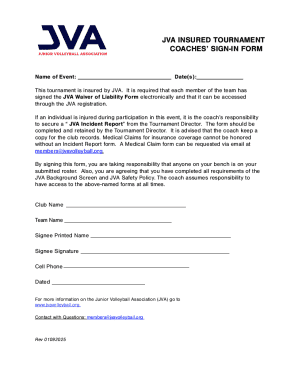
The Coaches' Sign-In Form is an activity participation document used by coaches to ensure compliance with necessary liability waivers and medical release forms for team participation in insured events.
pdfFiller scores top ratings on review platforms




Who needs Coaches Sign-In?
Explore how professionals across industries use pdfFiller.

Coaches Sign-In is needed by:
-
Youth Sports Teams
-
School Athletic Programs
-
Community Sports Organizations
-
Recreational Leagues
-
Coaching Staff
-
Event Organizers
Comprehensive Guide to Coaches Sign-In
What is the Coaches' Sign-In Form?
The Coaches' Sign-In Form is essential for sports teams, ensuring that all necessary liability waivers and medical release forms are completed before participation in events. This form is a crucial tool, helping coaches manage important documents and keeping a record of essential player information.
Key components of the Coaches' Sign-In Form include:
-
Definition of the form and its purpose.
-
The significance of liability waivers and medical release forms.
-
The primary responsibility of coaches in handling these documents.
Purpose and Benefits of the Coaches' Sign-In Form
This form is necessary for teams and events as it clarifies liability and insurance coverage for participants. By providing a structured way to gather player information, the Coaches' Sign-In Form ensures that essential medical conditions are known, thereby promoting safety during activities.
The benefits associated with using the form include:
-
Clearer understanding of liability and insurance implications.
-
Enhanced safety through awareness of medical conditions.
-
Streamlined documentation for coaches and event organizers.
Who Needs the Coaches' Sign-In Form?
The Coaches' Sign-In Form is intended for a variety of stakeholders in the sports community. This includes coaches managing youth and amateur sports teams as well as event organizers who require proof of waivers and medical clearances for participants.
Additionally, many sports organizations may mandate the use of this form to ensure compliance with safety regulations.
Key Features of the Coaches' Sign-In Form
The Coaches' Sign-In Form is designed to be user-friendly, featuring several important fields aimed at collecting essential data efficiently. Specific fields include:
-
Club Name
-
Team Name
-
Coach Printed Name
-
Coach Signature
-
Date
These fields come with clear instructions, simplifying the task of completing the form digitally via pdfFiller.
How to Complete the Coaches' Sign-In Form Online
Completing the Coaches' Sign-In Form online is a straightforward process. Follow these steps to ensure accurate completion:
-
Access the form using pdfFiller's platform.
-
Fill out each required field, ensuring all player information is accurate.
-
Include your printed name, signature, and date.
Double-check the form for completeness and correctness before submission to avoid processing delays.
Submission Methods for the Coaches' Sign-In Form
After completing the form, it is important to submit it correctly. There are several submission methods available:
-
Digital submission via pdfFiller’s platform.
-
Printing and submitting in-person at designated locations.
Be aware of any specific deadlines for submission to ensure timely processing and compliance.
Importance of Security and Compliance When Using the Coaches' Sign-In Form
Utilizing the Coaches' Sign-In Form involves critical considerations regarding security and compliance. pdfFiller employs advanced security measures, including encryption and data protection techniques, to safeguard sensitive participant information.
It's essential to remain compliant with regulations such as HIPAA and GDPR to protect the privacy of all individuals involved.
Common Errors When Filling Out the Coaches' Sign-In Form
To prevent delays during submission, users should be aware of common mistakes that may occur. These include:
-
Missing signatures or dates on the form.
-
Inaccurate team or player information.
Before finalizing the submission, reviewing the form can help catch and correct these errors.
Examples and Samples of the Coaches' Sign-In Form
Visual references can be invaluable for understanding how to correctly fill out the Coaches' Sign-In Form. Examples of a properly completed form include:
-
Accurate entry of fields such as Club Name and Team Name.
-
Correct signatures and dates included.
Highlighting common pitfalls through these examples aids in preventing errors.
Effortless Completion with pdfFiller
Choosing pdfFiller to complete the Coaches' Sign-In Form enhances the experience significantly. The platform offers comprehensive features that simplify the process, including options for eSigning and easy editing.
With cloud-based accessibility, users can fill out the form anytime, making it a practical choice for coaches and organizers alike.
How to fill out the Coaches Sign-In
-
1.To access the Coaches' Sign-In Form on pdfFiller, visit the pdfFiller website and use the search bar to locate the form by name.
-
2.Once you find the form, click on it to open in the pdfFiller interface.
-
3.Before you begin filling out the form, gather all necessary information such as the club name, team name, and details for the coach's printed name and signature.
-
4.Start with the 'Club Name' field at the top of the form. Click on the box and enter the name of the club.
-
5.Next, navigate to the 'Team Name' field and input the assigned name of the team represented.
-
6.Continue to fill in the 'Coach Printed Name' by typing clearly into the designated area provided.
-
7.Proceed to the 'Coach Signature' field. You can either draw your signature using a mouse or touchpad, or you may upload a scanned copy of your signature.
-
8.In the 'Dated' section, click on the box to input the current date, ensuring it reflects the day of signing.
-
9.After completing all the fields, carefully review your entries for accuracy. Make sure all required fields are filled and properly signed.
-
10.Once satisfied with your form, you can finalize it by clicking on the 'Save' button in the top right corner of the interface.
-
11.You may opt to download the form as a PDF or submit it electronically via pdfFiller's submission features, ensuring you select the appropriate method for your needs.

Who is required to complete the Coaches' Sign-In Form?
The Coaches' Sign-In Form must be completed by coaches overseeing a team participating in an event. This ensures all team members have necessary waivers and medical releases signed.
What are the deadlines for submitting the form?
While specific deadlines may vary, it is recommended to complete and submit the Coaches' Sign-In Form well ahead of the event to ensure compliance and readiness for participation.
Can the Coaches' Sign-In Form be submitted electronically?
Yes, the Coaches' Sign-In Form can be completed online and submitted electronically through pdfFiller, enabling a quick and efficient method to maintain records.
What documents are necessary to complete the Coaches' Sign-In Form?
In addition to the form, you should have any necessary liability waivers, medical release forms, and personal identification available to fulfill completion requirements.
What common mistakes should I avoid when filling out this form?
Common mistakes include not signing the form, leaving required fields blank, or providing incorrect data such as team names. Always double-check your entries before submission.
How long does it take to process the submitted Coaches' Sign-In Form?
Processing times for the Coaches' Sign-In Form can vary based on the organization overseeing the event. Generally, it's advisable to confirm submission receipt as quickly as possible.
Are notarization and additional verification required for this form?
No, the Coaches' Sign-In Form does not require notarization. However, ensure that all information is accurately completed and verified for compliance.
Related Forms





Get the latest insights from our blog


If you believe that this page should be taken down, please follow our DMCA take down process
here
.
This form may include fields for payment information. Data entered in these fields is not covered by PCI DSS compliance.