
Last updated on
Oct 19, 2026

Get the free Department of Juvenile Justice Grievance Form
We are not affiliated with any brand or entity on this form

Fill out
Complete the form online in a simple drag-and-drop editor.

eSign
Add your legally binding signature or send the form for signing.

Share
Share the form via a link, letting anyone fill it out from any device.

Export
Download, print, email, or move the form to your cloud storage.
Why pdfFiller is the best tool for your documents and forms


End-to-end document management
From editing and signing to collaboration and tracking, pdfFiller has everything you need to get your documents done quickly and efficiently.
Accessible from anywhere
pdfFiller is fully cloud-based. This means you can edit, sign, and share documents from anywhere using your computer, smartphone, or tablet.
Secure and compliant
pdfFiller lets you securely manage documents following global laws like ESIGN, CCPA, and GDPR. It's also HIPAA and SOC 2 compliant.
What is Juvenile Grievance Form
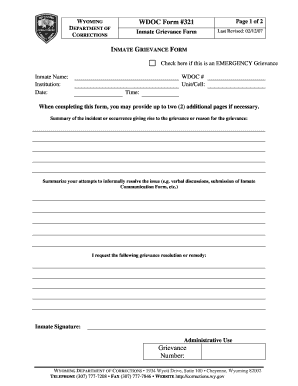
The Department of Juvenile Justice Grievance Form is a grievance document used by juveniles to report incidents within juvenile justice facilities.
pdfFiller scores top ratings on review platforms




Who needs Juvenile Grievance Form?
Explore how professionals across industries use pdfFiller.

Juvenile Grievance Form is needed by:
-
Juveniles seeking to report grievances
-
Juvenile Probation Supervisors reviewing incidents
-
Managers or Assistant Managers addressing complaints
-
Legal professionals assisting juveniles
-
Advocates for juvenile rights
-
Family members of juveniles in justice facilities
Comprehensive Guide to Juvenile Grievance Form
What is the Department of Juvenile Justice Grievance Form?
The Department of Juvenile Justice Grievance Form serves as a crucial tool for juveniles to report incidents and grievances experienced within juvenile justice facilities. This form is utilized primarily by individuals currently under juvenile supervision who wish to document concerns related to their treatment or environment. Signatures from all parties involved, including the juvenile and supervising officials, are required for the form to be valid, ensuring accountability in the grievance process.
Purpose and Benefits of the Department of Juvenile Justice Grievance Form
The grievance form provides numerous benefits for juveniles, facilitating the expression of concerns and fostering an environment of communication. By enabling structured documentation of grievances, it helps in the systematic resolution of issues pertinent to the juvenile justice system. Additionally, this documentation is essential for establishing a record that can be referenced in future evaluations, thereby enhancing oversight and improving conditions within juvenile facilities.
Key Features of the Department of Juvenile Justice Grievance Form
-
Includes fillable fields for essential information, ensuring clarity in communication.
-
Requires detailed descriptions of incidents, allowing users to articulate their grievances accurately.
-
Contains sections for outlining prior attempts at resolution, promoting transparency in conflict resolution.
-
Features PREA incident-related questions to address any potential violations within facilities.
-
Provides signature lines for juveniles, probation supervisors, and other officials involved in the grievance process.
Who Needs the Department of Juvenile Justice Grievance Form?
The grievance form is essential for various roles within the juvenile justice system. Both juveniles and probation supervisors are required to fill out the form in different contexts. Eligibility criteria generally include any juvenile currently under supervision or any supervisor involved in addressing grievances. This ensures all parties affected by incidents have a means of voicing their concerns formally.
How to Fill Out the Department of Juvenile Justice Grievance Form Online
To fill out the grievance form online using pdfFiller, follow these steps:
-
Access the pdfFiller platform and locate the grievance form template.
-
Fill in the required fields such as your name and the date the incident occurred.
-
Provide a detailed description of the incident in the designated section.
-
Check the relevant boxes for pre-designed sections including PREA inquiries.
-
Add signatures in the appropriate fields once the form is completed.
The pdfFiller platform features user-friendly tools that allow easy digital editing and signing, making the process efficient and accessible.
Submission Methods and Delivery for the Department of Juvenile Justice Grievance Form
There are multiple ways to submit the grievance form, including online submission via pdfFiller, in-person delivery to the appropriate office, or mailing the completed document. Users should be aware of any deadlines for filing grievances, as promptly addressing concerns is critical. Tracking submission status and receiving confirmation notifications ensures users are informed of the progress of their grievance.
Common Errors and How to Avoid Them When Filing the Department of Juvenile Justice Grievance Form
While filling out the grievance form, several common errors can occur. These may include incomplete fields, lack of necessary signatures, or unclear incident descriptions. To minimize these mistakes:
-
Review all entered information for accuracy before submission.
-
Check that all required fields are filled out completely.
-
Use a checklist of necessary steps to ensure all parts of the form are addressed.
Security and Compliance When Using the Department of Juvenile Justice Grievance Form
pdfFiller implements strict security measures to safeguard submitted documents, which is paramount when handling sensitive information. The platform complies with regulations such as HIPAA and GDPR, ensuring that user data and grievances are handled with the highest standards of confidentiality. This security is essential for protecting the personal information of juveniles and other parties involved in the grievance process.
What Happens After You Submit the Department of Juvenile Justice Grievance Form?
After submitting the grievance form, users can expect a structured response process. Typically, a designated official, such as a probation supervisor, is responsible for addressing the grievance within a set timeframe. The response may include an investigation into the claims made and an official reply outlining the findings and any actions taken.
Start Using pdfFiller to Handle Your Department of Juvenile Justice Grievance Form Today!
Utilizing pdfFiller enhances your experience in managing the Department of Juvenile Justice Grievance Form, providing an easy and secure method for document preparation. With capabilities for editing, eSigning, and securely sharing files, pdfFiller stands out as a valuable resource for effective document management in juvenile justice contexts.
How to fill out the Juvenile Grievance Form
-
1.Access the Department of Juvenile Justice Grievance Form on pdfFiller by searching for the form name in the pdfFiller search bar or navigating through the Government Forms category.
-
2.Once the form is open, familiarize yourself with the layout and available fields, noticing which areas require your input and signature.
-
3.Before completing the form, gather all necessary information, such as the incident details, dates, and previous attempts to resolve the grievance. Ensure you have the names and contact details of relevant parties.
-
4.Start filling in the form by entering your name and the date the incident occurred. Use clear, detailed language when describing the incident, including all necessary facts to support your grievance.
-
5.If the grievance relates to a PREA incident, make sure to indicate this by checking the appropriate box or providing a brief explanation.
-
6.Complete the fields designated for responses from a Juvenile Probation Supervisor and a Manager/Assistant Manager, if applicable. Remember to leave space for their signatures.
-
7.Once all fields are filled, thoroughly review the information for accuracy. Check spelling, grammar, and ensure all necessary details are provided.
-
8.Finalize the form by clicking on the save button in pdfFiller. You can download a copy for your records or choose to submit it directly through the platform if an online submission option is available.

Who is eligible to use the Department of Juvenile Justice Grievance Form?
The form is specifically for juveniles within juvenile justice facilities who wish to report grievances or incidents. Additionally, Juvenile Probation Supervisors and Managers can use it to respond to the grievances.
Is there a deadline for submitting this grievance form?
While specific deadlines may vary by facility, it is generally advised to submit the grievance form as soon as possible after the incident occurs to ensure timely processing.
How can the form be submitted?
The grievance form can be submitted through pdfFiller by utilizing the electronic submission option if available, or printed and physically delivered to the appropriate authority at the juvenile facility.
What supporting documents may be required with the grievance form?
While instances may differ, it is advisable to include any documentation that supports your grievance, such as incident reports, witness statements, or prior communication regarding the issue.
What are common mistakes to avoid when filling out the grievance form?
Ensure that you provide all required information, avoid vague descriptions of incidents, and double-check for spelling and grammar. Incomplete forms may lead to processing delays.
What is the processing time for grievances submitted using this form?
Processing times can vary based on the facility's policies and the complexity of the grievance. It’s recommended to inquire with facility staff for specific timelines.
Can family members help juveniles fill out this form?
Yes, family members can assist juveniles in completing the grievance form to ensure clarity and accuracy. However, ultimately, the grievances must reflect the juvenile's own experiences and concerns.
Related Forms



Get the latest insights from our blog


If you believe that this page should be taken down, please follow our DMCA take down process
here
.
This form may include fields for payment information. Data entered in these fields is not covered by PCI DSS compliance.