
Last updated on
Oct 19, 2026

Get the free Application for Building Permit
We are not affiliated with any brand or entity on this form

Fill out
Complete the form online in a simple drag-and-drop editor.

eSign
Add your legally binding signature or send the form for signing.

Share
Share the form via a link, letting anyone fill it out from any device.

Export
Download, print, email, or move the form to your cloud storage.
Why pdfFiller is the best tool for your documents and forms


End-to-end document management
From editing and signing to collaboration and tracking, pdfFiller has everything you need to get your documents done quickly and efficiently.
Accessible from anywhere
pdfFiller is fully cloud-based. This means you can edit, sign, and share documents from anywhere using your computer, smartphone, or tablet.
Secure and compliant
pdfFiller lets you securely manage documents following global laws like ESIGN, CCPA, and GDPR. It's also HIPAA and SOC 2 compliant.
What is Building Permit
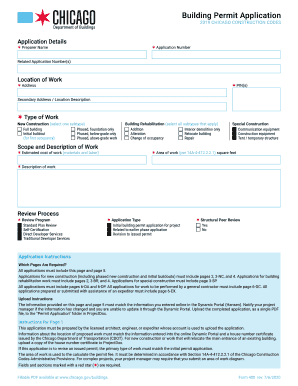
The Application for Building Permit is a government form used by residents and contractors to request permission for construction or renovation work in the City of Northlake, Illinois.
pdfFiller scores top ratings on review platforms




Who needs Building Permit?
Explore how professionals across industries use pdfFiller.

Building Permit is needed by:
-
Homeowners seeking to build or renovate their property
-
Contractors applying for permits on behalf of clients
-
Real estate developers planning construction projects
-
Architects submitting construction plans
-
Local government officials reviewing building permits
-
Business owners requiring renovations or expansions
-
Investors involved in development projects
Comprehensive Guide to Building Permit
What is the Application for Building Permit?
The Application for Building Permit is a crucial document in the city of Northlake, Illinois, required to obtain construction approval. Its primary function revolves around securing authorization for construction or renovation projects, ensuring compliance with local regulations.
The application necessitates specific fields to be filled out, including details about the property and contractor information. Additionally, signatures from both the applicant and the contractor are mandatory, establishing legal accountability for the submitted details.
Purpose and Benefits of the Application for Building Permit
Submitting the application for a building permit is fundamentally a legal requirement before initiating any construction work. This form of approval serves multiple benefits, such as enhancing safety and guaranteeing adherence to local building codes and standards.
Proceeding with construction without a permit can lead to significant consequences, including fines and mandated removal of unapproved work. Therefore, securing formal approval protects both the applicant and the contractor from potential legal repercussions.
Who Needs the Application for Building Permit?
Various individuals and entities must submit the application for a building permit. Key applicants typically include homeowners for residential projects and contractors overseeing commercial construction.
In some scenarios, other stakeholders, such as architects or engineers, may also need to ensure that the application reflects all necessary specifications. Different types of permits may apply based on whether the project is residential or commercial, necessitating tailored applications for each type.
Eligibility Criteria for the Application for Building Permit
Certain criteria dictate who can apply for this building permit. Applicants and contractors must possess specific qualifications related to their roles, ensuring they are equipped to navigate the construction approval process.
Moreover, property requirements related to location and zoning must be met. Additionally, contractors may face age or certification requirements to validate their capability to oversee the construction work.
How to Fill Out the Application for Building Permit Online (Step-by-Step)
To efficiently complete the application for a building permit, users should gather essential documents and information beforehand. Here’s a step-by-step guide to filling out the application electronically:
-
Collect necessary documents, such as property deeds and contractor licenses.
-
Access the online application platform and begin entering personal information.
-
Fill out property details, including address and zoning information.
-
Input contractor information, ensuring accuracy to avoid future issues.
-
Review all entries for completeness, especially fields requiring additional contractors.
-
Submit the application after ensuring all necessary signatures are provided.
Common Errors and How to Avoid Them When Submitting the Application for Building Permit
Applicants commonly encounter several mistakes when completing the form, which can delay the approval process. Identifying these frequent errors is vital for ensuring a smooth submission.
To avoid submission pitfalls, double-check all entered information for accuracy. Missing signatures can result in significant delays, emphasizing the importance of ensuring that both the applicant and contractor have properly signed the application.
Submission Methods and Delivery for Your Application for Building Permit
Users have multiple options for submitting their completed application, which includes in-person submission, online filing, or mailing the application to local offices. Each method provides flexibility based on user preference and convenience.
For further submission details, local offices offer specific instructions and deadlines, while processing times can vary. Applicants should consult the city’s official guidelines for the most accurate information regarding submission methods and timelines.
Fees and Payment Options for Filing the Application for Building Permit
The application process incurs several fees, which are integral to budget planning. Typical costs associated with a building permit vary by project type and size, and applicants should be aware of the payment methods available, including online options.
Some applicants may qualify for fee waivers or reductions based on specific criteria, helping to alleviate financial burdens associated with construction projects requiring permits.
What Happens After You Submit Your Application for Building Permit?
Once the application is submitted, it undergoes a review and approval process, during which the city evaluates the submission for compliance with local regulations. Applicants can typically expect feedback or approval within a defined timeframe.
Tracking the status of the application post-submission is crucial, as it allows applicants to stay informed about any required follow-up actions or adjustments necessary for approval.
How pdfFiller Can Help You with the Application for Building Permit
Utilizing pdfFiller can significantly simplify the process of completing the application for a building permit. With features like eSigning and cloud storage, users can fill out the form efficiently while ensuring their data remains secure.
Users benefit from accessing pdfFiller’s platform, which enhances document management. The strong security measures, including 256-bit encryption, ensure that sensitive information within applications is protected throughout the process.
How to fill out the Building Permit
-
1.Access the Application for Building Permit by visiting pdfFiller and searching for the form by its official name.
-
2.Open the form in the pdfFiller interface to begin filling it out, ensuring you have a stable internet connection.
-
3.Before completing the form, gather necessary information including your property address, type of construction or renovation work, and details about the contractor.
-
4.Start by entering the property details in the designated fields, ensuring accuracy to avoid processing delays.
-
5.Select the type of work you are applying for from a list of options provided in the form.
-
6.Fill in the contractor's information including their name, contact details, and license number. If additional contractors are involved, use a separate page to list them.
-
7.Provide the estimated cost of the construction job and the relevant permit fee in the specified sections.
-
8.Check all filled fields to ensure there are no blank areas or incomplete information that could hinder your application’s processing.
-
9.Review your completed Application for Building Permit thoroughly, confirming that all entries are correct and in compliance with local regulations.
-
10.Once satisfied, you can save your work within pdfFiller or choose to download a copy for your records before formal submission.
-
11.Submit the application as indicated in the form's instructions, which may require mailing or direct electronic submission through pdfFiller.

Who is eligible to submit the Application for Building Permit?
Homeowners, licensed contractors, and developers can submit the Application for Building Permit in Northlake, Illinois. Ensure that you have all necessary documentation, including contractor information and project details.
What is the processing time for the building permit application?
The processing time for the building permit application can vary depending on the details of the project. Typically, it can take several weeks, so it’s advisable to submit your application well in advance of planned construction.
What documents are required to submit with the application?
You will need to provide the completed Application for Building Permit form, any relevant contractor documentation, detailed project plans, and proof of property ownership. Check local guidelines for any additional requirements.
How do I submit my completed application?
You can submit your completed Application for Building Permit by following the instructions on the form. This usually involves mailing the application to the city or submitting it online, possibly via pdfFiller.
What common mistakes should I avoid when filling out this form?
Common mistakes include leaving fields blank, providing inaccurate contractor information, and failing to review the permit fees. Always double-check all entries to ensure they are correct before submission.
Are there any fees associated with the building permit application?
Yes, there is typically a fee associated with the Application for Building Permit. The fee amount can vary based on the type of project and should be calculated as part of the form submission process.
Can I modify my application after submission?
Modifying an application after submission may be possible, but it typically requires contacting the local building department. It’s best to make sure all information is correct before submission to avoid complications.
Related Forms




Get the latest insights from our blog



If you believe that this page should be taken down, please follow our DMCA take down process
here
.
This form may include fields for payment information. Data entered in these fields is not covered by PCI DSS compliance.