
Last updated on
Oct 19, 2026

Get the free Individual Emergency Plan Template
We are not affiliated with any brand or entity on this form

Fill out
Complete the form online in a simple drag-and-drop editor.

eSign
Add your legally binding signature or send the form for signing.

Share
Share the form via a link, letting anyone fill it out from any device.

Export
Download, print, email, or move the form to your cloud storage.
Why pdfFiller is the best tool for your documents and forms


End-to-end document management
From editing and signing to collaboration and tracking, pdfFiller has everything you need to get your documents done quickly and efficiently.
Accessible from anywhere
pdfFiller is fully cloud-based. This means you can edit, sign, and share documents from anywhere using your computer, smartphone, or tablet.
Secure and compliant
pdfFiller lets you securely manage documents following global laws like ESIGN, CCPA, and GDPR. It's also HIPAA and SOC 2 compliant.
What is Emergency Plan
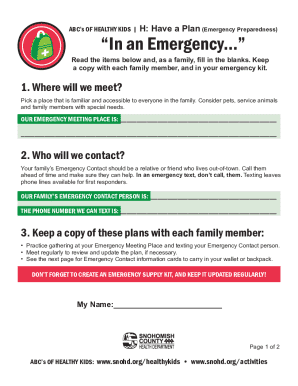
The Individual Emergency Plan Template is a personal form used by individuals and families to create a comprehensive emergency plan for disaster preparedness.
pdfFiller scores top ratings on review platforms




Who needs Emergency Plan?
Explore how professionals across industries use pdfFiller.

Emergency Plan is needed by:
-
Individuals looking to prepare for emergencies.
-
Families wanting to establish a safety plan.
-
Caregivers managing emergency procedures for dependents.
-
Pet owners needing to consider pets in emergency plans.
-
Community organizers developing emergency resources.
Comprehensive Guide to Emergency Plan
What is the Individual Emergency Plan Template?
The Individual Emergency Plan Template serves as a critical resource in disaster preparedness, designed to help individuals and families develop a comprehensive emergency plan. This template includes essential sections such as personal information, emergency contacts, and medical details, offering a structured approach to organizing vital information.
Among its various components, the template covers topics like managing medical conditions, listing medications, noting allergies, and including doctor and pharmacy information. Having an organized emergency plan can significantly enhance preparedness for unforeseen situations, ensuring that individuals are equipped to respond effectively.
Purpose and Benefits of the Individual Emergency Plan Template
Creating an emergency plan is essential for navigating unforeseen circumstances, such as natural disasters and accidents. The Individual Emergency Plan Template facilitates this process by consolidating necessary information in one easily accessible form. Users benefit from having a structured outline that promotes organization and preparedness, thereby fostering proactive behavior in stressful situations.
By utilizing this template, families can ensure that everyone knows their role during emergencies, as well as their evacuation routes and essential contacts. Thus, employing a personal emergency plan can significantly mitigate risks and enhance safety.
Key Features of the Individual Emergency Plan Template
The Individual Emergency Plan Template boasts various features aimed at improving user experience and efficiency. Key fields in the form include personal information, medical conditions, insurance details, and contact information for caregivers. These fields are designed to be fillable, making it user-friendly and accessible.
-
Fillable fields for essential data.
-
Guidelines for planning before, during, and after a disaster.
-
User-friendly design to encourage easy completion.
Who Needs the Individual Emergency Plan Template?
The Individual Emergency Plan Template caters to a diverse group of users, including individuals, families, and caregivers. Each profile, whether it be parents planning for children, caregivers looking after the elderly or pets, or solo travelers, can greatly benefit from customized emergency plans that correspond to their unique needs.
Customizing the template is vital, as it allows users to account for specific situations and health considerations, ensuring that the emergency plan is both practical and effective.
How to Fill Out the Individual Emergency Plan Template Online
Filling out the Individual Emergency Plan Template online is straightforward. Start by accessing the form and entering essential personal information, such as name, date of birth, and phone number. Follow with sections dedicated to medical information and contacts.
To streamline the process, users should gather necessary information, including medical histories and contact details, prior to starting. pdfFiller’s intuitive interface allows for efficient completion, enhancing the overall user experience.
Common Errors and How to Avoid Them
While completing the Individual Emergency Plan Template, users often encounter common errors that can hinder effectiveness. Incomplete fields and missing critical information are prevalent issues. To avoid such pitfalls, users should carefully review their entries before submission.
Double-checking all sections for accuracy ensures that the completed template is reliable and ready for emergencies. Validating the document against a checklist can significantly enhance its readiness for use.
Security and Compliance for the Individual Emergency Plan Template
Users can rest assured regarding the safety of their information when using the Individual Emergency Plan Template. pdfFiller implements robust security measures, including 256-bit encryption and HIPAA compliance, to safeguard personal data throughout the process.
Data protection is critical when handling sensitive documents, and pdfFiller ensures secure storage and sharing of completed forms, allowing users to trust the platform for their emergency planning needs.
How to Save and Share the Individual Emergency Plan Template
Once completed, managing the Individual Emergency Plan Template is simple. Users can download the form as a PDF, ensuring they have a copy for personal records. Additionally, options exist for sharing the completed template with family members or emergency contacts, promoting coordinated efforts during crises.
-
Download and save the template as a PDF.
-
Share with trusted family or emergency contacts.
-
Print a physical copy if needed for offline access.
Getting Started with pdfFiller for Your Emergency Plan
Getting started with pdfFiller for your emergency plan is a seamless experience that enhances the utility of the Individual Emergency Plan Template. pdfFiller offers various features, such as eSigning and cloud storage, making form completion more manageable.
Users benefit from pdfFiller’s capabilities, which streamline complex processes and help maintain organization, ultimately ensuring that users can focus on what matters most: being prepared for emergencies.
How to fill out the Emergency Plan
-
1.Access the Individual Emergency Plan Template on pdfFiller by visiting their website and entering the form name in the search bar.
-
2.Once you find the form, click on it to open in the pdfFiller editor.
-
3.Begin by gathering all necessary personal information, such as your name, date of birth, phone number, and any relevant medical details.
-
4.Use the fillable fields in the pdfFiller interface to enter your personal information accurately.
-
5.Navigate through the sections to complete emergency contacts, medical conditions, medication lists, and information about pets if applicable.
-
6.Read the guidelines provided within the form to understand what to include in your emergency plan.
-
7.Ensure all sections are filled out thoroughly to create a comprehensive plan.
-
8.After completing the form, review each section for accuracy and completeness.
-
9.Once satisfied with the information, save your work by clicking on the save button in the top-right corner.
-
10.You can download the form as a PDF or submit it directly through pdfFiller by selecting the appropriate option based on your needs.

Who is eligible to use the Individual Emergency Plan Template?
Anyone can use the Individual Emergency Plan Template, including individuals and families looking to create a personal emergency plan.
What information do I need to complete this form?
You will need personal details such as your name, contact information, medical conditions, medication lists, and emergency contacts to complete the form.
How do I submit the completed form?
You can submit the completed form through pdfFiller by using the submission option, or you can download it and submit it via email or print.
Are there any costs associated with using the Individual Emergency Plan Template?
Using pdfFiller may involve some fees depending on your subscription or access plan, but the form itself does not require any additional costs.
What are common mistakes to avoid when filling out the form?
Common mistakes include leaving fields blank, providing outdated information, and not reviewing the plan thoroughly before finalizing it.
How can I ensure the information is accurate and up-to-date?
Regularly review and update the information on your emergency plan, especially after any significant life changes or emergencies.
Can I add additional information to the form?
Yes, you can often add notes or additional sections by using the provided options in pdfFiller to ensure all necessary details are included.
Related Forms



Get the latest insights from our blog


If you believe that this page should be taken down, please follow our DMCA take down process
here
.
This form may include fields for payment information. Data entered in these fields is not covered by PCI DSS compliance.