
Last updated on
Oct 19, 2026

Get the free Secretary's Certificate
We are not affiliated with any brand or entity on this form

Fill out
Complete the form online in a simple drag-and-drop editor.

eSign
Add your legally binding signature or send the form for signing.

Share
Share the form via a link, letting anyone fill it out from any device.

Export
Download, print, email, or move the form to your cloud storage.
Why pdfFiller is the best tool for your documents and forms


End-to-end document management
From editing and signing to collaboration and tracking, pdfFiller has everything you need to get your documents done quickly and efficiently.
Accessible from anywhere
pdfFiller is fully cloud-based. This means you can edit, sign, and share documents from anywhere using your computer, smartphone, or tablet.
Secure and compliant
pdfFiller lets you securely manage documents following global laws like ESIGN, CCPA, and GDPR. It's also HIPAA and SOC 2 compliant.
What is Secretary's Certificate
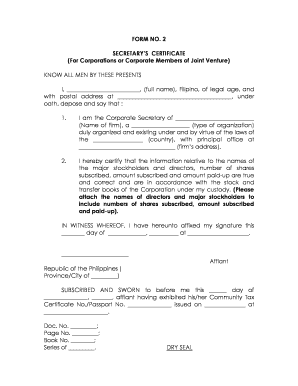
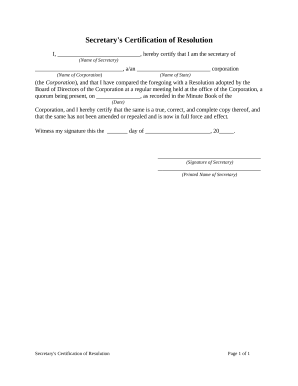
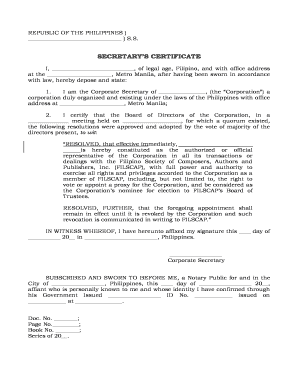
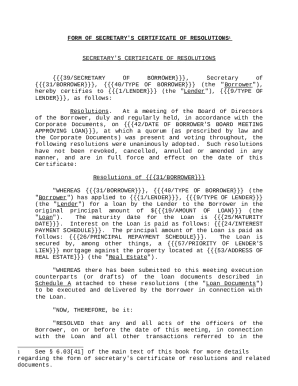
The Secretary's Certificate is a corporate document used by businesses to certify the authority of individuals to act on behalf of a corporation.
pdfFiller scores top ratings on review platforms




Who needs Secretary's Certificate?
Explore how professionals across industries use pdfFiller.

Secretary's Certificate is needed by:
-
Corporate Secretaries who need to verify signers
-
Business owners requiring documentation for transactions
-
Legal professionals managing corporate governance
-
Accountants needing proof of authority for financial matters
-
Investors seeking reliable information on corporate structure
-
Any representatives engaging in corporate dealings
Comprehensive Guide to Secretary's Certificate
What is a Secretary's Certificate?
A Secretary's Certificate is a crucial document in corporate governance, certifying the authority of individuals to act on behalf of a corporation. It is issued by the corporate secretary, who plays a vital role in ensuring that the certificate reflects the organization’s governance and operational decisions. As a formal declaration, the Secretary's Certificate provides a legal framework within which corporate activities can safely operate.
This corporate secretary certificate is essential in various transactions, as it lends credibility and validation to the decisions made within the corporate structure, paving the way for clearer communication with stakeholders.
Purpose and Benefits of the Secretary's Certificate
The primary purpose of the Secretary's Certificate revolves around its common uses in corporate transactions, such as validating board resolutions or authorizing specific actions. Organizations leverage this document to ensure clarity, as it outlines the decisions made during official meetings.
Some key benefits include:
-
Providing legal assurance in corporate dealings.
-
Enhancing transparency in organizational procedures.
-
Establishing trust with third parties during transactions.
Key Features of the Secretary's Certificate
A Secretary's Certificate typically comprises several critical components and sections, including the date of issuance, the name of the corporation, and the specific actions being authorized. These features contribute to the legality and functionality of the document.
Moreover, it requires signatures from key personnel, such as the corporate secretary and authorized signers. Regular updates are necessary to keep the certificate in line with current governance practices.
Who Needs the Secretary's Certificate?
The Secretary's Certificate is often required by various entities and individuals, ranging from corporations and partnerships to individual authorized representatives. This document holds significant value for businesses, especially when establishing formal authority within their operations.
Entities that typically need a Secretary's Certificate include:
-
Corporations applying for loans.
-
Companies entering into contracts.
-
Organizations undergoing regulatory compliance assessments.
How to Fill Out the Secretary's Certificate Online
Completing the Secretary's Certificate online can simplify the process significantly. Here’s a step-by-step guide to accurately fill out the form:
-
Access the Secretary's Certificate form through a reliable platform.
-
Fill in the corporation's name and relevant details in the designated fields.
-
Detail the specific resolutions or actions being certified.
-
Provide the names and titles of authorized signers.
-
Review the information to ensure accuracy before submitting.
Common Errors and How to Avoid Them
When completing the Secretary's Certificate, users often encounter common errors that may lead to rejection. Some typical mistakes include:
-
Omitting critical information such as dates or names.
-
Incorrectly signing or missing signatures.
-
Failing to update the certificate regularly.
To ensure accuracy and completeness, consider using a review and validation checklist before finalizing your document.
How to Sign the Secretary's Certificate
Signing a Secretary's Certificate can involve different methods, including digital and wet signatures. Understanding the requirements for each type is crucial when finalizing the document.
Although notarization is not typically required, having a notarized signature can add an extra layer of authenticity in certain situations. Users should be informed about the requirements for digital signatures versus wet signatures to ensure compliance with organizational policies.
Where to Submit the Secretary's Certificate
Submission methods for the Secretary's Certificate may vary depending on the entity’s requirements. It is essential to be aware of relevant deadlines to prevent any delays.
Consider the following submission recommendations:
-
Review your organization’s submission policies.
-
Confirm receipt of your submission via email or tracking systems.
Security and Compliance for the Secretary's Certificate
Handling sensitive information within a Secretary's Certificate demands strong security measures to protect corporate data. Organizations must comply with data protection regulations, including HIPAA and GDPR, to safeguard their documentation practices.
This focus on privacy and data protection ensures that all individuals involved in processing the certificate have their information managed securely.
Experience Hassle-Free Document Management with pdfFiller
pdfFiller offers intuitive solutions for filling and managing the Secretary's Certificate with ease. Key capabilities include:
-
eSigning documents securely.
-
Sharing documents with stakeholders efficiently.
The platform's robust security features ensure that sensitive corporate documents are handled safely, allowing users to focus on their business activities without worry.
How to fill out the Secretary's Certificate
-
1.Access pdfFiller and log in to your account, or create a new one if necessary.
-
2.Search for 'Secretary's Certificate' using the search bar to locate the form in the template library.
-
3.Once you find the form, click on it to open the fillable version.
-
4.Review the fields available in the form, which include the corporation's name, details of authorized signers, and their titles.
-
5.Gather necessary information, such as the corporation's legal name, the names of individuals authorized to sign, and their official titles.
-
6.Click on each fillable field to enter the corresponding data. Use drop-down menus where applicable to ensure accuracy.
-
7.Make sure to check for any required signatures as indicated within the document.
-
8.After filling out all necessary fields, carefully review the completed form for any errors or omissions.
-
9.Use pdfFiller's editing tools if you need to make corrections before finalizing the document.
-
10.Once satisfied with the information you provided, you can save your form for future edits or download it in your preferred format.
-
11.To submit the form, click on the 'Submit' button if the template allows for direct submission or follow instructions for email or physical submission.

Who is eligible to use the Secretary's Certificate?
Typically, any corporate secretary or authorized representative of a business entity can use the Secretary's Certificate to confirm the authority of signers. It's essential to have proper corporate governance in place.
What is the deadline for submitting a Secretary's Certificate?
The Secretary's Certificate does not have a universal submission deadline but must be completed before engaging in transactions that require proof of authority, such as opening bank accounts or signing contracts.
How do I submit the Secretary's Certificate once completed?
You can submit the completed Secretary's Certificate according to the requirements of the receiving entity, either by printing and delivering it physically or by emailing it, if accepted.
What supporting documents might be required with this form?
While the Secretary's Certificate itself serves as a key document, you may need to provide additional documents like articles of incorporation or an organizational chart depending on the context of use.
What are common mistakes to avoid when filling out the Secretary's Certificate?
Ensure all information is accurate, especially the names and titles of signers. Missing signatures or incorrect corporate details are common errors that can delay processing.
How long does it take to process a Secretary's Certificate?
Processing times can vary based on the receiving institution's requirements. It's recommended to allow for extra time prior to any transaction deadlines.
Do I need to notarize the Secretary's Certificate?
No, notarization is typically not required for a Secretary's Certificate, unless specified by the organization or in specific legal circumstances.
Related Forms



Get the latest insights from our blog


If you believe that this page should be taken down, please follow our DMCA take down process
here
.
This form may include fields for payment information. Data entered in these fields is not covered by PCI DSS compliance.