
Last updated on
Oct 7, 2026

Get the free Pre-Operative Assessment Form
We are not affiliated with any brand or entity on this form

Fill out
Complete the form online in a simple drag-and-drop editor.

eSign
Add your legally binding signature or send the form for signing.

Share
Share the form via a link, letting anyone fill it out from any device.

Export
Download, print, email, or move the form to your cloud storage.
Why pdfFiller is the best tool for your documents and forms


End-to-end document management
From editing and signing to collaboration and tracking, pdfFiller has everything you need to get your documents done quickly and efficiently.
Accessible from anywhere
pdfFiller is fully cloud-based. This means you can edit, sign, and share documents from anywhere using your computer, smartphone, or tablet.
Secure and compliant
pdfFiller lets you securely manage documents following global laws like ESIGN, CCPA, and GDPR. It's also HIPAA and SOC 2 compliant.
What is Pre-Op Assessment
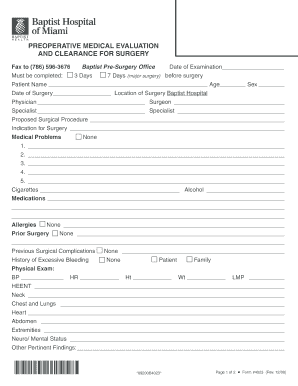
The Pre-Operative Assessment Form is a healthcare document used by physicians in British Columbia to evaluate a worker's medical condition before surgery.
pdfFiller scores top ratings on review platforms




Who needs Pre-Op Assessment?
Explore how professionals across industries use pdfFiller.

Pre-Op Assessment is needed by:
-
Physicians conducting pre-operative assessments
-
Workers undergoing surgery in British Columbia
-
Medical facilities requiring surgery-related assessments
-
Claim officers at WorkSafeBC
-
Administrative staff managing surgery documentation
Comprehensive Guide to Pre-Op Assessment
What is the Pre-Operative Assessment Form?
The Pre-Operative Assessment Form is a crucial document used in British Columbia to evaluate a worker's medical condition before surgery. This assessment plays a vital role in ensuring patient safety, as it helps physicians identify any potential health risks that could arise during the surgical process. The form is typically completed by physicians based on the medical history and current health status of the worker, providing a comprehensive overview necessary for safe surgical clearance.
Benefits of Using the Pre-Operative Assessment Form
Utilizing the Pre-Operative Assessment Form offers numerous advantages for both workers and physicians. First, it streamlines the process of obtaining surgical clearance by facilitating clear communication of medical histories. Second, it effectively helps identify any existing health risks that may affect the surgery. This form ensures that physicians have a thorough collection of medical histories and current medications, thereby promoting safety during the surgical procedure.
Who Needs the Pre-Operative Assessment Form?
The Pre-Operative Assessment Form is essential for workers undergoing specific surgical procedures that require evaluation. Workers who are filing a claim under WorkSafeBC are typically required to complete this form. Physicians play a key role in the process by filling out the necessary portions of the form, particularly for surgeries mandated by local regulations.
How to Fill Out the Pre-Operative Assessment Form Online (Step-by-Step)
Completing the Pre-Operative Assessment Form online via pdfFiller is a straightforward process. Here’s a step-by-step guide:
-
Access the form and start filling in the personal information section.
-
Complete detailed medical history, including allergies and current medications.
-
Fill out the sections requiring checkboxes and signature fields.
-
Review all entries for accuracy before submission.
Field-by-Field Instructions for the Pre-Operative Assessment Form
Each section of the Pre-Operative Assessment Form is designed for specific information gathering. Critical fields include:
-
Personal information such as name and date of birth.
-
Comprehensive medical history that must include any allergies and medications taken.
-
Details related to the physician's examination findings.
Submission Methods for the Pre-Operative Assessment Form
After completing the Pre-Operative Assessment Form, several submission methods are available. Users can fax the completed form to WorkSafeBC or the designated surgical facility. To ensure smooth processing, it’s essential to verify that the form is sent accurately and securely, maintaining confidentiality throughout the submission process.
Common Pitfalls and How to Avoid Them When Completing the Pre-Operative Assessment Form
When filling out the Pre-Operative Assessment Form, it’s important to avoid common mistakes. These include:
-
Leaving sections blank or providing incomplete information.
-
Forgetting to include necessary signatures from the physician or worker.
-
Failing to double-check the entries before submission.
Resources are available for users needing assistance with the process to minimize errors.
Security and Compliance When Handling the Pre-Operative Assessment Form
Handling the Pre-Operative Assessment Form involves ensuring the safety of sensitive information. pdfFiller provides robust security features, such as 256-bit encryption and HIPAA compliance. These measures are crucial for protecting the privacy of both workers and physicians during the submission process, thus ensuring compliance with relevant regulations.
Final Steps After Submitting the Pre-Operative Assessment Form
Once the Pre-Operative Assessment Form is submitted, users can anticipate certain timelines for responses from WorkSafeBC or medical facilities. It is advisable to track the status of the form carefully and remain aware of potential follow-up steps or corrections that may be required if issues arise.
Simplify Your Pre-Operative Assessment Process with pdfFiller
pdfFiller can greatly enhance the experience of filling out the Pre-Operative Assessment Form. The platform offers features such as editing, eSigning, and easy sharing options that facilitate form completion. Users can take advantage of these tools to make the process smoother and more efficient.
How to fill out the Pre-Op Assessment
-
1.To access the Pre-Operative Assessment Form on pdfFiller, go to the pdfFiller website and log in or create an account if you don’t have one.
-
2.Once logged in, use the search bar to find the 'Pre-Operative Assessment Form' by entering the form name directly.
-
3.After locating the form, click on it to open it in the pdfFiller editor interface.
-
4.Gather all necessary information before you begin filling out the form, including personal details, medical history, and any relevant claim information.
-
5.Start filling in the form by clicking on the fields to enter text. You can also use checkboxes where applicable for sections such as allergies, medications, and lab work.
-
6.As you complete the form, ensure that you refer to the provided instructions for guidance on how to fill out each section correctly.
-
7.After entering all required information and ensuring accuracy, review the entire form for any missed fields or errors.
-
8.Once you are satisfied with the form's content, you can save your progress or download it as a PDF.
-
9.To submit the completed form, you can fax it directly to WorkSafeBC and the surgical facility as indicated in the instructions.

Who needs to fill out the Pre-Operative Assessment Form?
The form must be filled out by the worker undergoing surgery and assessed by the physician to evaluate the worker's medical condition.
What information is required to complete this form?
You'll need the worker's personal and claim information, medical history, details of any allergies, medications currently used, and lab work results.
How do I submit the form after completion?
Submit the completed Pre-Operative Assessment Form via fax directly to WorkSafeBC and the surgical facility as per the guidelines stated in the form.
Are there any specific deadlines for filling out this form?
Typically, it’s advisable to complete and submit the Pre-Operative Assessment Form well before the scheduled surgery date to ensure timely processing.
Do I need to have the form notarized?
No, the Pre-Operative Assessment Form does not require notarization; however, it must be signed by both the physician and the worker.
What are common mistakes to avoid when filling out this form?
Common mistakes include leaving fields blank, entering incorrect information, and not providing necessary medical history details.
How long does it take for the form to be processed?
Processing times can vary, but typically you should allow several working days for the pre-operative assessment to be reviewed by WorkSafeBC and the surgical facility.
Related Forms





Get the latest insights from our blog


If you believe that this page should be taken down, please follow our DMCA take down process
here
.
This form may include fields for payment information. Data entered in these fields is not covered by PCI DSS compliance.