
Last updated on
Oct 19, 2026

Get the free Climatogram Activity Biome Distribution
We are not affiliated with any brand or entity on this form

Fill out
Complete the form online in a simple drag-and-drop editor.

eSign
Add your legally binding signature or send the form for signing.

Share
Share the form via a link, letting anyone fill it out from any device.

Export
Download, print, email, or move the form to your cloud storage.
Why pdfFiller is the best tool for your documents and forms


End-to-end document management
From editing and signing to collaboration and tracking, pdfFiller has everything you need to get your documents done quickly and efficiently.
Accessible from anywhere
pdfFiller is fully cloud-based. This means you can edit, sign, and share documents from anywhere using your computer, smartphone, or tablet.
Secure and compliant
pdfFiller lets you securely manage documents following global laws like ESIGN, CCPA, and GDPR. It's also HIPAA and SOC 2 compliant.
What is Biome Climatogram
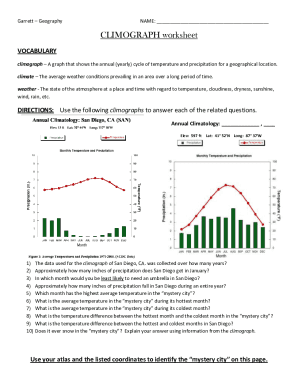
The Climatogram Activity Biome Distribution is an educational template used by students and teachers to investigate climate patterns and biome distribution globally.
pdfFiller scores top ratings on review platforms




Who needs Biome Climatogram?
Explore how professionals across industries use pdfFiller.

Biome Climatogram is needed by:
-
Students studying climate science
-
Teachers in environmental education
-
Researchers focusing on biomes
-
Schools offering geography courses
-
Educational practitioners in academia
Comprehensive Guide to Biome Climatogram
Understanding the Climatogram Activity Biome Distribution
The Climatogram Activity Biome Distribution is designed to provide a comprehensive overview of climate patterns and their impact on biome distribution globally. This activity aids in understanding crucial environmental concepts through the analysis of climatograms.
It defines the relationship between temperature, rainfall, and various biomes. The significance of this activity lies in its ability to convey how climatograms serve as a vital tool for studying climate variations and their effects on ecological distributions.
Rainfall and temperature data are fundamental to understanding climate and biomes, making this activity an essential educational resource.
Purpose and Benefits of the Climatogram Activity
This climatogram activity promotes a deeper understanding of environmental science among students and educators. Its advantages are multifaceted, providing valuable insights into biome characteristics.
Students benefit from analyzing various biomes, which enhances their critical thinking and analytical skills. The real-world applications of this activity extend into environmental studies, illustrating the significance of climate patterns in ecological understandings.
Key Features of the Climatogram Activity Biome Distribution
The activity template includes nine diverse example climatograms that allow users to explore various environmental conditions. Each climatogram comes with associated analysis questions, promoting greater engagement and comprehension.
-
User-friendly format with step-by-step guidelines for completion.
-
Engaging materials designed to facilitate deep learning.
Who Should Use the Climatogram Activity Biome Distribution?
The climatogram activity is beneficial for a variety of users, including students and educators focusing on environmental science. Researchers exploring climate patterns and ecological distributions will also find this tool invaluable.
Additionally, educational institutions seeking a structured approach to teaching about climates and biomes can effectively incorporate this activity into their curriculum.
How to Fill Out the Climatogram Activity Biome Distribution Online
To effectively complete the climatogram activity using pdfFiller, follow these step-by-step instructions:
-
Access the climatogram template on pdfFiller.
-
Enter the required data in the designated fields for rainfall and temperature.
-
Utilize the analysis questions to guide your evaluation of biome comparisons.
Field-by-field breakdown ensures that users understand what specific data to enter, resulting in more accurate analysis and conclusions about biome distribution.
Reviewing and Validating Your Climatogram Activity Submission
Before finalizing your climatogram submission, it's critical to ensure its accuracy. Start by using a checklist that highlights common errors to look for in your data entry and analysis responses.
-
Review all data carefully to avoid mistakes.
-
Confirm analysis responses are clearly articulated and relevant.
This validation process is essential for gaining a correct understanding of biome distributions.
Why Choose pdfFiller for Your Climatogram Activity Needs?
pdfFiller offers unique advantages for completing the climatogram activity. Its features such as edit, eSign, save, and share capabilities make it an ideal choice for both students and educators.
The user experience is intuitive, allowing for easy navigation and editing. Furthermore, pdfFiller implements robust security measures to protect sensitive educational data, ensuring a secure environment for your submissions.
What Happens After You Submit Your Climatogram Activity?
Once you have completed the climatogram activity, it's important to understand how to store and utilize your climatograms for further analysis. Retaining copies and supporting materials can enhance future studies on climate and biome relationships.
Suggestions for expanded research can help connect the findings from your climatograms to broader environmental contexts.
Enhancing Your Learning with a Sample Completed Climatogram Activity
For a clearer understanding, reviewing a sample completed climatogram activity can prove beneficial. This example provides insights into how to interpret data effectively.
By analyzing the sample, users can gain practical insights that can be applied to their own climatograms, enhancing their learning experience.
Get Started With Your Climatogram Activity Today!
Begin your journey into understanding climate and biomes with pdfFiller. Explore the functionalities of this platform to fill out your climatogram activity efficiently.
The ease of use, combined with high-level security features, offers a seamless experience for all users eager to learn about climate patterns through practical application.
How to fill out the Biome Climatogram
-
1.To access the Climatogram Activity Biome Distribution form, go to pdfFiller's website and search for the form name in the search bar.
-
2.Once you find the form, click on it to open in the pdfFiller editor. You will see the form sections where you can enter your information.
-
3.Before completing the form, gather necessary data including temperature and precipitation information for your chosen location.
-
4.Start by filling out your name, date, and period in the designated fields found at the top of the form.
-
5.Proceed to the provided climatograms and examine the data. Use the instructions to plot climate data for your selected location accurately.
-
6.To fill in the climatogram fields, simply click on each blank field and input the corresponding numbers for temperature and precipitation.
-
7.After entering all required data, review your answers and ensure all fields are completed accurately and clearly.
-
8.Once satisfied with your form, use pdfFiller’s tools to save your work. Click on the save icon to keep your progress.
-
9.You can download the form by selecting the download option among the pdfFiller tools. If you need to submit, follow the submission instructions provided in the platform.
-
10.Complete the process by either printing the form or emailing it directly to your teacher or research supervisor from pdfFiller.

Who can use the Climatogram Activity Biome Distribution form?
The Climatogram Activity Biome Distribution form is primarily designed for students studying climate science, teachers in environmental education, and researchers. It is a valuable tool for anyone needing to analyze climate patterns and biomes.
What information do I need before starting the form?
Before filling out the Climatogram Activity, gather temperature and precipitation data for the location you wish to analyze. This information is essential for completing the climatogram accurately.
How do I submit the completed form?
After finishing your Climatogram Activity form on pdfFiller, you can submit it directly through the platform via email or download it for printing. Follow the platform's submission options for best results.
Are there any common mistakes to avoid when filling out the form?
Common mistakes include forgetting to fill in all blank fields and failing to input accurate temperature or precipitation data. Double-check your information before submission to ensure clarity and correctness.
What is the processing time for feedback on submitted forms?
Processing times can vary based on the recipient and their review procedures. It's recommended to allow a few days to a week for feedback after submission.
Is training required to use this form effectively?
No specific training is required to use the Climatogram Activity form. However, familiarity with climate data and basic form filling using pdfFiller will be beneficial.
Can I edit the form after saving it?
Yes, once saved on pdfFiller, you can reopen the form to edit or update your information at any time, making it easy to make corrections or adjustments.
Related Forms




Get the latest insights from our blog


If you believe that this page should be taken down, please follow our DMCA take down process
here
.
This form may include fields for payment information. Data entered in these fields is not covered by PCI DSS compliance.