
Last updated on
Oct 19, 2026

Get the free Prescription Refill Form
We are not affiliated with any brand or entity on this form

Fill out
Complete the form online in a simple drag-and-drop editor.

eSign
Add your legally binding signature or send the form for signing.

Share
Share the form via a link, letting anyone fill it out from any device.

Export
Download, print, email, or move the form to your cloud storage.
Why pdfFiller is the best tool for your documents and forms


End-to-end document management
From editing and signing to collaboration and tracking, pdfFiller has everything you need to get your documents done quickly and efficiently.
Accessible from anywhere
pdfFiller is fully cloud-based. This means you can edit, sign, and share documents from anywhere using your computer, smartphone, or tablet.
Secure and compliant
pdfFiller lets you securely manage documents following global laws like ESIGN, CCPA, and GDPR. It's also HIPAA and SOC 2 compliant.
What is Prescription Refill
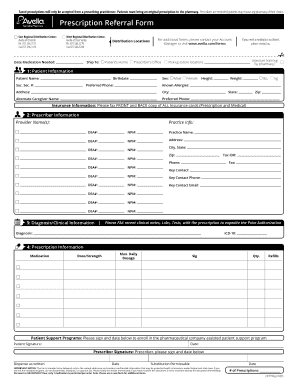
The Prescription Refill Form is a healthcare document used by patients to request refills for their medications.
pdfFiller scores top ratings on review platforms




Who needs Prescription Refill?
Explore how professionals across industries use pdfFiller.

Prescription Refill is needed by:
-
Patients who need medication refills
-
Pharmacies processing refill requests
-
Healthcare providers managing patient medications
-
Caregivers assisting patients with refills
-
Insurance companies verifying medication requests
Comprehensive Guide to Prescription Refill
What is the Prescription Refill Form?
The Prescription Refill Form is a crucial tool in healthcare that enables patients to request refills for their medications efficiently. This form gathers essential information needed for processing medication requests, including patient details such as name and date of birth, specific medication names, dosages, and pharmacy preferences. By completing this form, patients ensure their medication refill requests are organized and clearly communicated to the pharmacy.
Key information required on the prescription refill form encompasses personal identification and medication specifics, allowing healthcare providers a streamlined method to manage patient medication requests.
Purpose and Benefits of Using the Prescription Refill Form
Utilizing the prescription refill form significantly streamlines the medication refill process for patients. It provides a structured approach, making the request system organized and enhancing communication with pharmacies. By ensuring that all necessary details are included, patients reduce the likelihood of errors, leading to more efficient refills.
Benefits of this method include a shorter turnaround time for medication refills, improved accuracy in orders, and the ability for pharmacists to better prepare medications ahead of time, ultimately improving patient satisfaction.
Key Features of the Prescription Refill Form
The prescription refill form boasts essential components designed for user convenience. These include blank fields for personal and medication information, which allow patients to specify their needs clearly. The form also includes checkboxes for refill preferences, letting users indicate how they would like their prescriptions handled.
This user-friendly design allows patients to request multiple refills in one submission, optimizing the pharmacy's workflow and ensuring timely access to necessary medications.
Who Needs the Prescription Refill Form?
The prescription refill form is beneficial for various patients, including those on regular medications and caregivers managing prescriptions for others. Specific demographics, such as elderly patients or individuals with chronic illnesses, particularly benefit from this structured approach to medication management.
By using this form, these groups can enhance communication with pharmacies, ensuring that their unique needs are met and medications are replenished without delay.
How to Fill Out the Prescription Refill Form Online (Step-by-Step)
Filling out the prescription refill form online requires attention to detail to minimize errors. Follow these steps to complete the form accurately:
-
Access the prescription refill form through your healthcare provider's portal or the designated platform.
-
Enter your personal information, including your full name and date of birth, in the specified fields.
-
Provide details about the medication, such as the name, dosage, and the frequency of the refill.
-
Select your preferred pharmacy from the available options, or fill in the pharmacy's information manually if needed.
-
Review all entered information for accuracy before submitting the form.
These steps ensure a smooth submission process, minimizing the potential for common errors.
Submission Methods for the Prescription Refill Form
Patients have several options for submitting the completed prescription refill form to their pharmacies or healthcare providers. Submission methods include:
-
Emailing the form directly to the pharmacy.
-
Physically submitting the form in person at the pharmacy or healthcare facility.
-
Utilizing a healthcare portal for direct submission, which often streamlines the process.
These flexible submission options help accommodate different patient preferences and technological access.
Common Mistakes and How to Avoid Them When Submitting the Prescription Refill Form
When filling out the prescription refill form, patients often make some common mistakes that can delay processing. Recognizing these errors is crucial for a smooth refill experience. Common mistakes include:
-
Omitting required fields, such as the medication name or dosage.
-
Providing outdated pharmacy information.
-
Failing to review the form for typos or incorrect information.
To avoid these errors, it’s advisable to carefully review the form before submission, ensuring all information is complete and accurate, which can significantly enhance processing efficiency.
Security and Compliance When Using the Prescription Refill Form
Ensuring the security and compliance of the prescription refill form is paramount when handling sensitive patient information. pdfFiller emphasizes privacy and data protection, employing measures such as encryption and compliance with healthcare regulations, including HIPAA and GDPR.
These safeguards protect patient information throughout the refill request process, maintaining confidentiality and integrity while ensuring compliance with legal standards.
How pdfFiller Supports Your Prescription Refill Process
pdfFiller enhances the prescription refill process by providing a convenient platform for filling out, eSigning, and submitting the form. With its user-friendly interface, pdfFiller simplifies the form-filling experience by allowing easy edits, annotations, and secure submissions.
Additionally, its features cater to all user needs, making it easier for patients to manage their medication refills efficiently.
Start Your Medication Refills Easily with pdfFiller
By using pdfFiller for your prescription refill form, you can easily manage your medication refills. The platform offers intuitive tools for form completion and submission, simplifying the overall process. Take advantage of pdfFiller’s capabilities today to streamline your prescription management effectively.
How to fill out the Prescription Refill
-
1.Access the Prescription Refill Form on pdfFiller by visiting their website or searching for the form in their document library.
-
2.Open the form using the pdfFiller editor, which allows you to fill in the required fields easily.
-
3.Before you start filling out the form, make sure you have the necessary information ready, such as your name, date of birth, medication names, dosages, and your preferred pharmacy details.
-
4.Begin entering your personal information in the designated fields. Ensure that all details are accurate and current.
-
5.Carefully input each medication's information, including the name and dosage, into the specified areas on the form.
-
6.Look for checkboxes or options related to how you would like to receive your refills, such as calling the prescription into the pharmacy or mailing it.
-
7.After completing all fields, review your information to ensure there are no mistakes or omissions.
-
8.Finalize the form by checking each section once more for accuracy, including your preferences, and then proceed to save your changes.
-
9.Use the download option to save a copy of the completed form on your device or submit it directly to your pharmacy through the pdfFiller platform.

Who is eligible to use the Prescription Refill Form?
Any patient who has an ongoing prescription and needs a refill is eligible to use the Prescription Refill Form. It is designed for individuals managing their medication needs.
How do I submit the Prescription Refill Form?
You can submit the completed Prescription Refill Form by saving it and sending it directly to your pharmacy via email or fax, or by printing it out and delivering it in person.
What information do I need before filling out the form?
Gather your personal information, including your name and date of birth, along with the names and dosages of your medications and your pharmacy details to complete the form accurately.
How long does it take to process a refill request?
Processing times for refill requests can vary, but typically it takes 1-3 business days. Contact your pharmacy for specific timelines related to your request.
Can I request refills for multiple medications on one form?
Yes, the Prescription Refill Form allows you to request refills for multiple medications. Just be sure to fill out the details for each medication clearly.
What common mistakes should I avoid when filling out the form?
Ensure your personal information is correct, double-check your medication details, and don’t forget to specify your pharmacy preferences to avoid processing delays.
Is notarization required for the Prescription Refill Form?
No, notarization is not required for the Prescription Refill Form. It can be completed and submitted without a notary.
Related Forms



Get the latest insights from our blog


If you believe that this page should be taken down, please follow our DMCA take down process
here
.
This form may include fields for payment information. Data entered in these fields is not covered by PCI DSS compliance.