
Last updated on
Oct 19, 2026

Get the free Non-Medical Meal Modification Form
We are not affiliated with any brand or entity on this form

Fill out
Complete the form online in a simple drag-and-drop editor.

eSign
Add your legally binding signature or send the form for signing.

Share
Share the form via a link, letting anyone fill it out from any device.

Export
Download, print, email, or move the form to your cloud storage.
Why pdfFiller is the best tool for your documents and forms


End-to-end document management
From editing and signing to collaboration and tracking, pdfFiller has everything you need to get your documents done quickly and efficiently.
Accessible from anywhere
pdfFiller is fully cloud-based. This means you can edit, sign, and share documents from anywhere using your computer, smartphone, or tablet.
Secure and compliant
pdfFiller lets you securely manage documents following global laws like ESIGN, CCPA, and GDPR. It's also HIPAA and SOC 2 compliant.
What is Meal Modification Form
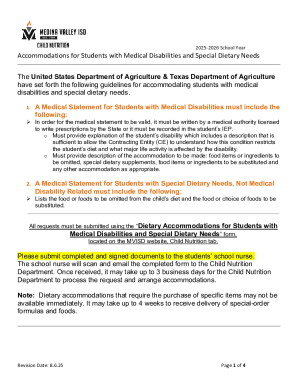
The Non-Medical Meal Modification Form is an education document used by parents or guardians to request dietary accommodations for children based on personal preferences in the New Orleans school district.
pdfFiller scores top ratings on review platforms




Who needs Meal Modification Form?
Explore how professionals across industries use pdfFiller.

Meal Modification Form is needed by:
-
Parents or guardians of students in Louisiana
-
School cafeteria managers processing dietary requests
-
Administrators in New Orleans school district
-
Dietary specialists assessing meal modifications
-
Students requiring dietary accommodations
-
Legal guardians involved in meal requests
Comprehensive Guide to Meal Modification Form
Understanding the Non-Medical Meal Modification Form
The Non-Medical Meal Modification Form is a critical document used in educational settings, particularly for parents or guardians in the New Orleans school district. This form plays a significant role in ensuring that students' dietary needs are met, focusing on personal, cultural, or religious preferences instead of medical conditions. Parents and guardians can use this form to communicate dietary accommodations directly to the school.
It is essential to recognize the form's relevance as it allows for tailored meal options that respect diverse dietary requirements, fostering an inclusive school environment.
Purpose and Benefits of the Non-Medical Meal Modification Form
Parents and guardians should utilize the Non-Medical Meal Modification Form to ensure their children receive meals that align with their specific dietary preferences. This document highlights the necessity of catering to personal, cultural, and religious dietary needs, which can significantly impact students' well-being and satisfaction during meal times.
By proactively submitting this form, families contribute to an accommodating school environment that respects individual dietary choices, promoting overall nutritional health for students.
Key Features of the Non-Medical Meal Modification Form
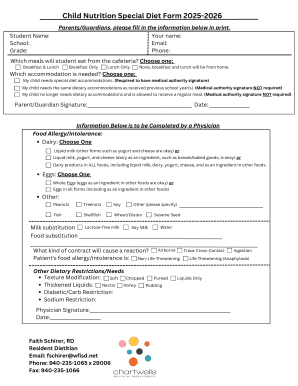
This form contains several essential sections designed to streamline the request process. Key features include:
-
Student information, including name and grade
-
Options for dietary preferences, allowing for customization
-
Signature requirements to ensure parental consent
The form can be easily submitted directly to the school’s cafeteria manager or via email, making it straightforward for parents and guardians to advocate for their children's dietary needs.
Who Needs the Non-Medical Meal Modification Form
The primary audience for the Non-Medical Meal Modification Form consists of parents or guardians in the New Orleans school district. It is important to identify specific scenarios that warrant dietary modifications, such as:
-
Students with vegetarian or vegan preferences
-
Children adhering to religious dietary laws
-
Individuals with specific cultural food practices
These scenarios highlight the importance of the form to accommodate diverse student needs.
How to Fill Out the Non-Medical Meal Modification Form Online (Step-by-Step)
Completing the Non-Medical Meal Modification Form online is a simple process. Follow these step-by-step instructions:
-
Access the form using pdfFiller.
-
Enter your child's information in the designated fields.
-
Select the appropriate dietary preferences by checking the relevant boxes.
-
Add your signature in the fields provided.
-
Review all entries for accuracy before submitting.
These steps ensure that the form is filled out correctly and efficiently.
Common Errors and How to Avoid Them
When filling out the Non-Medical Meal Modification Form, users often encounter common mistakes. Key issues include:
-
Missing or incomplete signatures
-
Incorrect selections for dietary preferences
To prevent these errors, it is advisable to double-check all entries before submission to ensure accuracy and completeness.
Submitting the Non-Medical Meal Modification Form
Once the form is completed, it is crucial to submit it correctly. There are two primary methods for submission:
-
Directly to the cafeteria manager at the school
-
Emailing the completed form to the designated address
After submission, it is important to follow up to confirm that the form has been processed and to address any further questions about dietary requests.
Security and Compliance When Using the Non-Medical Meal Modification Form
Handling sensitive documents like the Non-Medical Meal Modification Form requires a secure platform, such as pdfFiller. This platform ensures that personal data is protected through:
-
256-bit encryption
-
Compliance with HIPAA and GDPR regulations
Using secure platforms enhances the safety of submitting dietary preferences while maintaining compliance with privacy regulations.
Utilizing pdfFiller for Completing Your Form
pdfFiller offers numerous features that enhance the completion of the Non-Medical Meal Modification Form. Key capabilities include:
-
Editing and annotating options for customization
-
eSigning functionalities for secure submissions
By leveraging these features, users can efficiently manage their forms and ensure a smooth submission process.
Next Steps After Submission
After submitting the Non-Medical Meal Modification Form, users should be aware of the following actions:
-
Confirm the receipt of the form with school officials
-
Track the status of the request to ensure it's processed in a timely manner
If any corrections or amendments are necessary, promptly communicating with school staff will facilitate a smooth process.
How to fill out the Meal Modification Form
-
1.Visit pdfFiller and search for the Non-Medical Meal Modification Form using the search bar.
-
2.Click on the form to open it in the editing interface where you can view all available fields.
-
3.Gather necessary information such as your child's name, dietary preferences, and your contact details before starting the form.
-
4.Start by entering your child's full name in the designated field to identify the student.
-
5.Next, fill in your details as the parent or guardian, ensuring all contact information is accurate.
-
6.Locate the checkboxes in the form to indicate your child's dietary preferences, such as vegetarian or gluten-free.
-
7.Use pdfFiller’s tools to ensure your selections are clear and easy to read.
-
8.After completing all required fields, review the form carefully for any missing information or errors.
-
9.Once you are satisfied with the information provided, look for the signature line for the parent/guardian.
-
10.Use pdfFiller's e-signature feature to add your signature electronically.
-
11.After signing, save the completed form by choosing the appropriate option in pdfFiller.
-
12.Download a copy of the form for your records and ensure you have the final version ready for submission.
-
13.Submit the form electronically via the specified email address or print it out to hand deliver to the school's cafeteria manager.

Who is eligible to use the Non-Medical Meal Modification Form?
Parents or guardians of students enrolled in schools within the New Orleans district are eligible to use this form to request meal modifications based on dietary preferences.
Are there deadlines for submitting the form?
It is advisable to submit the Non-Medical Meal Modification Form before the start of the school year or at least two weeks prior to needing dietary accommodations. Check with your school's cafeteria manager for specific deadlines.
How can I submit the completed form?
You can submit the completed form by emailing it to the designated school cafeteria manager or by delivering a printed copy directly to the cafeteria at your child's school.
What supporting documents are required with this form?
Generally, no additional documents are required for the Non-Medical Meal Modification Form; however, confirming specific requirements with your school can be beneficial.
What are common mistakes to avoid when filling out the form?
Ensure all fields are completed before submitting, double-check contact information, and make sure signatures are included. Not using pdfFiller’s features effectively may lead to errors.
How long does it take to process the Non-Medical Meal Modification Form?
Processing times may vary but typically allow a few days for the school to review the request and communicate any needed changes or approvals.
Can I modify my request after submission?
Yes, if you need to change your dietary modification request after submission, it's best to contact the school cafeteria manager directly to discuss the updates.
Related Forms



Get the latest insights from our blog



If you believe that this page should be taken down, please follow our DMCA take down process
here
.
This form may include fields for payment information. Data entered in these fields is not covered by PCI DSS compliance.