
Last updated on
Oct 19, 2026

Get the free Community Development Block Grant Income Report
We are not affiliated with any brand or entity on this form

Fill out
Complete the form online in a simple drag-and-drop editor.

eSign
Add your legally binding signature or send the form for signing.

Share
Share the form via a link, letting anyone fill it out from any device.

Export
Download, print, email, or move the form to your cloud storage.
Why pdfFiller is the best tool for your documents and forms


End-to-end document management
From editing and signing to collaboration and tracking, pdfFiller has everything you need to get your documents done quickly and efficiently.
Accessible from anywhere
pdfFiller is fully cloud-based. This means you can edit, sign, and share documents from anywhere using your computer, smartphone, or tablet.
Secure and compliant
pdfFiller lets you securely manage documents following global laws like ESIGN, CCPA, and GDPR. It's also HIPAA and SOC 2 compliant.
What is CDBG Income Report
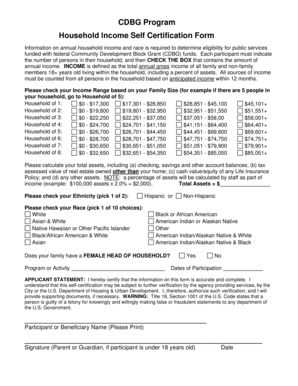
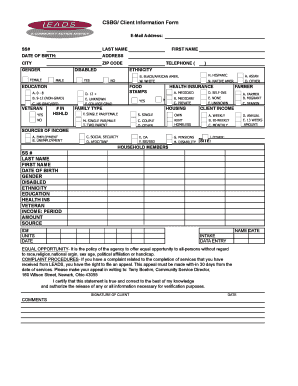
The Community Development Block Grant Income Report is an income verification form used by participants or guardians to document eligibility for assistance programs aimed at low and moderate-income families.
pdfFiller scores top ratings on review platforms




Who needs CDBG Income Report?
Explore how professionals across industries use pdfFiller.

CDBG Income Report is needed by:
-
Participants seeking assistance from community programs
-
Guardians of low-income households needing to report income
-
Local government agencies monitoring compliance with housing assistance regulations
-
Non-profit organizations assisting low-income families
-
Community development block grant administrators
-
Housing authorities evaluating household income
Comprehensive Guide to CDBG Income Report
What is the Community Development Block Grant Income Report?
The Community Development Block Grant Income Report serves as an essential document for low and moderate-income families in Massachusetts seeking government assistance. This form collects critical details regarding household demographics and income levels to ensure that aid reaches those who need it most. All data submitted is kept confidential, preserving the privacy of participants involved.
Key information gathered in this report includes the total household size, income level, and specific demographics. By completing this report, families verify their eligibility for assistance programs while maintaining compliance with federal regulations.
Purpose and Benefits of the Community Development Block Grant Income Report
Documenting household income through this report is crucial for accessing government resources available for low-income families. It serves not only to support applicants but also to ensure compliance with HUD income guidelines, which are vital for the sustainable development of communities across Massachusetts.
The data collected from this income verification form helps to optimize government funding and streamline access to necessary resources that enhance community welfare.
Who Needs to Complete the Community Development Block Grant Income Report?
This report is primarily intended for low-income families in Massachusetts, making it a vital tool for those who qualify for assistance. Participants or guardians play a crucial role in completing the report accurately, ensuring that all required information is provided.
Groups eligible to fill out the form range from single-parent households to large families, all aiming to secure their necessary assistance through proper income documentation.
How to Fill Out the Community Development Block Grant Income Report Online (Step-by-Step)
Completing the Community Development Block Grant Income Report online is a straightforward process using pdfFiller. Follow these steps to ensure your form is filled out correctly:
-
Access the form via the provided platform.
-
Fill in the required fields with accurate household information.
-
Review all entries for any inaccuracies.
-
Submit the completed form through the online portal.
This approach simplifies the filling process, allowing users to complete their income report swiftly and securely.
Field-by-Field Instructions for the Community Development Block Grant Income Report
Each section of the Community Development Block Grant Income Report requires specific details to ensure its validity. Here are some key fields to pay attention to:
-
Household Size: List all individuals residing in the home.
-
Income Level: Provide accurate and current total income figures.
-
Demographics: Include gender, age, nationality, and ethnicity information.
To avoid common errors, double-check the information entered and ensure all specified fields are complete.
Submission Methods and Delivery for the Community Development Block Grant Income Report
There are various methods available for submitting the Community Development Block Grant Income Report. Users can choose to submit online for faster processing or opt to mail their forms directly. Each method has its implications for delivery times and processing.
After submission, users should expect to receive confirmation of receipt and an estimated processing timeline. Ensuring accurate submission is crucial for maintaining assistance eligibility.
Consequences of Not Filing or Late Filing the Community Development Block Grant Income Report
Failure to submit or late submission of the Community Development Block Grant Income Report can have significant repercussions, including the potential loss of financial assistance. Timely filing is essential for compliance with HUD income guidelines and maintaining eligibility for much-needed support.
It's critical for participants to adhere to submission deadlines to avoid any disruption in assistance.
Security and Compliance When Handling the Community Development Block Grant Income Report
pdfFiller employs robust security measures to protect sensitive data associated with the Community Development Block Grant Income Report. Users can feel secure knowing that their information is safeguarded through 256-bit encryption and compliant with both HIPAA and GDPR standards.
This attention to security not only protects participant data but also reinforces trust in the form submission process.
Utilizing pdfFiller for the Community Development Block Grant Income Report
pdfFiller provides an array of features that enhance the user experience when completing the Community Development Block Grant Income Report. With capabilities such as eSigning, cloud-based access, and easy fillable forms, users can manage their documents more effectively.
Leveraging these capabilities can significantly simplify the form completion process, making it more efficient and user-friendly.
Common Errors and How to Avoid Them When Completing the Community Development Block Grant Income Report
Many users encounter common mistakes when filling out the Community Development Block Grant Income Report. To ensure successful completion, consider the following tips:
-
Verify all income figures before submission.
-
Ensure that all demographic information is accurately represented.
-
Check that no fields are left blank.
By following these practical tips, participants can help ensure their forms are filled out correctly and submitted without issues.
How to fill out the CDBG Income Report
-
1.To begin, navigate to pdfFiller's website and log into your account. Use the search feature to locate the 'Community Development Block Grant Income Report'.
-
2.Click on the form to open it in the pdfFiller editing interface. Familiarize yourself with the layout of the form and the available fields.
-
3.Before filling out the form, gather essential household information such as names, ages, income levels of all members, and any documentation required for income verification.
-
4.Fill in each field systematically. Start with the 'Agency' section, then systematically proceed to 'Household/Family Size', providing accurate data as prompted.
-
5.Continue to complete sections related to 'Income Level', 'Activity type income', and demographic fields such as 'Gender', 'Age', 'Nationality', and 'Ethnicity'. Make sure all entries are accurate to avoid delays.
-
6.If required, sign the form electronically in the designated 'Signature' field. Provide your name, date, and address in the appropriate areas ensuring clarity.
-
7.After completing the form, review all entries to confirm information is correct. Use pdfFiller's tools to edit or correct any mistakes.
-
8.Once satisfied with the completed form, choose your desired saving option—save it to your pdfFiller account, download it as a PDF, or decide to submit it through the platform as required.
-
9.If you opt to submit directly through pdfFiller, follow the prompts to ensure your form is sent to the appropriate agency or recipient.

Who is eligible to complete the Community Development Block Grant Income Report?
Eligibility typically includes low and moderate-income households applying for assistance programs. Participants or guardians representing these households must complete this form.
What supporting documents are required with this form?
Commonly required documents include proof of income, identification for all household members, and evidence of residency. Ensure you compile these before starting the form.
How is the Community Development Block Grant Income Report submitted?
The form can be submitted either online through pdfFiller or printed and delivered directly to the respective agency. Check local guidelines for submission methods.
Are there deadlines for submitting the income report?
Deadlines may vary depending on the assistance program. It's essential to check with the relevant agency or program for specific time-sensitive submission information.
What happens after I submit the Community Development Block Grant Income Report?
After submission, the form will be reviewed by the agency to determine eligibility for assistance, and you will be notified about the outcome, which may take some time.
What common mistakes should I avoid when filling this form?
Ensure all information is accurate and complete. Common mistakes include incorrect income figures, missing signatures, or failing to include all members of the household.
How can I ensure my information remains confidential?
Information provided on this form is kept confidential and typically is only shared within the agency for reporting and monitoring purposes, ensuring client privacy.
Related Forms




Get the latest insights from our blog


If you believe that this page should be taken down, please follow our DMCA take down process
here
.
This form may include fields for payment information. Data entered in these fields is not covered by PCI DSS compliance.