
Last updated on
Oct 19, 2026

Get the free Pennsylvania Workers\' Compensation Notice
We are not affiliated with any brand or entity on this form

Fill out
Complete the form online in a simple drag-and-drop editor.

eSign
Add your legally binding signature or send the form for signing.

Share
Share the form via a link, letting anyone fill it out from any device.

Export
Download, print, email, or move the form to your cloud storage.
Why pdfFiller is the best tool for your documents and forms


End-to-end document management
From editing and signing to collaboration and tracking, pdfFiller has everything you need to get your documents done quickly and efficiently.
Accessible from anywhere
pdfFiller is fully cloud-based. This means you can edit, sign, and share documents from anywhere using your computer, smartphone, or tablet.
Secure and compliant
pdfFiller lets you securely manage documents following global laws like ESIGN, CCPA, and GDPR. It's also HIPAA and SOC 2 compliant.
What is PA Workers' Comp Notice
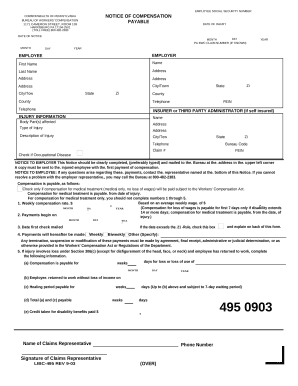
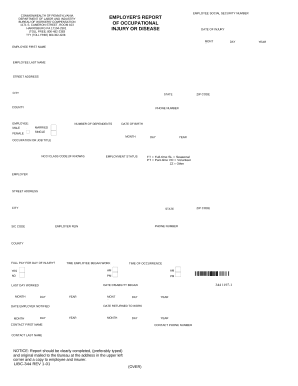
The Pennsylvania Workers' Compensation Notice is a notice template used by employers to inform employees about their rights and responsibilities regarding workers' compensation benefits.
pdfFiller scores top ratings on review platforms




Who needs PA Workers' Comp Notice?
Explore how professionals across industries use pdfFiller.

PA Workers' Comp Notice is needed by:
-
Employers in Pennsylvania who have employees
-
Employees seeking to understand their workers' compensation rights
-
Human resources professionals handling employee benefits
-
Legal advisors for workplace injury cases
-
Occupational safety officers
-
Workers' compensation claim adjusters
Comprehensive Guide to PA Workers' Comp Notice
What is the Pennsylvania Workers' Compensation Notice?
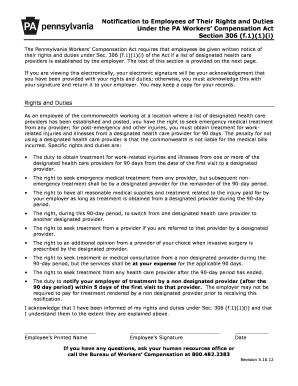
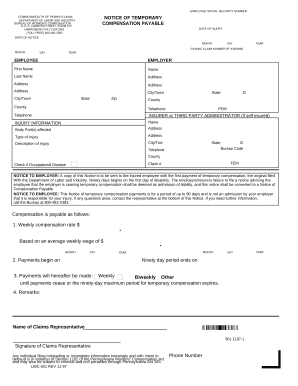
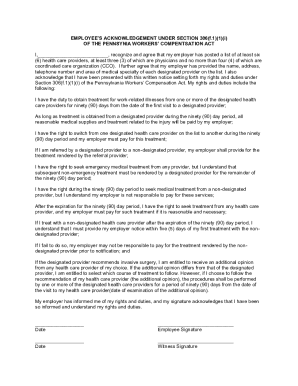
The Pennsylvania Workers' Compensation Notice serves as a vital document designed to inform employees about their rights and responsibilities under the Workers' Compensation Act in Pennsylvania. This workers compensation form outlines the essential information regarding injury reporting procedures and designated physicians who may provide medical treatment for work-related injuries.
The notice is crucial for ensuring that employees are aware of the necessary steps to take in the event of a workplace injury, thereby protecting their rights and facilitating access to benefits.
Purpose and Benefits of the Pennsylvania Workers' Compensation Notice
This notice highlights the rights and responsibilities that employees must understand to manage workplace injuries effectively. By utilizing the Pennsylvania Workers' Compensation Notice, both employers and employees can benefit from increased awareness regarding reporting protocols and benefits available under the law.
Understanding the designated physicians and accurate reporting procedures is essential for employees. Proper knowledge ensures that they can make informed decisions and take decisive actions in the event of an injury, thereby enhancing their PA workers comp rights.
Who Needs the Pennsylvania Workers' Compensation Notice?
The Pennsylvania Workers' Compensation Notice is essential for all employees and employers within the state. Employers must provide this notice to new hires, while it is especially important following any injury incidents in the workplace.
Having this notice readily available for employees ensures they have access to critical information regarding their rights and how to navigate the workers compensation acknowledgment process.
How to Fill Out the Pennsylvania Workers' Compensation Notice Online
To fill out the Pennsylvania Workers' Compensation Notice using pdfFiller, follow these steps:
-
Access the form within the pdfFiller platform.
-
Enter the employee's name in the designated field.
-
Provide necessary details such as date and time of the injury.
-
Ensure the employee signs the form digitally.
-
Review all entries for accuracy before finalizing.
Double-checking each field while completing the employee injury reporting process will help avoid common errors and ensure the form is submitted correctly.
Common Errors and How to Avoid Them when Completing the Pennsylvania Workers' Compensation Notice
When filling out the Pennsylvania Workers' Compensation Notice, employees may encounter several common errors. Frequent mistakes include:
-
Leaving required fields blank, such as the employee's name or injury details.
-
Incorrectly signing or omitting the signature altogether.
To prevent these errors, it's wise to review the form thoroughly before submission. Ensure all fields are completed accurately to avoid rejections.
How to Sign the Pennsylvania Workers' Compensation Notice
The signing requirements for the Pennsylvania Workers' Compensation Notice may vary. Employees can use digital signatures or wet signatures based on their preference and the employer's policies. To eSign the form via pdfFiller, follow these steps:
-
Open the completed notice in pdfFiller.
-
Select the eSign feature to add your signature.
-
Make sure to save a signed copy for your personal records.
Retaining a signed copy is important for tracking your submission and ensuring compliance with the requirements set forth by Pennsylvania law.
Where to Submit the Pennsylvania Workers' Compensation Notice
Proper submission of the Pennsylvania Workers' Compensation Notice is crucial. Employees should provide the completed form to their immediate supervisor or the human resources department within their organization. Adhering to submission deadlines is vital, especially following an injury incident to ensure that the case is processed in a timely manner.
Understanding the submission methods and who to contact within the employer's organization enhances the process's efficiency, ultimately protecting the employee's rights.
What Happens After You Submit the Pennsylvania Workers' Compensation Notice?
After submitting the Pennsylvania Workers' Compensation Notice, employees can expect a series of follow-up steps. Typically, acknowledgment of the submission will be communicated to the employee within a defined period. It is important to track your submission to ensure that it is received and processed promptly.
Following up on the notice also plays an essential role in determining any potential benefits that may be available as a result of the reported injury, thus safeguarding employees' rights.
Leveraging pdfFiller for Your Pennsylvania Workers' Compensation Notice
pdfFiller significantly simplifies the process of completing the Pennsylvania Workers' Compensation Notice. It provides users with a secure platform for filling, editing, and signing documents without needing downloads or additional software. Security features, including 256-bit encryption, ensure that sensitive information remains protected throughout the process.
Utilizing pdfFiller not only streamlines the completion of employee management forms but also enhances user convenience and compliance with security standards.
How to fill out the PA Workers' Comp Notice
-
1.To access the Pennsylvania Workers' Compensation Notice form on pdfFiller, navigate to the website and sign in to your account.
-
2.Use the search bar to find the Pennsylvania Workers' Compensation Notice form by entering the form name.
-
3.Once located, click on the form to open it in the pdfFiller editor.
-
4.Before filling out the form, gather necessary information such as the employee’s name, contact details, and information related to the workplace injury.
-
5.Fill in the employee’s name and other required fields by clicking on each text box and typing in the appropriate information.
-
6.Refer to the instructions provided within the form to complete sections about designated physicians and reporting procedures accurately.
-
7.After completing all necessary fields, review the entire form for any errors or missing information.
-
8.Once satisfied with the entries, click on the 'Finish' button to proceed to save, download, or submit the form.
-
9.To save, choose the 'Download' option if you want to keep a copy on your device or select 'Email' if you want to send it directly to someone.
-
10.If you need to share the form with others, use the 'Share' button to generate a shareable link.

What are the eligibility requirements for using the Pennsylvania Workers' Compensation Notice?
Any employer in Pennsylvania with employees is required to use this form to inform workers about their rights under workers' compensation laws.
Is there a deadline for providing the Pennsylvania Workers' Compensation Notice?
Employers must provide the Pennsylvania Workers' Compensation Notice as soon as an employee is hired or when injuries occur. Timely distribution helps ensure compliance with legal requirements.
How should I submit the Pennsylvania Workers' Compensation Notice?
The notice can be provided in person or via email. Make sure to obtain the employee's acknowledgment signature to ensure receipt and understanding of the document.
What supporting documents are needed with this form?
Typically, no additional documents are required when providing the Pennsylvania Workers' Compensation Notice. However, it’s advisable to retain any related medical reports for future reference.
What common mistakes should I avoid when filling out this form?
Ensure all information is accurate and complete, especially the employee's name and injury details. Forgetting to obtain the employee's signature can also lead to issues later on.
How long does it take to process the Pennsylvania Workers' Compensation Notice?
The form itself does not require processing time; however, employers should ensure timely distribution to employees upon hiring or when an injury arises.
Can the Pennsylvania Workers' Compensation Notice be modified?
Employers should not alter the standard wording of the form. Any modifications can violate compliance requirements under Pennsylvania's Workers' Compensation Act.
Related Forms





Get the latest insights from our blog


If you believe that this page should be taken down, please follow our DMCA take down process
here
.
This form may include fields for payment information. Data entered in these fields is not covered by PCI DSS compliance.