
Last updated on
Oct 19, 2026

Get the free Notice of Remote Hearing
We are not affiliated with any brand or entity on this form

Fill out
Complete the form online in a simple drag-and-drop editor.

eSign
Add your legally binding signature or send the form for signing.

Share
Share the form via a link, letting anyone fill it out from any device.

Export
Download, print, email, or move the form to your cloud storage.
Why pdfFiller is the best tool for your documents and forms


End-to-end document management
From editing and signing to collaboration and tracking, pdfFiller has everything you need to get your documents done quickly and efficiently.
Accessible from anywhere
pdfFiller is fully cloud-based. This means you can edit, sign, and share documents from anywhere using your computer, smartphone, or tablet.
Secure and compliant
pdfFiller lets you securely manage documents following global laws like ESIGN, CCPA, and GDPR. It's also HIPAA and SOC 2 compliant.
What is Remote Hearing Notice
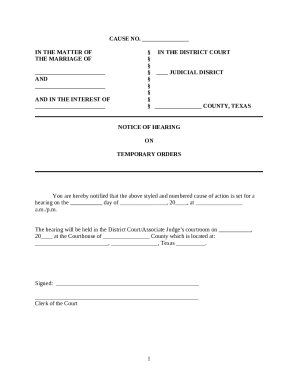
The Notice of Remote Hearing is a legal document used by Texas courts to inform involved parties about a scheduled remote court hearing via Zoom.
pdfFiller scores top ratings on review platforms




Who needs Remote Hearing Notice?
Explore how professionals across industries use pdfFiller.

Remote Hearing Notice is needed by:
-
Court coordinators who manage court scheduling.
-
Judges who need to notify parties of remote hearings.
-
Litigants involved in court cases requiring remote appearances.
-
Attorneys representing clients in Texas court.
-
Administrative staff in legal settings handling hearing protocols.
Comprehensive Guide to Remote Hearing Notice
What is the Notice of Remote Hearing?
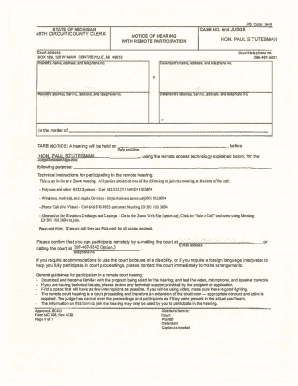
The Notice of Remote Hearing is a crucial legal document within Texas courts, primarily designed to inform parties of remote court hearings. This document not only stipulates the specific date and time of the hearing but also offers instructions for joining via Zoom, enhancing access to justice.
Key components of this document include fields that require essential information such as the scheduled date, time, and signatures from the Court Coordinator or Judge. Understanding the significance of the Notice of Remote Hearing ensures that all parties are appropriately informed and able to participate in their cases effectively.
Purpose and Benefits of the Notice of Remote Hearing
The primary purpose of the Notice of Remote Hearing is to increase accessibility for participants unable to attend court in person. By facilitating remote participation, this document allows for hearings to proceed smoothly without physical presence.
Benefits include considerable time and expense savings for all parties involved. Furthermore, the Notice ensures that every participant receives crucial information, such as the meeting ID and dial-in numbers, to join the hearing seamlessly.
Key Features of the Notice of Remote Hearing
This legal form is equipped with various features to enhance usability. It includes detailed instructions for joining the hearing via both video and phone, ensuring versatility for all users.
-
Instructions for virtual participation through Zoom.
-
Guidance on emailing proposed exhibits to both the court and opposing parties.
-
Designated fillable fields make the completion of the document straightforward.
Who Needs the Notice of Remote Hearing?
The Notice of Remote Hearing is essential for multiple key figures within Texas courts. Court coordinators and judges are primary users who ensure proper adherence to remote hearing protocols.
Any party involved in a Texas court case that necessitates a remote hearing must be notified adequately. It is vital that all involved parties receive this notice promptly to avoid any procedural delays.
How to Fill Out the Notice of Remote Hearing Online (Step-by-Step)
Follow these steps to fill out the Notice of Remote Hearing using pdfFiller effectively:
-
Access the form through pdfFiller's platform.
-
Enter the hearing date and time in the specified fields.
-
Provide all required signatures, ensuring accuracy.
-
Review the instructions for submitting proposed exhibits.
-
Validate the completed form before submission to check for any errors.
Utilizing pdfFiller’s features simplifies the editing process, making it user-friendly for legal professionals and clients alike.
Submission Methods and Delivery of the Notice of Remote Hearing
Once completed, the Notice of Remote Hearing can be submitted through various methods. Common submission options include emailing the document to the respective court or physical filing at the courthouse.
-
Email submissions to designated court addresses.
-
Physical filing at the appropriate courthouse location.
-
Confirmation of receipt is typically available for tracking submissions.
Timely submission is essential, and individuals should be aware of any associated filing deadlines to avoid complications.
Common Errors and How to Avoid Them When Filing
Filing the Notice of Remote Hearing can be straightforward; however, certain errors commonly occur. Awareness of these mistakes can help streamline the process.
-
Failing to include required signatures.
-
Omitting essential information such as the date and time.
-
Submitting proposed exhibits after the stipulated deadline.
Ensuring thorough checks for completeness and accuracy can mitigate these errors, while early filing allows for corrections if needed.
Security and Compliance when Handling the Notice of Remote Hearing
When dealing with the Notice of Remote Hearing, security is paramount. pdfFiller employs robust security measures to safeguard sensitive legal documents.
-
256-bit encryption to secure data transmission.
-
Compliance with regulations including HIPAA and GDPR.
-
Features focused on document management and editing security.
These precautions underline the importance of data protection in legal contexts, ensuring that all parties' information remains confidential.
How pdfFiller Can Help with the Notice of Remote Hearing
pdfFiller enhances the process of handling the Notice of Remote Hearing by offering a variety of user-friendly features. The platform simplifies the form-filling process with intuitive tools for users.
Additionally, its capacity to edit legal documents, coupled with a straightforward interface, provides an efficient solution for creating and managing legal notices. Users have reported high levels of satisfaction with pdfFiller’s easy-to-navigate system.
How to fill out the Remote Hearing Notice
-
1.Start by accessing pdfFiller from your web browser and sign in or create an account if you don't have one.
-
2.Search for 'Notice of Remote Hearing' in the template library or use the URL to locate the form directly.
-
3.Once the form is open, familiarize yourself with its layout, paying attention to the blank fields for the date, time, and signature.
-
4.Gather the necessary information such as the hearing date, time, meeting ID, and dial-in numbers before filling out the form.
-
5.Using your mouse or keyboard, click on each blank field to input the required information. Make sure to enter all details accurately.
-
6.Refer to the instructions included in the document for specifics on how to join the hearing and when to submit exhibits.
-
7.After completing the form, review all entries for accuracy, ensuring that all required fields are filled out and that your contact information is correct.
-
8.Once you've finalized the document, proceed to save your work, either in the cloud or download it directly to your device in PDF format.
-
9.Optionally, use pdfFiller's email feature to submit the completed form directly to the court and the opposing party before the hearing.

Who is required to sign the Notice of Remote Hearing?
The Notice of Remote Hearing must be signed by either the Court Coordinator or the Judge presiding over the case to be valid.
What information do I need before filling out the form?
You should gather the hearing date, time, the meeting ID for Zoom, dial-in numbers, and the relevant party's email addresses to complete the form accurately.
Are there any deadlines for submitting this notice?
Yes, all proposed exhibits must be emailed to the court and opposing parties at least 24 hours prior to the hearing date, so be mindful of this timeline when submitting.
Can I submit the Notice of Remote Hearing electronically?
Yes, you can complete and submit the Notice of Remote Hearing electronically using pdfFiller, which allows for easy sharing via email.
Is notarization required for this form?
No, the Notice of Remote Hearing does not require notarization, but it must be signed by the designated official.
What are common mistakes to avoid when filling out this form?
Common mistakes include missing required fields, entering incorrect dates or times, and failing to provide the correct meeting ID or contact information.
How long does it take to process this notice after submission?
Processing times may vary, but generally, the court will acknowledge receipt before the scheduled hearing date, so it’s best to submit the form as soon as possible.




Get the latest insights from our blog


If you believe that this page should be taken down, please follow our DMCA take down process
here
.
This form may include fields for payment information. Data entered in these fields is not covered by PCI DSS compliance.