
Last updated on
Oct 19, 2026

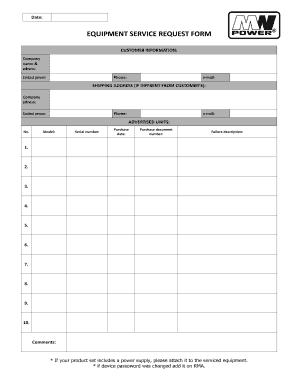
Get the free Vehicle Service Request Form
We are not affiliated with any brand or entity on this form

Fill out
Complete the form online in a simple drag-and-drop editor.

eSign
Add your legally binding signature or send the form for signing.

Share
Share the form via a link, letting anyone fill it out from any device.

Export
Download, print, email, or move the form to your cloud storage.
Why pdfFiller is the best tool for your documents and forms


End-to-end document management
From editing and signing to collaboration and tracking, pdfFiller has everything you need to get your documents done quickly and efficiently.
Accessible from anywhere
pdfFiller is fully cloud-based. This means you can edit, sign, and share documents from anywhere using your computer, smartphone, or tablet.
Secure and compliant
pdfFiller lets you securely manage documents following global laws like ESIGN, CCPA, and GDPR. It's also HIPAA and SOC 2 compliant.
What is Service Request
The Vehicle Service Request Form is a document used by customers to request vehicle maintenance or repair services.
pdfFiller scores top ratings on review platforms




Who needs Service Request?
Explore how professionals across industries use pdfFiller.

Service Request is needed by:
-
Vehicle owners seeking repair or maintenance services
-
Automotive service centers for scheduling repairs
-
Fleet managers needing maintenance logs
-
Insurance companies for vehicle damage assessments
-
Auto mechanics tracking service requests
Comprehensive Guide to Service Request
What is the Vehicle Service Request Form?
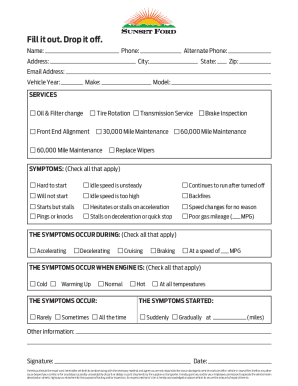
The Vehicle Service Request Form is essential for customers seeking automotive repair services. It serves the primary purpose of facilitating requests for vehicle maintenance and repairs. The form encompasses relevant fields that include vehicle details, specific service requests, and issues reported, allowing for efficient tracking by automotive service centers.
This form aids in the systematic organization of service requests, ensuring comprehensive information is collected from users, which is vital for effective service delivery.
Purpose and Benefits of the Vehicle Service Request Form
This form provides significant value to both customers and service centers. For customers, it streamlines the service request process, minimizing confusion and enhancing communication. Customers can easily convey their needs and issues, leading to a smoother experience.
Service centers benefit through improved organization and scheduling capabilities. By utilizing this automotive repair form, service centers can reduce errors, resulting in enhanced customer satisfaction and operational efficiency.
Key Features of the Vehicle Service Request Form
The Vehicle Service Request Form is designed with several key features to maximize usability. It includes numerous fillable fields and checkboxes that allow users to specify their needs clearly. Moreover, this form can be customized to cater to various types of service requests, accommodating the unique requirements of different vehicles.
Additionally, pdfFiller provides capabilities for cloud-based editing, making it easier for users to access and modify the form as needed.
How to Fill Out the Vehicle Service Request Form Online
Filling out the Vehicle Service Request Form online can be achieved through several steps. First, gather all necessary vehicle information, including the make, model, and any maintenance history.
-
Access the form using pdfFiller's platform.
-
Fill out the fields with detailed vehicle information.
-
Specify the service requested and any issues encountered.
-
Review all entries for accuracy.
-
Validate and ensure clear representation of the service needs.
Review and Common Errors to Avoid
Accuracy is critical when submitting the Vehicle Service Request Form. Common mistakes include providing incomplete vehicle details or vague service requests. To address this, double-check all information entered to ensure its correctness.
Communicating specific issues or requests clearly can prevent delays in service. It’s crucial to take the time to review the entries before submission to avoid complications.
How to Submit the Vehicle Service Request Form
Once the form is completed, there are various methods for submitting it. Users can choose to submit the form electronically through pdfFiller or print and submit it offline at their chosen service center. Confirmation and tracking of service requests should be clear to ensure users can monitor the progress of their requests.
Be aware of potential fees, deadlines, and processing times associated with the submission of the form, as these can vary by service center.
Security and Compliance Considerations
When using the Vehicle Service Request Form, security and compliance with regulations such as HIPAA, GDPR, and SOC 2 Type II are essential. pdfFiller employs 256-bit encryption to protect sensitive vehicle information, ensuring data remains secure during the submission process.
Users should also be advised on best practices for secure document handling to protect their information effectively.
How pdfFiller Helps Complete the Vehicle Service Request Form
pdfFiller enhances the process of completing the Vehicle Service Request Form by providing advanced editing and eSigning capabilities. Users can take advantage of the cloud-based platform for convenient editing and form submission.
Utilizing pdfFiller's features streamlines document management, allowing for easier updates and sharing of forms as needed.
Sample or Example of a Completed Vehicle Service Request Form
To aid users in completing their forms, a sample Vehicle Service Request Form is available as a reference. This sample includes filled-out sections that demonstrate how to present information clearly and effectively.
Users are encouraged to mimic the format and presentation seen in the sample to ensure consistency with the instructions provided in earlier sections.
Start Your Vehicle Service Request Today
Enjoy the ease of filling out the Vehicle Service Request Form online with pdfFiller. The platform offers secure, user-friendly options for completing and submitting your form, ensuring a hassle-free experience.
Taking advantage of pdfFiller's tools allows for greater convenience and enhances the overall process of vehicle maintenance management.
How to fill out the Service Request
-
1.To access the Vehicle Service Request Form, go to pdfFiller's website and use the search bar to locate the form by name.
-
2.Once you find the form, click on it to open it in the pdfFiller interface.
-
3.Before filling out the form, gather important vehicle information, such as the make, model, year, and any specific issues your vehicle is experiencing.
-
4.Begin by entering your personal contact information in the designated fields, including name, phone number, and email address.
-
5.Next, fill in the vehicle details section, providing accurate information about your vehicle.
-
6.Locate the service request section and specify the type of services you require, such as oil change, tire rotation, or brake repair.
-
7.Use checkboxes or fillable fields to indicate any specific issues or comments regarding your vehicle’s performance.
-
8.After completing all sections, review the form carefully to ensure all information is accurate and complete.
-
9.Make any necessary edits, and ensure that all mandatory fields are filled in before proceeding.
-
10.Once you're satisfied with your form, look for the options menu in pdfFiller to save or download your completed form.
-
11.You can also submit the form directly to your chosen automotive service center if they accept submissions through pdfFiller.

Who can use the Vehicle Service Request Form?
The Vehicle Service Request Form can be used by any vehicle owner needing repair or maintenance services. It's also utilized by automotive service centers and fleet managers.
Is there a deadline for submitting the form?
There is no universal deadline for submitting this form, but it is recommended to submit it as soon as possible to allow your service center to schedule your requested services promptly.
How can I submit the completed Vehicle Service Request Form?
You can submit the form by downloading it and either emailing it to your service center or using their online submission portal if available. Some centers may accept it directly through pdfFiller.
What supporting documents do I need for submission?
Typically, you do not need additional supporting documents to submit the Vehicle Service Request Form. However, if there are specific issues, such as warranty claims, additional documentation may be necessary.
What are common mistakes to avoid while filling this form?
Common mistakes include leaving mandatory fields blank, entering incorrect vehicle information, and failing to review the form before submission, which can lead to processing delays.
How long does it take to process the service request?
Processing times can vary by service center, but typically, you should expect a response within one to three business days after submission.
Do I need to notarize the Vehicle Service Request Form?
No, notarization is not required for the Vehicle Service Request Form. It is a straightforward request form meant for service scheduling.
Related Forms

Get the latest insights from our blog


If you believe that this page should be taken down, please follow our DMCA take down process
here
.
This form may include fields for payment information. Data entered in these fields is not covered by PCI DSS compliance.