
Last updated on
Oct 19, 2026

Get the free Colorado Child Care Assistance Program Enrollment Freeze Application
We are not affiliated with any brand or entity on this form

Fill out
Complete the form online in a simple drag-and-drop editor.

eSign
Add your legally binding signature or send the form for signing.

Share
Share the form via a link, letting anyone fill it out from any device.

Export
Download, print, email, or move the form to your cloud storage.
Why pdfFiller is the best tool for your documents and forms


End-to-end document management
From editing and signing to collaboration and tracking, pdfFiller has everything you need to get your documents done quickly and efficiently.
Accessible from anywhere
pdfFiller is fully cloud-based. This means you can edit, sign, and share documents from anywhere using your computer, smartphone, or tablet.
Secure and compliant
pdfFiller lets you securely manage documents following global laws like ESIGN, CCPA, and GDPR. It's also HIPAA and SOC 2 compliant.
What is CCCAP Enrollment Freeze
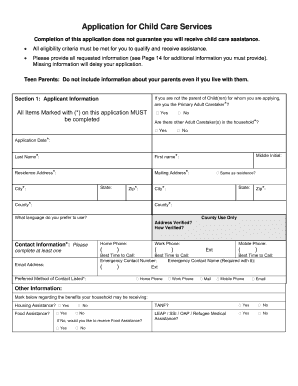
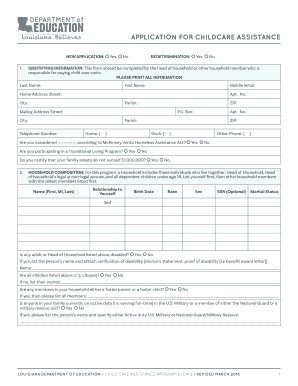
The Colorado Child Care Assistance Program Enrollment Freeze Application is a document used by families in Colorado to express interest in the program during an enrollment freeze period.
pdfFiller scores top ratings on review platforms




Who needs CCCAP Enrollment Freeze?
Explore how professionals across industries use pdfFiller.

CCCAP Enrollment Freeze is needed by:
-
Parents seeking financial assistance for child care in Colorado
-
Families needing to enroll during an assistance program freeze
-
Guardians of children eligible for child care funding
-
Social service agencies supporting families with child care needs
-
Community organizations assisting families with enrollment procedures
Comprehensive Guide to CCCAP Enrollment Freeze
What is the Colorado Child Care Assistance Program Enrollment Freeze Application?
The Colorado Child Care Assistance Program (CCCAP) is designed to provide financial assistance to families for childcare costs. The Enrollment Freeze Application is a crucial component that allows families to express interest in the program during periods of enrollment freezes. These freezes may occur due to various reasons, prompting individuals to ensure they remain in consideration for assistance.
Applying for the CCCAP enrollment freeze form is necessary for families needing ongoing support despite not being able to enroll immediately. This application enables them to track interest and enhance their chances of receiving aid once the freeze period ends.
Purpose and Benefits of the Colorado Child Care Assistance Program Enrollment Freeze Application
The Enrollment Freeze Application serves an essential role in managing interest levels during enrollment freezes. It is particularly important for families who may otherwise miss the window for assistance. By tracking interest, the program can better serve the community's needs.
Families who apply benefit greatly as they secure a place in line for assistance when the program reopens. Having an application on file allows for smoother transitions and helps alleviate the stress of childcare expenses during freeze periods. Access to the Colorado child care freeze application also provides families peace of mind during uncertain times.
Who Needs the Colorado Child Care Assistance Program Enrollment Freeze Application?
The target audience for the Enrollment Freeze Application includes families experiencing delays or freezes in their participation due to various circumstances. Common situations that may lead to the need for this form include changes in employment status, unexpected life events, or fluctuations in income.
Anyone who anticipates a need for childcare assistance should consider submitting the Colorado child care assistance program template to ensure they are prepared when the enrollment scenario changes.
Eligibility Criteria for the Colorado Child Care Assistance Program Enrollment Freeze Application
Basic eligibility requirements for applying to the CCCAP typically include factors such as household income, family size, and residency status in Colorado. Families must verify their circumstances, as these criteria can significantly affect eligibility.
Before applying, it is crucial for individuals to check their eligibility to avoid unnecessary complications. Understanding the specific requirements can help applicants streamline the process and improve their chances of acceptance.
How to Fill Out the Colorado Child Care Assistance Program Enrollment Freeze Application Online
Filling out the Enrollment Freeze Application online is straightforward. Start by gathering necessary information such as your applicant name, home address, and contact details. Then, follow these steps:
-
Visit the designated online application portal.
-
Fill in the 'Applicant Name' and 'Date' fields accurately.
-
Complete the 'Home Address' and 'Email Address' sections.
-
Ensure all starred sections, which denote required information, are completed to prevent application denial.
-
Review each section for accuracy before submitting.
Using the Colorado child care freeze application in a PDF format simplifies the process, ensuring applicants have a clear view of the required fields.
Common Errors and How to Avoid Them When Submitting the Colorado Child Care Assistance Program Enrollment Freeze Application
Common mistakes during the application process can lead to rejection. Some of the prevalent errors include missing required information or submitting an incomplete form. It is vital for applicants to double-check all entries.
To avoid these pitfalls, consider the following tips:
-
Thoroughly read instructions before filling out the application.
-
Use a checklist to validate that all required sections are filled.
-
Confirm that all contact information is accurate and current.
A review and validation checklist can serve as a useful tool to prevent errors during submission.
Submission Methods and What Happens After You Submit the Colorado Child Care Assistance Program Enrollment Freeze Application
Applicants have various submission methods to choose from, including online options for convenience. Once the application is submitted, it is essential to expect a confirmation and timelines for processing.
Typical next steps may include follow-up communications from program representatives. Keeping copies of submitted documents is vital, as they serve as a reference throughout the processing period.
Security and Privacy Considerations for the Colorado Child Care Assistance Program Enrollment Freeze Application
When dealing with sensitive information, data security is paramount. Submitting sensitive data should always be handled with care to protect personal information.
pdfFiller ensures the secure handling of documents, utilizing 256-bit encryption and adhering to compliance standards such as SOC 2 Type II and HIPAA, which guarantees privacy and data protection throughout the application process.
Renewal and Resubmission Process for the Colorado Child Care Assistance Program Enrollment Freeze Application
The renewal process is essential for families seeking continued assistance through the CCCAP. Understanding the resubmission process can help families manage their benefits effectively.
Applicants should address any changes in their situations, such as alterations in income or family composition, and update their applications accordingly to reflect these modifications.
Leverage pdfFiller for Your Colorado Child Care Assistance Program Enrollment Freeze Application
Utilizing pdfFiller can significantly simplify the application process. The platform provides users with tools for securely filling out forms and ensuring accuracy at every step.
Engaging with pdfFiller's capabilities can enhance users' experiences, facilitating a smoother journey through the application process and ensuring all documents are handled efficiently and securely.
How to fill out the CCCAP Enrollment Freeze
-
1.Start by accessing the Colorado Child Care Assistance Program Enrollment Freeze Application on pdfFiller. Open your web browser and navigate to the pdfFiller website.
-
2.Use the search bar to locate the form by entering its title. Click on the correct form from the search results to open it.
-
3.Once the form is loaded, familiarize yourself with the layout. Look for fields marked with asterisks, indicating required information you must fill in.
-
4.Gather necessary information before you start completing the form. This includes names, addresses, employment details, and citizenship status of all household members.
-
5.Begin completing the form by clicking into each field. Type in your data directly, or use pdfFiller’s tools to add text as needed.
-
6.For sections that require checkboxes, click on the appropriate box to select your response. Ensure all starred sections are fully completed to avoid application denial.
-
7.After filling in all fields, review the form for accuracy. Make sure there are no missed sections or incorrect details before finalizing.
-
8.Once you're satisfied with your application, explore the options to save or download your form. You can choose to save it to your device or submit it directly through pdfFiller.
-
9.If submitting online, follow the on-screen prompts to ensure your submission is completed successfully.

Who is eligible to apply for the Colorado Child Care Assistance Program?
Eligibility typically includes families with children who require child care assistance and who meet state-defined income thresholds. Ensure you verify your specific eligibility with local guidelines.
What should I do if I miss the enrollment freeze application deadline?
If you miss the deadline, contact your local child care assistance office for guidance. They may provide information on future enrollment dates or alternative resources.
How do I submit the Enrollment Freeze Application once completed?
You can submit your completed Enrollment Freeze Application via online submission tools on pdfFiller, or print it for mailing to your local child care assistance office.
Are there any required supporting documents needed to complete this form?
The form generally requires basic household information. However, it's advisable to check with your local office for any specific documentation they may require during the enrollment freeze.
What are common mistakes people make when filling out this application?
Common mistakes include leaving required fields blank or misreporting household income. Always double-check that all starred sections are complete and accurate before submission.
How long will it take to process my application?
The processing time for the Enrollment Freeze Application can vary. Typically, you can expect processing within a few weeks, but check with your local agency for more precise timelines.
Can I make changes to my application after submission?
If you realize an error after submitting, contact the local child care assistance office immediately. They can guide you on how to amend your application.
Related Forms





Get the latest insights from our blog



If you believe that this page should be taken down, please follow our DMCA take down process
here
.
This form may include fields for payment information. Data entered in these fields is not covered by PCI DSS compliance.