
Last updated on
Oct 19, 2026

Get the free NSW Pet Registry Permanent Identification Form
We are not affiliated with any brand or entity on this form

Fill out
Complete the form online in a simple drag-and-drop editor.

eSign
Add your legally binding signature or send the form for signing.

Share
Share the form via a link, letting anyone fill it out from any device.

Export
Download, print, email, or move the form to your cloud storage.
Why pdfFiller is the best tool for your documents and forms


End-to-end document management
From editing and signing to collaboration and tracking, pdfFiller has everything you need to get your documents done quickly and efficiently.
Accessible from anywhere
pdfFiller is fully cloud-based. This means you can edit, sign, and share documents from anywhere using your computer, smartphone, or tablet.
Secure and compliant
pdfFiller lets you securely manage documents following global laws like ESIGN, CCPA, and GDPR. It's also HIPAA and SOC 2 compliant.
What is NSW Pet ID Form
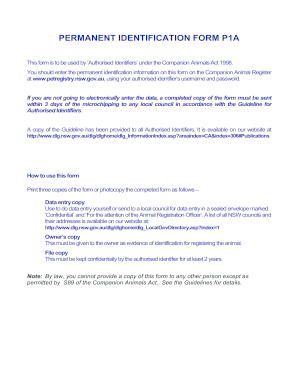
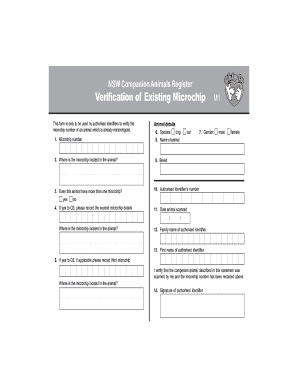
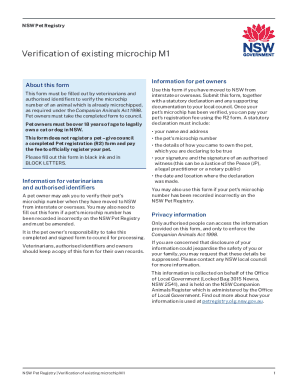
The NSW Pet Registry Permanent Identification Form is a government document used by veterinarians and authorised identifiers to record microchip details for animals as mandated by the Companion Animals Act 1998.
pdfFiller scores top ratings on review platforms




Who needs NSW Pet ID Form?
Explore how professionals across industries use pdfFiller.

NSW Pet ID Form is needed by:
-
Veterinarians performing microchipping procedures
-
Authorised identifiers conducting pet registrations
-
Pet owners needing to register their animals
-
Animal breeders registering litters
-
Local councils managing pet registrations in New South Wales
Comprehensive Guide to NSW Pet ID Form
What is the NSW Pet Registry Permanent Identification Form?
The NSW Pet Registry Permanent Identification Form is essential for recording microchip details for pets in compliance with the Companion Animals Act. This form serves as the cornerstone for microchip registration and must be submitted within three days of microchipping. By adhering to these requirements, pet owners can ensure that their animals are appropriately registered and identifiable.
Purpose and Benefits of the NSW Pet Registry Permanent Identification Form
Completing the NSW Pet Registry Permanent Identification Form is crucial for legal compliance concerning pet identification. This process not only meets legal requirements but also enhances the chances of reuniting lost pets with their owners. Timely registration can be a significant factor in ensuring the safety and security of pets within the community.
Who Needs the NSW Pet Registry Permanent Identification Form?
The individuals involved in filling out the NSW Pet Registry Permanent Identification Form include authorized identifiers, such as veterinarians, and pet owners. Each party has specific responsibilities, with authorized identifiers ensuring accurate data entry and pet owners providing essential information about their pets.
How to Fill Out the NSW Pet Registry Permanent Identification Form Online
Filling out the form online through pdfFiller is user-friendly and straightforward. Users should start by accessing pdfFiller and locating the NSW Pet Registry Permanent Identification Form. Here is how to proceed:
-
Log into your pdfFiller account or create one if you haven’t already.
-
Search for the NSW Pet Registry Permanent Identification Form.
-
Fill in the required sections, such as microchipping and owner details
-
Review the information for accuracy.
-
Submit the form electronically or print for manual submission.
Field-by-Field Instructions for the NSW Pet Registry Form
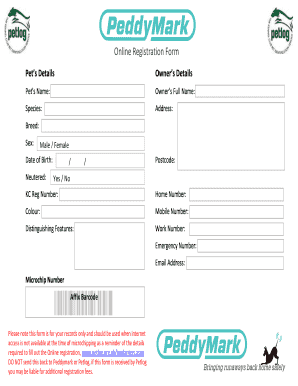
The form consists of several key fields that need careful completion. Important fields include the microchip number, pet details, and signatures from both the authorized identifier and the owner. Users should ensure they double-check entries to avoid common errors, such as missing signatures or incorrect details, that could lead to rejection of the form.
When and How to Submit the NSW Pet Registry Permanent Identification Form
Submitting the NSW Pet Registry Permanent Identification Form must be done promptly to comply with regulations. There are various methods for submission, including online via pdfFiller or in-person at designated locations. It is crucial to adhere to the deadline to avoid potential consequences associated with late filings.
Common Errors and How to Avoid Them
Errors in filling out forms can lead to complications or rejections. Some common mistakes include:
-
Missing signatures from the owner or authorized identifier.
-
Incorrect or incomplete microchip numbers.
To prevent these issues, individuals should validate their information before submission. Double-checking each field can greatly reduce the risk of errors.
Security and Compliance for the NSW Pet Registry Permanent Identification Form
When handling sensitive pet information, it’s vital to ensure data security. pdfFiller employs 256-bit encryption and adheres to SOC 2 Type II standards, making it a safe choice for filling out the form. Users can trust that their data is protected throughout the process, complying with necessary privacy regulations.
How pdfFiller Can Assist with the NSW Pet Registry Permanent Identification Form
pdfFiller offers robust functionalities to streamline the completion of the NSW Pet Registry Permanent Identification Form. Key features include options for filling out, signing, and submitting the form electronically. These tools ensure that users can comply with legal standards easily and effectively.
Next Steps After Submitting the NSW Pet Registry Permanent Identification Form
After submitting the NSW Pet Registry Permanent Identification Form, users should monitor their application status. In case further information is requested or if the application is rejected, it’s crucial to respond promptly to ensure successful registration.
How to fill out the NSW Pet ID Form
-
1.Start by accessing pdfFiller and searching for 'NSW Pet Registry Permanent Identification Form'.
-
2.Open the form from the search results to begin filling it out online.
-
3.Gather necessary information beforehand, including microchip details, pet owner information, and details of the authorised identifier.
-
4.Navigate to the fillable fields within the form and click on each field to enter the required information using the keyboard or on-screen keyboard.
-
5.Ensure all mandatory fields are completed, especially sections requiring microchip numbers and identification details.
-
6.Review the completed form carefully for any errors or missing information before saving.
-
7.Once satisfied with the form's content, proceed to save your changes using the 'Save' option.
-
8.If you need to download the form, choose the 'Download' option from pdfFiller to save it in your preferred format.
-
9.Follow the submission instructions specified, either submitting online through pdfFiller or printing and submitting it to the relevant local council in person.

Who is eligible to fill out the NSW Pet Registry Permanent Identification Form?
Eligible individuals include licensed veterinarians and authorised identifiers who are responsible for microchipping animals. Pet owners may also need to provide information to assist in completing the form.
What is the deadline for submitting this form after microchipping?
The form must be submitted to the local council within 3 days of microchipping a litter of puppies or kittens to comply with regulations.
How should I submit the completed form?
You can submit the completed form either online through pdfFiller or by downloading it and physically submitting it to your local council in New South Wales.
What supporting documents do I need when submitting the form?
While specific supporting documents may not be required, having proof of microchip details and identification of both the owner and authorised identifier is recommended.
What common mistakes should I avoid when filling out this form?
Ensure that all fields are filled out correctly and completely, particularly the microchip number and identification details. Double-check for signatures from both the owner and the authorised identifier.
What are the processing times for submitted forms?
Processing times vary by local council, but you can typically expect confirmation of registration within a few days to a week after submission, depending on their workload.
Can this form be filled out electronically?
Yes, the NSW Pet Registry Permanent Identification Form can be filled out electronically using pdfFiller, allowing easy access and submission options.




Get the latest insights from our blog


If you believe that this page should be taken down, please follow our DMCA take down process
here
.
This form may include fields for payment information. Data entered in these fields is not covered by PCI DSS compliance.