
Last updated on
Oct 19, 2026

Get the free Pre-service Authorization Request Form
We are not affiliated with any brand or entity on this form

Fill out
Complete the form online in a simple drag-and-drop editor.

eSign
Add your legally binding signature or send the form for signing.

Share
Share the form via a link, letting anyone fill it out from any device.

Export
Download, print, email, or move the form to your cloud storage.
Why pdfFiller is the best tool for your documents and forms


End-to-end document management
From editing and signing to collaboration and tracking, pdfFiller has everything you need to get your documents done quickly and efficiently.
Accessible from anywhere
pdfFiller is fully cloud-based. This means you can edit, sign, and share documents from anywhere using your computer, smartphone, or tablet.
Secure and compliant
pdfFiller lets you securely manage documents following global laws like ESIGN, CCPA, and GDPR. It's also HIPAA and SOC 2 compliant.
What is Authorization Request
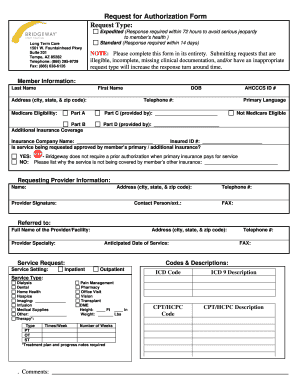
The Pre-service Authorization Request Form is a healthcare form used by medical providers to request prior authorization for essential medical services.
pdfFiller scores top ratings on review platforms




Who needs Authorization Request?
Explore how professionals across industries use pdfFiller.

Authorization Request is needed by:
-
Healthcare providers seeking authorization for patient services
-
Medical billing professionals handling insurance claims
-
Patients needing their services to be covered by insurance
-
Insurance companies for processing prior authorization requests
-
Facility administrators involved in patient treatment approvals
Comprehensive Guide to Authorization Request
What is the Pre-service Authorization Request Form?
The Pre-service Authorization Request Form is a crucial document in healthcare that facilitates the prior authorization of medical services. It is primarily utilized by healthcare providers to seek approval from insurance companies before proceeding with treatment or procedures. This form underscores the importance of thorough documentation and a clear understanding of patient needs.
Typically, healthcare providers are responsible for filling out this form to ensure all necessary information is communicated effectively. Importantly, the form requires the signature of a licensed MD, reinforcing the necessity for medical oversight in the authorization process.
Purpose and Benefits of the Pre-service Authorization Request Form
This form plays a significant role in streamlining the authorization process for healthcare services. By detailing patient information and care requirements, the Pre-service Authorization Request Form aids providers in securing timely approvals, which can enhance the quality of patient care. Moreover, adhering to this process ensures compliance with healthcare regulations, ultimately supporting both providers and patients in navigating complex insurance protocols.
Among the benefits of utilizing this form are faster processing times and reduced delays in patient care. With a well-completed form, providers can expect a higher success rate in obtaining necessary authorizations, facilitating more efficient treatment pathways.
Key Features of the Pre-service Authorization Request Form
The Pre-service Authorization Request Form includes several critical sections to capture essential information. Key components include:
-
Patient information, ensuring accurate identification
-
An urgent request checkbox to expedite processing when necessary
-
Provider information that establishes the treating physician's details
-
Clinical details to justify the medical necessity of the requested service
Additionally, the form mandates that supporting medical records be attached, which are vital for validating the request. The presence of fillable fields and checkboxes further enhances user experience, making the form easy to complete and submit.
Who Needs to Fill Out the Pre-service Authorization Request Form?
Healthcare providers across various specialties should utilize the Pre-service Authorization Request Form when seeking authorizations for patient treatments. This includes physicians, specialists, and healthcare facilities involved in providing care. In some cases, patients may need to initiate requests themselves, particularly for elective procedures that require prior approval.
Understanding when and how to use this form is essential, especially for situations requiring urgent medical attention or specific authorizations dictated by insurance plans.
How to Fill Out the Pre-service Authorization Request Form Online (Step-by-Step)
Filling out the Pre-service Authorization Request Form online involves following a structured process. Here’s a step-by-step guide:
-
Input member or patient name and their relevant identification information.
-
Complete the clinical information section, detailing the proposed medical service.
-
Check the 'urgent request' option if applicable to expedite authorization.
-
Ensure the MD Signature section is accurately filled out with the provider's signature.
It's crucial to review all entries for accuracy before submission to avoid delays in the authorization process.
Common Errors and How to Avoid Them
While filling out the Pre-service Authorization Request Form, users frequently encounter common mistakes that can delay processing. These include:
-
Missing signatures or incomplete sections, which can result in immediate rejection
-
Failing to attach necessary supporting documents, hindering the approval process
-
Incorrect patient or provider information, leading to confusion and delays
To avoid these pitfalls, it is advisable to double-check all entries and collect necessary documents in advance, ensuring a smooth submission experience.
Submission Methods and Where to Submit the Pre-service Authorization Request Form
Once the Pre-service Authorization Request Form is completed, there are various submission methods available. These include:
-
Online portals specifically provided by insurance companies
-
Faxing the completed form to the appropriate insurance provider
-
Mailing the form directly to the insurer's designated address
It's important to be aware of submission deadlines and expected processing times to ensure timely medical authorizations, which can significantly impact patient care.
Security and Compliance for the Pre-service Authorization Request Form
Handling sensitive information is paramount in healthcare documentation. pdfFiller employs robust security measures, including encryption and compliance with HIPAA regulations, to safeguard data during the completion and submission of the Pre-service Authorization Request Form. This adherence to security protocols ensures that users can confidently fill out forms online without compromising patient privacy.
Maintaining data protection while using these forms not only adheres to regulatory standards but also fosters trust between providers and patients.
How pdfFiller Enhances Your Experience with Pre-service Authorization Requests
pdfFiller significantly enhances the user experience related to Pre-service Authorization Requests by offering features that simplify form management. Users can easily edit documents, utilize eSigning capabilities, and manage files securely within the platform.
By providing intuitive options for completing and submitting forms, pdfFiller enables users to maintain organized records and effectively track their submissions, making the overall process more efficient and user-friendly.
Final Steps: What Happens After Submission?
After submitting the Pre-service Authorization Request Form, it's important to know how to track the submission status. Keep an eye on potential next steps, which may include providing additional information or amendments if requested by the insurance provider. Understanding typical timelines for responses can help manage patient expectations and prepare for any necessary follow-ups regarding care or approvals.
How to fill out the Authorization Request
-
1.Access the Pre-service Authorization Request Form by navigating to pdfFiller and searching for the form name in the search bar.
-
2.Once you locate the form, click on the form to open it in the editing interface.
-
3.Gather necessary information before you start filling out the form. This includes patient's name, treatment details, the requesting provider's information, and relevant medical records.
-
4.Begin filling in the required fields, such as 'Member/patient name.' Ensure that you complete all mandatory sections, including checkboxes for urgency if applicable.
-
5.Take your time to enter clinical details accurately and review the 'Provider Information' section to ensure that all credentials are listed correctly.
-
6.For the 'Urgent request' checkbox, determine if this applies to the case, and mark it accordingly.
-
7.Once you have filled in all required information, review the form thoroughly for any errors or omissions.
-
8.Sign the form electronically by clicking on the designated 'MD Signature' area and following the prompts to ensure the form is properly authenticated.
-
9.After you’ve verified all information is complete and correct, save your changes by clicking the save option.
-
10.Download the completed form to your device, or utilize the submission features on pdfFiller to send it directly to the appropriate insurance company or facility.

Who is eligible to use the Pre-service Authorization Request Form?
Eligibility to use the Pre-service Authorization Request Form typically includes licensed healthcare providers who are requesting authorization for medical services on behalf of their patients.
Are there any specific deadlines for submitting this form?
While the metadata does not specify exact deadlines, it is crucial to submit the Pre-service Authorization Request Form as soon as possible, especially in urgent situations, to prevent delays in treatment.
How can I submit the completed Pre-service Authorization Request Form?
You can submit the completed form electronically via pdfFiller by using their submission features or download it and send it physically by mail to the designated insurance company or facility.
What supporting documents are required with this form?
Supporting medical records should be attached when you submit the Pre-service Authorization Request Form. These may include clinical notes, test results, and any other relevant documentation pertaining to the patient's request.
What common mistakes should I avoid when filling out this form?
Common mistakes include failing to provide complete patient information, neglecting necessary signatures, and not attaching required documents. Ensuring all fields are filled correctly before submission helps avoid processing delays.
How long does it take to process the Pre-service Authorization Request?
The processing time for the Pre-service Authorization Request can vary by insurance provider; typically, it takes a few business days. Always check with the insurance company for specific timelines.
Is notarization required for this form?
No, notarization is not required to complete the Pre-service Authorization Request Form, making the process easier for requesting providers.
Related Forms





Get the latest insights from our blog


If you believe that this page should be taken down, please follow our DMCA take down process
here
.
This form may include fields for payment information. Data entered in these fields is not covered by PCI DSS compliance.