
Last updated on
Oct 19, 2026

Get the free 2026-2027 FAFSA Identity Verification Form
We are not affiliated with any brand or entity on this form

Fill out
Complete the form online in a simple drag-and-drop editor.

eSign
Add your legally binding signature or send the form for signing.

Share
Share the form via a link, letting anyone fill it out from any device.

Export
Download, print, email, or move the form to your cloud storage.
Why pdfFiller is the best tool for your documents and forms


End-to-end document management
From editing and signing to collaboration and tracking, pdfFiller has everything you need to get your documents done quickly and efficiently.
Accessible from anywhere
pdfFiller is fully cloud-based. This means you can edit, sign, and share documents from anywhere using your computer, smartphone, or tablet.
Secure and compliant
pdfFiller lets you securely manage documents following global laws like ESIGN, CCPA, and GDPR. It's also HIPAA and SOC 2 compliant.
What is FAFSA Verification Form
The 2026-2027 FAFSA Identity Verification Form is a financial aid verification document used by students to confirm their identity for federal financial aid eligibility.
pdfFiller scores top ratings on review platforms




Who needs FAFSA Verification Form?
Explore how professionals across industries use pdfFiller.

FAFSA Verification Form is needed by:
-
Students applying for federal financial aid
-
Financial Aid Administrators processing applications
-
Notaries verifying student identity
-
Authorized Officials at correctional facilities
-
Students needing to resolve FAFSA verification issues
Comprehensive Guide to FAFSA Verification Form
What is the 2 FAFSA Identity Verification Form?
The 2 FAFSA Identity Verification Form serves as a crucial tool for verifying identity when applying for federal financial aid. This form is required for students whose Free Application for Federal Student Aid (FAFSA) has been selected for verification. Failure to complete this form may result in delayed processing of aid or ineligibility for financial assistance.
Students who are undergoing verification must submit this form, along with supporting documents to authenticate their identity and eligibility for federal aid. Adhering to these requirements ensures a smoother aid application process.
Purpose and Benefits of the 2 FAFSA Identity Verification Form
Identity verification is essential for maintaining the integrity of the financial aid system. For students, completing this form accurately and on time is vital to ensure support for their educational endeavors. Timely submission not only expedites the verification process but also enhances chances of securing the needed funds.
Benefits of filling out the FAFSA identity verification form include increased chances of approval for financial aid and the ability to maintain enrollment in educational programs.
Who Needs to Complete the FAFSA Identity Verification Form?
The following roles are required to sign the FAFSA Identity Verification Form:
-
Students
-
Financial Aid Administrators
-
Notaries
-
Authorized Officials
Particular scenarios mandate completion of this form. For instance, if a student's FAFSA is selected for verification, they must submit this form to confirm their identity and eligibility for financial aid. Understanding these requirements can help reduce confusion during the verification process.
How to Fill Out the 2 FAFSA Identity Verification Form Online
To complete the FAFSA Identity Verification Form online, follow these steps:
-
Access the form using pdfFiller’s platform.
-
Carefully enter your personal information in the designated fields.
-
Attach necessary documents for identity verification.
-
Sign the form electronically.
-
Review the completed form for any errors or missing information before submission.
Common pitfalls include missing signatures or incomplete fields, which can delay the aid process. A thorough review can prevent these issues, ensuring a smooth submission.
Options for Completing the 2 FAFSA Identity Verification
Students have various options for completing the FAFSA Identity Verification Form:
-
In person: Visit your financial aid office for direct assistance.
-
Virtual Zoom Meeting: Schedule a meeting for guidance from financial aid staff.
-
With a Notary: Use a notary to sign and verify documents.
-
Through an Authorized Official: Submit the form with assistance from officials at your institution or confinement facility.
Each method has specific benefits and may be more suitable depending on your circumstances, ensuring you can complete this critical step in the financial aid process.
Document Requirements for the FAFSA Identity Verification Process
To successfully complete the FAFSA Identity Verification Form, certain documents are essential:
-
Government-issued photo ID
-
Social Security card
-
Additional documentation as requested by the financial aid office
A pre-filing checklist can help students prepare the necessary materials, ensuring they submit all required documentation to avoid delays in processing their financial aid applications.
Submission Methods and Where to Send the FAFSA Identity Verification Form
There are several submission methods for the FAFSA Identity Verification Form:
-
Mail the completed form to your financial aid office.
-
Submit electronically via your financial aid office’s portal.
Know the deadlines related to each submission method, as well as processing times to stay aligned with financial aid requirements and avoid missing out on needed assistance.
Common Issues, Errors, and How to Prevent Them
Errors during the completion of the FAFSA Identity Verification Form can lead to serious delays. Common mistakes include:
-
Omitting signatures
-
Providing incorrect personal information
-
Failing to attach required documents
Prevent these issues by utilizing a validation checklist to confirm that every required field is filled correctly before submission. This proactive approach can save time and enhance your financial aid experience.
Security and Compliance When Handling the FAFSA Identity Verification Form
When dealing with the FAFSA Identity Verification Form, document security is paramount. pdfFiller employs advanced security measures, including 256-bit encryption, to protect sensitive information. Additionally, the platform is compliant with data protection regulations such as HIPAA and GDPR, ensuring that your personal data remains secure throughout the verification process.
Enhance Your FAFSA Submission Process with pdfFiller
Using pdfFiller for your FAFSA Identity Verification Form simplifies the completion, signing, and submission process. With user-friendly features, it allows you to edit, eSign, and manage your documents securely, giving you peace of mind as you navigate your financial aid journey.
How to fill out the FAFSA Verification Form
-
1.To access the 2026-2027 FAFSA Identity Verification Form on pdfFiller, go to the pdfFiller website and search for the form name in the search bar.
-
2.Open the form and familiarize yourself with its sections, especially those requiring your personal information and signatures.
-
3.Before filling out the form, gather necessary documents such as your government-issued ID, Social Security number, and any additional documentation as specified.
-
4.Utilize pdfFiller's tools to fill in your information by clicking on each field and entering the appropriate details like your name, date of birth, and contact information.
-
5.If required, complete sections for signing in the presence of a notary or authorized official by designating where they need to sign.
-
6.Once all fields are completed, carefully review each section of the form for accuracy and ensure no sections are left blank.
-
7.After verification, you can save your changes directly in pdfFiller and download the document in your preferred format.
-
8.To submit your completed FAFSA Identity Verification Form, follow the submission instructions provided by your financial aid office, which may include uploading the form directly or sending it via email.

What are the eligibility requirements for using the FAFSA Identity Verification Form?
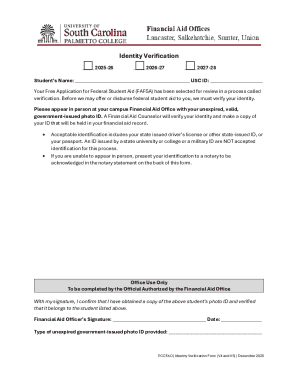
To use the FAFSA Identity Verification Form, you must be a student whose FAFSA application has been selected for verification. You also need to provide proof of identity using valid documents like a driver's license or ID card.
What are the deadlines for submitting the FAFSA Identity Verification Form?
The submission deadline for the FAFSA Identity Verification Form varies depending on your college or university. It is crucial to submit the form as early as possible to avoid delays in receiving financial aid.
How do I submit the FAFSA Identity Verification Form once completed?
After completing the FAFSA Identity Verification Form, submit it according to your institution's guidelines. This may involve submitting it in person, via email, or through an online portal.
What supporting documents are required with the FAFSA Identity Verification Form?
You typically need to provide a government-issued photo ID along with the FAFSA Identity Verification Form. Some schools may request additional documents, so check with your financial aid office for specific requirements.
What common mistakes should I avoid when completing the form?
Common mistakes include not signing the form, leaving fields blank, or submitting the form without the required identification. Ensure all information is accurate and complete before submission.
What is the processing time for the FAFSA Identity Verification Form?
Processing time can vary by institution. Generally, it might take a few days to a couple of weeks. Contact your financial aid office for more precise information on their processing timelines.
Do I need to notarize the FAFSA Identity Verification Form?
Yes, the FAFSA Identity Verification Form requires notarization if you are unable to verify your identity in person. Be sure to follow the guidelines for notarization as specified in the form.
Related Forms




Get the latest insights from our blog


If you believe that this page should be taken down, please follow our DMCA take down process
here
.
This form may include fields for payment information. Data entered in these fields is not covered by PCI DSS compliance.