
Last updated on
Oct 19, 2026

Get the free Subcontractor Change Form
We are not affiliated with any brand or entity on this form

Fill out
Complete the form online in a simple drag-and-drop editor.

eSign
Add your legally binding signature or send the form for signing.

Share
Share the form via a link, letting anyone fill it out from any device.

Export
Download, print, email, or move the form to your cloud storage.
Why pdfFiller is the best tool for your documents and forms


End-to-end document management
From editing and signing to collaboration and tracking, pdfFiller has everything you need to get your documents done quickly and efficiently.
Accessible from anywhere
pdfFiller is fully cloud-based. This means you can edit, sign, and share documents from anywhere using your computer, smartphone, or tablet.
Secure and compliant
pdfFiller lets you securely manage documents following global laws like ESIGN, CCPA, and GDPR. It's also HIPAA and SOC 2 compliant.
What is Subcontractor Change
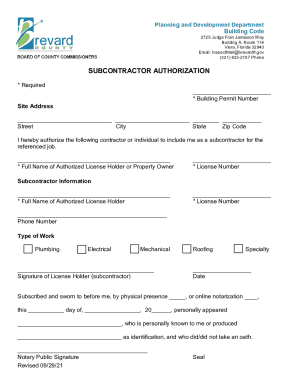
The Subcontractor Change Form is a permit application used by subcontractors and contractors to update subcontractor information for construction projects in Florida.
pdfFiller scores top ratings on review platforms




Who needs Subcontractor Change?
Explore how professionals across industries use pdfFiller.

Subcontractor Change is needed by:
-
Subcontractor License Holders who need to update their information.
-
Contractors or Owner-Builders managing construction projects.
-
Construction project managers overseeing subcontractor compliance.
-
Property owners requiring updated subcontractor details.
-
Legal representatives ensuring contractual compliance.
Comprehensive Guide to Subcontractor Change
What is the Subcontractor Change Form?
The Subcontractor Change Form is a critical document used in Florida's construction projects to update subcontractor information. This form ensures that all pertinent details regarding subcontractors, such as license holder names and company names, remain current. Maintaining accurate subcontractor information is essential for compliance with state regulations and for the smooth operation of construction activities.
Purpose and Benefits of the Subcontractor Change Form
The Subcontractor Change Form plays a vital role in contractor compliance and project transparency. By utilizing this form, contractors can avoid potential legal issues and enhance communication among all stakeholders involved in the construction project. The benefits of adhering to this process include streamlined project management and reduced risks associated with outdated or incorrect subcontractor information.
Who Needs the Subcontractor Change Form?
The primary users of the Subcontractor Change Form are subcontractor license holders and contractors or owner-builders. This form is particularly necessary in various scenarios, including when a subcontractor changes their business name or ownership. This ensures that all contractor relationships and responsibilities are clearly documented and recognized by the authorities.
Required Information and Documents for the Subcontractor Change Form
To complete the Subcontractor Change Form accurately, several essential details must be provided:
-
License holder names
-
License numbers
-
Company names
-
Contractor's information
In addition to these details, supporting documents must accompany the form submission to ensure compliance with Florida building permit requirements.
How to Fill Out the Subcontractor Change Form Online (Step-by-Step)
Filling out the Subcontractor Change Form online using pdfFiller is a straightforward process. Follow these steps:
-
Access the pdfFiller platform and locate the Subcontractor Change Form.
-
Enter the required information into the designated fields, ensuring accuracy.
-
Verify the details provided, focusing on critical areas such as the signature and notary sections.
-
Submit the form as per the submission methods outlined.
This step-by-step guide simplifies the process, ensuring that users can complete the form efficiently and correctly.
Notarization Requirements for the Subcontractor Change Form
Notarizing the Subcontractor Change Form is a crucial step that adds legal weight to the document. This process guarantees that the identities of the signers are verified, reducing the risk of fraud. Obtaining a notary signature typically involves the following:
-
Finding a licensed notary public.
-
Presenting valid identification.
-
Signing the form in the presence of the notary.
Understanding the notarization requirements can help users navigate this essential aspect of submitting the form effectively.
Submission Methods and Important Considerations
Once the Subcontractor Change Form is completed, it is important to know how to submit it properly. The available submission methods typically include:
-
Online through designated portals
-
In-person submission at local building departments
-
Mailing the form directly to the appropriate office
Users should also be aware of associated fees and deadlines for submission, as well as what to expect after submitting the form, such as processing times and notifications.
Common Errors and How to Avoid Them When Filing the Form
When completing the Subcontractor Change Form, individuals may encounter several common errors, such as:
-
Inaccurate license numbers
-
Missing signatures
-
Incomplete supporting documentation
To prevent these mistakes, carefully review all entries before submission and double-check for completeness to ensure a hassle-free filing process.
Security and Compliance in Handling the Subcontractor Change Form
Handling the Subcontractor Change Form requires strict adherence to security standards, such as HIPAA and GDPR compliance. pdfFiller emphasizes the importance of document security by implementing measures like 256-bit encryption. Users can trust that their sensitive information remains protected throughout the creation and submission process.
Why Choose pdfFiller for Your Subcontractor Change Form?
Choosing pdfFiller for filling out, signing, and managing your Subcontractor Change Form offers multiple advantages. Users benefit from an easy-to-use platform that supports real-time collaboration and secure storage of documents. With pdfFiller, you can streamline the form-filling process while ensuring compliance with all necessary requirements.
How to fill out the Subcontractor Change
-
1.Access the Subcontractor Change Form on pdfFiller by searching in the templates or using a direct link provided by your contractor.
-
2.Once open, navigate to the blank fields for subcontractor information, where you will need to input the current and new subcontractor details.
-
3.Gather all necessary information before starting. This includes names, license numbers, and company information of the subcontractors involved.
-
4.Complete all required fields ensuring accuracy, as mistakes can delay processing. Use pdfFiller's auto-complete functions to help fill repetitive fields.
-
5.Once completed, double-check all entries against your collected information for any errors or omissions.
-
6.Review the form in pdfFiller for completeness. Use the preview mode to see how it will look when printed or submitted.
-
7.Save your changes frequently using the save button available in pdfFiller. This ensures no loss of information during the filling process.
-
8.Download the completed form or submit it directly through pdfFiller. Be sure to check for any required fees during submission, as they may need to be paid online or in person.

Who is eligible to submit the Subcontractor Change Form?
Both subcontractor license holders and contractors or owner-builders are eligible to submit the Subcontractor Change Form as it pertains to construction projects in Florida.
What information is required to complete the form?
You will need detailed information about the current and new subcontractor, including license holder names, license numbers, and company names to successfully complete the form.
Is there a fee associated with the Subcontractor Change Form?
Yes, a fee of $40 is associated with submitting the Subcontractor Change Form in Florida and should be confirmed during the submission process.
Is notarization required for the Subcontractor Change Form?
Yes, the form requires notarization by the contractor or property owner to validate the signatures of all parties involved.
What common mistakes should I avoid while filling the form?
Ensure all required fields are filled out completely and accurately. Double-check names and license numbers for typos, and confirm that notarization is completed before submission.
How long does it take to process the Subcontractor Change Form?
Processing times can vary depending on the local jurisdiction, so checking with your local office or website will give the most accurate information.
How do I submit the completed Subcontractor Change Form?
You can submit the form electronically via pdfFiller or print it out and submit it in person at your local government office.
Related Forms






Get the latest insights from our blog



If you believe that this page should be taken down, please follow our DMCA take down process
here
.
This form may include fields for payment information. Data entered in these fields is not covered by PCI DSS compliance.