
Last updated on
Oct 19, 2026

Get the free WIOA Self-Attestation Form
We are not affiliated with any brand or entity on this form

Fill out
Complete the form online in a simple drag-and-drop editor.

eSign
Add your legally binding signature or send the form for signing.

Share
Share the form via a link, letting anyone fill it out from any device.

Export
Download, print, email, or move the form to your cloud storage.
Why pdfFiller is the best tool for your documents and forms


End-to-end document management
From editing and signing to collaboration and tracking, pdfFiller has everything you need to get your documents done quickly and efficiently.
Accessible from anywhere
pdfFiller is fully cloud-based. This means you can edit, sign, and share documents from anywhere using your computer, smartphone, or tablet.
Secure and compliant
pdfFiller lets you securely manage documents following global laws like ESIGN, CCPA, and GDPR. It's also HIPAA and SOC 2 compliant.
What is WIOA Attestation
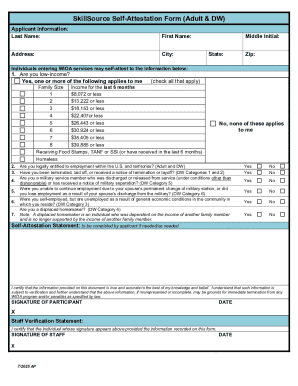
The WIOA Self-Attestation Form is an employment application document used by individuals applying for Workforce Innovation and Opportunity Act services to verify their eligibility criteria.
pdfFiller scores top ratings on review platforms




Who needs WIOA Attestation?
Explore how professionals across industries use pdfFiller.

WIOA Attestation is needed by:
-
Job seekers looking for workforce development assistance
-
Applicants needing to demonstrate eligibility for WIOA programs
-
Staff members assisting applicants with WIOA services
-
Organizations providing training and employment services
-
Community service providers involved in workforce development
Comprehensive Guide to WIOA Attestation
Overview of the WIOA Self-Attestation Form
The WIOA Self-Attestation Form serves a critical role in the employment application process, particularly for those entering programs governed by the Workforce Innovation and Opportunity Act (WIOA). This form is essential for confirming an applicant's eligibility when they are unable to provide requested documentation. Accuracy in completing this form is vital, as it directly impacts access to services and confirms eligibility for assistance.
This form facilitates efficient self-attestation and helps streamline the process, ensuring that individuals can access the resources they need in a timely manner.
Purpose and Benefits of the WIOA Self-Attestation Form
The primary purpose of the WIOA Self-Attestation Form is to enable applicants to declare their eligibility for WIOA services without needing extensive documentation. This promotes a more efficient application process and reduces delays in receiving assistance.
-
Allows applicants to assert their eligibility quickly and effectively.
-
Streamlines access to vital WIOA services and financial assistance.
-
Establishes a reliable self-attestation process that enhances user experience.
Who Needs the WIOA Self-Attestation Form?
This form is specifically designed for job seekers and workforce participants who are eligible to apply for WIOA services. It is especially relevant for individuals who may not have the necessary documentation readily available.
Applicants should fill out this form under circumstances where they need to confirm eligibility in alignment with WIOA program requirements, such as job searching or enrolling in training programs.
Eligibility Criteria for Using the WIOA Self-Attestation Form
To qualify for WIOA services, applicants must meet specific eligibility requirements. These criteria are outlined in WIOA guidelines and are critical for ensuring that support reaches those who genuinely need it.
-
Applicants must self-attest to the criteria without possessing the required documentation.
-
Understanding eligibility standards is key for proper assessment.
-
Individuals may need to confirm their status as job seekers or eligible training participants.
How to Fill Out the WIOA Self-Attestation Form Online (Step-by-Step)
Completing the WIOA Self-Attestation Form online can be straightforward if you follow a systematic approach. The following steps outline how to accurately fill out the form:
-
Begin by entering your personal information, including your name and contact details.
-
Check applicable boxes to indicate your eligibility status.
-
Provide any additional details as required in the designated blank fields.
-
Verify the accuracy of all information before submitting.
-
Avoid common pitfalls such as overlooking mandatory fields or submitting without a signature.
Signing the WIOA Self-Attestation Form: Requirements Explained
The signing process is crucial for validating the WIOA Self-Attestation Form. Both the applicant and a staff member must sign the document to ensure its legitimacy.
Applicants have the option to use either digital or wet signatures, providing flexibility in how the form is finalized. Utilizing tools like pdfFiller streamlines the eSignature process and ensures compliance with all requirements.
Submission and Processing of the WIOA Self-Attestation Form
Once you have completed the form, submitting it correctly is vital for effective processing. There are several methods available for submission:
-
Online submission through designated portals.
-
Mailing the completed form to the appropriate office.
-
Handing in the form in person at local WIOA offices.
After submission, applicants should be aware of the expected processing times and methods for tracking their submission status. Confirming receipt of the form is advisable to ensure timely processing.
Common Issues and Solutions when Using the WIOA Self-Attestation Form
Completing the WIOA Self-Attestation Form may present some challenges. Understanding common issues can help applicants navigate the process more smoothly.
-
Recognize common mistakes, such as incomplete fields or incorrect signatures.
-
Solutions are available for late filings or issues with documentation.
-
If necessary, understand how to amend or correct submissions effectively.
Security and Compliance with the WIOA Self-Attestation Form
Ensuring the security and compliance of personal data is paramount when handling the WIOA Self-Attestation Form. pdfFiller employs robust security measures, including 256-bit encryption, to protect sensitive information.
Applicants are encouraged to prioritize data protection while completing and submitting their forms, making sure they handle all personal information responsibly.
Utilize pdfFiller for Your WIOA Self-Attestation Form Needs
pdfFiller offers an intuitive platform for users looking to complete the WIOA Self-Attestation Form efficiently. With features that enhance usability, such as fillable fields and eSigning capabilities, pdfFiller makes the process straightforward.
By utilizing pdfFiller, applicants can enjoy a hassle-free experience when filling out the self-attestation form and ensure that they meet all necessary requirements quickly.
How to fill out the WIOA Attestation
-
1.To access the WIOA Self-Attestation Form, go to pdfFiller's website and use the search bar to find the form by its name or category.
-
2.Once you have located the form, click on it to open in the pdfFiller editor, where you can start filling out the fields.
-
3.Review the form's instructions carefully to understand what information you will need before you begin filling it in.
-
4.Gather all necessary personal information, including your name, contact details, and any relevant eligibility criteria.
-
5.Start filling in the first section of the form, entering your personal details into the designated fields using pdfFiller's intuitive interface.
-
6.Use the checkboxes to indicate your eligibility criteria as requested, ensuring that you read each option carefully before checking.
-
7.If additional information is required, provide clear and concise details in the spaces provided, reflecting your circumstances accurately.
-
8.After you complete all sections of the form, take a moment to review your responses for any errors or omissions.
-
9.Ensure both you and the relevant staff member sign the form in the designated areas using pdfFiller's signature tool.
-
10.Once everything is complete and thoroughly checked, save your work, and choose the option to download the completed form or submit it electronically as per the submission guidelines.

What are the eligibility requirements for the WIOA Self-Attestation Form?
Eligibility requirements generally include being an adult or dislocated worker, meeting income criteria, and being a U.S. citizen or legal resident. It's best to consult your local WIOA office or website for specific details.
Are there deadlines for submitting the WIOA Self-Attestation Form?
Submission deadlines can vary by program and local workforce agency. It’s advisable to submit the form as early as possible to avoid delays in receiving services or assistance.
How do I submit the WIOA Self-Attestation Form?
After completing the form on pdfFiller, you can submit it electronically if your local workforce program allows, or download and print it for physical submission as directed by your local agency.
What supporting documents do I need with the form?
Typically, you may need to provide identification such as a driver's license or Social Security card, along with any additional documents that support your eligibility claims. Check with your local WIOA program for specifics.
What common mistakes should I avoid when completing this form?
Common mistakes include missing signatures, incorrect or incomplete information, and not selecting the appropriate eligibility criteria. Review the form in full before submission to catch these errors.
How long does it take to process the WIOA Self-Attestation Form?
Processing times can vary based on your local agency's workload and policies. Generally, expect a response within a few weeks, but check with your local office for more accurate timelines.
Can I edit the WIOA Self-Attestation Form after it is submitted?
Once submitted, you typically cannot edit your form. If changes are necessary, contact your local workforce agency for guidance on how to proceed.
Related Forms






Get the latest insights from our blog



If you believe that this page should be taken down, please follow our DMCA take down process
here
.
This form may include fields for payment information. Data entered in these fields is not covered by PCI DSS compliance.