
Last updated on
Oct 19, 2026

Get the free CSCri Lump Sum Withdrawal or Transfer Form
We are not affiliated with any brand or entity on this form

Fill out
Complete the form online in a simple drag-and-drop editor.

eSign
Add your legally binding signature or send the form for signing.

Share
Share the form via a link, letting anyone fill it out from any device.

Export
Download, print, email, or move the form to your cloud storage.
Why pdfFiller is the best tool for your documents and forms


End-to-end document management
From editing and signing to collaboration and tracking, pdfFiller has everything you need to get your documents done quickly and efficiently.
Accessible from anywhere
pdfFiller is fully cloud-based. This means you can edit, sign, and share documents from anywhere using your computer, smartphone, or tablet.
Secure and compliant
pdfFiller lets you securely manage documents following global laws like ESIGN, CCPA, and GDPR. It's also HIPAA and SOC 2 compliant.
What is CSCri Withdrawal Form
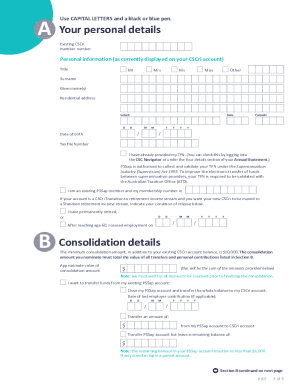
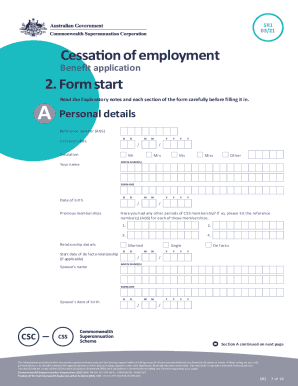
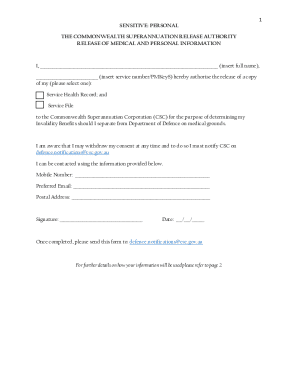
The CSCri Lump Sum Withdrawal or Transfer Form is a personal finance document used by members of the Commonwealth Superannuation Corporation (CSC) to request a lump sum withdrawal or transfer from their CSCri account.
pdfFiller scores top ratings on review platforms




Who needs CSCri Withdrawal Form?
Explore how professionals across industries use pdfFiller.

CSCri Withdrawal Form is needed by:
-
Members of the Commonwealth Superannuation Corporation (CSC)
-
Individuals seeking lump sum superannuation withdrawals
-
Those planning a transfer of their superannuation funds
-
Financial advisors helping clients with superannuation choices
-
Account holders needing to manage their CSCri accounts
Comprehensive Guide to CSCri Withdrawal Form
What is the CSCri Lump Sum Withdrawal or Transfer Form?
The CSCri Lump Sum Withdrawal or Transfer Form is a vital document for members of the Commonwealth Superannuation Corporation (CSC). This form allows those eligible to request a lump sum withdrawal or transfer from their CSCri accounts. It’s essential that members complete the form accurately to ensure their requests are processed efficiently.
Essentially, the CSCri transfer form facilitates smooth access to superannuation funds, making it simpler for members to manage their financial futures by enabling withdrawals or transfers.
Purpose and Benefits of the CSCri Withdrawal Form
Members may need to utilize the CSCri Withdrawal Form for various reasons, such as accessing funds for retirement or unexpected expenses. The benefits of a lump sum payment include immediate liquidity, which can provide financial flexibility in critical situations.
By filling out the CSCri lump sum payment form, users find that the process of accessing their superannuation funds is greatly simplified, eliminating unnecessary complications.
Who Needs the CSCri Lump Sum Withdrawal or Transfer Form?
This form is particularly relevant for members who are at a transitional stage in their careers or lives. Individuals qualifying for this form typically meet certain age and employment criteria. For example, members seeking funds due to job change or retirement situations will find this form essential.
Understanding eligibility is crucial prior to application, as it ensures a smoother experience when handling superannuation transfers.
Eligibility Criteria for the CSCri Withdrawal Form
To be eligible for the CSCri Withdrawal or Transfer Form, members must meet personal and financial requirements. The criteria generally include details such as minimum age, employment status, and specific withdrawal conditions.
-
Maximum withdrawal amounts can vary based on member status.
-
It’s important to be aware of any deadlines related to submissions.
-
Members should check for state-specific stipulations that may apply.
How to Fill Out the CSCri Lump Sum Withdrawal or Transfer Form Online (Step-by-Step)
Completing the CSCri form online involves several distinct sections, each requiring careful attention. Here's how to fill it out:
-
Start with entering your personal information, including title, surname, and given names.
-
Provide your residential address details, ensuring accuracy for communications.
-
Indicate your withdrawal or transfer options clearly to prevent delays.
-
Be prepared to include bank details where funds will be directed.
-
Review the form before submission to check for any common pitfalls.
Common Errors in the CSCri Form and How to Avoid Them
When filling out the CSCri form, users often encounter errors that can delay processing. Common mistakes include incomplete personal information or incorrect financial details. To prevent these issues:
-
Double-check each entry for accuracy and completeness.
-
Ensure that all necessary fields are filled out correctly according to the instructions.
-
Review the entire form thoroughly before submitting to avoid mistakes.
Where to Submit the CSCri Lump Sum Withdrawal or Transfer Form
Once completed, the CSCri form can be submitted through various channels. Members should ideally submit the form online for quicker processing, while also considering traditional mailing options.
It’s important to be aware of any associated fees for submission and check how to track the status of the form after it has been sent.
Understanding Security and Privacy for your CSCri Form Submission
When handling sensitive financial documents like the CSCri form, security is paramount. The online submission process is generally secured through robust encryption protocols.
Users can be reassured that privacy measures are in place to protect their financial information, and compliance with GDPR and HIPAA standards bolsters this protection.
How pdfFiller Can Simplify Your CSCri Form Experience
pdfFiller streamlines the process of filling out and managing the CSCri form. Its features include an easy-to-use online PDF editor, convenient eSigning options, and hassle-free cloud storage.
These functionalities not only enhance user experience but also provide tools for comprehensive document management related to the CSCri form.
Next Steps After Submitting Your CSCri Form
After submission, you can anticipate a confirmation of receipt to reassure you that your request is being processed. Typically, the processing time depends on various factors, so it’s wise to stay informed about the timeline.
If you encounter any issues or need corrections, there are specific steps you can follow to follow up on your submission efficiently.
How to fill out the CSCri Withdrawal Form
-
1.Access the CSCri Lump Sum Withdrawal or Transfer Form on pdfFiller by navigating to the website and searching for the form name.
-
2.Once you find the form, click on it to open in the pdfFiller interface. You will see various fillable fields and sections.
-
3.Before you start filling out the form, gather your personal details including your title, surname, given names, residential address, date of birth, and banking information.
-
4.Begin by entering your details in the provided fields; ensure accuracy as this information is crucial for processing your request.
-
5.Use the checkboxes to select your preferred withdrawal or transfer options. Make sure to read through all available options before making a selection.
-
6.After filling in all sections, review your information for errors or omissions. It’s important to ensure that all required fields are completed correctly.
-
7.Once satisfied with the information entered, save your progress using pdfFiller's save feature. You can choose to download a copy or finalize the form directly on the platform.
-
8.If you choose to submit the form online, follow the prompts to ensure the form is sent to the correct department as specified in the submission guidelines.

Who is eligible to use the CSCri Lump Sum Withdrawal or Transfer Form?
To be eligible, you must be a member of the Commonwealth Superannuation Corporation (CSC) with an active CSCri account seeking to withdraw or transfer funds.
What is the timeline for processing my withdrawal or transfer?
Processing times can vary but typically take up to two weeks. Ensure all sections of the form are completed to avoid processing delays.
What documents do I need to submit with this form?
You may need to provide identification documents and your bank account details. Check the form's instructions for specific documentation requirements.
Can I submit the form electronically?
Yes, you can complete and submit the CSCri Lump Sum Withdrawal or Transfer Form electronically via pdfFiller, ensuring all necessary fields are filled in correctly.
What common mistakes should I avoid when filling out the form?
Common mistakes include incomplete fields, incorrect personal information, and not selecting the appropriate withdrawal option. Always double-check your entries.
Are there fees associated with processing my withdrawal?
Generally, fee structures depend on the specifics of your account and the type of withdrawal. It's advisable to check the latest fees in the superannuation terms.
What happens if I submit the form after the cutoff date?
If the form is submitted after any specified cutoff date, it may delay processing until the next handling cycle. Always be mindful of deadlines to avoid such situations.
Related Forms




Get the latest insights from our blog


If you believe that this page should be taken down, please follow our DMCA take down process
here
.
This form may include fields for payment information. Data entered in these fields is not covered by PCI DSS compliance.