
Last updated on
Oct 19, 2026

Get the free Six Flags Waves of Pages Reading Program
We are not affiliated with any brand or entity on this form

Fill out
Complete the form online in a simple drag-and-drop editor.

eSign
Add your legally binding signature or send the form for signing.

Share
Share the form via a link, letting anyone fill it out from any device.

Export
Download, print, email, or move the form to your cloud storage.
Why pdfFiller is the best tool for your documents and forms


End-to-end document management
From editing and signing to collaboration and tracking, pdfFiller has everything you need to get your documents done quickly and efficiently.
Accessible from anywhere
pdfFiller is fully cloud-based. This means you can edit, sign, and share documents from anywhere using your computer, smartphone, or tablet.
Secure and compliant
pdfFiller lets you securely manage documents following global laws like ESIGN, CCPA, and GDPR. It's also HIPAA and SOC 2 compliant.
What is Waves of Pages
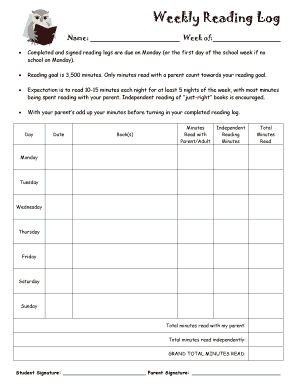
The Six Flags Waves of Pages Reading Program is an activity participation form used by parents to encourage children in grades K-5 to read for fun.
pdfFiller scores top ratings on review platforms




Who needs Waves of Pages?
Explore how professionals across industries use pdfFiller.

Waves of Pages is needed by:
-
Parents of K-5 students participating in the reading program
-
Teachers who need to track student reading hours
-
School administrators managing incentive programs
-
Librarians promoting reading activities
-
Community organizations involved in youth education
Comprehensive Guide to Waves of Pages
What is the Six Flags Waves of Pages Reading Program?
The Six Flags Waves of Pages Reading Program is a unique initiative designed to encourage reading among young students in grades K-5. Its core goal is to foster a love for reading while improving literacy skills in children. Participants in this program can enjoy enticing incentives, such as free admission to the Six Flags Waterpark for the 2026 season. This program engages students and highlights the importance of reading through interactive and rewarding activities.
Purpose and Benefits of the Waves of Pages Reading Program
The educational value of the Waves of Pages Reading Program is significant for young learners. This initiative not only promotes a love for reading but also contributes to improving students' literacy skills. Family involvement is encouraged, allowing parents to sign the reading logs, which further strengthens the child's reading experience and keeps track of their progress. Such participation can be essential in making reading a rewarding activity.
Key Features of the Six Flags Waves of Pages Reading Program
The Waves of Pages Reading Program includes essential components that make tracking reading hours both simple and effective. The program features a reading log that requires parental involvement to validate the reading time logged. Participants are expected to fill out the following fields:
-
School name
-
Student name
-
Grade
-
Teacher name
-
Reading log entries
-
Parent signature
Each of these elements is crucial in confirming the validity of the hours recorded.
Who Can Participate in the Waves of Pages Reading Program?
Eligibility for the Waves of Pages Reading Program is specifically aimed at students in grades K-5. To participate, students must have parental approval and properly complete the reading log. Additionally, it's essential to be aware of any regional differences or state-specific guidelines that may apply to ensure compliance.
How to Fill Out the Six Flags Waves of Pages Reading Program Form Online
Filling out the form for the Waves of Pages Reading Program is a straightforward process using pdfFiller. Below is a step-by-step guide on how to complete the form effectively:
-
Access the digital form through pdfFiller.
-
Fill in the required fields, including reading time and book titles.
-
Ensure that the parent signature is included to validate the submission.
Be sure to avoid common pitfalls, like omitting required information, to ensure a successful submission.
Signing and Submitting the Six Flags Waves of Pages Reading Program Form
Signing the form can be done either digitally via pdfFiller or physically, depending on user preference. Once completed, the submission methods include both electronic submission and printing the form for hand delivery. It is crucial to be aware of submission deadlines to guarantee participation in the program.
Tracking Your Progress and Confirmation
To track submission and reading progress effectively, users can verify that all reading logs are submitted on time. Confirmation of submissions can provide peace of mind and ensure that the student’s efforts are recognized. For additional assistance with any submission issues, necessary contact information or resources should be provided.
Security and Privacy Considerations for the Waves of Pages Reading Program
Participants can feel reassured about the security measures implemented for handling sensitive documents. The program complies with relevant regulations, including HIPAA and GDPR, reflecting the importance of privacy and data protection for students' reading logs. Ensuring a secure process is a top priority for the program.
Enhance Your Experience with pdfFiller
pdfFiller offers a host of features to assist with form filling, editing, and signing that enhance the experience of managing the Waves of Pages Reading Program. Users can take advantage of capabilities such as creating fillable forms, storing documents, and sharing completed forms seamlessly. These features streamline the entire process, making participation more accessible.
Get Started with the Six Flags Waves of Pages Reading Program Form Today!
Now is the perfect time to engage in the Waves of Pages Reading Program. Parents are encouraged to participate actively, ensuring their children take advantage of this rewarding reading initiative. Whether downloading or filling out the form through pdfFiller, getting started is simple and effective in supporting literacy development.
How to fill out the Waves of Pages
-
1.Access and open the Six Flags Waves of Pages Reading Program form on pdfFiller by searching for the title in the platform's search bar.
-
2.Once the form is open, navigate through the fillable fields. Each field will clearly indicate the information you need to provide.
-
3.Before filling out the form, gather necessary information such as the student's name, grade, school name, teacher’s name, and reading log entries to ensure a smooth process.
-
4.Carefully enter the student’s information, including details for each reading log entry. This may involve noting the title of the book, the number of minutes read, and dates of reading sessions.
-
5.After filling in the relevant fields, review the form to ensure all information is accurate and complete. Double-check for any missing signatures or entries.
-
6.Finalize the form by selecting the option to save or download. pdfFiller provides options to export the completed form in various formats.
-
7.Submit the completed form to the student’s teacher as per the submission guidelines provided by the school. Ensure the parent signature is included.

Who is eligible to participate in the Waves of Pages Reading Program?
The Waves of Pages Reading Program is aimed at students in grades K-5. Parents must sign the form to confirm their child’s participation.
What is the deadline for submitting the reading log?
Check with your child’s school for specific deadlines regarding the submission of the reading log. Typically, responses are due by the end of the 10-week program.
How do I submit the completed form?
The completed form should be submitted to the student’s teacher. Ensure that it is signed by a parent as part of the submission process.
What supporting documents do I need to attach?
No additional documents are required; however, ensure the reading log is completed accurately and has a parent’s signature as proof of participation.
What are common mistakes to avoid when filling out the form?
Common mistakes include forgetting to sign the form, not logging all reading hours accurately, or leaving fields incomplete. Take your time to review before submission.
How long does it take to process the reading log submission?
Processing times may vary by school. Typically, teachers will review submitted logs shortly after the submission deadline and notify parents if any information is missing.
Is there a fee to participate in the Waves of Pages program?
Participation in the Waves of Pages Reading Program is free; students can earn tickets for the Six Flags Waterpark without any associated costs.
Related Forms



Get the latest insights from our blog


If you believe that this page should be taken down, please follow our DMCA take down process
here
.
This form may include fields for payment information. Data entered in these fields is not covered by PCI DSS compliance.