
Last updated on
Oct 19, 2026

Get the free Answer to Contract Form
We are not affiliated with any brand or entity on this form

Fill out
Complete the form online in a simple drag-and-drop editor.

eSign
Add your legally binding signature or send the form for signing.

Share
Share the form via a link, letting anyone fill it out from any device.

Export
Download, print, email, or move the form to your cloud storage.
Why pdfFiller is the best tool for your documents and forms


End-to-end document management
From editing and signing to collaboration and tracking, pdfFiller has everything you need to get your documents done quickly and efficiently.
Accessible from anywhere
pdfFiller is fully cloud-based. This means you can edit, sign, and share documents from anywhere using your computer, smartphone, or tablet.
Secure and compliant
pdfFiller lets you securely manage documents following global laws like ESIGN, CCPA, and GDPR. It's also HIPAA and SOC 2 compliant.
What is Contract Answer
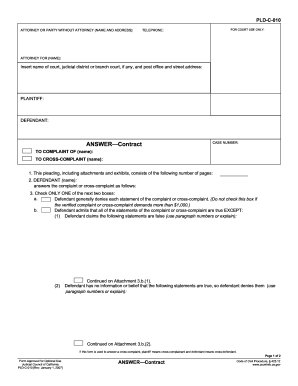
The Answer to Contract Form (PLD-C-010) is a legal document used by defendants in California to respond to a contract lawsuit by admitting or denying statements made in the complaint.
pdfFiller scores top ratings on review platforms




Who needs Contract Answer?
Explore how professionals across industries use pdfFiller.

Contract Answer is needed by:
-
Defendants in contract lawsuits
-
Lawyers representing clients in contract disputes
-
Individuals needing to file a legal response in California
-
Parties involved in contract negotiations or litigation
-
Service providers assisting clients in legal processes
-
Anyone requiring proof of service documentation
Comprehensive Guide to Contract Answer
What is the Answer to Contract Form (PLD-C-010)?
The Answer to Contract Form, also known as the PLD-C-010, serves a crucial role in the legal landscape of California. This form provides defendants with a structured way to respond to contract-related lawsuits. It is particularly significant because it allows defendants to either admit or deny the claims made against them, thereby playing a fundamental part in the legal process.
This form is specifically designed to address disputes arising from contracts. By utilizing the Answer to Contract Form, defendants can clearly outline their stance on the allegations presented in court. Some key areas of legal scenarios where this form is applicable include breach of contract claims and disputes over contract terms.
Purpose and Benefits of Using the Answer to Contract Form
The Answer to Contract Form is essential for defendants as it enables them to effectively respond to a lawsuit. By completing this form, defendants ensure that their rights are protected and that they can present their side of the case within the legal framework. Timely responses are crucial; when defendants utilize this form promptly, they can prevent defaults or negative rulings that may adversely affect their legal standing.
Additionally, the form serves as a safeguard for defendants' rights. It gives them the opportunity to clarify their position regarding the allegations, ensuring their voice is heard in the judicial process.
Who Needs the Answer to Contract Form?
The primary audience for the Answer to Contract Form includes defendants embroiled in contract disputes. These individuals could range from business owners facing lawsuits to consumers disputing contract terms with service providers. Understanding the role of the person responsible for completing the Proof of Service is also pivotal, as they ensure that the completed form is properly served.
Individuals may find themselves needing this form in various legal contexts, such as disputes over written contracts, verbal agreements, or service contracts. Utilizing this form is essential for those wishing to assert their rights within a legal framework.
When and How to File the Answer to Contract Form
Filing the Answer to Contract Form must be done within strict deadlines. In California, defendants are generally required to file this form within 30 days after being served with the complaint. Failure to meet this deadline can result in significant legal consequences, including default judgments.
To ensure successful filing, follow these steps:
-
Compile the necessary accompanying documents, including the Proof of Service (POS-030) form.
-
Complete the Answer to Contract Form accurately.
-
File the completed form with the appropriate court.
How to Fill Out the Answer to Contract Form Online (Step-by-Step)
Completing the Answer to Contract Form online can streamline the process. Follow these detailed steps to ensure accuracy:
-
Begin by entering your personal information in the designated fields such as name and address.
-
Review common checkboxes that indicate your admissions or denials regarding the statements in the complaint.
-
Pay attention to the legal terminology used to ensure accurate responses.
These tips will not only aid in accuracy but also help you avoid common pitfalls during completion.
Common Errors and How to Avoid Them
When filling out the Answer to Contract Form, there are several errors that users frequently encounter. Some of these include incorrect personal information and missing signature fields. To mitigate mistakes:
-
Double-check all entered information for accuracy.
-
Review the completed form against court requirements to ensure compliance.
Understanding the legal terminology is also crucial when completing this form to avoid misunderstandings or misstatements.
Security and Compliance When Using the Answer to Contract Form
Security is paramount when handling the Answer to Contract Form. Ensuring compliance with jurisdiction-specific rules is essential to maintain the integrity of the process. pdfFiller employs various security measures, including encryption, to protect user data.
Maintaining privacy during the filing process is crucial, as it safeguards sensitive information from unauthorized access. Following best practices for securing legal documents can enhance compliance and user confidence.
How to Submit the Answer to Contract Form and Next Steps
Submitting the Answer to Contract Form can be done through multiple methods. Common submission methods include:
-
Mailing the completed form to the appropriate court.
-
Electronic filing, when available.
After submission, it is important to confirm successful dispatch of the form. Tracking the submission may offer insights into the next steps defendants should anticipate as their case progresses.
Tips for Using pdfFiller for the Answer to Contract Form
pdfFiller enhances the experience of completing the Answer to Contract Form through its intuitive platform. Users can enjoy easy form editing features which simplify the process of entering information and making corrections.
Moreover, pdfFiller provides secure sharing and e-signature capabilities, ensuring that forms can be completed and dispatched safely. Utilizing pdfFiller's templates offers consistency and efficiency in legal form management.
How to fill out the Contract Answer
-
1.Access pdfFiller and search for the 'Answer to Contract Form (PLD-C-010)' in the form library.
-
2.Once located, click on the form to open it within the pdfFiller interface.
-
3.Begin by reviewing the form's instructions to understand the requirements for submission.
-
4.Gather all necessary personal and case information before filling out the form, including your full name, address, and the case details.
-
5.Start completing the fillable fields in the form, entering your information directly into the designated areas.
-
6.Make sure to check the boxes that apply to your response, including whether you deny or admit the statements of the complaint.
-
7.After filling out all required fields, review your entries for accuracy to ensure all information is correct.
-
8.Use pdfFiller's built-in features to save your progress as you work on the form to prevent data loss.
-
9.Once finalized, export the completed form in your desired format or choose to print directly from pdfFiller.
-
10.Consider using the Proof of Service (POS-030) form as directed, and ensure both are ready for filing.
-
11.Submit the completed forms to the appropriate court within 30 days, as required by California law.

Who is eligible to use the Answer to Contract Form?
Anyone named as a defendant in a contract-related lawsuit in California can use the Answer to Contract Form (PLD-C-010) to respond to the complaint.
What is the deadline for filing this form?
The Answer to Contract Form must be completed and filed with the court within 30 days of being served with the complaint to ensure your rights are protected.
How should I submit my completed form?
Once filled out, the Answer to Contract Form must be filed with the court. You can submit it either in person or through electronic filing, depending on the court's requirements.
What supporting documents are required with this form?
Along with the Answer to Contract Form, you will typically need to submit a Proof of Service form (POS-030) to verify that the other party has been served with your response.
What are common mistakes to avoid when filling out this form?
Ensure that all required fields are completed, double-check your admissions or denials regarding the complaint, and avoid any omissions or inaccuracies in your personal information.
How long does it take to process the Answer to Contract Form?
Processing times can vary by court; however, once submitted, you should check in with the court clerk to ensure your form has been received and properly filed.
What happens if I miss the filing deadline?
Missing the filing deadline can result in a default judgment against you, so it's crucial to complete and submit the Answer to Contract Form within the specified 30-day period.
Related Forms



Get the latest insights from our blog


If you believe that this page should be taken down, please follow our DMCA take down process
here
.
This form may include fields for payment information. Data entered in these fields is not covered by PCI DSS compliance.