
Last updated on
Oct 19, 2026

Get the free Request for Reissued Check
We are not affiliated with any brand or entity on this form

Fill out
Complete the form online in a simple drag-and-drop editor.

eSign
Add your legally binding signature or send the form for signing.

Share
Share the form via a link, letting anyone fill it out from any device.

Export
Download, print, email, or move the form to your cloud storage.
Why pdfFiller is the best tool for your documents and forms


End-to-end document management
From editing and signing to collaboration and tracking, pdfFiller has everything you need to get your documents done quickly and efficiently.
Accessible from anywhere
pdfFiller is fully cloud-based. This means you can edit, sign, and share documents from anywhere using your computer, smartphone, or tablet.
Secure and compliant
pdfFiller lets you securely manage documents following global laws like ESIGN, CCPA, and GDPR. It's also HIPAA and SOC 2 compliant.
What is Reissued Check Request
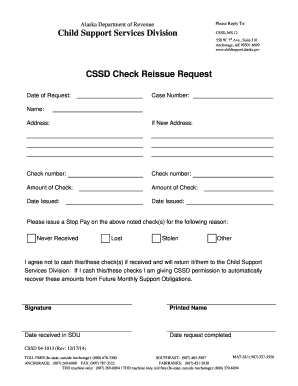
The Request for Reissued Check form is a document used by individuals and companies to request a replacement check that was lost, destroyed, or not received.
pdfFiller scores top ratings on review platforms




Who needs Reissued Check Request?
Explore how professionals across industries use pdfFiller.

Reissued Check Request is needed by:
-
Individuals who lost a check
-
Claimants seeking financial reimbursement
-
Businesses needing replacement checks
-
Residents of California requesting refunds
-
Accountants managing unclaimed property
-
Financial departments of companies in need of check records
Comprehensive Guide to Reissued Check Request
What is the Request for Reissued Check?
The Request for Reissued Check form is a formal document designed for individuals or companies to request a replacement check that has been lost, destroyed, or was not received. This form allows users to initiate the reissuance process efficiently. It can be utilized by both personal claimants and corporate entities who face issues with unclaimed checks.
Common scenarios that might prompt the use of this form include situations where the original check has been misplaced or has never arrived in the mail. Submitting the form ensures that the claimant can receive a replacement check in a timely manner.
Purpose and Benefits of the Request for Reissued Check
Submitting the Request for Reissued Check form serves multiple purposes for the claimant. Firstly, it provides assurance that a replacement check will be issued promptly, helping to alleviate financial stress. Additionally, the form addresses issues related to unclaimed property, allowing individuals or businesses to recover owed funds.
In cases where the original check is not located, this form reinforces the necessary steps to take, ensuring that claimants do not remain hindered by financial delays. Ultimately, utilizing this form can streamline the process of receiving your funds again.
Who Needs to Use the Request for Reissued Check?
The primary users of the Request for Reissued Check form are individuals or organizations experiencing issues with checks that were never received or were lost. Claimants can include both personal users and corporate representatives.
Eligibility for using this form is often determined by state regulations, which may specify the typical scenarios under which a reissue request is permissible. Understanding the distinctions between these claimant categories helps ensure that the appropriate individuals utilize the form effectively.
How to Fill Out the Request for Reissued Check Online (Step-by-Step)
Filling out the Request for Reissued Check online can be accomplished through the pdfFiller platform. Follow these steps to efficiently complete the form:
-
Access the Request for Reissued Check form on pdfFiller.
-
Enter personal information, including your name and contact details.
-
Indicate the reason for the request, ensuring clarity in your explanation.
-
Attach any required supporting documentation digitally, such as identification and proof of address.
-
Review all entered information for accuracy before submitting the form.
Required Documents and Supporting Materials
To successfully submit the Request for Reissued Check, specific documents are necessary. These typically include:
-
A valid form of identification, such as a driver’s license or state ID.
-
Proof of address, which may include a utility bill or lease agreement.
These documents are crucial to establish the identity of the requester and ensure that the correct individual or entity receives the replacement check. Preparing these materials in advance can facilitate a smoother submission process.
How to Submit the Request for Reissued Check
Submission of the Request for Reissued Check can be done through several methods. Claimants have the ability to submit the form online via pdfFiller or send it by mail. If choosing the mail option, the completed form should be sent to the City of Adelanto's Accounts Payable department.
It is important to adhere to any deadlines specified to avoid delays in processing. Understanding the expected processing times will help manage expectations regarding when the replacement check will be received.
What Happens After You Submit the Request?
Once the Request for Reissued Check has been submitted, claimants can expect to receive confirmation notifications regarding their submission. This helps in tracking the progress of the request.
Tracking the status of your request is essential, as it allows users to stay updated on the processing timeline. Typically, there is a clear timeline provided for when feedback or the replacement check can be anticipated.
Common Errors and How to Avoid Them
To ensure a successful submission of the Request for Reissued Check form, awareness of common errors is crucial. Some pitfalls to avoid include:
-
Incomplete fields, which can delay processing.
-
Inaccurate personal or contact information that could cause issues in communication.
Double-checking all entries and ensuring that all required fields are filled with accurate information will significantly reduce the likelihood of errors during submission.
Security and Compliance for the Request for Reissued Check
When submitting sensitive information through the Request for Reissued Check form, security is of utmost importance. pdfFiller utilizes advanced security protocols, including 256-bit encryption, to protect user data throughout the process.
Compliance with regulations such as HIPAA and GDPR further assures users that their privacy is safeguarded during the submission and processing stages. This commitment to data protection enhances user confidence while filling out the form.
Final Thoughts on Completing the Request for Reissued Check
Utilizing pdfFiller to complete the Request for Reissued Check form provides an easy and secure avenue for claimants. The user-friendly interface facilitates efficient form filling, ensuring a seamless experience.
Taking proactive steps to obtain your reissued check can alleviate financial concerns and streamline the process of recovering funds. Users can feel confident in the reliability of the pdfFiller platform for handling their documentation needs.
How to fill out the Reissued Check Request
-
1.Begin by accessing the Request for Reissued Check form on pdfFiller. Use the search bar to find the exact form or navigate through the category 'Business Forms'.
-
2.Once the form is open, familiarize yourself with the layout. The form contains multiple fillable fields and checkboxes that need to be completed carefully.
-
3.Before filling out the form, gather all necessary information, including personal identification and proof of your address. This documentation will support your request.
-
4.Start completing the form by providing your personal information in the designated fields. Ensure that your details are accurate and match the supporting documents.
-
5.Next, indicate the reason for your reissued check request. Providing clear and specific reasons will expedite the processing of your request.
-
6.Attach any necessary supporting documents electronically through pdfFiller. You can easily upload files to ensure they accompany your request.
-
7.Once all fields are filled, review the completed form carefully. Make sure there are no errors or missing information before finalizing.
-
8.To sign the document, use pdfFiller's signature tool to add your signature electronically. Ensure you have completed all required fields before signing.
-
9.After reviewing and signing the form, save your changes. Select the option to download the form or submit it directly from pdfFiller, depending on the method required by the City of Adelanto's Accounts Payable department.

Who is eligible to use the Request for Reissued Check form?
Any individual or business that has lost a check, whether personal or issued by a government entity, can use this form to request a reissue.
What supporting documents are needed with the form?
You will need to provide personal identification and proof of address alongside the completed form to process your request successfully.
How do I submit the Request for Reissued Check form?
You can submit the form electronically via pdfFiller or print it to mail it directly to the City of Adelanto's Accounts Payable department, following their submission guidelines.
Are there any processing fees for this request?
Typically, there are no processing fees for reissuing checks, but confirm with your local authority for any potential charges related to your specific request.
What common mistakes should I avoid when filling out this form?
Common mistakes include providing incorrect personal information, forgetting to sign, and not attaching the required supporting documentation.
How long does it take to process the reissued check request?
Processing times can vary, but generally, expect the request to take 2-4 weeks. Check with the relevant department for specific timelines.
Can I edit my submission after it's been sent?
Once submitted, you typically cannot edit the request. If you realize there are errors, contact the Accounts Payable department immediately for guidance.
Related Forms




Get the latest insights from our blog


If you believe that this page should be taken down, please follow our DMCA take down process
here
.
This form may include fields for payment information. Data entered in these fields is not covered by PCI DSS compliance.